

Shopify and WooCommerce are two of the most popular ecommerce platforms available — but which one is right for your online store?
After thoroughly testing both platforms across setup, pricing, features, and ease of use, I found Shopify to be the better overall choice for businesses that want a streamlined, scalable ecommerce solution.
However, WooCommerce offers unbeatable flexibility if you already use WordPress or want full control over your store.
Below, I’ll walk you through how both platforms perform in key areas like pricing, SEO, design, and payment processing — and help you decide which one suits your goals.
Quick Verdict: Shopify vs WooCommerce
Shopify – Best for ease of use and growth
WooCommerce – Best for flexibility and SEO
| Platform | Best For | Starting Cost |
|---|---|---|
| Shopify | Scaling your store quickly | $39/month |
| WooCommerce | Full control and SEO customization | ~$15/month |
I tested both Shopify and WooCommerce hands-on, including setup, theme customization, product uploads, and SEO tools — and here's what I found.

- Full solution from $29/month
- Limited time offer: first 3 months for $1/month
- SEO Friendly
- Offline Store
- App Store
- 24/7 Support
- Beautiful Templates

- Free to Use
- SEO Friendly
- Highly Customizable
- Beautiful Templates
Quick Comparison: Shopify vs WooCommerce
| Feature | Shopify | WooCommerce |
|---|---|---|
| Setup Speed | Instant, hosted solution | Manual setup via WordPress |
| Monthly Cost | Starts at $39 | Varies ($5–$30 hosting) |
| Design Templates | 190+ templates | Thousands (via WordPress) |
| SEO Tools | Basic built-in | Advanced via plugins like RankMath |
| Payment Gateways | 100+ (extra fees with 3rd parties) | 75+ (no extra fees) |
| App Store | 8,000+ apps | 60,000+ WordPress plugins |
| Customer Support | 24/7 live chat | Forum + plugin dev support |
| Learning Curve | Easy for beginners | Steeper setup and maintenance |
WooCommerce vs Shopify – Pros and Cons
As we compare WooCommerce vs Shopify, it becomes clear that both have strengths and weaknesses. Let's explore which can be attributed to each platform.
Shopify Pros and Cons
Pros 👍
- You know exactly how much you'll be paying every month and the pricing is fair.
- There's access to thousands of apps to extend your store.
- The themes are plentiful and beautiful.
- Shopify handles everything for you from hosting to security.
- It takes just a few minutes to launch your store.
- Dropshipping is rather simple with Shopify.
- The support is the best in the business.
Cons 👎
- You don't have as much control over your site with Shopify.
- Customization is better with other platforms.
- You're stuck with a monthly payment that's only going to get higher.
WooCommerce Pros and Cons
Pros 👍
- WooCommerce offers complete customization and control.
- WordPress has a huge community online.
- The themes and plugins are endless, since just about anyone can make and sell them online.
- WooCommerce is simple to configure on WordPress.
- The WooCommerce plugin is free.
Cons 👎
- WordPress does have a bit of a learning curve.
- You may find that WooCommerce ends up being more expensive due to plugins, themes, and hosting.
- You're stuck managing everything from hosting to security, and maintenance to backups.
Best for Pricing: Shopify
When it comes to cost, WooCommerce can offer more flexibility and potentially lower long-term expenses if you already run a WordPress site, but Shopify takes the win for simplicity, value, and the fact that you get a store ready to sell from day one.
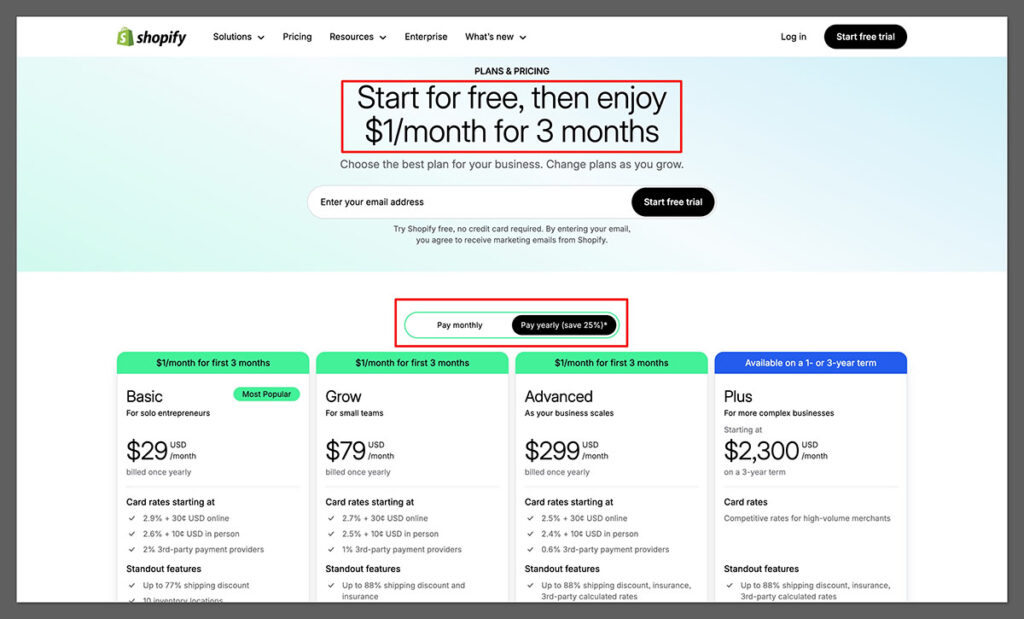
At $39 per month for the Basic plan ($29 when you pay anually), you’re not just paying for software — you’re paying for hosting, security, ecommerce features, and built-in AI tools that make setup and ongoing management much faster.
Shopify Pricing
Shopify’s pricing is straightforward, with three main plans:
- Basic – $39/month
- Grow – $105/month
- Advanced – $399/month
Shopify also offers a $1/month deal for the first three months on select plans, along with a three-day free trial.
But keep in mind:
- Transaction fees apply if you don’t use Shopify Payments (up to 2%)
- Most third-party apps require monthly fees
- Premium templates range from $100 to $500
Where Shopify really proves its value is in what you get for the price. For $39/month, you can start selling immediately without dealing with separate hosting providers, SSL certificates, or payment gateway integrations.
The platform also includes Shopify Magic, an AI-powered suite that can write product descriptions, generate homepage sections, customize theme layouts, and even suggest logo and branding ideas — all without paying extra for separate tools.
Another key advantage is the speed to launch. With WooCommerce, even though the plugin itself is free, you’ll spend more time sourcing and configuring plugins for SEO, payments, shipping, and design tweaks.
Shopify has most of these capabilities built in, so you can focus on uploading products and going live instead of spending days on technical setup.
Shopify’s Basic plan is also packed with features you’d normally expect to pay extra for elsewhere.
Abandoned cart recovery, multichannel selling across marketplaces and social media, professional reporting, and discount code generation are all included at no additional cost. With WooCommerce, these often require premium plugins, which quickly add to the bill.
Finally, Shopify’s fixed monthly pricing makes budgeting predictable. With WooCommerce, costs can fluctuate as you renew plugin licenses, upgrade hosting, or hire a developer for maintenance.
Shopify rolls everything into one clear monthly fee, letting you plan your expenses without surprise costs — and that peace of mind is worth as much as the features themselves.
WooCommerce Pricing
WooCommerce is a free plugin for WordPress — but there are added costs to consider:
- Hosting – $5 to $30/month
- Domain name – ~$12/year
- Premium themes – $50 to $100 one-time
- Plugins – Some are free, others cost $50–$200/year
While it’s true you can control costs by choosing free or low-cost options, many store owners end up paying more than they expected once they start adding advanced features, higher-quality hosting, or developer support.
The Winner
Shopify is the clear winner for pricing because of the value it delivers at $29/month. You get a fully hosted, secure, and ready-to-sell store that comes with AI features to speed up setup and content creation, plus built-in sales tools that would cost extra on most other platforms.
It’s the most straightforward way to get a professional store online without worrying about hidden costs or technical hurdles.
Best for Selling Online: Shopify

Shopify is designed for ecommerce — and it shows. From inventory tools to sales channels, it outperforms WooCommerce for most online sellers.

Sales Features
Both platforms support:
- Product variations and categories
- Inventory tracking
- Discount codes and promotions
- Multi-channel selling via social media and marketplaces
- Abandoned cart recovery
But Shopify’s built-in features are more cohesive, and less reliant on third-party plugins.
For example, I used Shopify’s AI-powered product description generator (Shopify Magic) to create copy in seconds. It’s perfect for large inventories or time-strapped business owners.
WooCommerce, on the other hand, needs plugins for many core sales features. Tools like BigAI Copywriter exist, but they’re not built-in.
Payment Options
- Shopify integrates with 100+ gateways like PayPal, Stripe, Apple Pay, and Google Pay
- You can avoid extra fees by using Shopify Payments
- Without it, expect up to a 2% transaction fee
WooCommerce supports 75+ gateways through add-ons — including Stripe, PayPal, Square, and more. There are no added transaction fees regardless of provider.
The Winner
Shopify is better for fast, seamless selling.
If you want to launch and grow fast with everything in one place, go with Shopify.
If you want flexibility and lower payment fees, WooCommerce is a smart long-term play.
Best for SEO: WooCommerce
Search engine optimization (SEO) is essential if you want to drive organic traffic. WooCommerce takes the lead here with better control and plugin support.
Shopify SEO Features
Shopify offers:
- Editable title tags and meta descriptions
- Image alt text and sitemaps
- Clean code and fast loading times
- Integration with Semrush via Ecommerce Booster app
But you’re locked into URL structures like /collections/ and /products/, which can be limiting for technical SEO.
WooCommerce SEO Features
WooCommerce gives you full control:
- Choose your URL structure (no forced folders)
- Use plugins like RankMath or Yoast SEO
- Add advanced schema markup, breadcrumbs, and internal links
- Integrate your blog seamlessly with your store
You can optimize every detail — from heading tags to canonical URLs — which is ideal for aggressive SEO strategies.
The Winner
WooCommerce is the clear SEO winner. If organic traffic is a core part of your strategy, WooCommerce gives you more freedom to optimize.
Best for Ease of Use: Shopify
If you’re just getting started or want to avoid technical headaches, Shopify is the easier platform to use.
Shopify Setup
Getting started with Shopify took me less than an hour. It asked a few questions about my business, then guided me through product uploads, design, and payments.
What I liked:
- Guided onboarding
- Built-in hosting and security
- Drag-and-drop theme editor
- Clear dashboard for managing orders and products
Even after setup, I found managing the store to be intuitive. Adding new products, adjusting inventory, or editing homepage sections felt natural, even without a technical background.
The admin area is clean and doesn’t overload you with too many options at once.
WooCommerce Setup
Setting up WooCommerce took longer. I had to:
- Choose a host and install WordPress
- Install the WooCommerce plugin
- Set up a theme, payments, and security plugins
- Manually configure SEO and backups
There’s a bigger learning curve, especially if you’re new to WordPress.
The process gave me more flexibility, but also more chances to make mistakes. Setting up tax rules, shipping zones, or handling plugin conflicts often required extra time or research.
If you’re not comfortable troubleshooting issues yourself, you may find the learning curve frustrating.
The Winner
Shopify is much easier to set up and run. It’s ideal for beginners or business owners who want to focus on sales — not troubleshooting.
Best Templates and Design Options: Tie
Both platforms offer attractive templates — but the experience differs.
Shopify Templates

- 190+ templates
- 13 free options
- Paid themes cost $100–$500
- Mobile-friendly and easy to customize
- Section-based editor for fast changes
Shopify’s themes are sleek, fast, and made for ecommerce. Each one comes with product-focused features like image zoom, related items, and built-in filters.
What stood out to me was the speed and ease of theme switching.
You can preview and publish new themes without breaking your existing layout or products. It made experimenting with different designs much less stressful compared to WordPress-based setups.
WooCommerce Templates
- Thousands of WordPress themes support WooCommerce
- Many free options available
- More flexibility to edit code or use page builders (like Elementor)
WooCommerce gives you more freedom if you want a truly custom layout, but it’s easy to end up with inconsistent design if you’re using too many plugins.
While I appreciated the range of options, it was also easy to run into conflicts between themes and plugins.
Not every theme is built with WooCommerce compatibility in mind, so it takes a bit more diligence to ensure everything functions smoothly.
The Winner
Shopify for consistency and simplicity.WooCommerce for design freedom and custom layouts.
Best for App Integrations: Tie
Apps can boost your store’s functionality — whether you need upsells, shipping calculators, or review systems.
Shopify App Store
- 8,000+ apps
- High-quality curation
- Add apps directly from dashboard
- Some premium apps can be pricey
You’ll find apps for everything from live chat to email marketing, but some features (like upsells or reviews) require a monthly fee.
What I liked is how smooth the installation process is. The app ecosystem feels integrated into the admin panel, so installing, testing, and removing apps doesn't require technical steps.
Plus, reviews and screenshots help you judge apps quickly.
WooCommerce Plugins

- 60,000+ WordPress plugins
- Many are free or one-time paid
- More variety and niche options
Because WooCommerce is part of WordPress, you get access to plugins for SEO, design, marketing, and more. But plugin conflicts and maintenance can be an issue.
In my experience, finding quality plugins requires more research. Not every plugin is updated regularly, and some aren’t compatible with certain themes or PHP versions.
The freedom is great, but you’ll need to vet everything more carefully.
The Winner
Shopify is more curated and reliable. WooCommerce gives you more choice and control.
Best Support: Shopify
Support matters, especially when your store is live and making money.
Shopify Support
- 24/7 live chat
- Help center, email, and community forums
- Priority support for Plus users
I found Shopify’s support quick and helpful during my testing, especially for setup and troubleshooting payment issues.
What also helped was Shopify’s documentation. It’s extremely thorough, with videos, step-by-step guides, and a community forum where most questions already have an answer.
This made it easy to solve minor issues without waiting on support responses.
WooCommerce Support
- Support depends on hosting provider and plugin developers
- No centralized support
- Community forums are active, but not always fast
If you use premium plugins, you’ll get email support — but response times vary.
The biggest issue for me was fragmentation. If a problem occurred, I often had to contact a host, a theme developer, or a plugin author individually.
Getting a clear solution meant coordinating between multiple sources, which can slow down your response time.
The Winner
Shopify wins here. Having 24/7 live chat makes a big difference when something breaks at 2am.
Final Verdict: Shopify vs WooCommerce
Both platforms are excellent — but they’re built for different types of users.
| Use Case | Best Platform |
|---|---|
| Easy setup and fast growth | Shopify |
| Full control and customization | WooCommerce |
| SEO-focused content strategy | WooCommerce |
| Scalable infrastructure | Shopify |
| Budget-friendly ecommerce | WooCommerce |
| Dropshipping + paid ads | Shopify |
If you want to start quickly, avoid the tech side, and scale confidently, Shopify is the best all-in-one ecommerce solution.
If you want full control over design, SEO, and integrations — and are comfortable managing plugins or hiring a developer — WooCommerce is a powerful, flexible option.
- Try Shopify (3 months for $1)



Hello,
Shopify option looks attractive for somebody like me ( start up, looking for an easy and not expensive solution for an e-shop as I have no idea about platforms, software and how to develop by myself) but in Shopify you have no control over your own store isn’t it ? Hosting , domain name – the entire shop is property o Shopify or ? So if something happens they can take your domain name and shut down your store also ?
What about Prestashop and Lightspeed – are these good reliable and not expensive option for a small -mid size e-shop compared to Shopify?
Hello Dana,
The domain name and all the content from the website is yours, and this is the case with every SaaS product. In case they need to shut down, you will still be able to export your data and migrate your domain name.
You can check out our Prestashop vs Shopify comparison and Shopify vs Lightspeed comparison for more info.
Hi there,
I’ve been using woocommerce for over 6 years. However as clients demands have grown with their business I am biting the bullet and getting to grips with shopify. However, I still prefer woocommerce as a personal choice.
By the way, I always recommend my clients to make use of the cart2cart’s migration preview option (it’s free) – it allows to see how your current data will look like on the new platform before making the final choice. Very useful, recommend.
Thanks for sharing Mathew! 🙂
Muchas Gracias! Muy completo el Post. En lo personal considero que tener quien te resuelva dudas en cualquier momento, que tu tienda tenga un nivel de seguridad alto para procesar pagos y cuidarte de hackeos y todo para que tu tienda virtual funcione bien y tu tranquilo, bien vale el pago de Shopify.// Soy diseñadora y me especializo en Imagen de Marca. La mayoría de los sitios web que realizo para mis clientes son en WordPress y tiene buenas ventajas. Además que puedo hacer todo un desarrollo creativo bien dedicado creado para su marca. Sin embargo, cuando se trata de tiendas virtuales ya no siento que Woodpresss sea la mejor opción. Cuando al WordPress le activo el Woocommerce, veo que el sitio demanda muchísimos más recursos, se pone desde cierto punto inestable. Ya para más de 45 productos yo diría que requiere de alojamiento en un servidor dedicado.
Y si voy a pagar un servidor dedicado mensualmente, francamente prefiero otras plataformas de ecommerce como Prestashop por ejemplo, que es una plataforma propiamente creada para tiendas virtuales, más funcional y ofrece un buen nivel de seguridad (sus adicionales varios son de pago). Aunque también está considerar: si voy a pagar servidor dedicado y esos adicionales y no es que sea yo una amante de dedicarme a configuraciones y procesos de seguridad, entonces por qué mejor no Shopify? que ya me da el alojamiento y todas las herramientas optimizadas y listas para usar.
Considero que, como en todo negocio, son muchas las tareas que hay que hacer y a no ser que el dueño de negocio, tenga un equipo dedicado para configuraciones de seguridad y demás actualizaciones constantes en su tienda, los beneficios que te ofrece Shopify son muchísimos a la hora de operar con tranquilidad y practicidad con tu tienda: El que todo funcione, que ya esté todo optimizado para vender, por una tarifa clara cada mes, para mi es una ventaja y así el dueño del negocio se dedica a hacer bien lo que hace bien, a preparar buen contenido para su web de forma frecuente, sin preocupaciones de configuraciones, de seguridad, trabajando de forma más fluída y agradable.
I love your comment, it gives me more confidence in entering this world of online store.
I have a doubt about SHOPIFY service charges.
I know there is a monthly charge, also per transaction for each sale, but is there another charge for the person paying with a credit card online?
I understand that there is another charge when using the SHOPIFY POS ( SHOPIFY PAGOS) When buying in store, is there a way to avoid so many charges?
Is there a way to avoid so many charges or reduce the charges?
Thank you
Such an impressive article! Choosing between Shopify and Woocommerce which platform is better seems difficult to me.
I have a store on zencart and considering to move to Shopify and WooCommerce. I ran a free demo of an automated migration tool called LitExtension and used its test store features to preview how each platform works. The conclusion is that these both platforms really made me satisfied!
WooCommerce is highway robbery. No thanks. At first I thought it would be a reliable platform but that is NOT the case. Looking for alternatives. Thanks
Hi why do you think that it’s not worth it. Just curious as a beginner. I am being told that you don’t own the data in shopify unlike woocommerce. How true is that?
Thanks for article!
But what happens to WooCommerce website if you have thousands of products. How will the DB server handle it? WP is not made as an ecommerce platform and the more products, the slower the website will become (unless you spend $x,xxx/month on enterprise level hosting).
This comment is excellent! Such a REAL thing to think/worry about! Thanks!
Hi,
I want to start a drop shipping store with minimum investment. I am interested in WooCommerce for it being free but read there is a cost for extensions. I want to know how much I have to invest to go with a basic drop shipping store. Would be great if you itemize the bare necessary extensions.
Thanking you in anticipation.
Looking forward.
Regards,
Riz
Hello Riz,
Check out our WooCommerce review. Scroll down to the WooCommerce Pricing section of the review where Joe breaks down the costs of using WooCommerce for an average installation.
–
Bogdan – Editor at ecommerce-platforms.com
Thank you for great review material!
I am starting a small company with basically 1 product + options of it. Have read a lot of shop/platform reviews, and my choice lands on Shopify vs WooC. vs BigCartel
I am a web designer, and can handle WC but am attracted to the “full-service” concept of Shopify and BC, but not the monthly fees. WC would be an initial set-up cost, and then I would keep it up myself.
Appreciate your thoughts on which platform to go with, and potentially migrate over to. Thank you.
Hello Petra,
If you sell a single product I would suggest starting with Big Cartel. They have a free plan if you sell 5 products or less.
–
Bogdan – Editor at ecommerce-platforms.com
Hi,
Very deeply researched post. appreciate your efforts.
we wish to create a marketplace for a community, where people of that community can do business within, selling goods and services. and also the buyer putting their request for a particular good and service. The idea is to connect buyers and sellers, we don’t wish to make any profit, only a small fee to sustain the platform, Rs, 1000 or Rs. 500 per year. kindly guide us which platform is recommended or is there a simple alternative to a market place.
since we don’t want to make money, we don’t want the hassle of making a company or filing tax. kindly guide what form of website or marketplace would you suggest in this scenario.
thank you and would appreciate your thoughts on the above
Hi,
Thank you for this detailed content.
I am not sure how Shopify charges for payment processing. Do they charge anything to themselves on top of the charges collected by the third party gateway like PayPal?
Cheers
Hello Mazen,
When using external gateways the charge between 0.5% (for Advanced Shopify) and 2% (for Basic Shopify).
–
Bogdan – Editor at ecommerce-platforms.com
I have mostly good things to say about my experience with Shopify, especially with their customer support. I do also appreciate the discounted shipping rates that I receive with “Shopify Shipping:”. However, I think there is one drawback that hasn’t yet been addressed here. They do not have a way of setting up a calculated shipping rate that is based on both the weight and the size of the box: the dimensional rate.
You have to be content to use only one box size or you have to employ an add-on. Even with the add-on it cannot show your customer the actual rate if it is a UPS shipment. You have a way to adjust the rate up and down to approximate the actual rate but it isn’t the actual rate. So this seems like just another workaround for an extra monthly fee. Shopify needs to just come up with the software to correct this problem. Dimensional rates have been imposed by most, if not all, carriers since 2015. Your thoughts?
Could you please solve this dilemma for me? I used Shopify first but then switched to Woocommerce because as a startup, $29 a month was not making sense. The fact that I had been using WordPress for nearly a decade played a role. But what has been irking me with Woocommerce is the silly money it asks for for basic things. I want to run a catalog store – instead of a regular E-commerce store – but the ease is not there. Can’t remove the checkout without buying an extension. Wanted to add a feature to give users ability to ask for quote and it needed an extension again. So, my question is, what would you recommend to me – a person who needs a catalog store and not an E-commerce? Thanks for the great comparison article by the way!
Hello,
You may use a simple WordPress theme. Since you will not be using WooCommerce the checkout page will disappear automaticly and you can take orders from your cosutomers via a contact form.
Hope this helps,
–
Bogdan – Editor at ecommerce-platforms.com
An SSL Cert is free at Let’s Encrypt.
and with most hosting companies.
I am finding it hard to locate a hosting company that allows Let’s Encrypt without charging me for the install/renewal, ($10) per 3 months, or that doesn’t charge $30 a month like shopify.
Hi Gene, Shopify has partnered with Let’s Encrypt to offer an SSL certificate at no cost to all stores.
–
Bogdan – Editor at ecommerce-platforms.com
Let’s Encrypt is only available for sites with Shell access, not likely if you have shared hosting.
Regarding CRM and syncing with Zoho, Salesforce, Mailchimp etc, which do you feel is the better option? Thank you
Hello,
You will be able to integrate the apps you’ve mentioned with both Shopify and WooCommerce.
If you opt for Shopify here you’ll find a list with the best CRMs that integrate with Shopify.
–
Bogdan – Editor at ecommerce-platforms.com
Hi,
What about safety, how would you compare those two?
WooCommerce is the world’s most widely used eCommerce platform and WordPress is the most used website platform.
Would it be more common that hackers try to compromise WordPress / WooCommerce than Shopify?
Hello Rene,
With Shopify you won’t have to worry about security. With WooCommerce you will have to manage updates, keep backups, to make sure that your website is secure. You can do this using high quality plugins (and make sure they’re up to date)or with the help of a web developer.
–
Bogdan – Editor at ecommerce-platforms.com
Hello, This was an amazing article. You don’t see this detail much anymore, it is appreciated.
I am a beginner, creating designs for print on demand and wanting to expand beyond facebook. I have a question for you. I was thinking of starting with woo commerce because I am very familiar with WP –not a geek, but several blogs over the years,
Is it an easy transition from wordpress to shopify Thank you for your time on this!
Hello,
As long as you’re familiar with WordPress you shouldn’t have any problems switching to Shopify.
–
Bogdan – Editor at ecommerce-platforms.com
Awesome comparisons. Thanks for sharing this useful information with the world.
Reading from Costa Rica with much appreciation.
Once again, thanks!
Yopu’re welcome Dwayne!
Great article and very informative! Thank you.
Thanks! We’re really glad you liked it Adam.
–
Bogdan – Editor at ecommerce-platforms.com
If I was on WordPress and I am now using Shopify with Different URL permalinks, can I do 301 redirects from WordPress to Shopify? My prodcut links on WordPress will be different than my product links on Shopify. If I can, how would I do this?
Hello, you can use an app like Easy Redirects.
Yes there is an easy drop down menu fix for this native within Shopify’s platform. Once you confirm the domain from WordPress is associated with your Shopify account, the option to redirect will become available. I’m sure it’d be easy for a guru to point you in the right direction, if you haven’t already solved this 🙂
Great post! This is a big help for those who can’t decide which to use.
I hope there’s a version of this in which you will tackle more deep (developer’s perspective) functionalities of each. Like on what extent you can edit the appearance or functionalities of the two.
I’m used to woocommerce and my clients tends to have their own design on their homepage. Sometimes they want a functionalities like adding new ‘Tab’ on product information, adding contact form, adding blog, etc.
Is Shopify flexible like woocommerce or if I use this, I will be lock on what’s Shopify offers? Kindly let me know 🙂
Great article. Covered everything in depth. Please suggest me if shopify or woocommerce support multi currencies and multiple shipping templates. In my case, I wish to provide shipping free for Domestic audience whereas charge shipping fees to international customers. Do I have to have two separate instances or can I do this one of instance only ? Please help. Thanks a ton.
Hi Sachin, with the help of a developer you can implement these features on both Shopify and WooCommerce.
Thank you for this detailed and informative post. It helped me to make up my mind. Although I am pretty technical and versed in WordPress to some level, I do know that I don’t need anything else to slow me down even a little with learning how to implement it, test it, design it, etc (as far as WooCommerce would go). I am going to go with Shopify based on this review. (Previously, I was thinking that SquareUp was the answer to my transaction processing but through wasted time, I now realize that it is not robust enough when your products have several options and shipping rates based on destination are quite varied.) SquareUp is got for in-person point of sale. So that said, thanks again for the advice!
We’re glad we could help Cindy, good luck with your project!
Cheers.
–
Bogdan – Editor at ecommerce-platforms.com
Hi Cindy,
I suggest couple of things for you..
a) Locate the Stripe prohibited business list and make sure you are not in that list.. (You’ll be surprised what’s on that list)
b) get a 14-day trial with Shopify and try and test all the features that’s important for your business and see if Shopify delivers. Ie – Shipping, Currencies
also, you have to invest extra if you want to create landing pages and one-click-upsell .. start with the end goal in mind and work backwards.. first think Sales and then lastly how to make the website pretty 🙂
Hey!
Which one do you think is better for handling high amount of products by myself?
Today I do have a store built with WooCommerce, but as we have a dozen of new products every week, it’s just impractical to maintain it.
The main reason is because all the process it’s so time consuming: creating new products, editing categories, updating how many we have in inventory, finding out which one is best to put more marketing energy on, etc.
– – –
Does Shopify have an interface to do it quickly and painlessly?
Or is it better to continue with my WooCommerce site and find a plugin to help me manage it?
Thanks!!
Woocommerce supports adding and editing in products through xml or csv feeds created from excel sheets. There are plugins that do this which makes updating your site easier and faster. Search for plugins under “Import / Export product feeds”. Hope this helps.
Ray,
You seem very knowledgeable. I am starting a small company with basically 1 product + options of it. Have read a lot of shop/platform reviews, and my choice lands on Shopify vs WooC. vs BigCartel
I am a web designer, and can handle WC but am attracted to the “full-service” concept of Shopify and BC, but not the monthly fees. WC would be an initial set-up cost, and then I would keep it up myself.
Appreciate your thoughts on which platform to go with, and potentially migrate over to. Thank you.
There should be some updates RE SSL. Most decent hosting is including SSL in their plans now, or the WordPress geared hosting at least offers easy setup of Let’s Encrypt. It’s a factor constantly mentioned in the breakdowns, which really isn’t as much of a factor anymore.
People who aren’t very experienced with WordPress will likely have setup issues with WooCommerce. Especially digging into plugins and extensions. I see people above mentioning issues like speed problems. I have never had any with WooCommerce site I’ve worked on after my initial learning stage. But yes, it’s going to take a lot longer to set it up and get to that point. And it’s not a project I would recommend as a first project to anyone without some experience using and customizing WordPress and themes. Unless you have a lot of time to set it up and learn. You can get something up much quicker with Shopify.
As far as some other WooCommerce downsides. Payment Gateways (other than Stripe and PayPal) can really be a pain to setup from my experience. Shopify has way more options, and they are much easier to setup. WooCommerce has options for setting up flat rate shipping that can be useful with some work, but you likely will need a shipping extension/calculator. The store can be extended in a ton of ways with free plugins and customization, but that’s one area that’s tougher.
One other important note, there are great WooCommerce extensions on sites like CodeCanyon that cost a fraction of the official Woo extensions and come with better support in a most cases.
Thanks for the detailed comparison. I am somehow convinced that WooCommerce would be my choice for my next project
Good luck with that Anjali!
Does anyone has experience with both platform? I have used WordPress for other company (of course adjusting premium them to customer request ). To be honest I do like WordPress. One day one of my customers website got hacked according to the host provider, and it was put out of service. It was a informational website and there was no much to loose. However, when it comes to accept online payment, I very scared that WordPress can get hacked, and though all the credit card information is stored on PayPal or Stripe server, a Hacked website can leave a bad impression to customers even when no credit card information is stolen. I don’t even mine pay
I really love all the option that I get one WP+Woocommerce. I signed up for a free trial on shopify, and I am still trying too hard to convinced myself to go for Shopify. If anyone of you have tried both platform before (paid shopify service not just trial), please share your experience.
A WordPress install HAS to be vigilantly kept update to date. Even more so when running WooCommerce. A security plugin should be installed that forces secure passwords on users as well, and notifies you of login attempts etc. I have never had a website that’s kept up to date have security issues. But I have fixed many where people didn’t update themes/plugins/wordpress version or used plugins that aren’t even in development etc.
Shopify maintains their own security (other than you obviously using secure passwords and guarding them) so it’s not as much of an issue.
Hi All,
I found this article incredibly informative (and not biased). There are a lot of reasons to choose either one and it really depends on what your purpose is for site in general. When it comes to SSL certificates for wordpress, I went with Bluehost to host my WordPress site (currently in construction). They included an SSL certificate with the hosting and I got three years for a little over the price of Squarespace’s annual subscription.
I have also used Shopify (mostly to tinker with) and I love the simplicity and tools it offers for selling. I would say that if you are solely focused on ecommerce then Shopify is the path of least resistance. I will however say that learning WordPress and the details that go into launching any kind of site on it’s platform is an incredibly useful skill and a rewarding challenge.
Dear Catalin, great Post, thank you!
Woocommerce really suck when trying to make it fast. After weeks of development using a premium woocomerce theme, designing frontend, organizing widgets, adding a few products and categorizing them, I decided to start the speed optimization process trough cache plugin(w3), varnish, and CDN(cloud front) hosted on Digital Ocean 8GB. All tough my site was fast IT WAS A DISASTER, all the woocommerce functionalities where bugging, added products to the cart weren’t updated in the product page, same for wishlist and compare, product photos where not showing in the product page even after flushing all cache (cloud front, varnish and w3) but the worst is when you disable cache for logged in users(witch are 50% of your visitors)… The site doesn’t move. On top of that WordPress/Woocommerce are never 100% compatible with any theme or upgrade/plugin. I had to deal with dozens of different coding authors that point the finger at each other if a problem comes up. After giving up with woocommerce I decided to try Shopify and it was a breeze of fresh air, with no optimization my site was blazzing fast, all functionalities where working like a charm and best of all no need to deal with dozens of authors. My conclusion: woocommerce can be great if you don’t try to make it fast, take a look a there showcase https://woocommerce.com/showcase/ , the sites look good but they’re very slow and compare them to the sites on the shopify showcase https://www.shopify.com/examples and you’ll understand that when it comes to speed shopify rocks…
Thank you for posting this. I have had 1 nightmare after the other with my wordpress/WooCommerce site. It has been rebuilt 3 times, I thought I had finally got the problems sorted and it was super fast. But then it slowed to a crawl and I wasn’t getting any answers from the technical guys who I am paying a monthly maintenance fee to. I was left to do the research myself & I am a non technical person. So for the last week I have been researching the best hosts & learning more about hosting packages, shared servers, dedicated servers & now VSP or VPS, whichever it is….. my head is absolutely busted, it is 4am & I’m still researching . I have to say an out of the box solution that runs super fast is looking very attractive right now!
Hey Mary, I’m EXACTLY in the same boat right now… did you end up moving with Shoppify?
Hi,
In reading the article, am I correct in reading that with Woo Commerce, I cannot link it with an in-store POS? Or is there a plug in/app to make that happen? I read in your comparison chart above that Shopify can be e-commerce AND an in-store POS and I do need both. I have a web person who set up my WP website professionally, and I just recently bought a WASP bluetooth scanner and a Dream Payments Credit card machine and I really don’t want to have to get rid of it all and buy Shopify’s hardware (Scanner, etc) which is necessary if you want to use their POS. It would be awesome if Woo Commerce could support me in an online AND in-store POS retail situation. Can you confirm this? Thanks in advance.
Hi Krista, There’s a plugin called WooCommerce POS. We haven’t reviewed it yet but you could ask your developer to take a look at it. Shopify also offers an iOS app and a card reader for your store. Hope this helps.
Best,
–
Bogdan – Editor at ecommerce-platforms.com
Nicely done, thank you!
You’re welcome Anthony 🙂
Hello,
I’m a front developer with good knowledge of JavaScript, HTML & CSS, and a basic PHP understanding. As a professional I’ve developed many WordPress themes from scratch, but to be honest, I have never really felt 100% confident working on this huge platform. Especially when it came to developing WooCommerce store, where things like security is so important. Recently I’ve been coding redesigned shopify theme for my client and I really enjoyed working with liquid templates – it’s really as simple for developer as their admin panel for client is. As a mid front end I feel I have full control on my part of the job, and “they” do the rest. Of course from the very moment I’ve realized that there are many annoying limitations, but in spite of them I managed to handle all the problems without any paid plugins.
Getting to the point – I’ve decided to start an e-commerce business myself, so obviously I would like to use my coding experience to cut the costs a little bit. However, I’m planning to use a subscription model with annually billing (in return I’ll be offering smaller prices). Any new logged-in client can add products to the cart, but at the moment of checkout, they’d be informed that they are starting a 30-day trial – after which, they’d be charged for a year membership.
I would prefer to do that on shopify – because I would feel more confident on my skills level – but I’m wandering if it’s reasonable or even possible. What do you think? Of course, I would need some add-ons (e.g https://apps.shopify.com/customer-pricing), but is shopify platform prepared for this kind of customization? I would be grateful for any advice!
Best,
Kacper
Hi Kacper,
Probably a backend developer could help you figure out if it’s possible to implement these features (or modify an existing app) and also if using WordPress + WooCommerce or Magento would be more appropriate for this level of customization.
Best,
–
Bogdan – Editor at ecommerce-platforms.com
Hi, as a beginner I would appreciate ranking some other e-commerce platforms such as Wix and Square space as well so that we don’t remain in doubt concerning other e-com platforms. Probably a quick side by side comparison of the most important features would be extremely helpful for us new players.
Thank you for the great article anyway.
Hi Ziad, you could find the links below useful.
https://ecommerce-platforms.com/comparison-chart
https://ecommerce-platforms.com/articles/best-ecommerce-platforms
https://ecommerce-platforms.com/ecommerce-reviews/ultimate-squarespace-commerce-review
https://ecommerce-platforms.com/compare/shopify-vs-squarespace-ecommerce-platform-comparison
https://ecommerce-platforms.com/ecommerce-reviews/wix-ecommerce-review
–
Bogdan – Editor at ecommerce-platforms.com
Hi there,
Shopify or WooCommerce for what is primarily a public facing site that is only wanting an online shop so partners can buy products at a discounted rate?
The shop would require a gated or password protected login / access page. I’d have a link in the footer, so the shop is otherwise oblivious to your average visitor just looking at where they can find there nearest store.
So basically, I’m looking to create a website that has a shop that only a select group o people can access and buy online from.
I’m leaning towards one particular WordPress theme with built in woocommerce that would be quite easy for our current site to replicated (with modifications).
I’ve used shopify, but I’m pretty sure they don’t offer that gated or password login.
Any suggestions would be much appreciated.
Hi Jarad,
Shopify stores can be password protected too (quite easy actually). In your case, if you find a good developer, WooCommerce could be a better solution.
Best,
–
Bogdan – Editor at ecommerce-platforms.com
As a webdesigner I’ve used both and most definitely prefer Shopify. (Better UI, easier theming…)
The only downside with Shopify is the lack of native multi-language support. (It’s mentioned in the article that it does, but is doesn’t). There are some apps available like Langify for Shopify, but they have downsides: No url structure for SEO, other UI, messes up code, slows down site…
I also like to point out that high quality SSL for self-hosting is widely available for free => Letsencrypt.
Great comparison.
Just to add something on top of your post.
** Domain **
When signing up with Shopify, you get a “*.myshopify.com” domain + SSL for free, but when adding a custom domain (or top-level domain in your post), you need to get your own SSL certificate separately.
Hi Rick,
Shopify provides an SSL certificate at no cost to all stores. As far as I know SSL certificates are not available during trial period.
Thank you for your article! I’ve appreciated the comparison breakdown.
I’m interested in creating a WordPress site for a small entrepreneurial business, and I will be developing a custom theme. Do you have a recommendation as to which E-Commerce platform, between WooCommerce and Shopify, will allow for best theme customization? And which may have the documentation to enable ease of writing a theme that will have proper functionality with the E-Commerce features?
Hi Brittany,
WordPress with WooCommerce will allow for more customization than Shopify.
Nice post.
Can I run shopify in wordpress?
Yes, you can. This app, “Shopify for WordPress.org” will let you add a Shopify shopping cart to your WordPress site.
Best,
–
Bogdan – Editor at ecommerce-platforms.com
Nice write up. As an eStore owner who started out using Woocommerce I can say it cost me about $1000 initially to get up and running. More $ was spent months later when the speed of the webstore (both navigating the store & working in the backend updating products & pricing) became too slow for my liking. I started on Dreamhost because they offered Word press from the start. I then upgraded it to a VPS (virtual private server) & at over 1000 products its slow again. Granted I selected their cheapest plan for the VPS, 1GB ram, 30GB SSd but when I have to update inventory on multiple products my browser will lose connection almost every time. Navigate as a customer & its pretty slow too.
Then there came the plugins and fee$$$$. One for shipping tables, one for products variation images, one for product addons, one for a SEO plugin, one for backup & restore plugins… you get the picture.
Had I known I’d be into it for over $1k from the start, if I had started off with Shopify I would have been covered for 3 years at their basic plan of $29/mo. Keep that in mind everyone.
I should add, I found this reading up on Shopify vs Woocommerce articles. I’m thinking of moving over to Shopify even though I already started out the hard way. Store is getting more and more visitors & better speed with more uptime is a concern.
godaddy SSL certificate cost me $9.99/ Month when it was on sale regular price around $39
Hosting is around $50 hosting
$10 for domain
So total I am spending $70-80 , There are many free themes available however if you want you get $60 theme thousands to choose from Themeforest.
where on shopify I am spending $348.
So basically its more like how you want to deal .. dont want to deal with hosting and design and focus on sales and spend some extra bucks .. or you want to start small saving money
Again There are limitations in shopify when it comes to customization.
Hmm interesting. Do you have a website with godaddy?? I’m trying to compare right now
You’re running your store on cheap go daddy shared hosting? That won’t end well.
While I agree with many points in this article, WordPress is highly regarded for its SEO capabilities, content management, and strong page rankings in organic Google searches. We recently switched to Shopify from an outdated custom website and saw a 60% drop in traffic that mirrors that image of Google Analytics for the WooCommerce site in this article. After stepping back from pointing the blame squarely at Shopify and accepting responsibility for perhaps not taking all aspects of the migration into consideration, I started finding my errors with Google Webmaster Tools, re-submitted our sitemap, fixed 404 errors, added meta data, H Tags, and began working through a systematic check list to bring our new site up to Google’s standards. Even a seamless transition would have most likely still delivered some degree of temporary penalty in Page Ranking, so seeing a causal relationship between transitioning to Woo from Shopify and a drop in organic traffic as the main reason for such a drop is a bit shortsighted and a thorough analysis of all the factors is warranted before reaching any conclusions.
Having created sites on both Woo and Shopify, I found that neither platform was a simple plug and play and even on Shopify, editing the Liquid Files is required to produce a fully functional website that offers custom product fields, extra rows, or maximizing potential on mobile devices. I actually had an easier time with Woo in dealing with custom input fields and editing the templates, but the greatest challenge on Woo was simply hiding WordPress and making my e-commerce sites not look like a blog. If I had to create another Woo site, I would definitely fork over the money to purchase a custom template and plugins from day one. The initial investment on day one may be higher than Shopify, however over the life of the site, Woo’s ongoing costs are actually significantly less. Both platforms when correctly implemented are excellent.
Thanks so much for this article! You have summed up the argument for me very well. I see that going forward I might need to change to WordPress/Woo when my business grows, but as a complete beginner, I don’t need the outlay costs of hiring a WordPress eCommerce developer to set it all up for me (which I know I personally would need). I just want an out-of-the-box package that will look great and do the basics for a year or two. And of course give a good UX for customers. Shopify it is!
I agree with your analysis and because I use both platforms it’s a confirmation of what I have learned about the differences. The Woocommerce plugins can be more time consuming to set up, but they can do a lot more for a truly customizable product for a one time fee. Most of the Shopify apps are by subscription. One case in point is Woocommerce Product Designer which took a lot of time to set up, but nothing in Shopify app store comes close. The Shopify app/apps that I found like uploadery and infinite options by Shop pad work really good, but they only add text and upload customer images. Woocommerce Product Designer is an on site (website) product editing tool. You can add text and adjust fonts, size, and color; draw on the image of the product ( i.e. any color t-shirt offered) set as the canvas; insert images from various categories of clipart or png library that you have created; and also allow customers to upload their own images and place them on the canvas, resize, reposition and save the mockup to their own customer account. The only way I can offer this to my Shopify customers is a redirect to the same product on the Woocommerce site.
We have built sites using both Shopify and WooCommerce from the ground up (Timber for Shopify is the recommended skeletal template to start from). Liquid is a pretty easy language to work with so I wanted to correct a few people here that suggested in their comparisons that a Shopify site couldn’t be built from ground level – you can either elect to use a purchased template, or do it your way – same as WordPress & Woo. Depends on the skill level. The Shopify (Basic Shopify) and Woo price that a client must pay for basic out-of-the-box necessities required to have a fully functioning, and secure ecommerce site is pretty much the same. With WooCommerce, a client needs to look after hosting and SSL costs, plus in many instances a payment gateway other than PayPal. This requires spending money on the initial supported Woo payment gateway plugin to both download it and to receive yearly support for it because as everyone working with WordPress knows, it updates almost every other week and plugins must be kept in line with those updates. Just that alone (incl. good hosting and SSL – not GD) would equate to spending the same monthly fee vs. Shopify. The various apps offered through Shopify and in most cases their associated monthly fees I would say also equate to the yearly Woo and WordPress plugin charges that you’ll want to use (hello table rate shipping to name one). So price is a general wash.
Thanks for sharing your thoughts Jason.
Bogdan – Editor at ecommerce-platforms.com
There are two diferent business model:
Shopify business model is based on monthly payment
WooCommerce business model is based on Premium Adons
I build websites and personally , I prefer WooCommerce. Why?
– free
– easy to set up
– you can purchase beautifully designed and WooCommerce compatible themes on the Envato Market (there are many options). The average price is $59
– easy to customize via CSS
– more flexible, you can do almost anything
– works on your self hosted site
– no monthly payment
If you have some knowledge in website building (a bit of CSS and HTML), you can seteup an e-commerce yourself for as little as $60 + hosting and domain. (WordPress and WooCommerce are free, all you need to do is buy an nice theme)
I think Shopify is a good option if you don’t know how to build websites but still want
to do it on your own.
Hi Jennifer- Thank you for sharing your experience. I am in the process of exploring the best option for selling electronic greeting cards which is membership based. I have connected with Shopify Experts, Wix, Woo Commerce and Big Commerce. I am more confused than ever. However, this article and responses has been most helpful ( to create more confusion and some clarity). I am curious to know what the issues were with your Woo Commerce site- as I am thinking that this might be the best option for me. Most of the e-commerce platform options require too much customisation and use of apps for what I want to do. More importantly- how do you find a developer that really know what he/she is doing and someone who can do an excellent job of creating the full site map?
Thanks for sharing your thoughts Samuel!
There are a few things wrong with this article. Firstly the choice would depend on your skill level. If you are a developer you can make woocommerce do practically anything and it is ultimately much more flexible than shopify. If you have no clue then shopify is the best option (unless you pay a developer – which depending on your company situation might be the best way to go). But either way you really should start to learn web/image editing and css basics no matter what platform. I have seen some HORRID DIY shopify sites because people are led to believe anyone can do it regardless of experience (NOT TRUE). Now for the issues i think should be clarified:
1) drop in SEO is because you did not remap your URLs. Woocommerce is great for SEO and i would say it has better abilities than shopify for tuning (wordpress sites generaly work very well with google)
2) speed is dependant on design and hosting. You can make woocommerce faster than shopify just by choosing the right host. You cant change host with shopify – infact you cant move from shopify. With woocommerce/wordpress you can download your entire site in a usb stick and upload it to another host. your entire store is yours, you own it, not shopify!
Ah – finally Jack brought up my biggest concern… On another blog, I read about the problems if I decided to switch from Spotify to another system – like WP/WC. If I got this part right, the only way to cancel a Shopify hosting is to agree on the entire site and shop to be deleted “up front”. And since the code behind Shopify is Shopify’s the data from my shop won’t be present in a way that can be transferred to another system. Reports, customer history, products, etc. etc. will all be lost, unless I build a new site + shop first and somehow transfer data to this, which I would guess to be very difficult. So, to go the Shopify way is a choise that efficiently will tie me down to Shopify for a long time (or lots of money)!
Even worse will be if you go through a 3rd part developer who keeps the keys in their pocket.. Here (Denmark) such company went bankrupt, and their customer records and FTP codes where bought by a greedy company who demanded fees in the 1000$ class just for keeping shops running (even prepaid ones).
Otherwise comparing the two ways to go is a great idea, and just what I need.. My shop (hosted by one.com) needs to be a lot better especially regarding mobile units, so I am looking for new solutions.
Cheers (and I hope my language will be forgiven)
Yes, what happens if one day Shopify decide to double its pricing?. Remember what happened with Ning…
Thank you! It reinforces my reasons for going with Woocommerce.
Good tips.
Woo commerce and WordPress….. Looks great, lower costs (assuming you do not need a lot of licensed apps). For people concerned about hackers…. There are plugins that handle security. That said, with WordPress plugins you are at the mercy of many individual developers that may, at any point, have a eureka moment and decide to stop updating their plugin you have relied on leaving you scrambling. Then there are the updates with each release of WP and WC as well as any other plugins you have running.
With Shopify there is ease of mind with regards to that as you are on their platform. Security is handled. Fast hosting is handled. Updates are handled.
For me it comes down to how tech savvy you are. Non tech savvy? Go with Shopify. Tech savvy? Go with WooCommerce.
Interesting how everyone wants free ecommerce software to SELL their products. Vendors have a right to charge fees and make money too. I’m still waiting for open source dentists, housing, food…
I’ve used both platforms, and there are some excellent pros and really bad cons to both. But when it comes to cost, it will be about the same. If you were to host your Woo Commerce Site properly, on a good server like WP-Engine or something like that, you’re looking at $29 a month to start. Then there’s the themes and the plugins. If you cost up the average, I’ve build sites for clients which cost up to $500 to buy up all the plugins and theme. That’s approx $45 a month. Now, yes, you don’t have to update these, but I would strongly recommend making sure you keep buying the yearly support packages in case you need to use them and so that you can keep the themes up to date. But when you take that all into consideration + custom development + custom website design + $99 a year for a good SSL certificate + % that Stripe or Paypal take from sales when you use their platforms, then the packages from Shopify don’t look so bad. They have great integration for Ebay, Google Shopping, Amazon etc etc and the cost is compatible.
Don’t get me wrong. Woo Commerce is excellent. And will do allot more, and integrate with allot more than Shopify will because of the open API’s. But Shopify shouldn’t be discounted for people who just want to know their store is secure and will do what a commerce store should do. And that’s Sell Product.
Thanks for sharing your thoughts Petar.
Cheers!
It sounds like your review is focussed on the full Shopify platform.
What are your thoughts on using the Shopify plugin for WordPress compared to Woocommerce?
Thank you for putting up this helpful Ultimate comparison. I’m sure both platforms are great, and it will depend on each person to decide which works best for them. According to my long-time experience using wordpress, i must say that nothing came close to it interms of flexibility, customization & control. With shopify you are using a hosted solution service, and you’re very limited on what you can do… unless you want to hire a shopify developer for $$$ or install tons of apps for $$/M to get things look & work as you want.
Bottom line, woocommerce gives you more freedom & you own every aspect of your business.
Andrew Rezk
Good review, albeit a bit biased towards shopify. The image that shows a traffic drop to woocommerce is very misleading, as any migration not done properly will lead to a huge drop like that.
Also, because Shopify is hosted, you are very limited to what you can change on the platform. For example if you wanted to experiment with a one-page checkout, you can’t do it, because that part of the platform is locked down.
If you have 0 tech knowledge and have no idea what HTML is, than Shopify is better for you. But once you get a bit more knowledge, you will quickly learn the walls of the box shopify has you in.
Thanks for putting up such a nice and informative post. We all know about the everlasting comparison between WooCommerce and Shopify. Each platform has some positives and negatives.
I agree with the point made by JENNIFER HICKEY; the problem with woocommerce is the plugin updates and the time that it takes show the effect. Also every-time an update takes place, its not sue whether it will work properly or not.
Shopify on the other-hand provides a better option where you have to purchase the package and rest will be done by them. Its not necessary to have knowledge of web designing in order to work on shopify. Further more, Shopify is a self-hosted CMS that is built specifically for creating online stores and shops. It exempts you from going through the hassles of web-hosting and installing CMS. You just have to sign up for their service and manage your e-store.
therefore i prefer going on with Shopify to have glitch free service.
The only real disadvantage I’ve found to Shopify is there somewhat archaic method for shipping profiles that are difficult to implement if you simply want a flat rate, something Woocommerce does with much ease.
Everything with Shopify appears to be weight based for physical product which is a real issue if you want a fast, simple shipping profile.
I love the simplicity of Shopify but think Woocommerce/WordPress integration simply offers more flexibility.
Glad you posted this, Dave, I’ve had similar issues. If you sell on Ebay, you know about the different shipping profiles that can be created and added to the pertaining products you sell. I use a shipping profile that would look like this. $4.00 For the first item, $2.00 for each additional item shipped together. Wondering if you can offer a recommendation for a Woo Commerce plugin that can do this? I plan to go with Woo. Shopify sounds like such a breeze, but cost wise, in the long run is like Ebay, (AKA Feebay) they nickle and dime your profits to no end. Thank you! JD
Basic Woocommerce does this well.
We have spent 15 months having someone develop a woo commerce site and have started over twice! With every update something goes wrong. I can’t keep up with all the issues. We no longer fix a list of pending issues and the site looks great and a few days or weeks later there is a whole new list of problems. I don’t have time to worry about these things anymore. The site does not look like a trusted site. For that reason I really appreciate your feedback. I think it is time to jump ship. I am happy to pay more if it means not dealing with all this frustration. After all, time is money too! When all the glitches cause overlapped wording, changes in alignment of photos, etc. your site looks like a scam and that affects sales. Needless to say I don’t want to be responsible for any security issues either.
Hello Jennifer,
I feel like im in the same boat as you with woo commerce. Do you mind emailing and to let me know what platform you decided to go with. I wasted so much time and money on woo commerce.
Thanks,
Dan
Hi Jennifer & Dan, I’m in exactly the same boat. Would love to hear what you did in the end.
Decisions and decisions.
I am starting a blog on WordPress soon, and eventually will start selling some of the stuff I make. But I can’t seem to choose among shopify, woocommerce and squarespace. The main drawback for me with the three are as follows:
shopify: I am not only selling, but I will also have an active blog. I want both of these to be seamless (same design, layout etc.) which I don’t think I can have with shopify unless, I don’t know… I dish out a lot of money on a developer. I design and develop my own sites, but I am limited in my skills, and while it works for blogs and what not, an e-commerce design on shopify and then integrating it with my current blog will be problematic for me.
squarespace: no paypal!
woo-commerce: I’d like to have some support? Also, it appears that potentially this is going to be a lot more expensive than say, shopify or squarespace… which is not cool!
Yeah… I don’t know what to do…
Hi Maliha,
Shopify does have a great blogging feature!
Excellent article.
I moved from an old osCommerce platform to Shopify last July 2015. Most of my business is retail based and has been so for 32 years, but the ecommerce side is growing fast. We initially moved over 15k SKUs which was a challenge.
Currently we manage ~ 10k SKUs on line and an additional 5k SKUs in-store. Most of these are one of a kind items. So the system is being updated daily…almost non stop.
As a non tec person I can honestly say that the Shopify platform has been and still is excellent. We put it under a lot of pressure and it stands up – every day. The Gurus (support) are really outstanding and have been there when needed.
As your article states, the Shopify choice of Apps is very good. Without some of them, it would be difficult to manage the business efficiently.
But so as not to sound too much of a Shopify supporter, there is one issue which is a nuisance; Specifically I cannot offer a basic Promo such as ‘Free Shipping for orders over say $100 for a category e.g. Jewellery in Canada (or any single country). Nope the system does not allow this most basic simply powerful promotion.
So come on Shopify, get your act together. You have a great platform…just listen to your customer needs a bit more!
With Shopify, I understand you can swap out the links to take you to the checkout with Affiliate links, to Amazon for example. Does Shopify still get a transaction fee on those? Or would you simply be paying for hosting in that scenario?
Hi Scott, nope they can’t take a transaction fee if you’re using affiliate links 🙂
Apparently, that game has changed AND shopify is upping their pricing and pricing model significantly right now.
Useful blog, thanks! But … about SEO, it would be interesting to see the same story reversed.
Did web traffic drop because of something related to the move (a new structure / different content / lots of 404s?) rather than because of the platform itself? Might the traffic have also dropped also in a move from WooCommerce to Shopify? What other changes were made to the website when it moved?
Maybe Shopify simply is better for SEO?! However this one graphic might be telling a misleading story.
My partner uses shopify for his son’s butcher sandwich shop. Shopify gives bundled products metrics for deeper analysis. Synchs well with major banks, integrates with quicken accounting software and Canadian Turboxtax software for tax filing.
My partner is not developer but does blog, he does financial modelling for his son. I actually think biz success is not just software, it is marketing in person, how to do financial and biz forecasting, etc.
Great post: clear, well organized and to the point. Just the job for someone like me, makes my research for an ecommerce platform so much easier.
This is the third or fourth post I’ve read on your blog and I think that’s a good sign I should subscribe to your newsletter 🙂 Already downloaded your ebook.
I already have an eBay shop and I’m now looking to work on a website and your blog seems to be the perfect tool for this. I’m already sold on Shopify.
To top it all up, you’re from my neck of the woods as well 🙂
Mult succes !
Hi Sorin, glad to hear you like my blog and thanks for the kind words 🙂
If you’d like a lifetime 10% off discount for Shopify email me on [email protected]
Interesting review. It made me give it a shot, with Shopify, but … you were wrong.
Where you were wrong is software developers, with even basic knowledge of programming and PHP/WordPress, should NEVER go into the Shopify illusion. Here is my story…
Few days ago, inspired by some reviews (yours among them), I decided to give it a shot. I took the 14-days free Shopify trial. Things were great! I’ve been able to find from start a great free Bootstrap-based theme (which it takes a while to find on WordPress) and I’ve seen those guys customized already a lot of good WordPress-like stuff into their modules. Their PayPal screens didn’t look so ugly (because they had some basic customization), they got rid of so many settings used to confuse people etc. This is what they did and I was still convinced their product had value, because of this. But!
I just wanted to test a full payment cycle with PayPal, to see how it works. First surprise: I was forced to choose a paid plan! OK, I took the starter, at $14/month. Few hours laters I just needed some basic customization of my theme. But just to change some basic CSS/HTML there, your plan jumps to $29/month. One day later, I visit again the Reports area, where there used to be plenty of basic but useful reports types. NONE was available to me anymore! And I was still under the $29 US plan! That’s it, to get some decent but basic reporting, you have to jump to the next slice, of $79/month!
I also needed a forum and a knowledge base for my site, but it wasn’t possible to find a free plugin, like for WordPress. Their number of add-ons is limited, and most add-ons are ridiculously expensive.
Sorry, but it was too much… Just 4-5 days later, I implemented by now a personal fully hosted solution with WordPress and WooCommerce, which required of course a bit more customization, but the whole code is mine, and it works just fine now!
Bottom line, if you already know some WordPress and PHP, just go with WooCommerce. Shopify is good for those people with not enough tech knowledge, ready to pay a lot for things other people already took care of. The rest of us may get this as a rip-off.
Who are you hosting with?
Hi Cristi, i find myself exploring Shopify as an option for a client that wants an online store selling 10-20 items. I have many years of dev experience (front end, backend, graphic design etc.) but i’m tempted to try Shopify for this project. Can you please message me … there’s contact info on my website carrabino. Maybe we can chat over skype. If you feel you can help, i would be happy to hire you for some surgical consulting. thanks.
I am in my 14-day trial with Shopify and wanted to know how could I list two items for the price of one (if that makes sense.) I did not see an option for that. Example: Two Fitz and Floyd Leaf Bowls for the same price as one. I could list one for 19.95 but not two for 19.95. By email, someone from Shopify said that I would need an add-on to be able to do that. After I studied the website for a while, I realized that I would need a lot of add-ons and Apps to make it work to my satisfaction, which I cannot afford. It’s like buying a new car with a missing wheel and the salesman saying there will be a charge for the missing wheel. It is quite obvious that the add-on should have been free; I wanted to offer two items for one price. How simple is that? So, even if you are experience with websites, etc. and do not have the money for needed add-ons and Apps, Shopify will not be beneficial. I am not an expert with websites but do know if it walks like a Duck, it must be one. In this case, I think it is common sense vs. tech knowledge. Shopify is far too pricey; I will try my hand at WordPress – MarketPress Commerce (relatively new) in lieu of the WooCommerce.) This is my first time posting, so all mistakes are forgiven, hopefully.
Eloise, it seems to me if you want to sell two bowls for one price and it isn’t possible, why not satisfy the algorithm by making your ONE item a “Set of Two Bowls”…problem solved, no?
Hi Cristi,
Thanks all the insights on the price scheme, right where I suspected.
Great comments. I’m on Shopify and I wish the blog looked better, functioned better. But I love the ease and piece of mind. I know everything is safe and secure and I know how to work everything. I think I’ll end up having to hire someone to customize my blog to look more 2016
After learning that the writer is primarily a Shopify developer, it came as no surprise that he would be trying to glorifying Shopify over Woocommerce.
Saying that “Site wide, there are plenty of ways that Shopify proves to beat WooCommerce in the SEO game”, is quite an overstatement. Shopify certainly has some edge over Woocommerce in certain things, but certainly not on all, as the writer tries to prove.
Being in the ecomm/SEO business for over 8-10 years, and having optimized Shopify, Volusion, Magento, and WordPress/Woocommece for various clients, I can certainly say that Shopify is great if you are a beginner and know nothing about the nitty-grity of optimizing websites for better results for your business, but if you are a bit experienced and know what you are doing, Woocommerce can be a great platform too.
Hi Catalin,
Thank you for writing all the content in your post. I’ve built websites with Magento, WooCommerce and even had to build a store in Volusion but moved it away to Magento based on my customers needs. I have a friend who built his ecommerce site with shopify and is an absolute advocate for it, partially because its easier to setup than WooCommerce, but also has the added benefit of the referral affiliate aspect. Despite all your good points of both platforms, in my opinion, you are either swayed more towards shopfiy for the same beneifts as my friend or you don’t know about the technical beneficial and cost aspects of a woocommerce store. For instance, you made a point about how one person noticed a dip in traffic which appears to be more than a 50% drop, but didn’t touch on the technical aspects that the person didn’t know to 301 redirect his pages/collections/products to the way woocommerce handles the permalink structure. If you are not educated and know how to make a sound transition to a different platform, any website that makes a transition regardless of the platform will have the same results. I do applaud you on your efforts to do this ecommerce comparison, but because of my experience, I have identified some holes in your comparisons such as pricing of plugins (many are free and some very inexpensive but what I’ve seen many woocommerce newbs do is research the plugin’s success and failures… but they are called, “plugins” in wordpress, Magento’s nomenclature is “extensions”) that doesn’t give woocommerce a fair chance in your battle’s perspective. I appreciate your article because it moved me to write a response based on my experience. Cheers!
I use woocommerce.
I purchased my domain and my SSL Certificate through GoDaddy. I host through InMotion Hosting. I pay roughly $538.00 yearly for my domain (plus .net .org and spelling variations), SSL certificate, hosting, plus my required state tax license and a UPS box. UPS box is $186.00 so if you take that out of the equation its down to $352 / year.
I have not purchased any of the woocommerce apps.
A lot of the things you praised shopify for are also offered with woocommerce:
Offer gift cards
Create discount codes
Install cart recovery systems (on Professional and Unlimited)
Include individual product reviews
Amend shipping options
Import products using CSV files
List different product variations
Print orders
I utilize all of the above options and they do not cost anything extra.
What are the plugins you use to offer coupons etc for free?
Total e-commerce newbie here.
So, if I have a WP blog and want to use Shopify instead of WooCommerce, are you saying I can’t simply put up a nav button that says “store” and that will be where people to go to Shopify for my products? I have to use a Shopify theme for my entire website if I use them for sales?
Hi Dan, you can do that but the “Store” will be on a separate URL than your main WP blog.
With Shopify, can the separate url be a subdomain from the same name myblogname.com/store ?
Hi Lola,
That’s definitely possible.
Cheers
Hello All, I’m having trouble deciding between Shopify and Woo for selling my artwork. Note: I am totally lost when it comes to blogging, coding and website design. I love a certain Shopify theme but am concerned about how Leslie and many other reviewers have said the Blogging platform in Shopify is “wimpy”. I don’t currently run a blog but thought it would be a great way to promote and help sell my artwork. Is Shopify’s blog platform satisfactory for a newbee blogger? Will I be losing out by not having a WordPress blog in some capacity? I like that Shopify has good reviews for its customer service. I would probably only need the $29 a month plan which is pricey but could be worth it to have 24/7 customer service. Thanks for all of your help!
Hi Holley, I suggest to use our quiz to find which is the best platform for your project: ecommerce-platforms.com/quiz
Hey Freddie
Just looked at your website and you’re right it does fly!!
Who does your hosting and how much?
Thanks
Neil
What prevents me from staying at the basic price level for Shopify? If I don’t require gift cards, etc can I just stay at Basic forever?
Thanks
Hi Jud, yes you definitely can!
I actually use WordPress with Shopify buttons. It’s the best of both worlds in terms of ease of use and least expensive.
WES, can you please elaborate?
Thanks
That’s interesting. Does if afford all the same features as a Shopify or Woo solution?
One significant advantage with Shopify is there is a Point of Sale option for businesses that also sell directly (brick & mortar, pop-up stores, etc). Having a simple single platform for both can be a huge boost to certain businesses!
True! Thanks for your comment Babul!
There is a point of sale option with Woo, too.
I am SO confused. I will have less than 10 skus but need lots of features to sell a packaged food product. I have read ad-nauseum about which site to go with and hosted vs. not but am still perplexed!
First, I was going Woo for flexibility and control and lower costs. Then, a few knowledgable, small-medium sized agencies suggested it was a big mistake to go Woo b/c it’s simply to easy for a hacker to get in and if I get hacked once, could put me out of business (obviously a great risk!). Plus, adding up the costs of Woo, seemed like it wasn’t actually going to save me money and including the cost of development, might actually be more expensive than a hosted solution. Note they gave this advice knowing they were too expensive for me so they weren’t trying to win my business at this point and said I could always ditch the hosted solution later.
So then I moved back to looking at hosted and have been comparing Big Commerce and Shopify without really being able to narrow a decision. BC seems to have more features but not sure it’s really cheaper and support/satisfaction seems like it might be less than Shopify.
Now, someone is suggesting I reconsider Woo. Can anyone help me break this endless confusion and tie?
Hi Josh, I’ve developed this quiz especially for people who are confused about the best option for their needs. Hope it helps!
I have a network of woocoomerce multi-vender stores with front end editing. Less than $100 a month to run it with unlimited products all on a super fast SSD server. Sales of over $1M per month. Try to do that with Shopify. Theirs is $179 a month and that’s just for one shop. No comparasion. Ha!
How do you keep the costs so low having to deal with the SSL certificates? I mean, you need one per site, right?
Dear Scott can we talk via skype ? I have few questions to ask you , I need some advice with setting up a multi-stores platform , setting up multiple e- shops sites and centralizing all the data and management to one place .
that’s my mail
[email protected].
thank you .
I have set up many websites for my clients using Woocommerce. I am currently developing one with the following cost breakdown:
$15 per month hosting and SSL.
$15 per month for credit card processing gateway (Free if you use PayPal).
$300 per year for plugins that is required by my client.
Thus, the cost of this website is $55 per month.
The initial set up cost was $500 includes installation and customization of his theme. His website now brings in over $300k in revenues per month. With Shopify, my client would have needed the at least the professional or unlimited plan which will cost him $80 to $180 a month.
Thus, my take on this is if you are willing to fork over some money to develop your woocommerce in the beginning, you will save huge amounts in the long run.
Who is the host?
Very informative, thanks! Though I’ve never been a WordPress fan, I decided to give WooCommerce a try. Unfortunately, after 4 months of torture with design templates and SSL certificate, I gave up. Not to say I’m completely disappointed with WooCommerce, but I suppose it just wasn’t right to me. Thus, I’ve went for Shopify recently. It took me a while to get everything done, but thanks to guys from Cart2cart my migration went better than I’ve expected.
As of my experience using Shopify, I can definitely say it’s good enough. It has very intuitive and beautiful admin panel, great analytical and reporting tools, good page loading speed, wonderful templates, etc. There is something charming about Shopify, you know 🙂
Hi Shaun. This is helpful. There are far too many opinions btwn. Woo and Shopify and I’ve found it impossible to decide. Heard lots of concerns about security on Woo and pricing didn’t really seem like it would be cheaper.
Glad to hear you’re happy with Shopify. Did you compare it with Big Commerce before buying? If so, very curious–why Shopify over Big Commerce?
What would you recommend someone who has a decent WP blog do? I’ve started using shopify but there is no blog import functionality from WP to Shopify > I see my choice as persevere with WP for the ecommerce, or start blog from scratch w/Shopify (or import a WP blog with zero formatting)…
All my email subscribers are on WP also…
I honestly change the URL of the blog so it sits on a subdomain and link that from the nav.
You can import it as well.
Cheers
Great article but it took some time to go through. Both are very good but based on my experience with WooCommerce I like it very much. Thanks for sharing nice article.
You’re welcome!
Thanks for this. You touch on many of the reasons I prefer Shopify. I’ve done both, and find Shopify to take the cake. I had SO much spam when I was with WP, couldn’t keep up with the updates, order notification and inventory management seems much easier to deal with. Of course it’s still not perfect, nothing is….
You probably didn’t enable akismet or some similar service 🙂 If you did that, spam would be almost zero
You just google a woo problem and you’ll get an answer…try it now and you’ll see the answer in under 3 seconds.
You can find many resolution articles / blogs on google and many woo tutorials on youtube which can help you save some cash and time. WordPress is also the best web builder because of plugins that interact with each other.
I sell digital graphics downloads. I started out on Zenfolio (mostly geared towards photographers), which I like for my ease of use, but I found a lot of clients found it confusing and just wanted to be able to buy a collection of textures (as an example). I then used e-junkie on WordPress. While there are good things about that combo if you only sell a few things, I found it a bit clunky and my WordPress site was hacked. Twice. I would never do another WP site without really good managed hosting.
I next chose Shopify and it’s been great-mostly. I love my theme. It’s beautiful. It has all the features I need. Out of the Sandbox is awesome (I’m in no way affiliated with them.) Shopify is easy for me and easy and secure for my clients.
There are some down sides. It is quite pricey. I end up paying around $$160 – 200+ a month. Another thing I don’t like is that some of the apps need coding – which has to be redone if you update or change your theme. This is a little hassle if you aren’t a coder. The blog is also quite wimpy, so I need to have a WP blog. I often wish I could have everything together – although the benefit is that I get an extra traffic source from my WP blog.
Ironically, now – I’m thinking of opening up an additional shop once again on Zenfolio for my stock images. The benefits over Shopify for digital stock (individual files) is that it’s incredibly easy and fast to use and there are no storage or band-width limits. I could batch upload files and the images, keywords, file info, watermarking, etc. are done automatically. I can set file size and licensing without having to upload an additional image.
While Shopify is great for collections,it can be time-consuming creating a product for individual stock images, plus most of the digital download apps charge for storage and band-width.
I’m constantly weighing the pros and cons between Zenfolio, Weebly, Shopify, and WooCommerce. Each have their strengths. I do agree though that there are hidden costs / labour in the WordPress route. In the end, it probably costs about the same as Shopify.
Finally, your original post 🙂
WooCommerce opens up it’s loving arms when you have a good developer. There’s no need to go it alone! If you really know what you want design wise and the features you require it’s not that expensive to hire an agency to set you up. It’s usually a set price and takes care of all the “hidden costs”. It’s like getting solar on your roof – pay now, realize savings later.
You mentioned in your other comment that you felt Shopify cost was like hiring an assistant. But you can also have an assistant in your agency. Except with Shopify you have to pay them every month, whereas a development firm you only need to call when you need something small changed every now and then.
You can have a VPS hosting with Blue Host for as low as.. I believe around $40/mo.
Anyway, to me this is the rent vs buy debacle. I think Shopify is a great service. But as a business owner I see negative value in the long run, and a strong possibility to one day outgrow it completely and have to start over.
Besides, now you’re running two sites for blog vs shop, likely devaluing your SEO efforts!
Sure, setting up WooCommerce to look aesthetically-pleasing and function correctly is a pain in the butt. However, it might be worth it to you if you want to keep a bigger piece of the pie. There’s only so much profit in ecommerce. Why pay others to do what you can do yourself?
Because “others” who specialize in doing something I don’t do can often do it far more efficiently than I can, therefore I can generate more income in that amount of time than I would spend on hiring a specialist. The problem here is people often don’t take their own time spent into consideration when assessing this calculus.
This is the reason I ended up choosing Shopify. I figure it’s like paying for an assistant.
But now you end up renting instead of owning. Higher upfront cost when you buy a house, but you’re likely to save in the end and are investing in your company.
Id like to add, to get what I need for my small business, its add, add, add. Id spend about $200+ per month to run Shopify when I pay about that per year with WordPress with the SSL certificate fee in mind. (I haven’t bought mine yet)
At my growth Id need to move to the $179 plan plus other ‘app’ fees. Im already past 1g of content… Thats a lot of fee for my small business…
There are so many great outside plugins for woo not made by woo with no yearly fees for WordPress.org. You dont mention all the other great WP/woo options out there not made by woo with support. Many non woo themes as well. 🙂
I dont use one woo feature but its basic free plugin. I found what I needed outside woo at Themeforest like table rate shipping, its was a one time $22 fee to extend my shipping functions for woo. Something that $10 per month with Shopify…. My theme came with woo so its more custmized over just adding the plugin to any ole theme.
I have excellent support from my host and my theme developers too. Buy a good theme with support and you dont have to worry. Post in their support forum and bam, fixed, or just do a searh in their forum and the answer is there. They give you CCS tweaks and all so you dont have to ‘know’ code.
Some themes made today are very robust with features, far more than what Shopify offers for at a one time buy.
The blog functions are Seriously lacking with Shopify. Same with picture functions. I cannot size the pictures to what I need, Im stuck in their structure. You cant add alt text or change titles nor bulk delete photos. Fail.
I can see a business outgrowing Shopify quickly cost wise. Its nickle and dime central.
That said. Overall Shopify is not bad out of the box, has some good features. I can see it working well for those who just want basics with no apps and the basic plan.
You can tell they built the platform with WP ‘inspiration’. ha ha.
Yeah, the Shopify costs are high and I’m often tempted to move to Woo Commerce, Weebly – something less expensive. I’m still weighing the benefits. The thing is, I would never run a WP store without a hosted site. When I had a WP site, I was hacked – twice. If you run WP the right way, it will end up costing a lot more than is first evident.
Totally agree Leslie, that’s why most of the times I recommend Shopify to beginners, instead of going the WP route, which can be tricky if you don’t have any development / security knowledge.
Love your Blog!! My research is done and as a beginner I’m going with Shopify
What about having your homepage and blog hosted on a wordpress theme with all the design modifications you want and using shopify just for the products section, have you ever seen that done? It just seems like the best of both worlds in my opinion. any thoughts on that?
Hi Daniela,
Sure it’s possible, but Shopify has an easy-to-use blogging software built right into your ecommerce system so there is no need to build a blog on another platform.
Cheers!
Bogdan – Editor at ecommerce-platforms.com
Years after you I have the same idea and I’m trying to put it into practice, despite as far as I’ve read searching the net it seems not to be the best option..no one supports this solution unfortunatly, everybody says there is not need to have 2 platforms when Shopify also give you the possibility to have a blog session.. I’m still convinced that WP is the best to have a blog and Shopify seems to be the best to open an ecommerce.. so I will go down this road anyway and see how it will go 🙂 I would be so curious to know what have you done in these 5 years and if at the end you choose Shopify or WooCommerce….
Thank you so much for your input it help me to decide on what platform I needed to start on. I’m going with Shopify!
As a partner in a development shop, I must disagree. The reason you were hacked was probably because you didn’t get professional help to set it up.
Sure, when someone tells you it’ll run you $4000-$12000 for development and set up, it can lead to sticker shock. But with Shopify any successful organization will quickly grow into the Unlimited plan, at which point it’s $2160 a year. And what if down the road you will need some custom features that Shopify simply won’t be offering? For companies with established credit, my agency gladly works out a payment plan.
I recommend WooCommerce for basic e-commerce installations, and custom build with Ruby on Rails for something that requires, or likely will in near future>, a lot of custom elements or integrations. It’s money wisely spent upfront. Just have to make sure you find the right help and invest in your business.
Just my two cents. Great article and I agree with most points. I just think beginners should always seek professional help, unless under a complete lack of budget. It’s like going to court without a lawyer…
Hey Leslie,
You were most probably hacked by using old themes/plugins and/or not securing your site. WordPress as a whole is secure, and WooCommerce performs well too 🙂
I agree. I’m a web developer and out of date wordpress and magento stores get hacked so often.
Any website/server can be hacked, just some are a little harder to hack than others.
I plan to sell prints based on my drawings and I already have a wordpress blog where I post my creations so the blog thing and pictures are CRUCIAL for my shop, just like yours.
Do you sell internationally? I’ll need several shipping options and I’d like to know the best shipping plugins out there.
Thank you
Well said Kelly!
I started a store on Shopify just last month and closed it after about 3 weeks 🙂 I come from WP background and found many things not workable the way we used to in WP and every time I needed a certain functionality, I had to get an app. Nice apps if they were one time purchase but they lock you down with monthly payments, I saw that just running the store alone, I’m looking at a very hefty price…no thanks!
Kelly
Totally agree. Good I’m not you, don’t get me wrong, but I don’t have money to spare and doing numbers for a prime hosting, ssl and payment gateway, woocommerce it’s definitely the way to go.
Hope you get returned your investment
Stay happy! 🙂
u have FULL control of your business with Woocommerce.
I’ve developed a couple of non-ecommerce websites for my clients (I’m a photographer who does some video and some design) and I’m now helping a client set up an ecommerce site. My initial investigations have led me to recommend Shopify as the easier to implement solution, mainly because of security. The issue of credit card SSL certificates when using WP based sites looked to be complex and expensive. But your article doesn’t mention this aspect. Am I misunderstanding something? Thanks for the help, Aaron
Thanks for your thoughts Aaron, spot on! Just added a line about this aspect.
woocommerce will work with any theme
yup, thanks for the headsup, updated the post to make it more clear!
Hi,
Nice post. Its so interesting and much impressive compression between two big E- commerce platform.
but why people moving to shopify because I think there are many reason some of these are
1. Shopify Is Easy to Use
2. Shopify Is Hosted
3. Reliability
4. Customizable Design
5. The Shopify App Store
I think I would choose shopify if im selling low to medium priced items, coz it would be another story if you are selling high priced items and then cut some % from the profit. You know, 2% of 10 $ vs 2% of 1000 $.
I think of this post as bias.
thats not really how percentage works. if you sell cheap things you are dependant on selling more of it. so when you have sold 100 things at 10$ you will have paid the same amount in fees as if you sold one item at 1000$. by this logic you would never choose shopify 🙂
Hi Kent,
If you are using Shopify Payments there are no additional fees, the fees apply only if you use external payment processors.
Best,
Bogdan – Editor at ecommerce-platforms.com
I think you’re misunderstanding Francis, what he says is that if you’re selling by volume (luxury market) products priced around $ 800-$1000 lets say 100 per week. That percentage will eat your profits much quicker than lower price points. For that you obviously go with WooCommerce long-term. If you are not computer literate than the obvious choice is that you have to suck it up and use Shopify.
I think it very much depends on the user profile.
Shopify if much closer to being an out-of-the-box solution. It’s super simple to use and that’s what you’re paying for.
I’ve just started using WooCommerce after plenty of shopify experience and I find the UI less obvious.
One other big factor is the apps. IMO shopifys app store beats Woo’s plugin installations are way less clear.