

Teachable’s pricing ranges from $29 per month to $309 per month (billed annually), with the Builder plan offering the best value for most course creators thanks to its 0% platform transaction fees.
Following our 2026 research, during which we tested and compared leading online course platforms, we found that choosing the right Teachable plan comes down to how much you’re selling – because the wrong tier can quietly eat into your revenue through layered fees.
Key Takeaways 🔍
- Teachable’s $69/month Builder plan (billed annually) is the best value, since it removes transaction fees and supports up to 5 products and 1,000 students
- The Starter plan charges a 7.5% platform fee on every sale, which adds up fast on top of standard payment processing fees
- Builder, Growth, and Advanced plans all have 0% platform transaction fees
- Teachable no longer offers a true free plan — Starter at $29/month (annual) is the entry point
- Keep in mind additional costs such as Stripe/PayPal processing fees of 2.9% + $0.30 per US card transaction, which apply on every plan
How Much Does Teachable Cost?
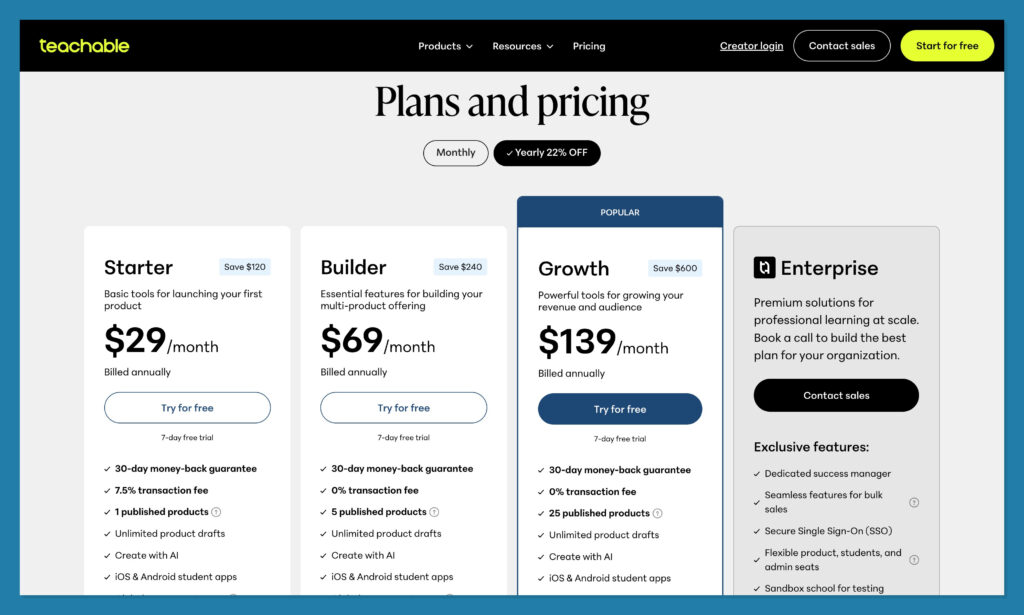
Teachable has four paid plans, ranging from $29 to $139 per month (billed annually). There’s no free plan anymore — Teachable dropped its free tier as part of its 2026 pricing overhaul, replacing the old Free/Basic/Pro structure with the current Starter–Advanced ladder.
If you’re just getting started with your first online course, the Starter plan ($29/month annual) lets you publish one product and host up to 100 students.
But if you’re planning to sell regularly, I’d recommend jumping straight to the Builder plan ($69/month annual) to avoid the 7.5% transaction fee that eats into every Starter sale.
| Plan | Monthly Price (Annual) | Monthly Price (Monthly) | Transaction Fee | Products | Students | Best For |
|---|---|---|---|---|---|---|
| Starter | $29/mo | $39/mo | 7.5% | 1 product | 100 | Testing your first course idea |
| Builder | $69/mo | $89/mo | 0% | 5 products | 1,000 | Small but growing course business |
| Growth | $139/mo | $189/mo | 0% | 25 products | Unlimited | Multi-course businesses scaling up |
| Enterprise | Custom | Custom | 0% | Custom | Unlimited | Larger creators and small academies |
Teachable Pricing Plans Explained
You can choose from one of four paid plans: Starter, Builder, Growth, and Advanced. All plans are available on monthly or annual billing, and paying annually saves you between 22% and 25% depending on the tier. Here’s what each plan includes and who it’s best suited for.
What’s Included in Teachable’s Starter Plan?
Annual price: $29 per month ($348 for the year)
Monthly price: $39 per month
Transaction fee: 7.5% per sale
Best for: Validating your first course with a small audience
Teachable’s Starter plan is the entry-level option at $29 per month (billed annually). It’s designed for creators who want to test the waters with a single course before committing to a higher tier. Here’s what you get:
- 1 published product — enough for a single course, coaching program, or digital download
- Up to 100 students
- Unlimited video storage — no restrictions on how much course content you upload
- Basic course templates, quizzes, and certificates
- Community features and mobile app access
- Email support
The big catch? Every sale on the Starter plan gets hit with a 7.5% platform fee — and that’s before Stripe or PayPal take their cut. On a $99 course, you’re losing roughly $7.43 to Teachable plus another $3.17 in processing fees (2.9% + $0.30), leaving you with about $88.40 per sale.
Should You Use Teachable’s Starter Plan?
The Starter plan makes sense if you’re launching your very first course and want to validate the idea before investing more. But once you start making regular sales, that 7.5% fee becomes a serious drag on revenue. Most creators will want to upgrade to Builder fairly quickly — the math works in Builder’s favor once you’re earning more than roughly $530/month in course sales.
What’s Included in Teachable’s Builder Plan?
Annual price: $69 per month ($828 for the year)
Monthly price: $89 per month
Transaction fee: 0%
Best for: Small but active course businesses
Teachable’s Builder plan ($69/month annual) is where things get interesting — and where I’d recommend most course creators start if they’re serious about selling. The plan eliminates platform transaction fees entirely, which is a major improvement over Starter. Key features include:
- Up to 5 published products — room for multiple courses, coaching offers, or bundles
- Up to 1,000 students
- 0% platform transaction fees — you only pay standard Stripe/PayPal processing
- All Starter features plus more robust tools for managing a growing school
The jump from $29 to $69/month might seem steep, but consider this: if you sell ten $99 courses per month on the Starter plan, you’re paying $74.25 in transaction fees alone — more than the monthly cost difference between the two plans. Builder pays for itself quickly.
Should You Use Teachable’s Builder Plan?
The Builder plan is the best value in Teachable’s lineup. It’s ideal for creators who have validated their course idea and are ready to grow. With 0% transaction fees and support for up to five products, it gives you the room and the economics to scale without constantly watching fees eat into your margins.
What’s Included in Teachable’s Growth Plan?
Annual price: $139 per month ($1,668 for the year)
Monthly price: $189 per month
Transaction fee: 0%
Best for: Established course businesses with multiple offerings
Teachable’s Growth plan ($139/month annual) is built for creators running a multi-course business. If you’ve outgrown the Builder plan’s five-product cap or need unlimited student enrollment, this is the next step. Key features include:
- Up to 25 published products — ideal for creators with a full catalog of courses, memberships, and downloads
- Unlimited students — no enrollment caps to worry about
- 0% platform transaction fees
- All Builder features with expanded capacity for a scaling operation
Should You Use Teachable’s Growth Plan?
The Growth plan makes sense once you’ve built out a course catalog and are enrolling students at a steady pace. The unlimited student cap is the real draw here — if you’re bumping up against Builder’s 1,000-student limit or need more than five products, Growth gives you the headroom without transaction fees. For most solo creators, this will be the highest tier you’ll ever need.
What’s Included in Teachable’s Advanced Plan?
Annual price: $309 per month ($3,708 for the year)
Monthly price: $399 per month
Transaction fee: 0%
Best for: Large creators and small online academies
Teachable’s Advanced plan ($309/month annual) is the top tier, designed for larger operations that need scale and richer admin capabilities. On top of everything in the Growth plan, the Advanced tier includes:

- Up to 100 published products — enough for a full academy-style catalog
- Unlimited students
- 0% platform transaction fees
- More robust admin and management tools designed for team-based operations
Should You Use Teachable’s Advanced Plan?
The Advanced plan is only worth the investment if you’re running a full-fledged online academy or education business with a large catalog. Most individual course creators won’t need 100 product slots. But if you’re operating at that scale — or managing a team of instructors — the Advanced plan’s expanded capacity and admin features justify the price.
Transaction and Processing Fees Explained
This is where Teachable’s pricing gets tricky, and it’s important to understand the difference between platform transaction fees and payment processing fees — because they stack on top of each other.
Platform Transaction Fees
Teachable charges a percentage-based platform fee that varies by plan:
- Starter: 7.5% on every sale
- Builder, Growth, Advanced: 0% — no platform fee when using Teachable’s built-in payment gateways
Payment Processing Fees
Regardless of which plan you’re on, you’ll also pay standard payment processing fees through Stripe or PayPal. These are charged per transaction and apply on every plan, including the ones with 0% platform fees:
| Payment Method | Fee |
|---|---|
| US card payments (Stripe) | 2.9% + $0.30 |
| International card payments (Stripe) | 3.9% + $0.30 |
| US PayPal | 3.49% + $0.49 |
| International PayPal | 4.99% + $0.49 |
⚠️ Watch Out for the Custom Gateway Fee
If you’re a US-based school using a custom Stripe gateway instead of Teachable’s built-in payments, you may be charged an extra 2% integration fee per transaction on top of your processor’s standard rates. This is easy to miss and can significantly increase your costs.
Real-World Cost Per Sale: Starter vs Builder
Let’s say you’re selling a $99 course to a US customer paying by card. Here’s what each plan actually costs you per sale:
| Starter | Builder | |
|---|---|---|
| Course price | $99.00 | $99.00 |
| Platform fee (7.5% / 0%) | –$7.43 | $0.00 |
| Processing fee (2.9% + $0.30) | –$3.17 | –$3.17 |
| You keep | $88.40 | $95.83 |
That’s a difference of $7.43 per sale. If you’re selling 8 or more courses per month, the transaction fee savings on Builder alone outweigh the $40/month price difference between the two plans.
Does Teachable Have Any Hidden Fees or Additional Costs?
Beyond the headline plan prices and transaction fees, there are a few less obvious costs to keep in mind:
- Processing fees always apply — even on 0% transaction fee plans, Stripe and PayPal still charge their standard rates on every sale
- Student and product caps — Teachable’s 2026 structure introduced hard limits on the number of students and published products per plan. Exceeding these limits can trigger overage charges, so “unlimited” is now reserved for Growth and Advanced tiers only
- Custom Stripe gateway surcharge — US schools using their own Stripe account may pay an additional 2% integration fee per transaction
- International payment markups — selling to international customers costs more due to higher processing rates (3.9% + $0.30 for cards, 4.99% + $0.49 for PayPal)
How Can I Save Money With Teachable?
Despite the layered fee structure, there are a few straightforward ways to reduce your costs on Teachable:
- Pay annually instead of monthly — annual billing saves you 22–25% across all plans. On the Builder plan, that’s $240/year in savings
- Skip Starter if you’re already selling — the 7.5% platform fee makes Starter more expensive than Builder once your monthly revenue crosses roughly $530
- Use Teachable’s built-in payment gateways — avoid the extra 2% integration fee that can come with custom Stripe setups
- Don’t overpay for capacity you don’t need — if you have fewer than 5 products and under 1,000 students, Builder is plenty. No need to upgrade to Growth just yet
- Price courses to offset processing fees — higher-priced courses lose a smaller percentage to the flat $0.30 per-transaction charge
Is Teachable Good Value for Money?
Teachable delivers solid value, but the plan you choose makes a big difference. The Builder plan ($69/month annual) offers the best balance of features and economics for most course creators — you get 0% transaction fees, room for five products, and support for up to 1,000 students.
Where Teachable loses some points is at the entry level. The Starter plan’s 7.5% transaction fee is steep compared to competitors that offer lower-cost or free tiers. If you’re just exploring and not ready to commit, platforms like Thinkific still offer more generous free plans.
But once you’re committed to selling courses, Teachable’s feature set — unlimited video storage, built-in community features, mobile app, quizzes, and certificates across all plans — is genuinely competitive.
The 2026 pricing overhaul also introduced student and product caps that didn’t exist on older plans, which means you’re getting less flexibility than legacy users. But for new creators starting fresh, the current structure is clear and predictable as long as you understand the fee layers.
How Do I Choose the Right Teachable Plan?
If you’ve looked at each plan but aren’t sure which one fits, here are some key questions to consider:
- Are you testing an idea or ready to sell? — if you’re validating, Starter works. If you’re ready to launch, go straight to Builder
- How many courses will you offer? — one course fits Starter, up to five fits Builder, anything beyond needs Growth or Advanced
- How large is your audience? — under 100 students works on Starter, under 1,000 on Builder, unlimited on Growth and Advanced
- How price-sensitive are your customers? — international audiences mean higher processing fees, which eat into margins more on lower-priced courses
- Do you need a free plan? — Teachable doesn’t have one anymore. If that’s a dealbreaker, you may want to explore alternatives like Thinkific
Final Verdict: Which Teachable Plan Is Best for You?
Teachable offers four paid plans with no free tier, ranging from $29 to $309 per month (billed annually). The key decision comes down to how much you’re selling and how many products you need.
Let’s quickly revisit who each plan is best for:
- The Starter plan is best for: creators testing their first course idea with a small audience. The 7.5% transaction fee keeps costs variable, but it’s not economical for regular sellers.
- The Builder plan is best for: serious course creators ready to grow. With 0% transaction fees and support for five products, it’s the plan where Teachable starts delivering real value.
- The Growth plan is best for: established course businesses with multiple products and growing student bases. Unlimited students and 25 product slots give you serious room to scale.
- The Advanced plan is best for: larger operations and online academies that need 100 product slots and advanced admin tools.
Final Thoughts From the Author
Of the plans I’ve discussed, the $69/month Builder plan is the best value for money. Yes, it’s more expensive at first glance than the Starter plan — but once you factor in the 7.5% transaction fee on Starter, Builder actually costs less for anyone selling more than a handful of courses per month.
The 0% platform fee means you keep significantly more of every sale, and five product slots give you enough room to build out a proper course catalog. I’d recommend starting with the Starter plan only if you’re genuinely unsure whether your course will find an audience. Once you’ve validated the idea, upgrade to Builder and don’t look back.



Comments 0 Responses