

Quick answer: SendOwl is built for people who don’t want to mess around with bloated ecommerce platforms. It strips out the noise and gives you just what you need to sell — fast checkouts, secure digital delivery, and a dashboard that’s easy to manage.
Whether you’re launching your first ebook or scaling a catalogue of software products, SendOwl stays out of your way and lets you focus on sales.
You don’t get a storefront, but you do get one of the simplest selling setups out there.
What is SendOwl?
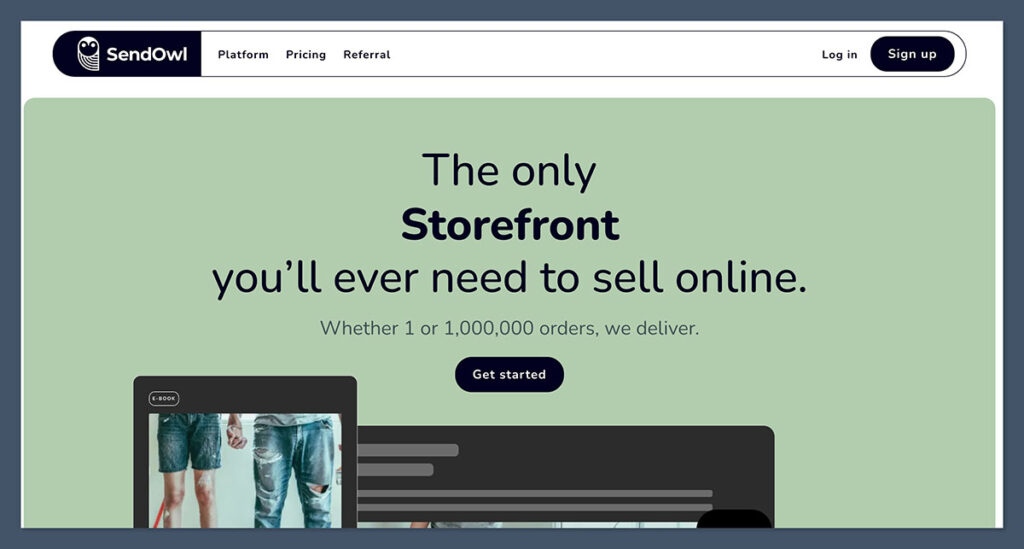
SendOwl is a checkout and digital delivery platform designed for creators, ecommerce founders, and digital-first sellers who don’t want to mess with complicated store builders.
You won’t be building an online storefront like you would with Shopify or WooCommerce. That’s not what SendOwl is about.
Instead, you’ll be generating direct product links, embed buttons, or hosted checkout pages that slot right into your existing funnel — whether that’s a blog, a sales page, or even a YouTube description.
It takes care of everything after the click: payments, secure file delivery, license key generation, and even affiliate tracking — without requiring extra plugins or tech know-how.
Who it’s really built for:
- Digital product sellers offering PDFs, eBooks, templates, or downloadable guides
- Course creators who don’t need a full-blown LMS like Kajabi or Teachable
- Software developers selling apps or tools that require license key distribution
- Membership site owners with gated content or file libraries
- Content creators using platforms like Instagram, Substack, or YouTube to drive sales
If you’re selling physical products, look elsewhere. There’s no shipping setup, warehouse integration, or inventory system. This platform is purely digital — and that’s why it’s so lean and fast to use.
If you already have an audience and just want to plug in a way to sell and deliver instantly, this is the tool. Nothing fancy. Just focused.
Pros 👍
- Fast, lightweight setup for selling digital products
- Secure digital file delivery, license keys, and drip content built-in
- Built-in affiliate system with tracking
- One-page checkout is clean and converts well
- Easy to embed on existing sites, landing pages, or funnels
Cons 👎
- Design flexibility is minimal
- Weak analytics and basic reporting
- Not made for physical product sellers
- Features hidden behind higher-tier plans
My Experience With SendOwl
I run a digital product arm of my ecommerce business — selling everything from PDF templates and downloadable toolkits to full online courses.
I’d tried the usual suspects: Shopify’s Digital Downloads app, Gumroad, even Payhip. But each of them came with trade-offs. Most felt bloated, overbuilt, or forced me to hack together five different plugins just to sell a single file.
Eventually, I hit a point where I was spending more time fixing the system than selling. That’s when I decided to try SendOwl.
Getting started
The setup process was a breath of fresh air. There’s no storefront to build, no themes to choose, no plugins to research. Within 15 minutes, I had:
- One product listed
- A checkout page live
- A payment link I could paste directly into an email, Instagram bio, or YouTube video description
There was zero friction — no endless form builders or SEO fields to fill in. Just upload the product, write a price, hit publish.
What stood out immediately:
- I didn’t need a developer
- I didn’t need to “learn” the platform
- I didn’t even need to think about tech — it just worked
Interface and workflow
There’s no design wizard or fancy onboarding tour. But honestly? That’s what I liked most.
If you’ve used Stripe, Gumroad, or even PayPal buttons, you’ll feel at home. The layout is intuitive. It focuses only on what matters: getting paid and delivering files automatically.
It let me skip the unnecessary and go straight to selling — and for digital creators, that kind of speed is rare.
Why I Switched to SendOwl
Before SendOwl, I’d bounced between a few platforms.
I started with Shopify’s Digital Downloads app, but it quickly became more work than it was worth. I had to dig through endless menus, rely on multiple third-party tools, and constantly update things just to deliver one file.
It felt like running a full ecommerce store just to sell a PDF.
Then I moved to Gumroad, which worked well at first — until they started tightening controls, adding more limitations, and bumping up transaction fees. Suddenly, I was giving up 10%+ per sale and getting less flexibility in return.
I needed something that just did the job without the extras dragging me down.
Here’s why I gave SendOwl a serious try:
- I wanted full control of my product pricing and checkout flow
- I didn’t want to give up a big chunk of my revenue to platform fees
- I needed the ability to drip content weekly for one of my email-based courses
- I wanted a simple affiliate system — without installing 10 plugins or duct-taping APIs
I’ll be honest: I didn’t expect much from it.
But once I jumped in, it just worked. No developer. No designer. No headaches. It ticked every box I needed for selling digital products without drowning in complexity.
Features That Mattered to Me
When it comes to selling digital products, most platforms overcomplicate the process.
What stood out about SendOwl was how well it handled the core essentials — the features that actually impact sales, delivery, and automation.
Below are the key tools I used most — and why they worked for my business.
Digital File Delivery
The file delivery system is rock solid. You upload your digital product once, and SendOwl handles the rest with built-in protections that prevent piracy or abuse.
- Uploads are stored and delivered securely, hosted on SendOwl’s servers
- You can set download limits — by time, number of attempts, or unique buyer
- Customers receive an auto-generated email with a secure access link
- Download links are time-sensitive and expire after a set period, which adds a layer of control
If you’ve sold digital goods before, you know how important it is to protect your work without annoying your customers. SendOwl hits that balance.
Checkout Pages
SendOwl’s checkout isn’t flashy, but it’s fast — and that’s what matters when someone’s ready to buy. It loads quickly, looks clean, and keeps distractions to a minimum.
- Clean, minimal layout keeps the focus on conversion
- You can brand it with your logo and colours to maintain visual consistency
- Choose between using a hosted checkout page or embedding the checkout directly on your site or funnel
- Fully mobile responsive, so buyers can purchase on any device
For creators and marketers driving traffic from YouTube, email, or social — this is a huge win.
Affiliate Tracking
This feature alone saved me from having to piece together third-party affiliate tools.
- Comes with a built-in affiliate dashboard
- Create and manage unique referral links
- Track performance, clicks, and conversions with ease
- Payouts are manual via PayPal, which gives you full control over who gets paid and when
For a solo seller like me, it was a huge bonus — I didn’t need to set up complex integrations or manage spreadsheets.
Drip Content & License Keys
If you sell courses, software, or access-based content, these features are surprisingly powerful given the simplicity of the platform.
- Set up drip schedules to release lessons, downloads, or gated content over time
- Perfect for email-based courses or phased programs
- Built-in license key generator lets you assign one-time or recurring software keys automatically
- Easily connect this with product access rules
Quick Feature Breakdown
| Feature | Included in Plan | Notes |
|---|---|---|
| Secure File Delivery | Yes (All Plans) | With link expiration and download limits |
| Branded Checkout | Yes | Custom logo and colours |
| Embedded Checkout | Yes | Works on landing pages, websites, etc. |
| Affiliate Tracking | Yes (from Growth) | Manual payouts but robust tracking |
| Drip Content | Yes (from Growth) | Schedule delivery across days or weeks |
| License Key Generator | Yes (from Growth) | Ideal for SaaS or digital activation codes |
These features aren’t just checkboxes — they’re things I actually used daily, and they worked without needing support tickets or workarounds. That’s a big part of why I stuck with SendOwl.
What I Liked the Most
After testing a half-dozen ecommerce tools over the years, SendOwl stood out for its speed, simplicity, and focus. It didn’t try to be everything. It just nailed the core things I needed as a digital seller.
Here’s what made the biggest impact:
- Speed and simplicity
I didn’t have to build a storefront, browse themes, or install plugins. I uploaded my product, set a price, and started selling — all in under an hour. It felt more like sending a Stripe link than launching a store. - It focuses on conversions
No distractions, no bloated UI. Buyers land on a single page with one goal: purchase. The checkout flow is clean and high-converting — exactly what you want for direct-response traffic. - Zero transaction fees on higher plans
I’m tired of handing over 10% of every sale to platforms like Gumroad. With SendOwl’s Pro plan, I keep 100% of the revenue (minus Stripe/PayPal fees). That alone paid for the upgrade within the first few weeks. - The affiliate system works out of the box
I invited a few partners, generated links, and tracked their performance — all inside the dashboard. No extra software. No Zapier hacks. Just clean, usable functionality that worked immediately. - It just works
There’s something underrated about a tool that doesn’t break. Every file delivered. Every email sent. Every payment cleared. I didn’t have to chase down support or debug integrations.
What I Didn’t Love
That said, SendOwl isn’t perfect — and it’s worth knowing where it falls short, especially if you’re expecting a full ecommerce platform.

Here’s what could be better:
- Design limitations
Beyond uploading a logo and choosing your colours, there’s not much you can customise. You can’t build landing pages or fully design product layouts. It’s a checkout tool — not a full storefront builder. - Analytics are basic
You’ll see your sales, product views, and conversion rates, but that’s about it. There’s no advanced reporting, segmentation, or cohort tracking. If you need deep data, you’ll need to export it or use external tools. - No product search or filter
If you’re selling 20+ digital products, managing your catalogue starts to feel clunky. There’s no tagging system or advanced sorting. It’s fine for small libraries, but not ideal for scaling product lines. - Limited integrations
SendOwl works with Zapier, which opens up some automation, but native integrations are sparse. There’s no one-click connect for tools like ConvertKit, MailerLite, or Notion. You’ll have to DIY a few things.
Bottom line?
If you’re selling a small collection of digital products and want a lean setup, these limitations won’t be dealbreakers.
But if you’re running a full content business with deep marketing stacks or large product catalogs, you may eventually feel boxed in.
SendOwl Pricing – What’s the Catch?
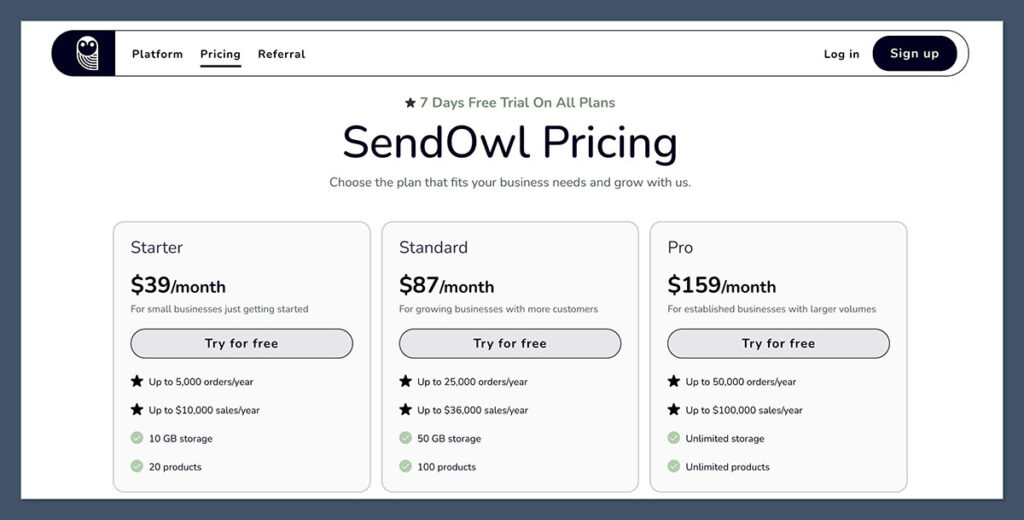
SendOwl has shifted from simple pricing to a tiered, usage-based model that scales with your business. It now offers three core plans — Starter, Standard, and Pro — each based on your yearly sales and order volume.
Instead of charging transaction fees like many creator platforms, SendOwl uses a flat monthly fee, giving you predictable costs and full control over your margins.
Here’s a breakdown of SendOwl’s pricing:
| Plan | Price (USD/month) | Orders/year | Sales/year (USD) | Storage | Products |
|---|---|---|---|---|---|
| Starter | $39 | Up to 5,000 | Up to $10,000 | 10 GB | 20 products |
| Standard | $87 | Up to 25,000 | Up to $36,000 | 50 GB | 100 products |
| Pro | $159 | Up to 50,000 | Up to $100,000 | Unlimited | Unlimited products |
Each plan includes:
- No transaction fees — You keep 100% of your revenue (minus Stripe or PayPal processing)
- Free trial — Test any plan before you commit
- Core features like upsells, affiliate programs, cart abandonment, PDF stamping, and integrations
Bandwidth and Add-on Costs
SendOwl keeps pricing transparent, even for overages:
| Plan | Free Bandwidth | Overage Fee | Product Update Emails / Imports |
|---|---|---|---|
| Starter | First 10GB free | $2.00 per GB afterward | $5.00 per 1,000 |
| Standard | First 10GB free | $1.50 per GB afterward | $3.00 per 1,000 |
| Pro | First 50GB free | $1.00 per GB afterward | $2.00 per 1,000 |
How SendOwl Compares to Other Platforms
| Platform | Entry Plan | Transaction Fees | Best For |
|---|---|---|---|
| SendOwl | $39/mo | None | Digital product sellers |
| Gumroad | Free, but 10% | 10% platform fee | Creators, basic ecommerce |
| SamCart | $79–$159/mo | + Transaction fees | Funnels and upsells |
Platforms like Gumroad may look cheaper up front, but once your revenue scales, their 10% cut adds up fast. For example:
- If you make $10,000/year, Gumroad takes $1,000 in fees. SendOwl takes $0.
- At $100,000/year, you’re losing $10,000 on Gumroad vs. just $1,908 annually on SendOwl’s Pro plan.
So, Which Plan Is Right for You?
- Starter ($39/mo) – Ideal for small businesses or creators just starting to monetize digital products
- Standard ($87/mo) – Best for those growing steadily with multiple products and moderate volume
- Pro ($159/mo) – Made for high-volume sellers who need unlimited everything and premium support
If your business is scaling past these limits, SendOwl also offers custom plans for high-volume merchants — including those doing $250K+ per year.
SendOwl isn’t trying to be the cheapest platform. It’s focused on maximizing your revenue by eliminating platform fees, offering a predictable cost structure, and giving you serious digital selling tools at each tier.
For digital-first businesses, that trade-off is more than fair — especially if you’re tired of losing 10% on every sale.
Who Should Use SendOwl?
SendOwl isn’t trying to be the all-in-one ecommerce answer. It’s not for building out big brand storefronts or managing large inventories.
Instead, it’s built for speed, digital delivery, and getting paid with as little friction as possible.
If you’re focused on selling downloadable content, subscriptions, or software, it’s one of the leanest tools I’ve used.
Here’s who should jump in:
- Creators selling digital goods
Think PDFs, ebooks, templates, guides, printables — if it’s downloadable, you’re covered. - Solo founders or coaches
If you just want a no-hassle checkout you can plug into your site, this is it. It works perfectly with landing pages, email funnels, or even a Notion site. - SaaS devs or software founders
Especially if you need to deliver license keys or manage recurring subscriptions — SendOwl has this built in. - Course sellers
For simple, email-based or file-based courses, the drip content feature works great. You can schedule lesson releases across days or weeks without using an LMS.
You don’t need to be technical. You don’t need to hire a developer. This is made for digital-first sellers who value time and simplicity over bells and whistles.
But skip SendOwl if:
- You sell physical products
There’s no shipping logic, address collection, or fulfilment support. It’s not a fit for physical inventory. - You want a storefront with themes and page builders
There’s no drag-and-drop editor or homepage builder. It’s just checkout and delivery — no visuals, no catalog pages. - You need advanced reporting or segmentation
If your business relies heavily on data breakdowns, customer tagging, or CRM-level analytics, SendOwl’s built-in tools will feel too light.
Bottom line: If you’ve got a product and an audience — and want to launch quickly without platform bloat — SendOwl is a strong fit.
But if you’re building a visual storefront or need high-level ecommerce features, you’ll hit its limits pretty fast.
SendOwl vs The Competition
SendOwl doesn’t try to compete with the big ecommerce builders. Instead, it carves out a space for digital sellers who value simplicity, control, and low fees.
But how does it actually stack up against other popular platforms in the digital product space?
Here’s a side-by-side view:
| Platform | Best For | Transaction Fees | Built-in Affiliate? | Checkout Customization |
|---|---|---|---|---|
| SendOwl | Digital products | 0–5% | Yes | Basic |
| Gumroad | Creators | 10% | No | Moderate |
| Payhip | Beginners | 5% | Yes | Basic |
| ThriveCart | Funnels | One-time fee | Yes | Strong |
| Shopify + App | Digital/physical | App-dependent | Via apps | Strong |
A few key takeaways:
- SendOwl vs Gumroad
Gumroad is beginner-friendly, but its 10% transaction fee quickly eats into margins. It also lacks built-in affiliate support. SendOwl gives you more control, lower fees, and native affiliate tools — making it better suited for creators who want to grow revenue over time. - SendOwl vs Payhip
Payhip is similar in simplicity and pricing, but SendOwl offers stronger drip content and licensing tools — making it a better fit for course creators and software sellers. If you only need a few basic features, though, Payhip might be enough to start. - SendOwl vs ThriveCart
ThriveCart is powerful and highly customizable — ideal for marketers running high-ticket funnels or selling bundles with upsells. But it comes with a hefty one-time fee and a steeper learning curve. SendOwl is better if you just want to sell quickly without upfront investment. - SendOwl vs Shopify
Shopify is overkill for most digital-only businesses. It’s app-heavy, requires setup, and still won’t give you native tools like drip content or license key delivery. You can achieve something similar with plugins — but at that point, you’ve added time and cost. SendOwl gets you to checkout faster, without the bloat.
Bottom line?
If you’re selling digital products and want lean performance, low fees, and built-in automation, SendOwl hits the sweet spot.
It’s not the most feature-rich, but for many creators and solo entrepreneurs, it’s exactly enough — and nothing more.
Final Verdict – Is SendOwl Worth It?
If you’re a digital product seller looking for a tool that’s fast, simple, and focused on results, then yes — SendOwl is absolutely worth it.
It doesn’t try to do everything. It doesn’t come with a flashy storefront builder or 800 templates.
What it does offer is a lean, conversion-focused system that gets your product into your customer’s hands with zero fluff.
Here’s what it nails:
- Speed to launch: You can be up and selling within the hour
- Control over your money: Low to zero transaction fees, depending on your plan
- Automation that works: From content dripping to license key delivery
- No unnecessary bloat: You’re not stuck paying for features you’ll never use
That said, it’s not for everyone.
If you’re scaling a larger brand with dozens of SKUs, need detailed analytics, or want to build out a full visual storefront — you’ll hit its limits quickly.
It’s not meant to replace Shopify or ThriveCart for complex ecommerce businesses.
But if your goal is to monetize digital products fast and friction-free, SendOwl quietly outperforms most of the big names. It’s not the loudest tool in the room — but for creators, coaches, and solo entrepreneurs, it’s one of the most effective.
This platform isn’t just underrated — it’s one of the most overlooked revenue tools out there.



Can I script/embed the send owl digital product into my site’s shop page to allow the gui to have a seamless integration or are their urls only used with social media as you wrote above? I host my own site. I want a digital platform to assist with files being shared. It seems like a lot of extra work if one needs to maintain a storefront on their site & a websire with an estore for tangible goods. Any suggestions for ebooks/artcles that would allow me to control file distribution if this isn’t for me?
Good evening I have been using Sendowl for a few months now and I see that it works very well. But a doubt arises … If I use the html link that is associated with the product where I receive a commission, and I send this link via SMS it is not counted as a commission because it is not associated with the affiliate email. Quite right?
I hope I have explained myself well enough. Thanks
Hello Tommaso, it depends on how that link is generated, and if it depends on a browser cookie that can get lost when sending the link via SMS.
I’m a digital dropshipper (I’m not the owner of products) can i use sendowl, no problem for that?!
Thanks
Sure, I don’t see why not.
Do you recommend using SendOwl if you have a website hosted by Wix? I’ve been having difficulties putting the SendOwl cart on my Wix hosted website.
Hello Erin, we haven’t got the chance to test SendOwl with Wix, but it should work. Do you have a Wix ecommerce site?
I bought an E-book from a less than “official” website. That being said I found some reddit reviews etc saying they purchased and were fine. As far as my credit card, I’m not too worried, worst case I dispute some claims. My main concern is downloading the PDF from sendowl. It auto downloaded into my google drive versus onto my computer hardrive. Does sendowl make sure the pdfs they are sending are safe/secure without viruses/malware ?
Thank you in advance for your time !
Hello Blair,
The documents are scanned for viruses, but there might be links in the eBook that lead to suspicious websites. So be careful about that.
hi, would you recommend Sendowl for selling a larger number of digital products, in this case 1000+ images? if not can you recommend anyone else?
Thanks!
Hello, SendOwl should work just fine. You can find sone great alternatives here.
If I want to sell a tangible product and a digital product that go together is sendowl all I will need?
Hello Fancy,
Unfortunately SendOwl will only allow you to sell digital products.
You might consider using Shopify and the Digital Downloads App if you want to sell both physical and digital products.
I started to use Send92@, but why are they taking a cut of the income? I thought there were no transaction fees?
Hello,
There are no transaction fees issued by SendOwl, just a flat monthly fee but your payment gateway will charge a transaction fee each time you receive a payment.
Hope this helps,
–
Bogdan – Editor at ecommerce-platforms.com
If I want to sell a software on-premise (download online), this platform is enought? I’m worried about the license key to protect the product. Thanks!
Hello Angelina,
SendOwl would be enough but no one can guarantee that your software won’t be pirated.
–
Bogdan – Editor at ecommerce-platforms.com
To sell digital products only, would I use SendOwl or Shopify+SendOwl?
Hello Francesco,
If you want to sell from social media accounts or email lists SendOwl is all you need. If you want a full ecommerce site then, by combing Shopify and SendOwl, you have the capability to sell digital goods with an ecommerce backend.
Best,
–
Bogdan – Editor at ecommerce-platforms.com