

Shop Pay is all about guiding potential customers through their path to purchase and generating more sales.
Shop Pay (originally called Shopify Pay) is a convenient payment button that you add to your checkout process.
It runs on Shopify Payments, which processes card payments for your Shopify store through payment processors such as Stripe, the tool that helps countless huge companies to handle payments.
Today, we’re going to answer the question “what is Shop Pay,” introduce you to all of its benefits and costs, and explain why you should consider using it for your own online store.
Let’s start with the basics.
In this article:
- What is Shop Pay?
- How Does Shop Pay Work?
- Is Shop Pay Safe?
- What is a Shop Pay Code?
- Shop Pay vs Shopify Payments
- Shop Pay vs the Shop App: What’s the Difference?
- How Much Does Shop Pay Cost Merchants?
- How to Enable Shop Pay on Your Shopify Store
- Can You Use Shop Pay Without a Shopify Store?
- Is Shop Pay Right for You?
- Shop Pay FAQs
What is Shop Pay?
Shop Pay is a convenient payment method and checkout solution for customers on a Shopify store. This handy little tool allows customers to save credit card information, along with other data.
For instance, your customers can add their shipping address and billing information, for a faster checkout next time they buy.
The accelerated checkout system from Shop Pay ensures that your customers can process payments faster, which means that you end up with more repeated purchases. Shopify says Shop Pay lifts conversions by up to 50% compared with guest checkout, based on an April 2023 study with a Big Three management consulting firm. Its 2025 internal data adds 16% higher average order values and shoppers 77% more likely to buy again. Both are Shopify’s figures.
To save their details, the customer enters their email address at checkout and then a mobile number, which becomes their Shop Pay account.
Although you can speed through Shop Pay’s payment process with a phone number, there are limits to this. Customers entering only a phone number in the checkout contact field won’t have the option to save their information.
Shop Pay comes with a bundle of awesome features to explore. Aside from saving your customers heaps of time when they check out, Shop Pay also comes with features like local pickup and delivery options.
Customers and businesses can also rest assured that information is safe and private. Billing and shipping information stays on Shopify’s PCI compliant servers.
You don’t store customers’ saved card details on your store, so you’re less at risk of issues with compliance regulations.
How to get Shopify for $1 per month for the first 3 months?
Shopify has begun offering a special deal for sellers who sign up for a new Shopify plan. That deal?
Try Shopify free for 3 days, then pay $1/month for the first 3 months of full access to the platform!
This offer is for eligible new merchants on Basic, Grow, and Advanced (Starter is closed to new stores, and the old Shopify plan is now Grow). See our Shopify free trial guide for the rules.
How Does Shop Pay Work?
Shop Pay is a very straightforward solution, which is excellent for both you and your customer.
All your customer needs to do to make their purchase is click on the purple Shop Pay button on your checkout page. The first time, the user enters all shipping, credit card, and billing information.
After your customer enters their number and links the account they want to save, they’ll be ready to checkout faster next time.
Shop Pay ensures that whenever your customer logs into your store again, they can simply authorize their purchase without having to enter all of their details again.
For security purposes, your customers verify themselves with a 6-digit code by text or email, a Shop passkey, or a Shop app approval.
Crucially, this means that all customers do need to add a mobile phone number to create a Shop Pay account.
The basic Shop Pay features make for a rather intuitive shopping experience, but there’s much more to it. To answer the question of “how does Shop Pay work?” it’s best to go over all of its features.
Several of these features live in the free Shop app rather than in the checkout button (see Shop Pay vs the Shop App below).
Here are the primary features (for online shoppers) to give you an idea of how it all works:
A Cart Filler
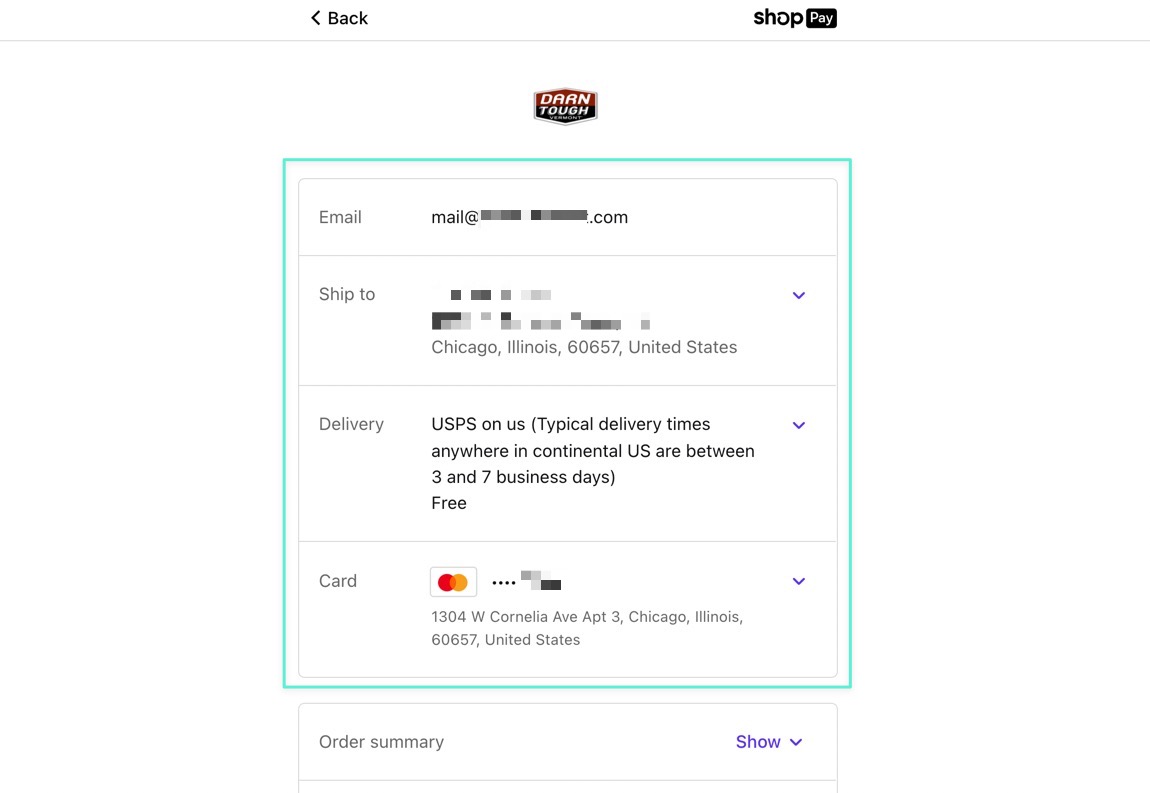
The whole point of Shop Pay is to speed up the checkout process for all online customers.
Therefore, users only have to type in payment information once; after that, the tool automatically recognizes your profile when visiting a participating online store.
All previously entered billing information is encrypted and saved so that customers only have to click one Buy Now button to fill in a checkout form, eliminating the need to pull out a credit card or even type in your name.
Paying in Full or with Shop Pay Installments
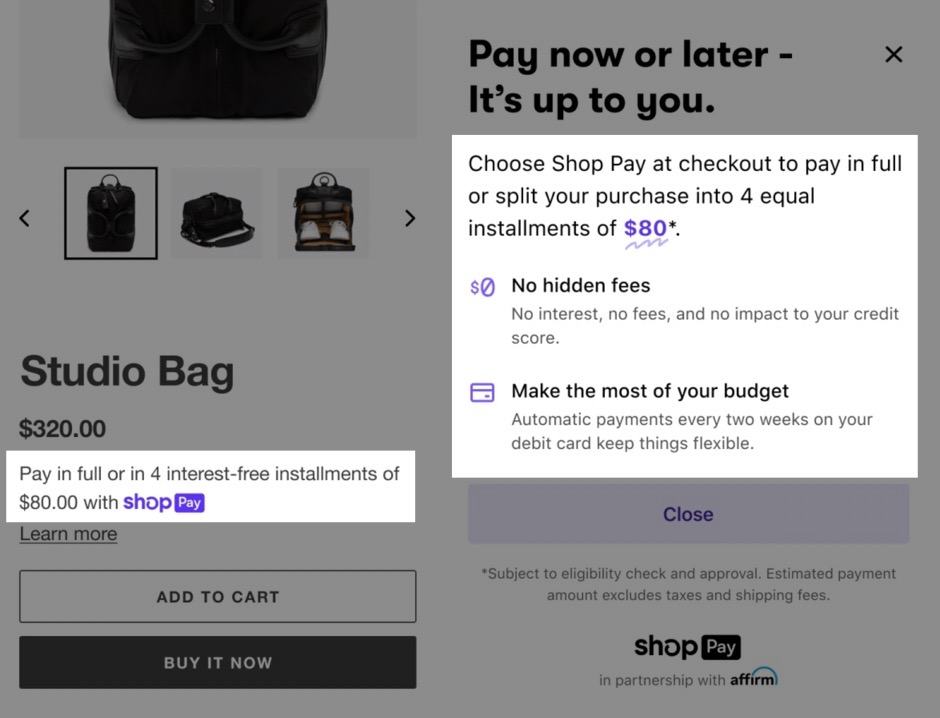
Perhaps one of the most exciting features from Shop Pay is how the customer can choose to either pay in full at the moment of purchase or spread it into multiple payments.
Here’s how it works:
- The customer picks Shop Pay Installments.
- They choose a plan: 2 or 4 interest-free payments every two weeks, or monthly payments over 3 to 24 months.
- The customer selects a debit or credit card to pay the first payment and future installment payments.
- The account walks customers through a brief identity verification process to pay later. Affirm approves each purchase individually, and opening the account doesn’t affect a credit score.
- The customer agrees to terms, authorizes the payment through Shop Pay (Affirm handles their installment processing).
- For security, Shop Pay verifies the customer with a 6-digit code by text or email, a passkey, or a Shop app approval to complete the process.
What about late fees?
Shop Pay installments don’t work like a credit card.
Apart from interest on monthly plans (0-36% APR), there are no fees, penalties, or additional charges to break a payment into installments. You can make early payments in the Shop app without a penalty, and, unlike credit card payments, Shop Pay Installments doesn’t charge a fee if you miss a payment.
However, missed payments aren’t free of consequences: your payment history with Affirm might affect your credit score.
What Qualifies a Transaction for Shop Pay Installments?
In the US, an order must be between $35 and $30,000 USD to qualify for Shop Pay Installments, and its size (plus the store’s Installments package) decides which plans the shopper sees. This amount includes taxes, shipping, and discounts.
| Order size (US) | Payment plan | Interest |
|---|---|---|
| $35-$50 | 2 payments, every two weeks | 0% |
| $50-$999.99 | 4 payments, every two weeks | 0% |
| $150-$30,000 | Monthly, over 3, 6, 12, 18 or 24 months (18 and 24 on premium-package stores) | 0-36% APR where available |
Other rules:
- Other countries: Canada uses the same range in CAD, the UK £50-£30,000, and Australia is in early access for online stores only
- Domestic purchases: billing and shipping addresses, payment details and the Installments account country must match your business entity’s country and checkout currency
- Exclusions: Capital One and Chase credit cards, gift cards and subscription products
- In person: US Shopify POS stores can offer it at the counter on the same terms
Transaction Auto Logging for Past Orders and Receipts
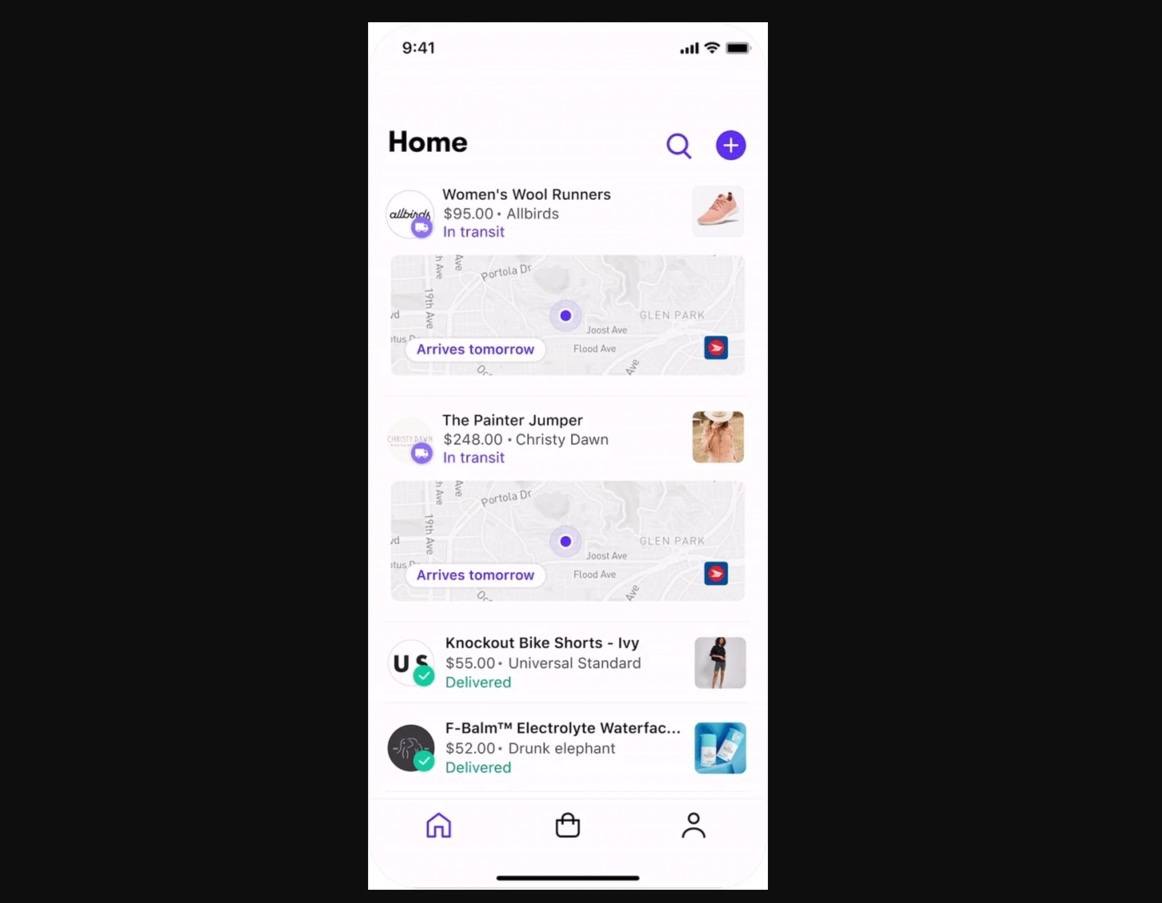
The Shop app logs past orders from Shopify stores automatically, and from other retailers if you connect a Gmail or Outlook inbox. That means online consumers can go back in their history to see the items they’ve bought, how much it all cost, and where the products came from.
The history module also organizes orders and gives users quick search and filter tools to find things immediately.
Not only that, but you can find detailed receipts as well.
Returns and Customer Support with the Click of a Button
The Shop app is primarily designed to help online shoppers. So, it’s not directly connected to any store you visit.
However, each store’s page in Shop shows whatever the merchant provides, such as its store policies, contact details and social links.
You can view a shipping or return policy, or find the seller’s email or phone number, from the convenience of the app.
Customized Shopping Recommendations
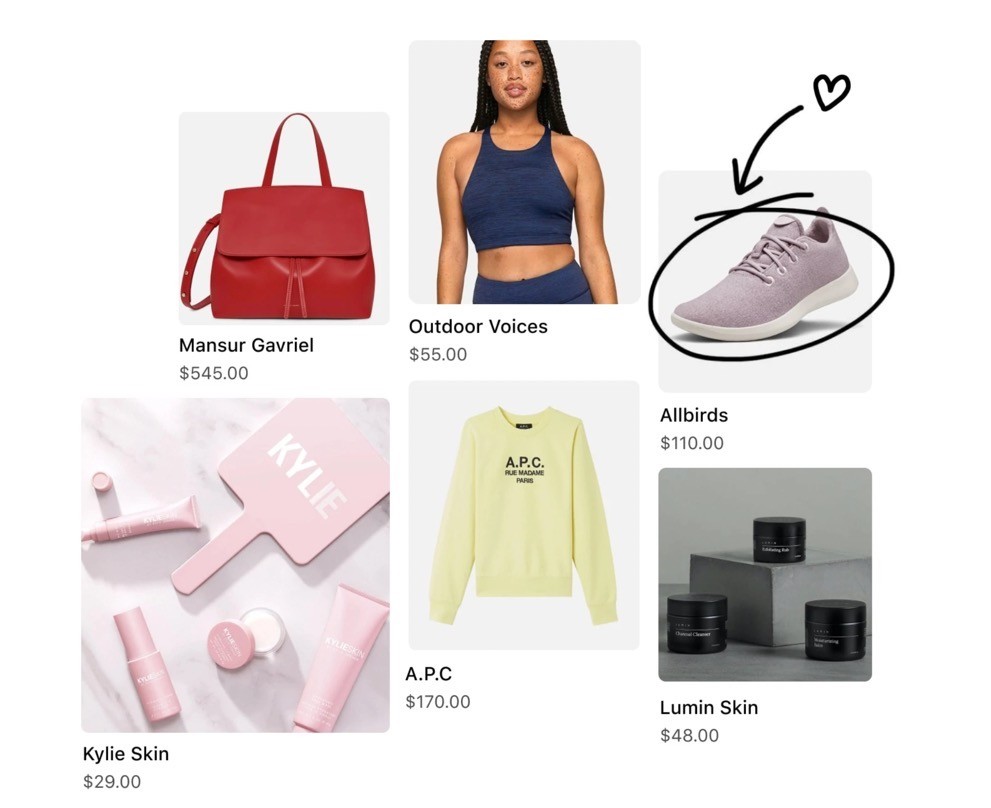
The Shop app is upfront about its data: your purchase history, activity synced from stores where you’re signed in (on by default), your settings and your location, which you can review in its privacy settings.
With this information, the app presents a simple, customized feed made just for you. You’ll see recommendations from your favorite shops, deals from related shops, and trending items that you may like as well.
In-Store Pickup, Local Delivery and Paying in Person
If a store offers pickup in store or local delivery, customers can choose either option when they check out with Shop Pay. Shop Pay also works in person: on Shopify POS, the customer scans a QR code and pays on shop.com.
And here are the merchant-side features, most of which come from the free Shop channel:
Marketing Automations to Improve Repurchase Potential
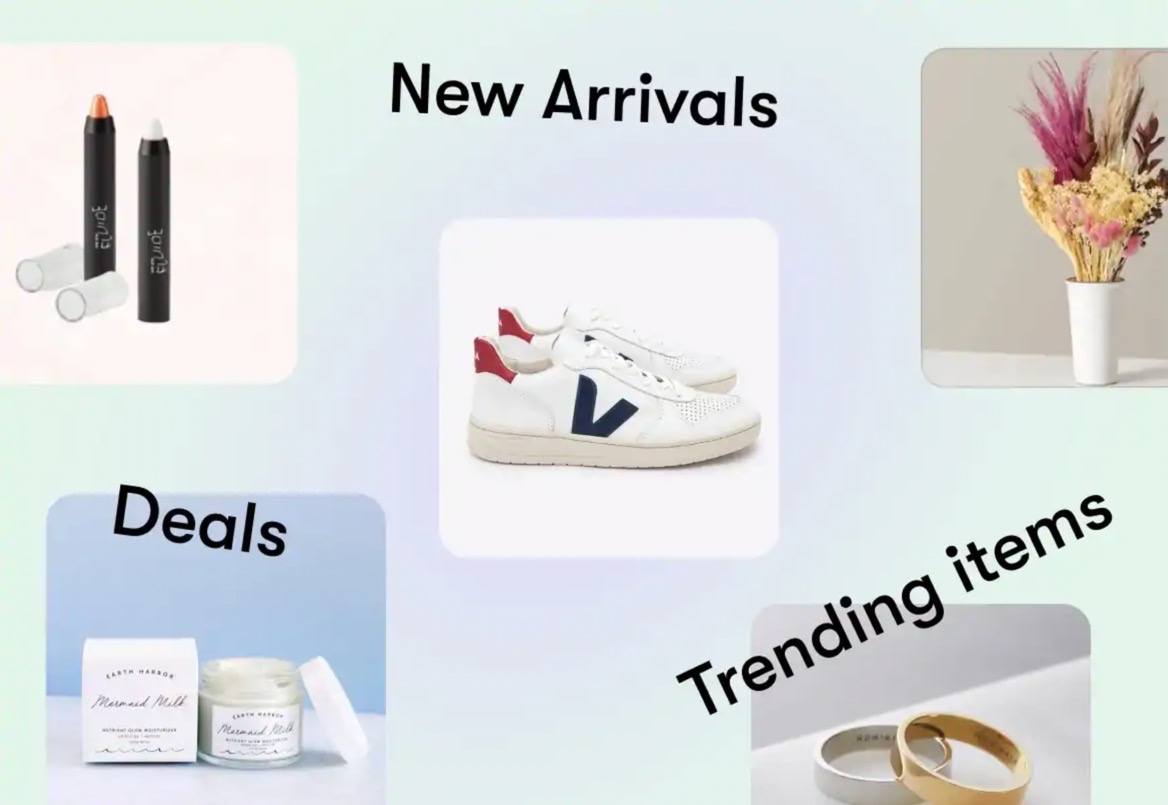
When it comes to the standout features for online merchants, we’d definitely start with the marketing automations.
Standard Shopify checkout modules allow for plenty of marketing options, but the Shop channel, which works alongside Shop Pay, makes it even more interesting.
Some of these marketing automations include:
- Track with Shop: a prompt on your order status page that lets customers install Shop and follow their delivery
- Post-purchase offers: offers shown in Shop after an order to bring the customer back
- Shop Campaigns: pay-per-conversion ads in the Shop app and on shop.com; you set an average acquisition cost and pay only when a customer converts
Order Tracking Through the Shop App
Order tracking runs through the Shop app, not Shop Pay itself: customers follow their deliveries in Shop or on shop.com.
This all builds trust and makes your business far more transparent.
It also means fewer “where is my order?” messages for your store.
Checkout Options and Store Customization
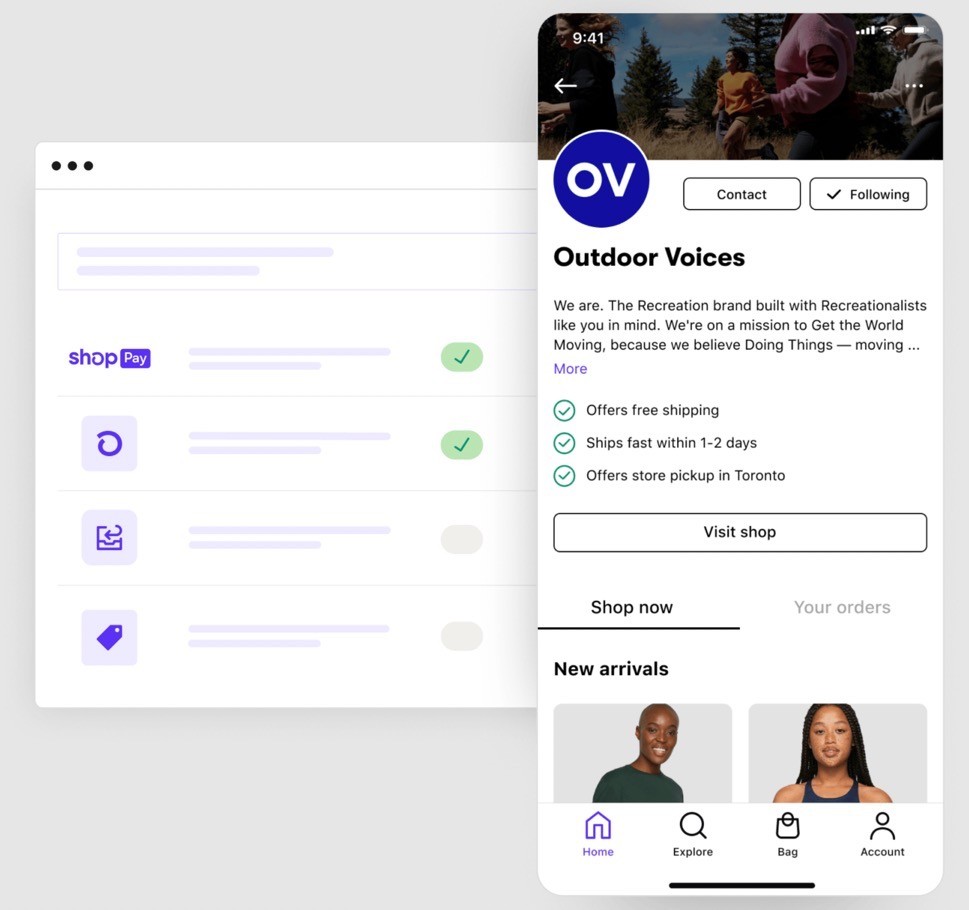
Merchants get to choose what the checkout experience looks like and what gets offered to customers. For instance, sellers can choose to offer free shipping, fast shipping, or in-store pickup.
Along with that, the Shop channel’s brand settings let you set your store description, avatar, shipping and return policies, contact details and social links.
A Shop Pay Button for Your Online Store and Social Shops
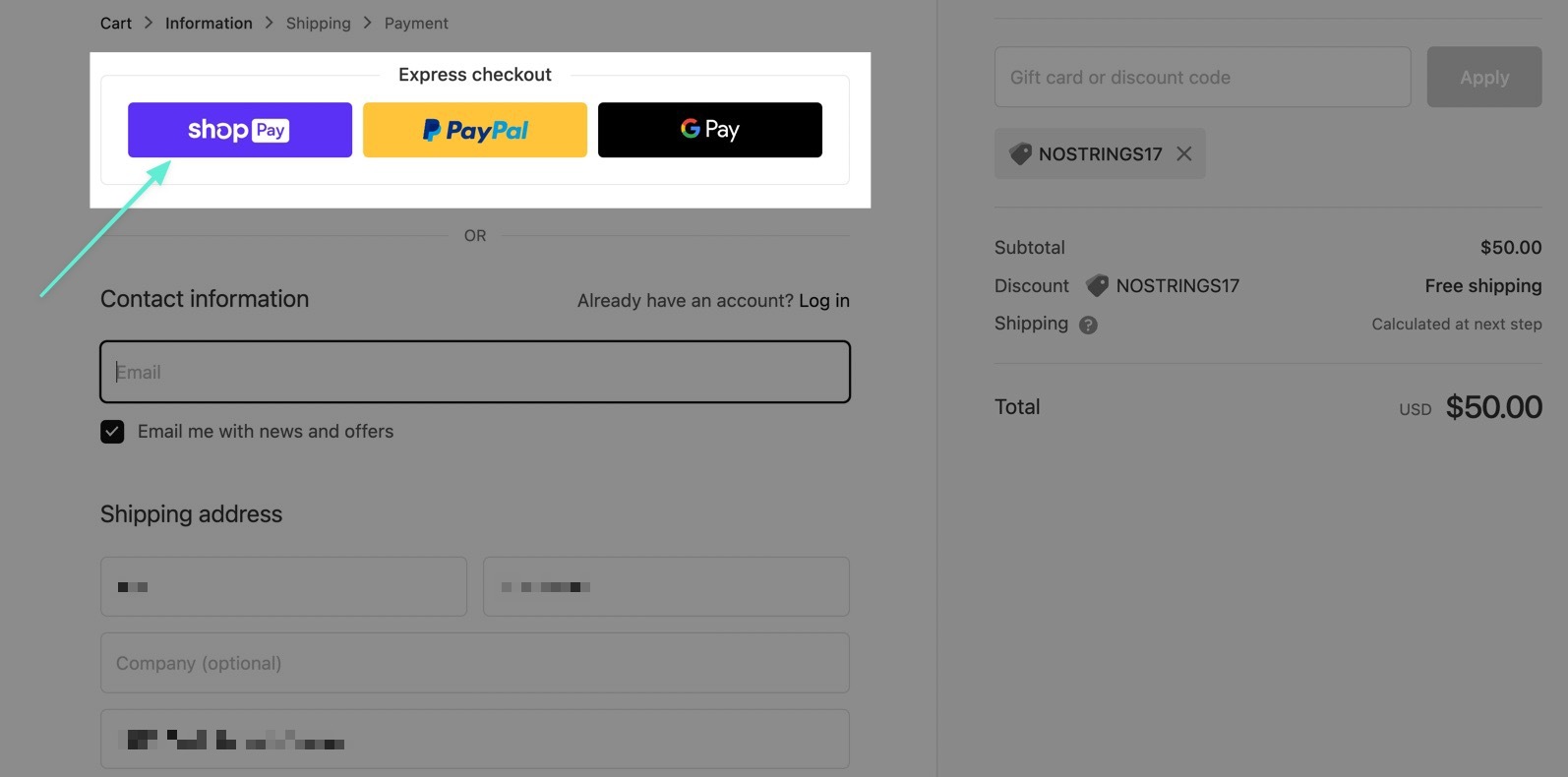
As a Shopify product, you’d think merchants would need a Shopify store to use Shop Pay.
That’s not the case. Although it was in the past, Shopify eventually expanded its support beyond Shopify merchants, meaning that brands on other ecommerce platforms can now add a Shop Pay button through the Shop Pay Wallet API (more on that below).
For Shopify merchants, Shop Pay appears as a purple button in your store’s express checkout, including for shoppers who arrive from your Facebook or Instagram shop.
A Mobile App to Manage Tracking Notifications, Shipments, and Marketing
We already covered tracking notifications, shipments, and marketing. There’s no separate Shop Pay merchant app: you manage Shop Pay under Settings > Payments in the Shopify admin or mobile app.
Get Featured on Curated Lists
The Shop app presents users with curated recommendations and Shop Minis (quizzes, shoppable videos and virtual try-ons) on a regular basis. It also serves as a way for online businesses to reach new customers.
Merchants can take advantage of the strong marketing potential this brings about, considering Shopify counted more than 400M Shop Pay accounts as of September 30, 2026.
Eligible stores are listed in Shop automatically once they meet Shop’s requirements, such as an active plan, business details and a fulfilled order.
Is Shop Pay Safe?
It’s not always easy to know which payment options and checkout solutions merchants should offer on a website. You want to make sure that you’re creating a simple experience for your customers.
The same can be said for customers; is my payment information safe if I purchase through Shop Pay?
Based on our research, Shop Pay is very secure.
Thanks to things like text and email verification codes, passkeys, PCI compliance, and encrypted financial data, customers and merchants get several layers of purchasing security.
The processor even handles all the payment security elements on behalf of merchants.
There’s no technical expertise necessary. This makes Shop Pay an excellent choice for companies that don’t want to hire their own developer to make their website suitable for customers.
How Shop Pay Keeps Payment Details Safe
- Level 1 PCI DSS: Shopify says it’s certified Level 1 PCI DSS compliant
- Encrypted cards held by Shop Pay: stores never see the full card number and receive shipping and billing details only after an order
- Verification: a 6-digit text or email code, Shop app approval, or a Shop passkey (face, fingerprint or PIN); returning customers on the same device can skip verification
Shopify Protect: Free Chargeback Cover for Eligible Orders
Shopify Protect is free and reimburses the chargeback amount and fee for fraudulent or unrecognized chargebacks on eligible Shop Pay orders. Meet these requirements:
- US only: a US business with a US Shopify Payments account
- Shop Pay only: Installments orders aren’t covered
- Shipped physical goods: any digital or pickup item voids coverage; subscriptions get the first order only
- Fast fulfillment: fulfill all non-refunded items with valid tracking from a supported carrier (USPS, UPS, FedEx) within 7 days, in transit within 10 days
- No shipping-address changes after checkout
Shopify’s Fall ’26 Edition (October 28, 2026) is rolling out a wider Protect suite that blocks high-risk checkouts before payment authorization and drafts chargeback responses with AI; non-Shop Pay cover is still “coming soon”. See our guide to fraud prevention certifications.
What is a Shop Pay Code?
A Shop Pay code is the 6-digit code texted to a user’s phone (or sent to their email) to verify their identity for a purchase.
This code is essentially the piece that allows the app to make transactions for users take only a few seconds. Shop Pay stores saved cards encrypted on Shopify’s PCI compliant servers; to verify the user’s identity, Shop Pay sends a 6-digit code when the shopper selects Shop Pay at checkout or uses a new device or browser.
They then type it into the checkout screen to process the transaction, eliminating the need to type in anything else, such as the credit card number, customer name, or shipping address.
Here’s what a Shop Pay code looks like when sent to your phone as an SMS message:
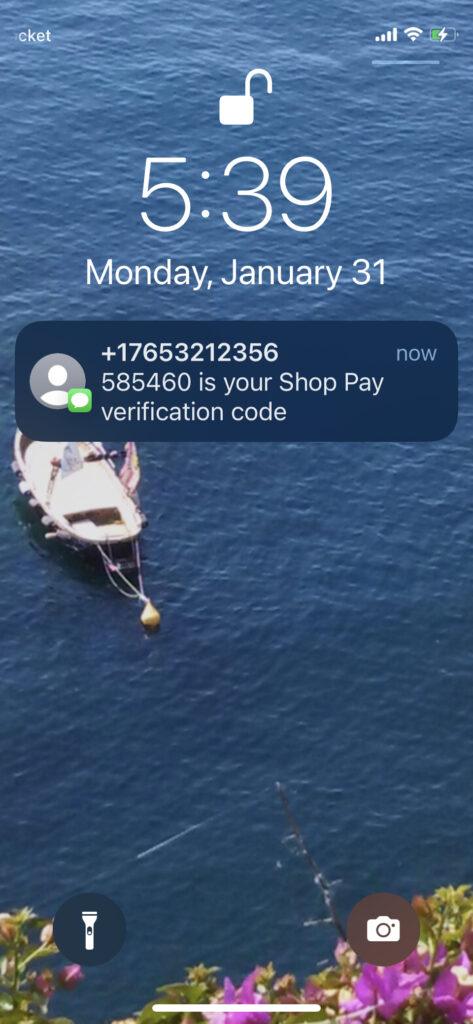
After which, users can type the code into the authentication field (which appears in the store you’re currently shopping at).
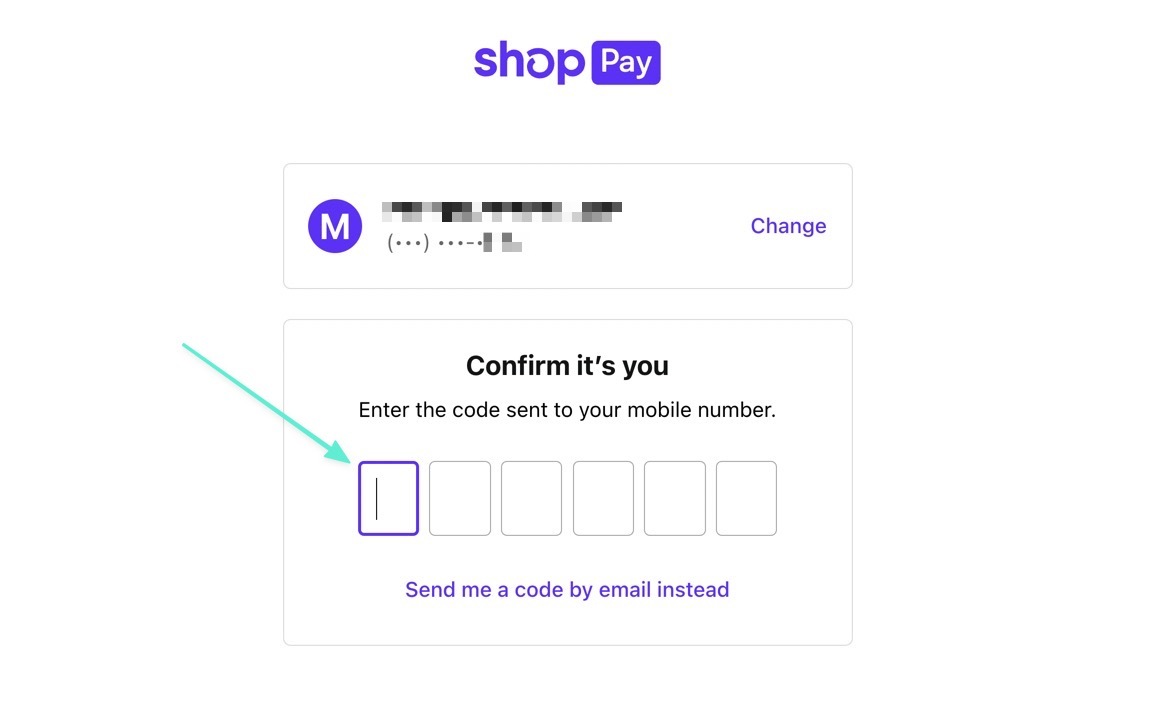
Then, it fills in all necessary payment information and processes the transaction.
💡 Note: You can also get the Shop Pay code by email instead of text, approve purchases in the Shop app, or use a Shop passkey (face, fingerprint or PIN) instead.
Got a Shop Pay Code You Didn’t Ask For?
In a June 2023 Shopify Community thread, one person wrote: “I just got a text giving me a Shop Pay Code” and “I dont use Shopify and I have no idea what is going on.” Shopify replied that a stray code “can mean that someone has accidentally input their phone number incorrectly” and that “the code itself is a safety measure.”
Shop admits that accounts created at checkout are easy to forget. Its opt-out form removes Shop Pay but keeps your Shop account for order tracking. To remove both, open Shop app > Account > Data & privacy > Delete account; this doesn’t erase data held by stores.
Shop Pay vs Shopify Payments
If you’re familiar with Shopify as an ecommerce platform, then you’ll know that Shop Pay isn’t the only checkout option the company can offer.
Shop Pay is all about speeding the payment process along. If you want to help your customers make multiple payments fast, then Shop Pay will help with that.
Crucially, Shop Pay isn’t the same as Shopify Payments. Shopify Payments is the payment processor built into Shopify, and Shop Pay is the accelerated checkout wallet that runs on top of it.
A standard card payment doesn’t save the shopper’s details for the future; Shop Pay, which comes included with Shopify Payments, does that job. However, Shopify Payments has its own benefits, like saving you some cash on transaction fees and checkout solutions.
Shopify Payments appears on your site as an unbranded checkout option for your customers. On the other hand, Shop Pay is a branded purple button in the express checkout section. You’ll definitely be able to tell them apart on your website.
Here are some additional ways Shop Pay works with (and differs from) Shopify Payments:
- Customers can use Shopify gift cards on the Shop Pay solution if merchants offer them.
- If the checkout doesn’t ask for a shipping address, then Shop Pay won’t either.
- If you’re selling services or downloads instead of physical products, you might not need an address to complete a payment. Shop Pay will pay attention to the kind of checkout process that you already have set-up when creating an accelerated solution.
- Shop Pay doesn’t force customers to use it every time; customers can always go through the full checkout journey instead. Turning on Shop Pay just means that customers have another purchasing option next to the rest of your checkout.
- PayPal and Klarna aren’t available inside Shop Pay; shoppers who want them use your standard checkout.
- Shop Pay needs Shopify Payments, except in Australia, France and the US, where it can sit next to a third-party gateway.
How to Use Shop Pay as a Merchant
How to Use Shop Pay as a Consumer
Shop Pay vs the Shop App: What’s the Difference?
Shop Pay handles checkout; the free Shop app handles shopping and tracking. The optional Shop channel gives you merchant tools:
| Shop Pay | Shop app | Shop channel | |
|---|---|---|---|
| What it is | Accelerated checkout wallet | Free shopping and tracking app (iOS, Android, shop.com) | Optional sales channel in your Shopify admin |
| Who uses it | Shoppers at checkout | Shoppers | Merchants |
| Main jobs | Saved details, one-tap checkout, Installments | Order tracking, discovery, Shop Cash | Track with Shop, offers, Shop Campaigns, brand settings |
| Needed to offer Shop Pay? | Turn it on in Settings > Payments | No | No |
Shoppers earn Shop Cash only on eligible Shop Pay orders in the Shop app or on shop.com, not your store’s checkout. You fund Shop Cash offers through Shop Campaigns.
How Much Does Shop Pay Cost Merchants?
Shop Pay itself is free. Shopify says: “Shop Pay comes free with Shopify Payments. You pay zip, zero, nada.” Each order uses your normal Shopify Payments card rate, based on your Shopify pricing plan:
| Plan (US) | Online card rate (incl. Shop Pay) | In-person card rate |
|---|---|---|
| Basic | 2.9% + 30¢ | 2.6% + 10¢ |
| Grow | 2.7% + 30¢ | 2.5% + 10¢ |
| Advanced | 2.5% + 30¢ | 2.4% + 10¢ |
| Plus | 2.25% + 30¢ | 2.3% + 10¢ |
International cards add 1%. Shop Pay and Installments orders have no third-party transaction fee with Shopify Payments; transaction fees apply when you run it alongside another provider.
Shop Pay Installments Fees and the Premium Package
Shop Pay Installments is free to activate. Each order carries a higher fee that includes standard processing, charged once per order. You receive payment within 1-3 business days, minus the fee; Affirm takes the risk if shoppers stop paying.
Find your exact rate in Settings > Payments > Shopify Payments > Manage > More actions > Manage payment methods > View payment rates. The last rate Shopify published, in an older Shopify Plus guide, was 5.9% + 30¢ (5% + 30¢ on Plus); treat it as history, not today’s rate.
- No fee refunds: the Installments fee isn’t returned when you refund an order
- No Shopify Protect: Installments disputes go through Affirm, which gives you 15 days to respond
- Eligibility reviews: Affirm can suspend Installments for password-protected, mainly B2B or restricted-product stores
Shopify’s Installments page lists these packages. Order size and your store’s package determine available plans:
- Standard: $50-$1,000 purchases; monthly plans up to 12 months
- Premium: eligible stores; $35-$30,000 purchases, interest-free plans up to 12 months and monthly plans up to 24 months
Shop Pay Installments vs PayPal Pay Later, Afterpay and Klarna
| Shop Pay Installments | PayPal Pay Later | Afterpay | Klarna | |
|---|---|---|---|---|
| Merchant fee (US) | Higher rate, shown in your admin | 4.99% + 49¢ | Not published (quote) | Not published (quote) |
| Order range (US) | $35-$30,000 | Pay in 4: $10-$2,000; Pay Monthly: $49-$10,000 | No universal range | No universal range |
| Interest-free option | 2 or 4 payments every two weeks | Pay in 4 | Pay in 4 | Pay in 4, Pay in 30, Pay in full, when paid on time |
| Monthly plans | 3-24 months, 0-36% APR | 3, 6, 12 or 24 payments, 0-35.99% APR | Pay Monthly, 0-35.99% APR | 3-24 months, 0-35.99% APR |
| On Shopify | Built into Shopify Payments | Not inside Shop Pay | Afterpay app, US stores in USD only | Klarna app (US), not inside Shop Pay |
Shop Pay Installments charges shoppers no late fees; Afterpay late fees may apply on Pay in 4. Compare the alternatives in our Afterpay vs Klarna guide.
How to Enable Shop Pay on Your Shopify Store
Turning on Shop Pay takes a few clicks in your Shopify admin.
With Shopify Payments
- From your Shopify admin, go to Settings > Payments.
- In the Shopify Payments section, click Manage.
- In the Shop Pay section, check Shop Pay.
- Click Save.
- Finish your business details and banking information so you get paid.
Don’t skip step 5: if setup isn’t complete within 21 days of your first Shop Pay payment, Shopify automatically refunds all your Shop Pay payments to customers.
With a Third-Party Payment Provider
Stores in Australia, France or the US using another gateway can add Shop Pay as an accelerated checkout if they meet their country’s Shopify Payments requirements:
- Go to Settings > Payments.
- Under Third-party payment provider, click Manage.
- In the Shop Pay section, check Enable Shop Pay and click Save.
- Click Complete set up, add your store and banking details, and click Save.
Turning On Shop Pay Installments
Installments needs Shopify Payments, Shop Pay and a business entity in the US (including Puerto Rico), Canada, the UK or Australia (early access), with matching selling and payout currency:
- In Settings > Payments, click Manage in the Shopify Payments section.
- In the Shop Pay section, select Shop Pay Installments and click Save.
- For the premium package, click Manage under Shop Pay Installments and choose Select premium package if it’s offered.
Can You Use Shop Pay Without a Shopify Store?
Yes. Shoppers never need a Shopify store. To integrate Shop Pay on another ecommerce platform, you need Shopify Payments, not a Shopify storefront.
Shop Pay on Other Ecommerce Platforms
Add Shop Pay through the Shop Pay Wallet API so your composable commerce stack can offer it without replatforming. You need:
- A checkout that collects the shopper’s email before payment
- A business eligible for Shopify Payments where it’s available
- API skills in-house or from Shopify’s Professional Services team
You get the Shop Pay button on product pages, cart and checkout, order tracking in the Shop app, and Shop Pay Installments by default in the US, Canada and the UK (with extra transaction fees).
Facebook and Instagram Shops
Since August 26, 2025, Meta no longer runs checkout inside Facebook and Instagram for Shopify stores. Shoppers tap “Checkout on seller’s website” and land on your Shopify checkout, where Shop Pay appears as it does for any other visitor.
Shop Pay in AI Shopping Agents
Shopify’s Fall ’26 Edition (October 28, 2026) put Shop Pay inside personal AI agents, starting with Muse from Meta, Claude Duet and Instinct; Claude Duet, Grok Bot and Instinct also use it at brands not on Shopify. You approve each purchase, and the agent never sees your card.
You can also give ChatGPT, Claude or another agent Shop’s shop.md skill to search over a billion products and check out with Shop Pay. To sell through AI channels without a Shopify storefront, see our guide to the Shopify Agentic plan.
Is Shop Pay Right for You?
Shop Pay is just another payment option offered by Shopify to give sellers and customers a better experience online.
The biggest benefit for merchants is that it encourages regular future sales from your most dedicated clients.
The easier it is for these people to make payments, the more likely they are to continue buying from your store.
Because of that, and the incredible security that’s built into the service, Shop Pay is worth switching on for most Shopify stores, with a few real downsides:
- Missing methods: no PayPal or Klarna inside Shop Pay
- Installments costs: a higher fee that isn’t returned on refunds
- Limited cover: Shopify Protect covers only eligible US Shop Pay orders
- Surprise codes: shoppers who forget they saved their details get confused by verification texts
Another major bonus of Shop Pay is that it costs nothing beyond your normal Shopify Payments rate.
And because Shopify covers eligible US Shop Pay orders with Shopify Protect at no charge, a fraudulent chargeback on those orders doesn’t come out of your pocket.
As for the customer, Shop Pay and the Shop app together present a curated, one-stop-shop for managing everything from payment details to tracking codes.
You’re only required to type in a quick verification code (or use a passkey) to checkout online, and you can rest easy knowing that all transactions are secure with Shopify.
Do you use Shop Pay? How is it working out for you? Let us know in the comments, and read more about Shopify stores on our blog.
Shop Pay FAQs
Is Shop Pay free for merchants?
Yes. Plain Shop Pay is charged at your normal Shopify Payments card rate (2.9% + 30¢ online on the US Basic plan), with no third-party transaction fee. Installments orders cost more (see the cost section above).
Does Shop Pay Installments affect your credit score?
Opening a Shop Pay Installments account doesn’t affect your credit score, but the purchase itself, your payment history with Affirm and your overall credit use might. Affirm approves each purchase individually.
Does Shop Pay charge late fees?
No. Shop Pay Installments charges no late fees or extra charges apart from interest on monthly plans. See What about late fees? above for details.
How do I change my Shop Pay phone number or delete my account?
At shop.com, open Account > Sign in & security > Change beside your number; confirm codes sent to both numbers. You can change it once every 24 hours; email verification without your old number erases saved payment details. To delete your account, use Shop app > Account > Data & privacy > Delete account. Installments users must also update Affirm.
Do I need a Shopify store to use Shop Pay?
Not as a shopper. Merchants need Shopify Payments, but brands on other platforms can add Shop Pay through the Shop Pay Wallet API (see above).
Is Shop Pay better than PayPal or Afterpay?
Not across the board. Shop Pay costs nothing beyond your card rate and has its own installments, while PayPal Pay Later charges 4.99% + 49¢ and Afterpay sets its fee in a merchant agreement. Shoppers who prefer either use your standard checkout. Compare terms in the table above or read our Shopify vs PayPal guide.


does shop pay payment can used in woocommerce shop??
Shop Pay is availabvle for Shopify at the moment.
I am not a Shop Pay customer. How do I stop receiving text messages with a Shop Pay code to my cell phone which are clearly intended for some else’s cell phone? Is someone trying to make charges on my credit card?
Hello Alejandra, please check this thread for more info.
I order some porter chargers n I haven’t received them yet. Do I have to pay first then I get my items.
Hey Dora,
If the online store doesn’t accept cash on delivery, then you should pay first so you can complete the order.
Hello, Does someone knows wich banks are allow in Shop Pay?
Good day
I bought from a online shop Divine fashion and paid through shop pay however I have not received anything also I have emailed the shop and do some research and work are saying it’s a scam please assist me with some clarity on this
Have you tried asking you credit card provider for a chargeback?
Does Shop Pay allow for monthly payments?
Hey Jeff, as far as I know you won’t be able to do that.
Where can I see if my customers have used it? I want to know if this is something that my buyers use.
Today is the first time my customer is using this shop pay app we’ll have to wait and see
👍👍👍
I’m not buying anything but today I received 2 shop pay codes. So someone is trying to use one of my cards. How do I find out what card???
As a seller What happens if a customer doesn’t finish the shop pay payments?
Hello Kayla, I’m not sure that I understand what you’re asking…
I think what Kayla is asking is, what happens if a customer doesn’t make an installment payment. I presume this has no effect on the seller as Shopify finances the whole payment to the seller, in advance, and installment obligations are between the buyer and Shopify. Regardless of payment status (full payment or default) seller is always paid fully. Is that correct?
She’s asking What will happen if the customer doesn’t finish paying the item/product they bought off. Will Sellers still get the money for the product that is not paid off? How does that work?
THATS A GOOD?
What if I don’t have a cell phone? I am disabled and have no need for one. I have a home phone and one of those medical buttons that used my home wifi to call for help.
Hello Heide,
If you don’t have a mobile phone, there are online services that provide a virtual phone number and enable you to receive text messages and WhatsApp messages.
I keep getting shop pay codes to my phone. I have not tried to pay for anything. Therefore I don’t need a code to continue. Is someone using my phone number to defraud someone?
Hey Mike, check out this thread for more info.
Hey Mike, check out this thread for more info.
How can I remove my information from Shop Pay
Hello Charise,
Do you have a Shop Pay account?
Hi Bogdan,
The problem with this system is the customer has no idea of what or who Shop Pay is but somehow it’s TXTing you codes and making payments without the your (the customers) authority. As a customer, this is very concerning and until I understand it better and who is behind this system. I wont be using it again.
What do you do when you ordered something 10/31/20 and used shop pay and have never received my items… I just lost my husband so I’m on a fixed income and the gifts I ordered never came . I have e-mailed the company I bought from and have received no answer… how do I either get my 59.00 back or the items.
Thank you
[email protected]
Odd, I’m having the same problem. I’ve never paid through Shop Pay before this so the strange thing is that it’s the only thing I ordered for the holiday that hasn’t shown up, so I’m not sure if it’s the site’s fault or ShopPay. The website I ordered through isn’t responding either, which is doubly annoying.
If I were you, I’d refute the charge with your bank and show all your efforts at making contact with them or the place you ordered from. That’s what I’m going to do. As you ordered the end of October, it might be too late, but some have a 90 day refute policy, so still worth a try.
Call your credit card company for a refund
I am think the same thing. I have not receive my item. Do they send the item after you have paid in full. I am confused
I keep getting messages from this app that I never set up. How do I rectify this? Has someone used my info to sign up?
Hey Margy, check out this thread for more info.
I don’t know how I got shop pay..I don’t want it and did not apply for it. Some merchant uses it and got me involved ..please take me off your system……paul
Hey Paul, check out this thread for more info.
I am not a Shop Pay customer. How do I stop receiving text messages with a Shop Pay code to my cell phone which are clearly intended for some else’s cell phone?
Hello K, this article should help.