


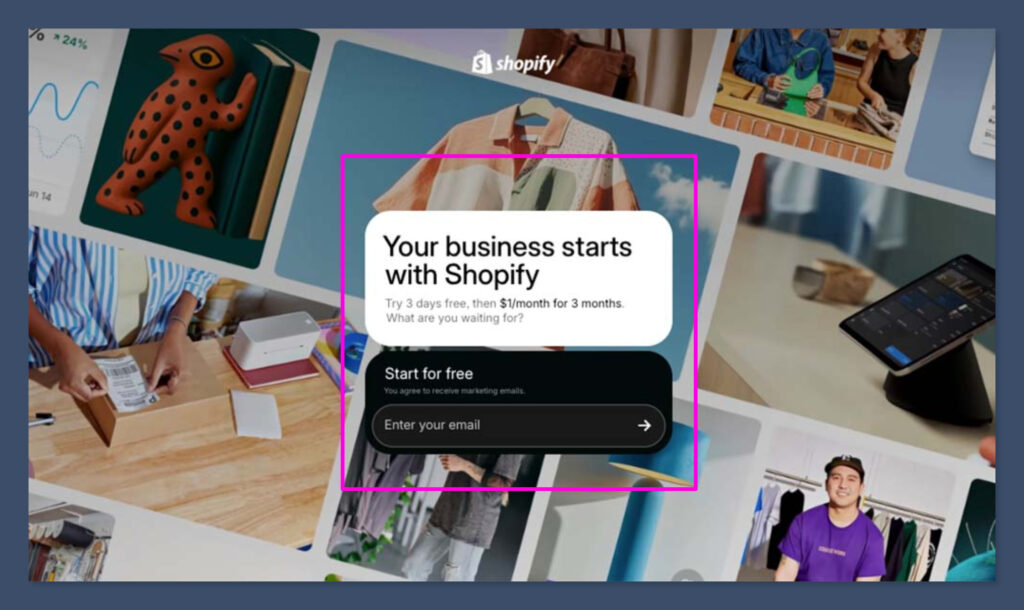
Shopify offers a free 3-day trial, followed by 3 months at just $1 per month. During the trial, you can build your store, test all features, use Shopify’s new AI website builder, and prepare to start selling — without needing to commit to a full-priced plan upfront.
In this guide, we’ll break down exactly what the Shopify free trial includes, how to make the most of it, and why their new AI website builder makes launching a store faster and easier than ever.
What is the Shopify Free Trial and How Does It Work?
The Shopify free trial is a limited-time offer that allows new users to explore the platform without needing to commit to a paid subscription immediately. As of December 2025, Shopify offers 3 days of full access for free, followed by 3 months at just $1 per month.
This pricing structure gives beginners and first-time ecommerce store owners an extended runway to learn, test, and validate their business idea before paying full price.
What’s included in the Shopify free trial?
When you sign up for the free trial, you get access to nearly all of Shopify’s core features. This includes the drag-and-drop theme editor, unlimited product listings, marketing tools, and the ability to install apps from the Shopify App Store.
Here’s what’s included during the trial period:
- Access to the Shopify dashboard and store builder
- Ability to create unlimited product listings
- Access to free and premium themes (although purchases are extra)
- Built-in SEO tools and URL customization
- Use of Shopify’s AI Store Builder (covered in more detail below)
- Access to Shopify Payments, Shop Pay, and other gateways
- Discount setup, coupons, and email marketing integrations
One thing to note: while you can build and customise your store during the trial, your website won’t go live to the public until you choose a plan and activate it. That said, everything you build is saved, and you can keep iterating until you’re ready to hit publish.
Shopify Pricing After the Free Trial
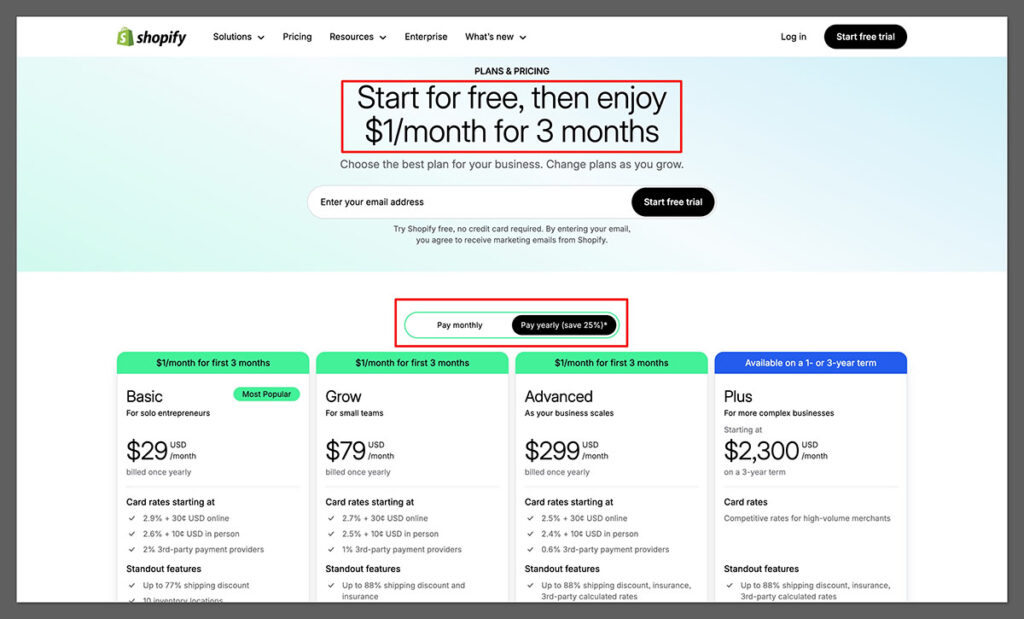
Once your 3-day free trial is up, Shopify gives you an extended offer: $1/month for the first 3 months on any of its basic plans. This is great for startups who want to grow slowly without making a big investment right away.
| Shopify Plan | Regular Price | Trial Extension Price (First 3 Months) |
|---|---|---|
| Basic | $39/month | $1/month |
| Grow | $105/month | $1/month |
| Advanced | $399/month | $1/month |
After those 3 months, pricing returns to standard rates. If you’re just starting, the Basic plan is often more than enough and includes everything needed to launch and run a successful online business.
The Shopify AI Website Builder: Launch a Store in Minutes
One of the newest and most talked-about features in Shopify is its AI-powered website builder, which is designed to help new users create a full ecommerce store without needing to touch a single line of code or hire a designer.
How It Works
The AI website builder is incredibly simple to use. You describe your business in one or two sentences (for example, “I sell organic skincare products”), and Shopify uses AI to create a custom store layout, including homepage sections, product categories, and call-to-action blocks.
Features of the Shopify AI Website Builder:
- Instant theme generation based on your business description
- Built-in conversion best practices (e.g. calls to action, trust signals)
- Designed specifically for ecommerce—not just static pages
- Editable layout that you can customise manually after generation
- Works with Shopify’s native themes and templates
This is a major advantage for solo founders or people who have never built a website before. Instead of being stuck on theme customization or trying to match brand colours, you can generate multiple layouts and pick the one that fits best.
Why Shopify’s AI Tools Make It Easier to Start Selling
Shopify isn’t just giving users a blank canvas. With the rollout of AI tools like Sidekick, users can interact with their store using natural language commands. This makes the process of editing your site or running promotions way more intuitive.
Sidekick: Your AI Assistant for Commerce
Sidekick is like having a virtual assistant built into your Shopify dashboard. You can ask it to create discount codes, write product descriptions, check analytics, or even walk you through tasks like setting up shipping zones.
Top tasks Sidekick can handle:
- “Add a 15% off Black Friday sale to all items in my Winter Collection”
- “Show me how many sales I made last week compared to this week”
- “Write a product description for a hand-poured soy candle”
- “Create a banner for free shipping over $50”
For someone brand new to ecommerce, these types of commands eliminate the learning curve and let you focus on what really matters: building and selling.
Real User Feedback: What People Are Saying About the Free Trial + AI Builder
Shopify has collected user feedback across its blog, community forums, and internal research. Based on that, it’s clear the AI builder is one of the most loved features among new store owners.
What new users are saying:
- “I launched my first store in less than an hour using the AI builder. It was a huge relief not having to figure out design from scratch.”
- “The trial gave me enough time to understand the tools, set up my products, and run a test launch before deciding to commit.”
- “Sidekick helped me fix a broken layout and explained what went wrong — it’s like having tech support built into the platform.”
Pros and Cons of the Shopify Free Trial
| Pros | Cons |
|---|---|
| Access to nearly all features for 3 days free | Store can’t go live without selecting a plan |
| $1/month plan for 3 months gives time to build without pressure | Some premium apps/themes require additional cost |
| AI website builder and Sidekick lower the learning curve | Limited to one store per account unless you pay for multiple plans |
| Perfect for beginners who want to launch fast | After 3 months, regular pricing kicks in |
How to Get Started with Shopify (Step-by-Step Tutorial)
If you’re ready to take advantage of Shopify’s free trial and launch your first store, the setup process is now faster and more beginner-friendly than ever — especially thanks to their AI-powered store builder.
Instead of sorting through themes manually, you can simply describe your business, and Shopify’s AI will build a fully designed store for you in seconds.
Here’s a step-by-step walkthrough to help you get started from scratch.
Step 1: Sign Up for the Free Trial
- Go to Shopify’s free trial page.
- Enter your email address, password, and choose your store name (you can change this later).
- Click “Create your store”.
At this point, your trial begins. You’ll have 3 days to explore the platform fully, followed by 3 months at just $1/month. This lets you experiment and build with almost no risk.
Step 2: Use AI to Generate Your Store Design

One of the newest features on Shopify is the AI Store Builder, and it removes the need to search through dozens of themes or hire a designer.
Instead of picking from free or paid themes upfront, you can now describe your business in one sentence, and the AI will generate an entire storefront layout instantly.
How to use it:
- When prompted, type a short description of your business. For example:
“A print-on-demand art store selling motivational and aesthetic posters” - Shopify’s AI will automatically create a homepage layout, product page templates, and navigation based on that description.
- You’ll get a preview of the design — and you can regenerate it if you don’t like the first version.
- You can still fully customise the design later using Shopify’s drag-and-drop editor.
This is ideal if:
- You’re starting your first ecommerce store and want to launch quickly
- You’re not confident with web design
- You want to explore multiple design directions fast before choosing a final one
Step 3: Add Your Products
Once the design is in place, the next step is adding your products. You can do this manually or by using an app (like Printful or Printify for POD).
Steps to add products manually:

- Go to Products > Add Product
- Upload images, write a detailed title and description
- Set pricing, inventory, and shipping details
- Add tags and collections for easy browsing
For Print on Demand stores:
- Install an app like Printify or Printful from the Shopify App Store
- Sync your account and choose products to sell (e.g. framed prints, canvases, t-shirts)
- The app will handle product creation, mockups, and order fulfillment
Step 4: Configure Payments, Shipping, and Taxes
- Go to Settings > Payments and activate Shopify Payments (recommended)
- Set up your shipping rates — flat rate, free shipping, or weight-based
- Under Settings > Taxes, choose whether to include or exclude tax at checkout
You’ll want to test a few dummy checkouts (without activating the live plan yet) to ensure everything works smoothly.
Step 5: Launch Your Store
Once your store is designed, products are added, and payments are set up:
- Click “Select a Plan” (Basic is usually enough for new stores)
- Activate your $1/month extended trial
- Hit “Remove Password” to make your store live
Congrats — your Shopify store is officially live and open for business.
Bonus Tip: You can continue to use Shopify’s AI tools like Sidekick to help manage promotions, change content, or track sales using simple text commands — making it easier to run your store even if you’re not technical.
Should You Start with the Shopify Free Trial?
If you’re starting an ecommerce business or testing a new product idea, there’s really no downside to using the Shopify free trial. It gives you all the tools you need to build a store quickly, learn how the platform works, and decide whether it’s the right fit — all without committing financially upfront.
With the introduction of AI-powered tools like the AI Website Builder and Sidekick, Shopify has made it even easier for non-technical founders to launch a store that looks good, works well, and is designed to convert visitors into customers.
How to Start Making Sales While Still on Shopify’s $1 Trial
One of the best things about Shopify’s 3-month trial offer is that it gives you time to get traffic and start generating sales without the pressure of high upfront costs. But the clock runs fast — and if you want to make money while you’re still only paying $1/month, it’s important to be proactive.
Here’s a breakdown of realistic, low-cost strategies you can use to start making sales in your first 90 days.
1. Launch with a Simple Offer (Not a Complicated Store)
Many new store owners spend all their time perfecting every detail — but if you want results during your trial, it’s smarter to launch with a minimum viable store.
Here’s how:
- Choose 1–3 products max (especially if using print-on-demand)
- Create a simple but compelling homepage with a headline, product image, and offer
- Set up Shopify’s AI website builder to generate your layout quickly
- Use urgency (like limited-time discounts) to push action
Example:
“Get our bestselling motivational print for just $14.95 — this week only.”
You don’t need 20 products, 5 collections, or a complex navigation bar. You need clarity and a strong call to action.
2. Post on TikTok and Instagram Reels Every Day
Organic social is still one of the fastest and cheapest ways to get traffic to a new Shopify store.
You don’t need to go viral to make sales — consistent, value-driven posts can help you find your first 10–20 customers.
What to post:
- Unboxing your own product
- “Behind the scenes” videos of packaging or design
- Talking head videos explaining your product story
- Timelapse videos of your product in use
- Customer reviews or mock reviews
Tips:
- Use trending audio
- Add 3–5 hashtags
- Always include a clear call-to-action in the caption (e.g. “Link in bio”)
You can add your Shopify store link to your bio using Linktree or Beacons to start directing traffic immediately.
3. Offer a “Friends & Family” Launch Discount
Your warm network is often your fastest path to your first sale. But most people don’t want to feel like they’re begging friends to buy. Instead, turn your launch into an exclusive invite-only promotion and present it professionally.
How to structure it:
- Create a discount code like LAUNCH20 for 20% off
- Use Shopify’s discount tool to set a limit (e.g. only 25 uses)
- Write a simple message or email:
“Hey — I just launched my online store! For friends & early supporters, I’m giving 20% off everything for the first 3 days. Here’s the link: [store URL] — would love your feedback!”
This works best when paired with urgency and a professional-looking store, which Shopify’s AI design tools make easy to create quickly.
4. Install Shopify Email and Send a Launch Campaign
Shopify Email is included in most plans and allows you to send up to 10,000 emails/month for free.
If you collect emails during the pre-launch (even from a few sign-up forms or friends), you can send your first launch announcement with:
- A discount
- Free shipping
- A call-to-action to share with others
Tips for your first email campaign:
- Use a short subject line like “It’s live 🎉” or “Get 25% off — this week only”
- Keep it image-driven with your product and a button
- Add a testimonial or quote if you have it (even if it’s from a test customer)
5. Use Etsy or eBay to Drive Sales to Shopify
Even if your goal is to grow on Shopify, you can still leverage other marketplaces to generate first sales — then use inserts, emails, or product packaging to bring repeat customers back to your site.
What you can do:
- List a few products on Etsy with minimal SEO effort
- Use Printify to sync listings across both Shopify and Etsy
- After the sale, add a postcard or note that says:
“Get 15% off your next order at [your store URL]”
This strategy helps you get proof of concept and build your brand on Shopify while still tapping into the massive traffic from marketplaces.
6. Add Upsells or Free Gifts to Increase AOV
Once you start getting traffic, it’s important to maximize your average order value (AOV) so your first few sales cover ad or product costs.
Smart ways to increase order size:
- Add a “Buy 2, Get 1 Free” offer
- Offer free shipping over $30
- Use a Shopify app like One Click Upsell to offer a bonus item post-checkout
- Create a bundle page with 2–3 items for a discounted price
Since you’re working within the $1 trial window, every order matters — increasing AOV helps you reinvest and grow faster.
7. Test $5–$10/day Meta Ads to Jumpstart Sales
If you have even a small marketing budget, running low-budget Facebook or Instagram ads can help you get initial traffic. You don’t need a complex funnel — just start with one product and a strong offer.
Getting started:
- Go to Meta Ads Manager and create a new campaign with the Sales objective
- Target interests that match your niche (e.g., art lovers, home decor, print design)
- Run an ad for $5/day for 3–5 days
- Use a carousel or single image ad with a clean product photo and clear value
Shopify integrates with Meta Ads, so you can track performance directly from your dashboard and make changes quickly.
Summary Table: 90-Day Shopify Trial Sales Playbook
| Strategy | Cost | Time to See Results | Skill Level |
|---|---|---|---|
| Launch simple product offer | Free | 1–2 days | Beginner |
| TikTok & Instagram Reels | Free | 1–7 days | Beginner |
| Friends & family discount | Free | 1–3 days | Beginner |
| Email marketing via Shopify Email | Free | 3–5 days | Beginner |
| Cross-posting on Etsy | Free–$0.20/listing | 3–10 days | Intermediate |
| Upsells & bundles | Free–$10/mo (app) | 1–3 days | Beginner |
| Meta Ads | $5–$10/day | 1–3 days | Intermediate |
By using these strategies, you can go from zero to your first sale (and beyond) during Shopify’s trial — all while keeping costs low. Focus on what’s working, double down on traffic channels that convert, and make the most of the 90-day window to build momentum.
Final Thoughts
The Shopify free trial isn’t just a marketing gimmick — it’s a genuine opportunity to build a store from scratch, with modern tools, minimal friction, and very little cost. Whether you’re selling physical goods, digital products, or dropshipping, Shopify provides a flexible and scalable environment to grow your brand. And with new AI tools designed to save time and simplify complex tasks, it’s easier than ever to get started.
Be sure to make the most of your 3-day free trial and $1/month offer by coming in with a plan, using the AI tools, and exploring the full range of features. You might be surprised how fast your idea can turn into a real business.



Comments 0 Responses