

Xero and FreshBooks aren’t as far apart in the accounting software space as they used to be, even if they still do clearly serve different audiences. Both of these platforms today have a lot of overlapping features, from double-entry accounting tools, to automation and reports.
The main difference is that FreshBooks still pushes its features mostly towards freelancers and agencies that work regularly with clients and need to send out custom invoices or reminders. Xero is a bit more directed towards growing businesses who have a lot of currencies, products and sales channels to manage at once.
They’re both valuable tools, and they’re both great if you’re sick of trying to handle all of the complicated parts of financial management yourself. The one you choose really just depends on the business you’re trying to run.
Quick Verdict: Xero vs FreshBooks
Xero is still going to be the winner if you’re a growing company selling various products in multiple currencies, to people around the world. It has better app connectors and inventory management tools, and it also doesn’t set limits on the number of people who can use it at once.
FreshBooks, on the other hand, will be your winner if you’re a freelancer looking for an intuitive way to handle invoicing or recurring billing.
Best for Growing Businesses
Xero
View Pricing Read Review →$25/month (US pricing), with unlimited users on every plan
- Advanced inventory
- Multi-currency capabilities
- Invoicing, with time tracking as an add-on
- Extensive reporting and double-entry bookkeeping
- Data bookkeeping automation and conversational AI assistants
Best for Invoicing

FreshBooks
View Pricing Read Review →$23 per month, billed one user per account
- Customizable and automated invoices
- Recurring billing and automated reminders
- Client portals and reports
- Time tracking and basic inventory
- Phone and email support
Xero vs FreshBooks: Pricing and Total Value
Xero and FreshBooks approach pricing a bit differently. With Xero, you’re charged based on the number and types of features you need, but you’re not spending money for extra accounts.
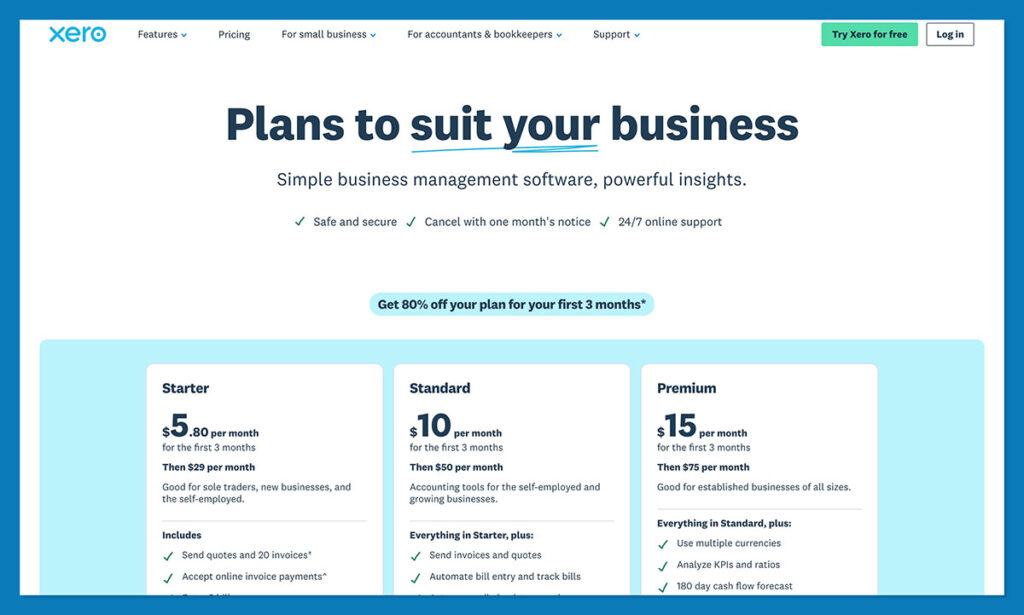
The prices start at around $25 per month for the “Early” plan, which restricts the number of invoices and bills you can send, but still gives you plenty of functionality. Growing starts at $59 per month, and Established starts at $97 per month. Each upgrade gives you higher caps on the number of bills you can send, report options, forecast lengths, and so on. All the plans come with some handy extras like real-time reports, and smart document capture.
With FreshBooks, you’re paying for both the software, and the accounts needed for each user. Plans currently start at $23 per month with support for up to 5 billable clients and unlimited invoices. Higher plans like Plus for $43 per month give you up to 50 clients and features like real-time expense tracking. The Premium plan gives you unlimited clients, plus more reporting tools for $70 per month.
Both are pretty good value for money when you consider the extra value you’re getting. Still, although Xero seems more expensive at first, FreshBooks can end up being the costlier option if you need more than one person to use the software.
Xero vs FreshBooks: The Main Accounting Features
As you’d probably expect, both tools have a lot of overlapping capabilities, since they’re both there to help you keep control of the financial part of your business. They’re just slightly more “specialized” in different areas. FreshBooks is better for recurring billing reminders, and invoices, Xero jumps ahead if you need multiple currencies, deep reporting, or stronger inventory management.
Invoicing, Expenses, Bills, and Time Tracking
FreshBooks is definitely the more inviting option for anyone doing service-based work. You can create custom invoices, and even turn invoices into payment plans with up to 12 installments. Users can set up automatic reminders (up to three), accept partial payments, charge late fees, and track time so you can add that to your invoice too.
There’s also support for retainers, which is great if you’re charging someone for something like consulting for the next twelve months. FreshBooks can automatically generate invoices for the agreed period, deducts logged hours from a retainer balance, and it lets you bill for extra hours separately.
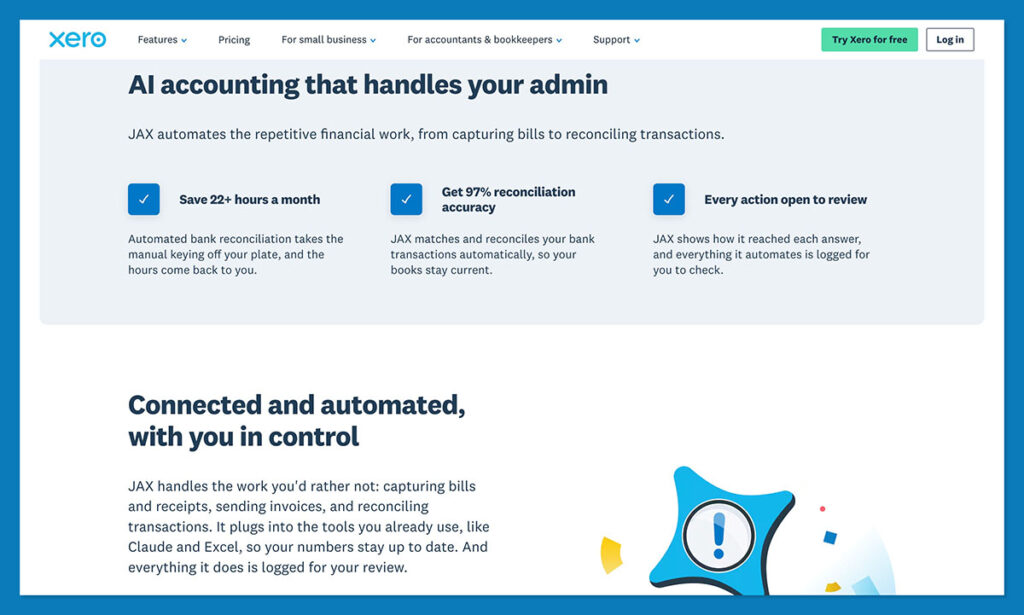
Xero is less service-focused, but that doesn’t mean its tools are bad. You can still create invoices and let customers pay through a range of methods from ACH, to Apply Pay. You can send reminders automatically too, and even schedule invoices to go out at specific times. Also, the JAX AI assistant can design invoices for you, too. There’s also a time-tracking feature available, but it’s an add-on.
FreshBooks is still the overall winner if invoicing is how you get most of your income, but Xero is catching up.
Bank Reconciliation, Payments, and Everyday Bookkeeping
Xero is a better pick for day-to-day bookkeeping, because it was built for traditional double-entry accounting. It gives you all the tools you need for advanced bank reconciliation, asset management, category tracking, plus transaction searching. It doesn’t have the same “client facing portal” features as FreshBooks, but it’s a lot better at automatically capturing useful documents.
FreshBooks is better than it once was from an everyday accounting perspective, depending on the plan you have. For instance, if you pay for Plus or above, you’ve got bank reconciliation to match expenses, invoice payments, bills, credits, transfers, or owner equity. There’s even a handy tool to help suggest matches for you.
Still, reconciliation for FreshBooks is only available in a single currency, and things like loans, investments, crypto or line-of-credit accounts are excluded. It’s also worth saying that Xero gives you the option to share access with your accountant on every plan, whereas FreshBooks restricts that on the Lite plan.

Ecommerce Integrations, Inventory, and Stock
Again, Xero comes out ahead for everyday ecommerce finance management. First, you’ve got more integrations with the sorts of tools you’ll probably be using. There’s even a free Shopify app that can pull information about sales, payouts, fees, refunds, taxes, and Shopify POS data into your accounting system. Inventory Plus also gives you connectors to both Shopify and Amazon FBA.
For inventory management, you’ve got fixed asset management, tracking for categories and individual products, as well as COGS and gross profit monitoring. Xero also added backorders to inventory tracking this year too.
FreshBooks can still handle ecommerce work, though. The inventory monitoring features are pretty light, but you can create products, assign income accounts, track quantities of stock, and have taxes added to your reports. There’s also Shopify support available, too. If you’re mostly running a service-based business, but adding a little inventory to the mix, FreshBooks could still work.
Multi-Currency Management, Sales Tax and Compliance
FreshBooks does let you work in multiple currencies, and it can accept inputs from various payment methods, but the reports only cover one currency at a time. The bank reconciliation features follow the same rule. On the plus side, tax-time reports can be generated on any plan, and on the higher plans you can run other financial and accounting reports, or even check project profitability data.
The number of currencies you can work with on Xero depends on your plan, you can accept different currencies on any plan, but only the Established option lets you use multiple currencies in reports. Established is great on that front, though, with more than 160 currency options, plus foreign invoices, bills, bank accounts, and expenses that you can convert automatically.
Xero also uses Avalara rates across various tax jurisdictions, so it’s a bit easier to handle multiple sources of income from around the world.
Reporting, Analytics, AI, and Automation
FreshBooks has done a lot less work than Xero in the AI and automation space lately, but it’s still decent from a reporting perspective. You can create all the basic reports you’d expect like profit/loss or expense summaries, though many more in-depth reports are restricted to higher tier plans.
There’s very little AI available, but automation is still great, especially if all you need is something to help send out reminders or deliver invoices on time. Xero is definitely more mature overall, though. First, from a reporting perspective, you can visualize performance with graphs on any plan, forecast cash flow (though the length of the forecast varies), and add Payroll as an optional extra. Higher-tier plans give you employee expense reports, KPIs, ratios, financial health scorecards, dashboards, and budget management tools.
With automation and AI, Xero can do everything that FreshBooks can do, but it also gives you more interesting AI features. For instance, the JAX assistant can answer questions about your data, benchmark your performance against other companies, build cash-flow projections, or even evaluate uploaded documents.
FreshBooks has plenty to help you keep making money, but Xero gives you far more if you want to understand what’s going to be most conducive to your growth in the long-term.
Payroll, Security, and Accountant Collaboration
The Payroll functionality comparison is closer than you might think. FreshBooks has a Payroll app powered by Gusto, and it’s available as an add-on to your standard accounting plan. That tool comes with off-cycle payroll, hourly time entries, and post-tax deductions and garnishments, too.
Xero also uses Gusto in the US, so the overall experience is pretty much the same, however the app is more embedded into the overall toolkit here.
With security, both companies are pretty much neck-and-neck, which is exactly what you’d probably expect from accounting software. Both are committed to protecting your data, and give you plenty of control over account access. Both also comply with various regulations.
Collaboration features, though, are much better with Xero, starting with the fact that multiple people can have an account without you having to pay for extra seats. If you know there’s going to be other people besides you dealing with finance, then Xero should be much easier to start and grow with.
Ease of Use and Customer Support
I personally think every accounting or bookkeeping tool comes with a learning curve, but it’s fair to say that FreshBooks’ is a little smaller. The dashboards are easy to understand, and the whole system is obviously designed for people who haven’t taken any accounting training. Xero is structured more like traditional ledger software, which can be a bit intimidating at first.
Also, since Xero was built for typical double-entry accounting, it does expect you to have a basic understanding of how that works. The AI assistant, JAX, can help you out, and there are plenty of resources available from both brands to teach you how to do certain things, but I think you’ll spend more time learning how to use Xero overall.
For support, FreshBooks may be a little better for some companies because it has phone support and Xero doesn’t. Still, both companies have great reputations for supporting their customers, and both have self-help resources, videos, and communities you can visit for extra assistance.
Xero vs FreshBooks: Which Should You Choose?
If I was narrowing it down to the major pros and cons of each platform, both have a strong position. FreshBooks is still excellent for invoicing, and clearly built around service-based businesses. It’s a little easier to set up and use at first (because there are fewer features to work out), the customer support is fantastic, and the everyday bookkeeping will be plenty for some users.
It’s not the tool you’d probably use if you’re selling a lot of products, rather than services, need to track inventory, or multi-currency payments, or need to work with other people on your accounts.
Xero is the slightly more complicated tool to use, and the early plans are restrictive, so you’re probably going to need to upgrade a lot faster. Still, it’s going to be the stronger option for growing businesses who need multiple people working on the books together without having to pay for separate accounts. It’s also the better option if you need more extensive inventory tools, more connections to third-party apps, support for a lot of currencies, and more advanced AI or automation.
For freelancers and invoice-based businesses, FreshBooks is the low-effort, affordable option, for growing companies with their mind set on scale, Xero wins.
Want to see how these two stack up against the rest of the market? We’ve also compared Xero vs QuickBooks and Xero vs Sage, and reviewed Wave Accounting if you need a free alternative.
Xero vs FreshBooks: Frequently Asked Questions
How much does Xero cost, and is the price changing?
Xero’s US plans are Early at $25, Growing at $55, and Established at $90 per month. A price increase takes effect on October 1, 2026, moving those to $27, $59, and $97 for new and existing subscribers. Existing promo codes will be honored until they expire, but the multi-organization discount is being phased out.
What are the limits on Xero’s cheapest plan?
Early caps you at 20 invoices and 5 bills per month, with only a 30 day cash flow forecast. It also excludes multi-currency, custom dashboards, financial health scorecards, and Inventory Plus. It suits a solo consultant sending a handful of invoices. For an active store, Growing is the realistic starting point.
Does Xero really include unlimited users?
Yes. No Xero plan charges per-user fees, so an owner, a bookkeeper, and an external accountant all get their own logins at no extra cost. This is Xero’s biggest structural advantage over FreshBooks, where each plan covers one user and extra team members are billed separately.
Which Xero plan do I need for multiple currencies?
Multi-currency is exclusive to the Established plan. Lower tiers can accept payments in other currencies through a payment provider, but cannot hold foreign currency accounts or report across currencies. If you sell internationally, budget for the $90 plan from day one, rising to $97 in October 2026.
Is Xero good enough for inventory and ecommerce accounting?
Yes, and it is the stronger option here. Core plans include tracked inventory, fixed assets, and COGS and gross profit monitoring. Inventory Plus is an add-on for Growing and Established only, and it adds Shopify and Amazon FBA connectors. A free Shopify app also pulls sales, payouts, fees, refunds, and taxes into your ledger.
What is JAX, and what can it actually do?
JAX is Xero’s built-in AI finance assistant. It answers plain-language questions about your own data, builds cash flow projections, benchmarks you against comparable businesses, and evaluates uploaded documents. Xero also applies AI to auto-reconciliation and Smart Document Capture. FreshBooks has strong rules-based automation but very little comparable AI.
Is Xero hard to learn without an accounting background?
It is steeper than FreshBooks, because Xero is built around traditional double-entry bookkeeping and assumes some familiarity with it. The offset is that every new subscriber gets free onboarding from a Xero Coach for the first 90 days, plus certification courses and an active community. Expect more setup time, but a much higher ceiling.
How much does FreshBooks cost?
FreshBooks prices by billable clients, not features: Lite is $23 per month for 5 clients, Plus is $43 for 50, and Premium is $70 for unlimited. Each plan covers one user, with additional team members charged separately, so a small finance team costs more than the headline price suggests.
Where does FreshBooks fall short for product businesses?
Three places. Bank reconciliation only works in a single currency, and it excludes loans, investments, crypto, and line-of-credit accounts. Inventory tracking is light, covering basic stock quantities rather than real stock control. And accountant access is restricted on the Lite plan, which creates friction at month-end.
Which one is better for freelancers?
FreshBooks, clearly. It is built around service billing, with client retainers, payment plans of up to 12 installments, client portals, and automated late fees. The dashboards assume no accounting training, and phone support is available, which Xero does not offer. If invoicing clients is your entire business, FreshBooks is the lower-effort choice.
Pricing note: All figures reflect published US pricing at the time of writing, verified against each vendor’s pricing page. Prices exclude sales tax and optional add-ons, and are subject to change.


Comments 0 Responses