

Best for Selling Online
Kit
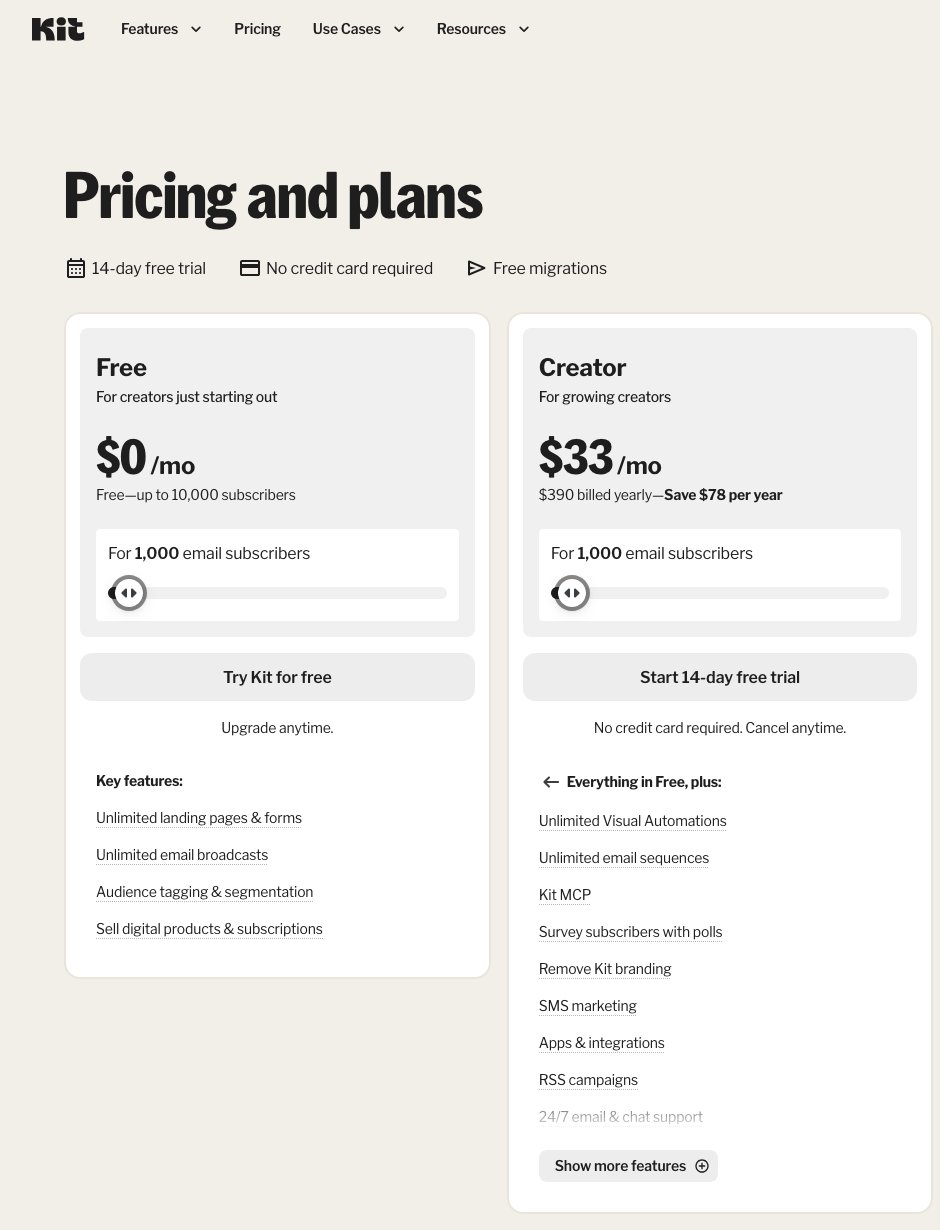
View Pricing Read Review →$0/month Free plan (up to 10,000 subscribers)
Creator from $33/month billed yearly
- Unlimited Visual Automations from Creator
- Shopify abandoned checkout emails
- Sell digital products at 3.5% + 30¢ per sale
Best for Budgets and Support

AWeber
View Pricing Read Review →$12.50/month Lite, billed annually
Plus $20/month billed annually (500 subscribers)
- 700+ email templates and Smart Designer
- Phone support plus 24/7 chat and email
- 14-day free trial on Lite and Plus
Our Methodology: We compared AWeber and Kit using their own pricing pages, feature pages and help docs (checked November 14, 2026), and weighted our scoring toward what online stores and digital product sellers need.
When comparing email marketing platforms, does the cheaper option give your store everything it needs? Kit (formerly ConvertKit) wins my AWeber vs Kit comparison: Kit is the better choice if you sell online. Its store integrations and purchase-triggered automations pull ahead, although AWeber makes a strong case for beginners.
I’ll show you why Kit wins for selling, and where AWeber’s cheaper paid plans, ready-made templates and phone support make it the better fit. The six rounds below compare pricing, selling features, email automation, ease of use, templates and support, with particular attention to what you actually get on each plan.
💡 Key Takeaways
- AWeber’s paid plans are cheaper: Lite starts at $15/month for 500 subscribers, while Kit’s paid plans start at $39/month.
- Kit’s free plan covers up to 10,000 subscribers, but leaves out automations and app integrations such as Shopify.
- Kit takes the lead for selling online, with a native Shopify abandoned checkout template and digital product sales at 3.5% + 30¢ per sale, card processing included.
- Kit’s Visual Automations are unlimited from the Creator plan, while AWeber Lite caps you at three automations.
- AWeber is the only one with phone support (8AM-8PM ET), plus 24/7 chat and email.
A Quick Comparison of AWeber vs Kit
Kit wins for store-connected marketing; AWeber costs less to start on a paid plan. All prices are in USD, as of November 2026.
| Kit | AWeber | |
|---|---|---|
| Overall rating | 4.2/5 | 4.0/5 |
| Starting price | Free; paid from $39/month ($33/month billed yearly) | $15/month ($12.50/month billed annually) |
| Free plan or free trial | Free for up to 10,000 subscribers • 14-day Creator and Pro trial, no card needed | 14-day Lite and Plus trial • Free plan for 500 subscribers still advertised on its free-plan page |
| Pros | Free up to 10,000 subscribers • Unlimited Visual Automations from Creator • Shopify abandoned checkout and product blocks • Digital products, paid newsletters and tips on every plan • No sending limits | Cheaper paid plans at most list sizes • Phone support and 24/7 chat/email • 700+ email templates and Smart Designer • AI writing, landing page and form tools • Done For You setup |
| Cons | No automations or apps on Free • Paid plans start at $39/month • Only 40+ email templates • No phone support • Custom tracking domain requires Pro | Lite: 1 list, 3 automations, 3 landing pages • Sends capped at 10-12x list size monthly • 1.0% sales fee on Free/Lite • Branding stays on Lite • Shopify connection centers on purchase tags |
| Number of email templates | 40+ | 700+ |
The overall ratings reflect our ecommerce-weighted criteria, explained in How We Test below.
What Kinds of Business Is AWeber or Kit Best For?
Choose AWeber for guided setup or Kit for store-connected marketing:
AWeber Is Best for…
- Small businesses and first-time sellers on a tight budget who want phone support, ready-made templates, and the option to have experts set everything up.
Kit Is Best for…
- Shopify stores and creators selling digital products, memberships or paid newsletters who need purchase-triggered automations and abandoned checkout emails.
1. Best for Pricing: AWeber
The Winner
AWeber’s paid plans cost less at almost every list size
AWeber Lite starts at $15/month and Plus at $30/month for 500 subscribers, while Kit’s paid plans start at $39/month. Kit’s free plan goes up to 10,000 subscribers, but without automations or integrations.
For the cheapest paid plan, AWeber beats Kit at every list size up to 10,000 subscribers.
How Much Do AWeber and Kit Cost?
AWeber starts at 500 subscribers; Kit’s pricing starts at its 1,000-subscriber paid tier.
| AWeber Plan | Key AWeber Features | Kit Plan | Key Kit Features |
|---|---|---|---|
| Free: $0 (advertised on its free-plan page) | 500 subscribers • 3,000 emails/month • 1 landing page • 1.0% sales fee | Free: $0 | 10,000 subscribers • Unlimited landing pages, forms, broadcasts • Tags/segments • Digital products and paid newsletters • No automations, sequences or apps • Email support |
| Lite: $15/mo, or $12.50/mo billed annually (500 subscribers) | 1 list • 3 landing pages, automations and users • 1 custom segment • Sends: 10x list size/month • 1.0% sales fee • AWeber branding • 24/7 support | Creator: $39/mo, or $33/mo billed yearly (1,000 subscribers) | Unlimited automations/sequences • 100+ apps, including Shopify/WooCommerce • Abandoned checkout • SMS marketing • No Kit branding • 24/7 email/chat |
| Plus: $30/mo, or $20/mo billed annually (500 subscribers) | Unlimited lists, landing pages, automations, segments and users • Sends: 12x list size/month • 0.6% fee • Advanced reporting • No AWeber branding • Priority support | Pro: $79/mo, or $66/mo billed yearly (1,000 subscribers) | Creator features • Unlimited users • A/B test 5 subject lines or content • Deliverability reporting/custom tracking domain • Growth Concierge • Priority support |
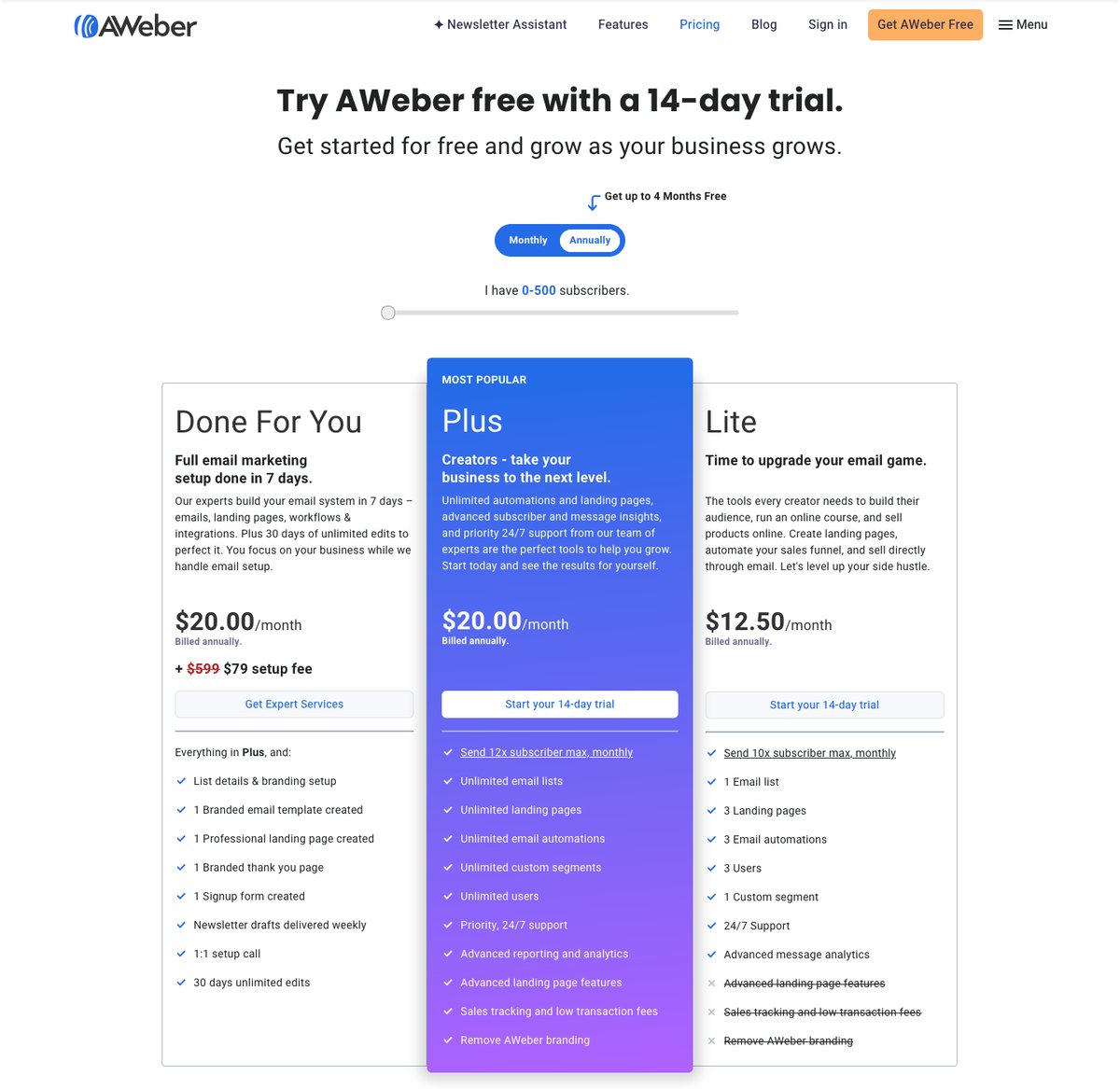
Done For You costs $20/month billed annually, including Plus. Experts build your template, landing page, thank-you page and form, with weekly newsletter drafts, a setup call and 30 days of edits. Check AWeber’s pricing page for the separate setup fee.
What You’ll Pay as Your List Grows
These prices use monthly billing. Kit places 500 subscribers in its 1,000 tier and 2,500 in its 3,000 tier.
| Subscribers | AWeber Lite | AWeber Plus | Kit Creator | Kit Pro |
|---|---|---|---|---|
| 500 | $15 | $30 | $39 | $79 |
| 1,000 | $25 | $45 | $39 | $79 |
| 2,500 | $35 | $55 | $59 | $99 |
| 5,000 | $60 | $90 | $89 | $139 |
| 10,000 | $100 | $135 | $139 | $189 |
| 25,000 | $210 | $250 | $199 | $279 |
Kit Free stays $0 up to 10,000 subscribers.
AWeber’s cheapest plan undercuts Kit’s through 10,000 subscribers, and Plus undercuts Pro throughout. Lite keeps AWeber branding.
Compare AWeber Plus with Kit Creator for unlimited automations: Creator costs less at 1,000, 5,000 and 25,000 subscribers.
Kit has no sending limits; AWeber’s caps include broadcasts and automations.
Annual billing generally costs ten monthly payments (Kit Creator is $390/year at 1,000 subscribers), and AWeber Plus at 500 subscribers drops to $240/year, the price of eight monthly payments.
💭 Our take
Lite’s three automations can cover a welcome series, post-purchase follow-up and promotional flow. Once you need more, compare Plus against Creator, not Lite.
🤔 Do AWeber and Kit Offer Free Plans or Free Trials?
- AWeber offers a 14-day Lite and Plus trial. Its free-plan page still advertises 500 subscribers and 3,000 monthly emails, but pricing leads with the trial, so check signup availability. Support also mentions a 30-day money-back guarantee.
- Kit Free covers 10,000 subscribers. Creator and Pro offer card-free 14-day trials and a 30-day paid-plan refund window. For broadcasts and simple selling, compare our best free email marketing software.
2. Best for Selling Online: Kit
The Winner
Kit’s selling tools go further for online stores
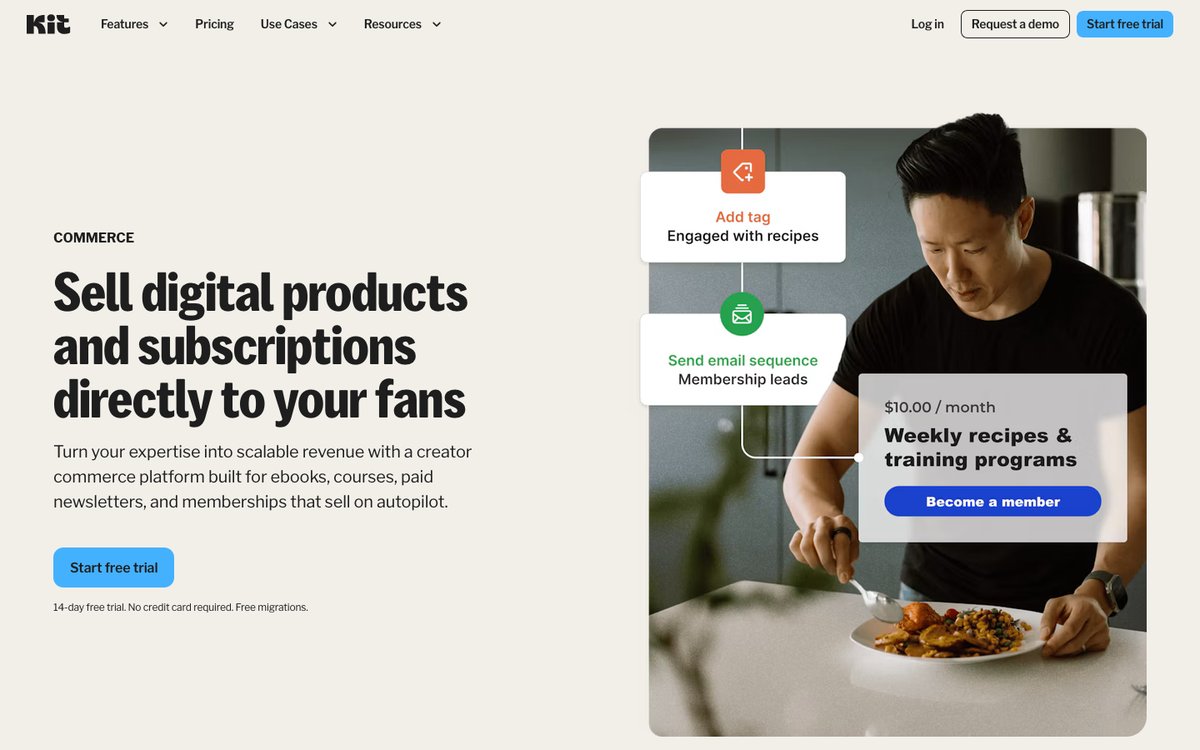
Kit connects natively to Shopify and WooCommerce, ships a ready-made abandoned checkout automation, and lets you sell digital products on every plan, including Free.
Kit offers the better selling features for online stores, especially Shopify product blocks and purchase-triggered automations. AWeber centers on Stripe checkout and purchase tags.
Shopify and WooCommerce Integrations
- Kit + Shopify: Creator and Pro connect through Kit’s App Store. Buyers receive product tags; a “Shopify: no marketing” tag helps exclude non-opted-in customers from promotions. “Product purchased” triggers work in Visual Automations and Rules. Emails support product, collection and favorites blocks; importing order history adds a Purchases chart.
- Kit + WooCommerce: The official plugin applies purchase tags, adds buyers to a form or sequence, and optionally sends purchase data. Kit’s Stripe integration imports past purchasers, but refunds don’t sync back.
- AWeber: Shopify buyers receive tags for specific products or any purchase. You can connect one Shopify store per account; new customers can take up to two hours to appear. WooCommerce and PayPal connections support purchase-triggered sequences.
| Store feature | AWeber | Kit |
|---|---|---|
| Shopify integration | Purchase tags by product; 1 store per account | Product tags, purchase trigger, product blocks, purchase history |
| WooCommerce | Purchase-triggered automations | Official plugin with purchase tags |
| Abandoned cart emails | Listed on automation page | Abandoned Checkout template: Shopify, Fourthwall, Wix |
| Product blocks in emails | Not publicly documented | Shopify product, collection and favorites blocks |
| Plan needed | Integrations on every plan | Creator or Pro |
| Integrations | Hundreds | 100+ apps |
Abandoned Cart Recovery
Kit’s Abandoned Checkout template starts when someone enters an email at checkout but leaves without buying. It waits one hour before a three-email sequence showing the abandoned product, then applies “Abandoned checkout recovered” or “Abandoned checkout lost” tags.
You need Creator or Pro and a Shopify, Fourthwall or Wix store.
AWeber advertises abandoned cart workflows, but its Shopify setup guide only describes purchase tags. Ask AWeber support to show you the cart trigger for your store before you rely on it.
💭 Our take
For Shopify stores, Kit’s abandoned checkout template is the biggest difference because it targets shoppers who already picked a product. It’s also the clearest reason to pay for Creator instead of staying on Free.
Selling Digital Products and Subscriptions
- AWeber: Stripe checkout works on landing pages, with buy buttons available in emails. Buyers join your list and receive product tags; landing-page sales reporting requires Plus. AWeber supports digital products and subscriptions, but not inventoried physical goods, multiple SKUs or metered billing.
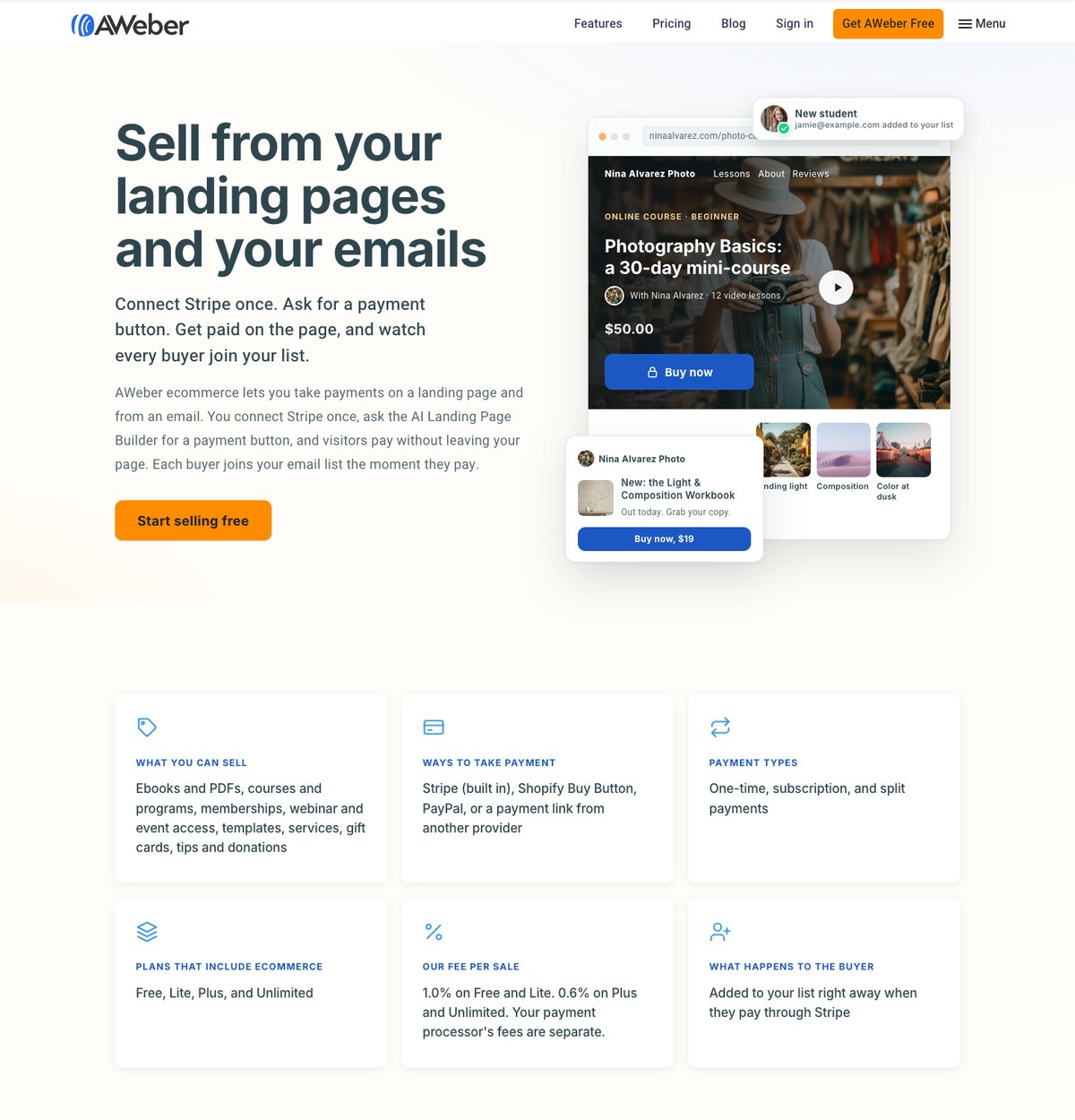
- Kit Commerce: Sell downloads, courses, coaching, paid newsletters or memberships, or collect tips. Pricing supports one-time purchases, subscriptions, tiers and pay-what-you-want.
- Payment options: AWeber supports Stripe checkout, the Shopify Buy Button, PayPal and other providers’ payment links. Kit accepts cards, Apple Pay, Google Pay, Affirm and Link.
For more options, compare our platforms to sell digital products.
| AWeber | Kit | |
|---|---|---|
| Plans that can sell | Free, Lite, Plus | Free, Creator, Pro |
| Platform fee per sale | 1.0% on Free/Lite • 0.6% on Plus | 0.6% on every plan |
| Card processing | Stripe or PayPal fees on top | Included: 3.5% + 30¢ total |
| Payment types | One-time, subscription, split payments | One-time, subscription, tiers, pay-what-you-want |
| Total fees on a $50 ebook* | $2.25 on Free/Lite • $2.05 on Plus | $2.05 |
AWeber totals assume Stripe’s standard US card rate of 2.9% + 30¢.
Kit’s free plan sells at the same total fee as AWeber’s $30-a-month Plus plan, under that processing-rate assumption.
Choose AWeber for a simple ebook landing page. I recommend Kit for connected-store marketing or recurring membership flows.
3. Best for Email Marketing and Automation: Kit
The Winner
Kit gives you more automation for your money
Kit’s Creator plan includes unlimited Visual Automations and sequences plus 25+ automation templates, and it bills each subscriber once no matter how many tags they carry. AWeber Lite stops at three automations.
For AWeber vs Kit automation, Kit wins on depth and flexibility. AWeber’s strongest counterpoint is its built-in AI writing tools.
Automation Builders
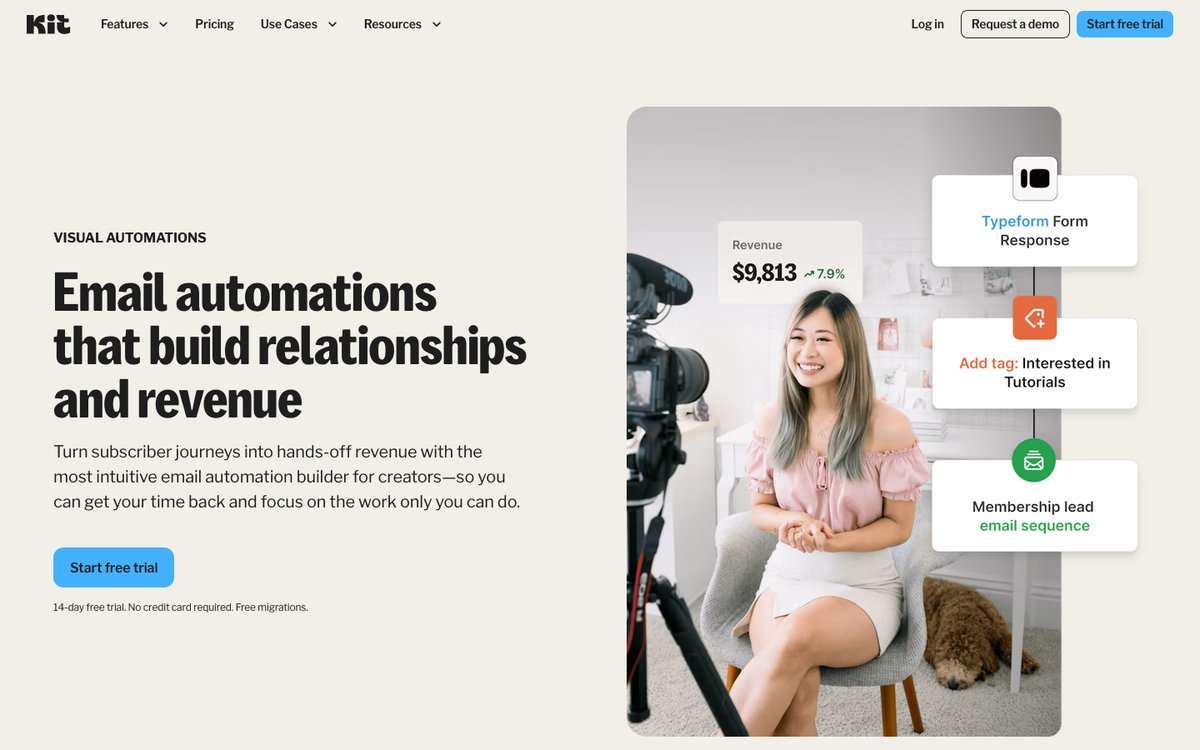
- Kit Visual Automations: Start flows from forms, tags, custom-field changes or purchases, with several entry points per automation. Actions send sequences, change tags or fields, add delays, and move or unsubscribe contacts. Conditions branch by tags, fields, filters or opens. You get 25+ templates and unlimited flows on Creator and Pro, but Free has neither automations nor sequences.
- AWeber Workflow Builder: Triggers include signups, purchases and RSS, plus the advertised cart workflows discussed above. Branch on tags, clicks or opens, add waits and tags, and view send/open/click statistics inside the builder. Lite allows three automations; Plus is unlimited.
Tags vs Lists
Kit keeps one subscriber base organized through tags and segments, available even on Free. Each unique active subscriber counts once, regardless of their tags.
AWeber uses lists, with tagging layered on top. Lite includes one list and one custom segment; Plus removes those limits. Some AWeber users report subscribers being counted across multiple lists, increasing their bills, so check this before structuring separate product audiences.
If you sell several products, tags let you segment buyers without juggling lists. A customer buying both an ebook and a course can carry both product tags in Kit.
A/B Testing and AI Tools
- A/B testing: Kit tests two subject lines on Free and Creator; Pro tests up to five or tests email content. AWeber includes email split testing.
- Resend to non-openers: Kit offers one-click resending on every plan. AWeber lists non-opener resends among its automation options.
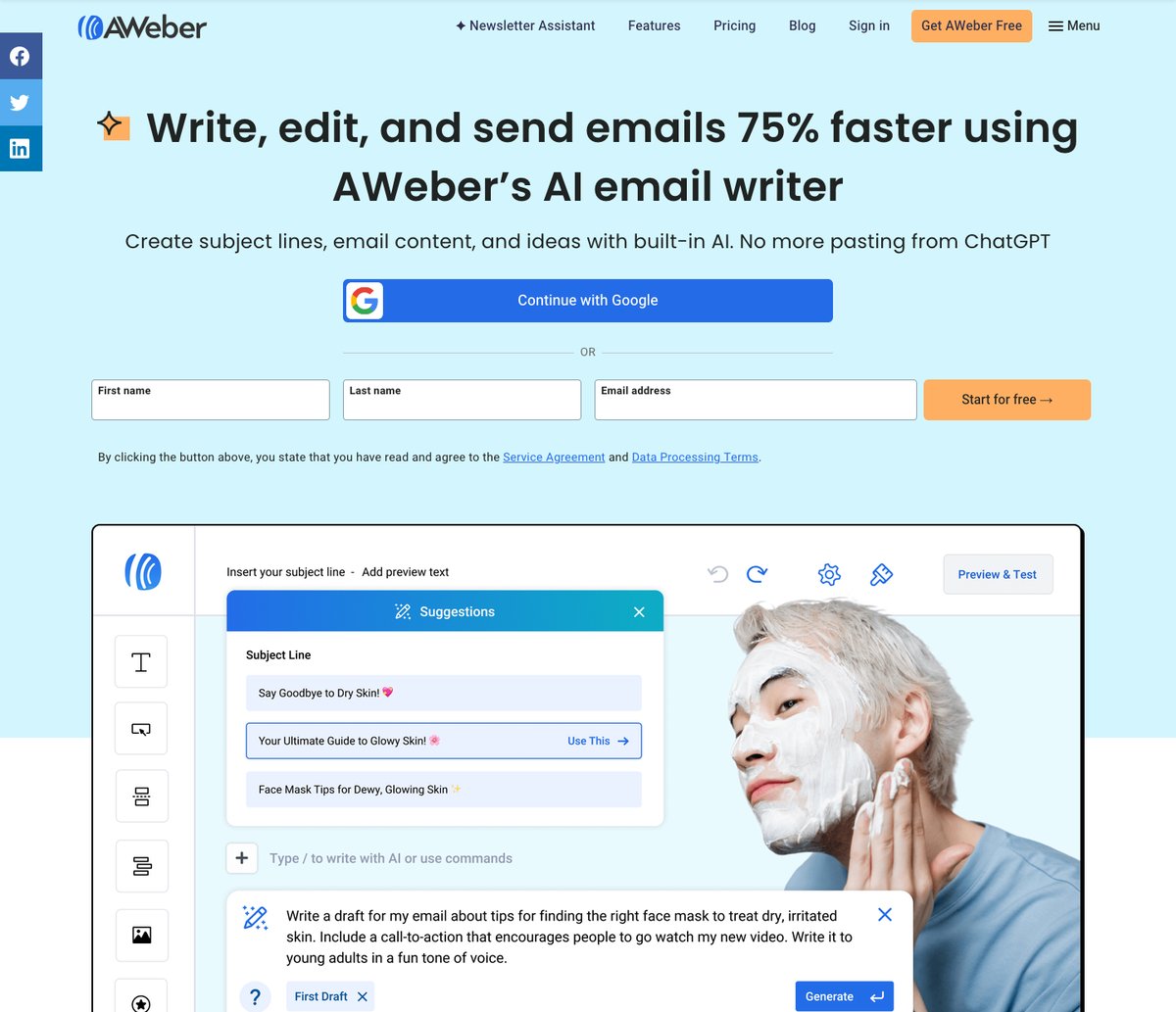
- AWeber AI: Its Writing Assistant drafts copy, subject lines and ideas. There’s also a Subject Line Assistant, emailed Newsletter Assistant drafts, and ChatGPT/Claude connections through MCP.
- Kit AI: MCP connects Claude, ChatGPT and Gemini on paid plans. Kit also promises an AI-optional writing experience; 24.6% of creators in its own survey weren’t excited about AI features.
AWeber is the better pick if you want AI to draft your emails, rather than connecting an external assistant.
🤔 What Are Kit Recommendations?
- Free Recommendations and Smart Recommendations, available on every plan, let creators recommend each other’s newsletters through signup forms.
- Paid Recommendations, on Creator and Pro, pay you for recommending newsletters; Kit keeps 23.5% of earnings. These plans also offer newsletter sponsorships.
Deliverability Tools
Kit Pro adds deliverability reporting and a custom tracking domain; AWeber also includes detailed deliverability reporting. Kit advertises a 99.8% delivery rate, meaning acceptance by inbox providers, not inbox placement. That figure doesn’t establish an inbox-performance winner.
For flows beyond either platform’s documented offering, such as browse abandonment or predictive product recommendations, compare email marketing software for ecommerce, dedicated email marketing apps for Shopify or WooCommerce email marketing tools.
4. Easiest to Use: AWeber
The Winner
AWeber does more of the setup work for you
AWeber’s setup questions feed an AI-drafted welcome email, and its Connect Domain tool can add your authentication records automatically. Kit’s checklist is clear, but you work through eight setup tasks yourself.
AWeber turns your setup answers into a welcome email. AWeber is the easier start for beginners, particularly if domain setup worries you.
My Experience With AWeber
AWeber’s signup offers Google sign-in or your first name, last name and email address.
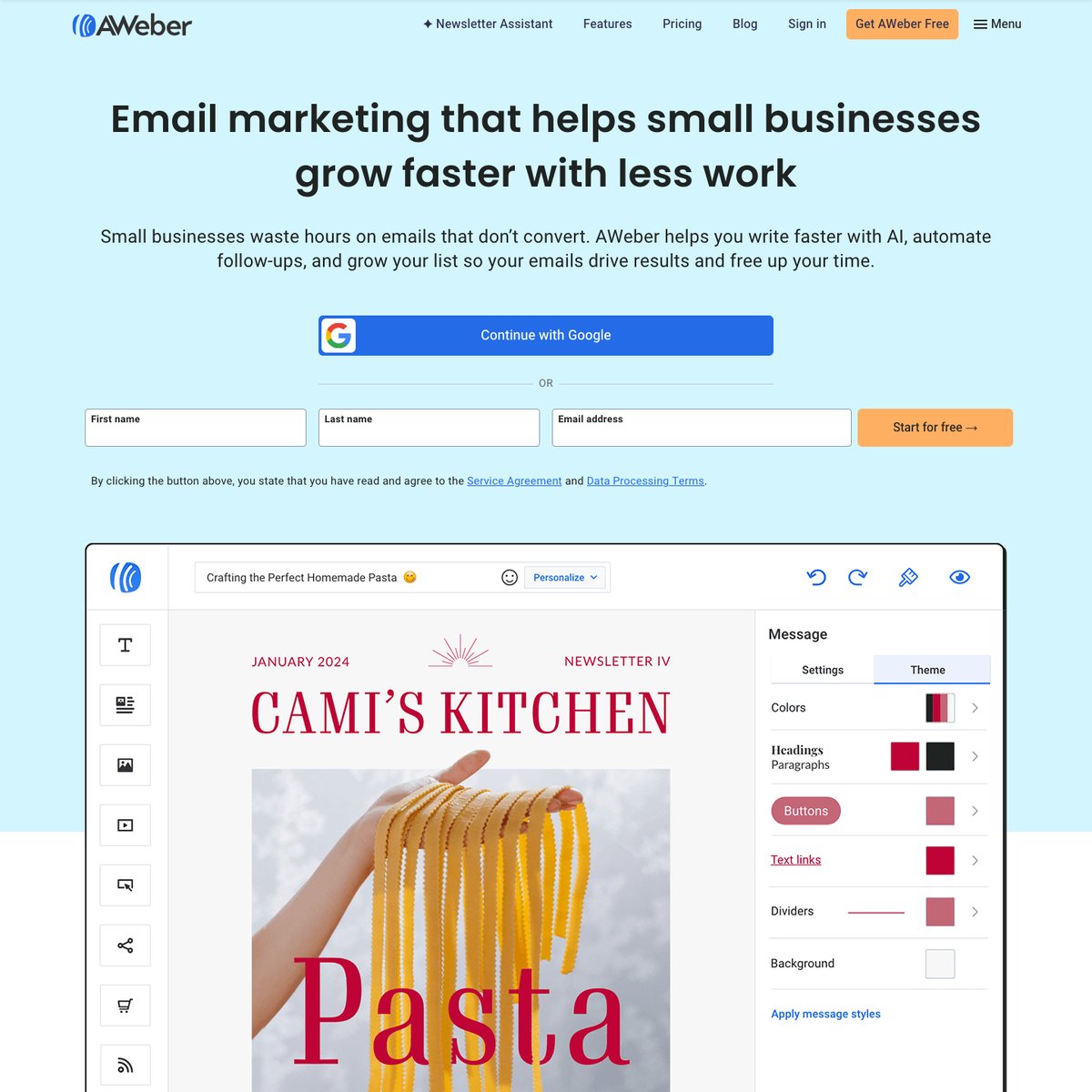
AWeber’s setup asks for:
- Your business basics: company name, website, industry and AWeber experience.
- A business address: required in your email footer under anti-spam rules.
- List size and previous provider: with free migration offered.
- Marketing goals and tools to connect.
After email confirmation and password creation, its AI drafts a welcome message from your answers. Preview it, activate it or save a draft.
My Experience With Kit
Kit’s onboarding walks you through a setup checklist instead:
- Add your mailing and sending addresses, then verify the sending address.
- Save up to 12 brand colors and choose a default template.
- Set up your newsletter site, the hosted home for newsletter posts.
- Customize the confirmation email, keeping double opt-in as Kit recommends, and set your time zone, which defaults to Eastern.
Kit’s free plan and 14-day trials require no credit card.
What’s the Next Step After Signing Up?
Both platforms push you to authenticate your sending domain early, as Gmail and Yahoo require for bulk senders.
AWeber’s Domains and Addresses > Connect Domain adds DKIM and DMARC records automatically with supported DNS providers, or supplies records to enter manually. Above 400 subscribers, you need your own-domain sending address; broadcasts return to Draft if authentication lapses.
Kit’s verified sending domain signs emails with your domain and supports DMARC compliance. Creator and Pro users can then connect their store and import purchase history.
🎨 What About the Email Editor?
AWeber offers drag-and-drop, HTML and plain-text editors, recommending drag-and-drop. Kit’s visual block editor supports elements such as Shopify products, polls and countdown timers, plus custom HTML/CSS templates on every plan.
Neither forces you to code: AWeber suits dragging elements into place, while Kit suits writing-focused newsletters.
5. Best Email Templates and Design: AWeber
The Winner
AWeber offers far more templates and smarter design shortcuts
AWeber advertises 700+ email templates, a landing page template gallery and a Smart Designer that builds a template from your website. Kit offers 40+ email templates but unlimited landing pages, even on its free plan.
I recommend AWeber’s design options over Kit’s if you want a ready-made starting point for store emails.
Email Templates
- AWeber: Its own count is 700+ email templates, alongside thousands of professional images. Smart Designer builds a template from your website’s URL. Dynamic content and AMP emails provide additional design options.
- Kit: Its 40+ creator-made templates are responsive, and every plan accepts custom HTML/CSS templates. The editor connects to Canva and Unsplash, with Shopify products available through the store integration. Liquid conditional content can show different blocks based on subscriber tags.
If you’re not a designer, AWeber’s library gives you far more starting points. Choose Kit when conditional content or Shopify product blocks matter more than layout choice.
Landing Pages and Sign-Up Forms
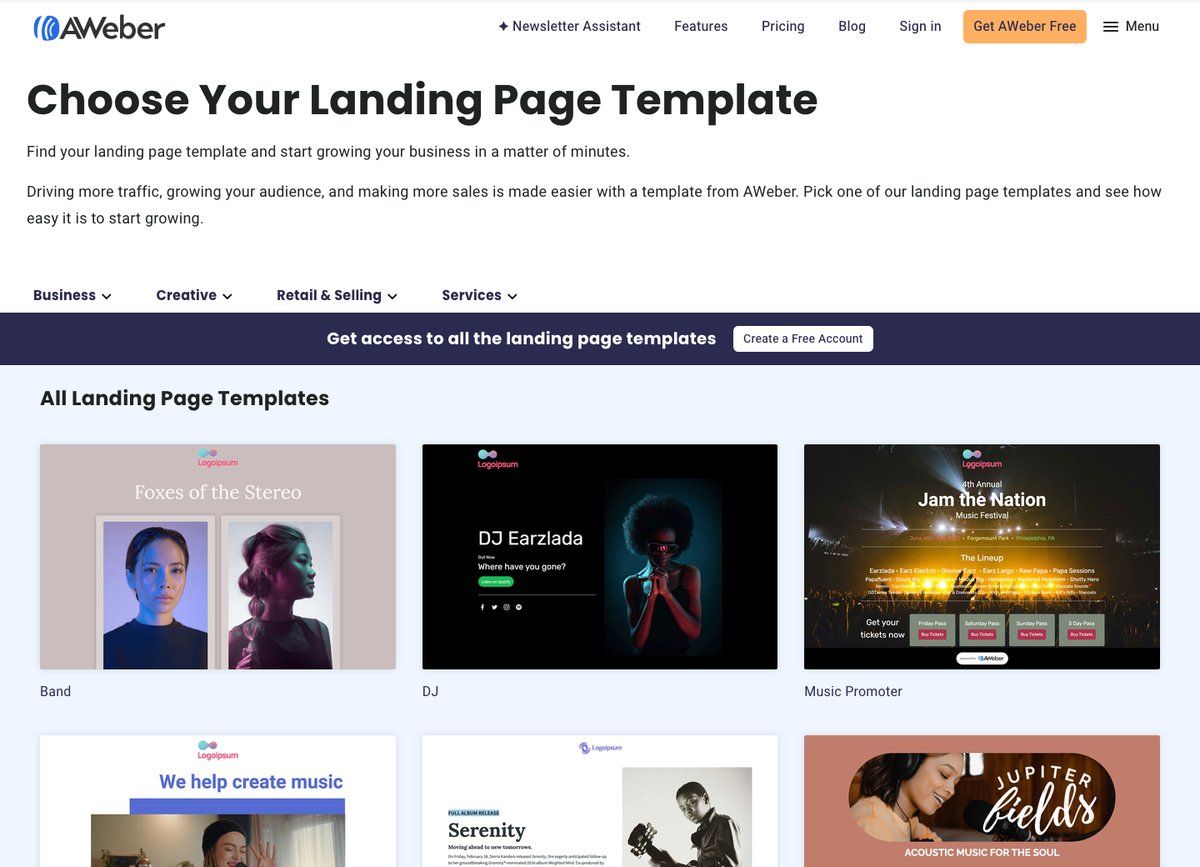
- AWeber: Its gallery groups landing pages into Business, Creative, Retail & Selling, and Services. The AI Landing Page Builder, launched in August 2026, joins an AI Signup Form Builder. Lite allows only three landing pages; Plus is unlimited, while the advertised Free plan includes one.
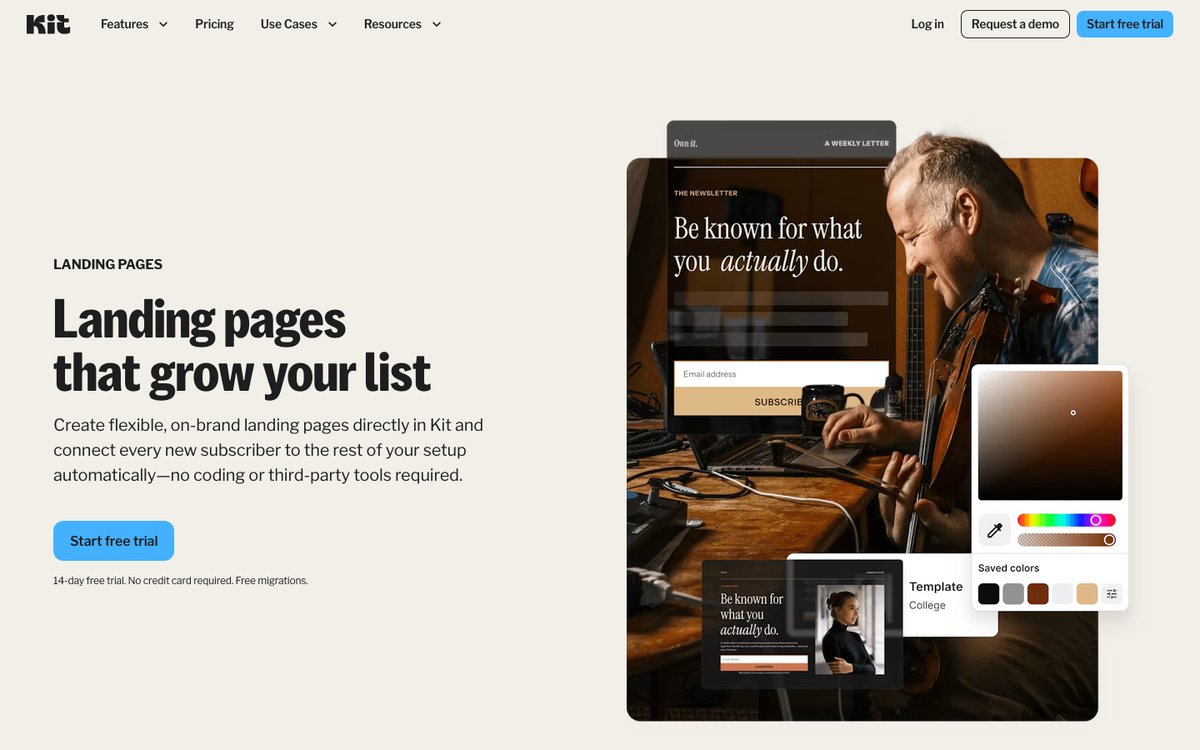
- Kit: You get unlimited landing pages and opt-in forms on every plan, including Free. Forms can appear inline, as a modal, sticky bar or slide-in. Kit also includes templates, custom-domain support and a hosted newsletter site.
For full store landing pages rather than signup pages, compare our landing page builders for ecommerce.
Top Tip 💡
On Kit, save your brand colors (up to 12) and choose a default email template during setup so new broadcasts start on-brand.
6. Best for Customer Support: AWeber
The Winner
AWeber is the only one you can phone
AWeber offers phone support from 8AM to 8PM ET plus 24/7 live chat and email. Kit’s free plan gets email support only, and its paid plans add 24/7 chat.
AWeber takes the lead for support, particularly when you’re connecting a store or authenticating a domain.
On Trustpilot, as of November 14, 2026, AWeber holds a 4.3 TrustScore from 178 reviews, against Kit’s 3.8 from 166.
AWeber Support
✔️ Phone support from 8AM-8PM ET, with US toll-free and international numbers
✔️ Live chat and email 24/7, including outside phone hours
✔️ Community forum, knowledge base, video tutorials, free workshops and certified experts available to hire
✔️ Free account migration; Plus customers get priority on chat, email and phone
❌ Phone support isn’t 24/7, despite the broader promise of round-the-clock help on AWeber’s support page
❌ Some early-2026 Trustpilot reviewers described difficult cancellations; one reported waiting five hours for a chat agent to downgrade
Kit Support
✔️ 24/7 email and chat on Creator and Pro
✔️ Pro adds priority support and a Growth Concierge team, including quarterly performance audits and access to an email strategist and deliverability specialist
✔️ Kit University courses and a task-organized help center covering setup, migration, automation and deliverability
✔️ Free migrations on paid plans
❌ Free users get email support only; no plan includes a phone line
❌ Kit’s AI assistant handles most questions first, rather than immediately connecting you to a person
❌ October 2026 Trustpilot reviews mention slow or generic replies and unexpected charges after importing contacts
These are individual customer reports. Check the subscriber tier before importing your store’s contacts to avoid an unexpected plan increase.
💭 Our take
Phone support matters most in your first few weeks, when you’re authenticating a domain or connecting a store. If that’s when you expect to need help, AWeber’s phone line is worth more than any template count.
How We Test Email Marketing Software
Selling and automation carry half our score because this comparison serves online stores and digital product sellers. We assess seven areas:
- Ecommerce and Selling Features: 30%
- We check store integrations, purchase triggers, abandoned cart recovery and digital-product selling fees.
- Email Marketing and Automation: 20%
- We assess automation builders, segmentation, A/B testing, AI and list-growth tools.
- Pricing and Value: 15%
- We compare costs from 500 to 25,000 subscribers and each plan’s features.
- Templates and Design: 10%
- We look at email templates, editors, landing pages and signup forms.
- Ease of Use: 10%
- We compare signup, onboarding and setup steps.
- Help and Support: 10%
- We check support channels, plan requirements and availability.
- Reputation: 5%
- We consider customer ratings on sites such as Trustpilot.
Every price, plan limit and feature in this comparison comes from AWeber’s and Kit’s own pricing pages, feature pages and help docs, which I reviewed on November 14, 2026. The screenshots show public pages, not account-level testing, so you can see each platform’s offering before signing up.
AWeber vs Kit: Our Winner
For online businesses that sell, Kit is the better email marketing platform. It won the two rounds carrying half our score: selling online and email automation. Its store connections and abandoned checkout template give Shopify sellers more to work with, while digital-product sellers can start on Free at 3.5% + 30¢ per sale, including processing. Creator adds unlimited Visual Automations, and tags keep product audiences in one subscriber base.
AWeber won the other four rounds. Choose it when budget and hands-on help matter most: Lite starts at $15/month, backed by phone support and 700+ templates. Its AI writing and landing page tools help with content creation, while Done For You offers a paid setup alternative. Lite’s three-automation limit makes Plus the fairer comparison with Kit Creator.
For more options, explore our AWeber alternatives, Kit alternatives and Brevo vs AWeber comparison.
While Kit is our top choice for selling online, I recommend trying both: use Kit’s 14-day trial to build a welcome series, run the same series through AWeber’s 14-day trial, and keep the one that fits your business.


Comments 0 Responses