


Quick Verdict: ShipBob is one of the top fulfilment platforms for ecommerce brands looking to scale fast without building in-house logistics. It offers solid tech, fast shipping options, and deep integrations with tools like Shopify, Amazon, and WooCommerce.
The platform stands out for its accuracy (99.95% order accuracy), free software access, and ability to save brands up to 13% on fulfilment costs.
It’s not the cheapest or most beginner-friendly option, but if you’re shipping 100+ orders a month and need a reliable, scalable partner — ShipBob delivers.

If you’re running or scaling an ecommerce brand, you’ll hit a point where packing boxes and printing labels no longer cuts it. You need fulfilment that’s fast, accurate, and doesn’t require you to lease warehouse space or hire a logistics team.
That’s where third-party logistics (3PL) providers come in — and ShipBob is one of the big names in this space.
As someone who reviews ecommerce platforms and tools full-time, I’ve spent a lot of time testing out solutions like ShipBob.
In this review, I’ll walk you through exactly how ShipBob works, its key features, pros and cons, pricing, and how it stacks up to the competition.
The goal is to help you decide if it’s a fit for your business — especially if you’re scaling and looking for a serious fulfilment partner.
What is ShipBob?
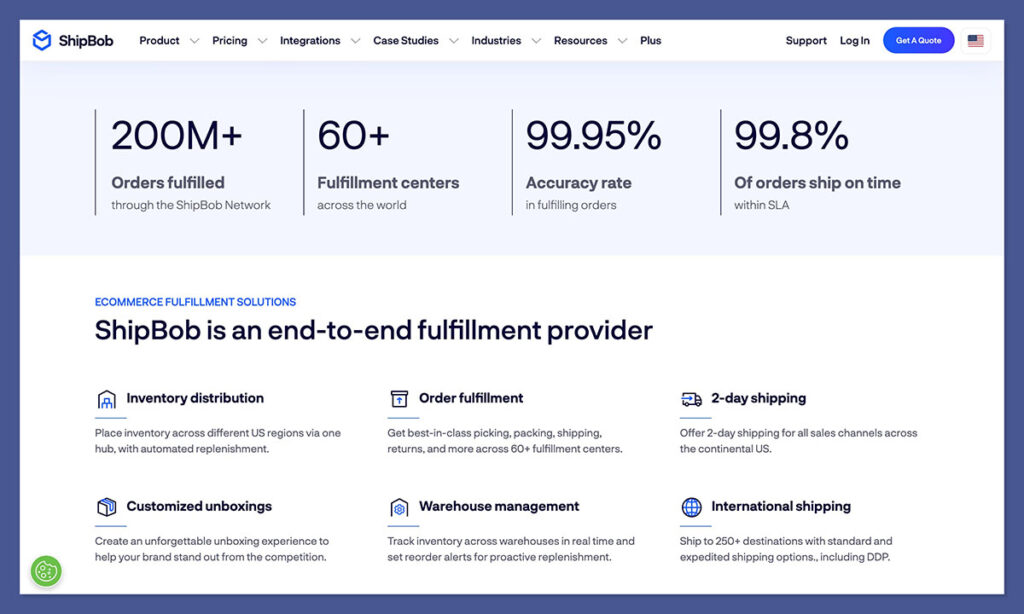
ShipBob is a tech-enabled 3PL that stores your inventory, then picks, packs, and ships orders to your customers. It’s designed for ecommerce brands that sell through platforms like Shopify, WooCommerce, Amazon, and BigCommerce.
The company was founded in Chicago and now operates over 50 fulfilment centres globally, with a focus on the US, UK, EU, Canada, and Australia.
At its core, ShipBob is trying to offer Amazon-level speed and efficiency — but with your branding, your customer experience, and your own storefront. That’s what makes it especially attractive for DTC brands that want to stay independent but scale efficiently.
Here’s a breakdown of how it works:
- You connect your store (Shopify, WooCommerce, etc.) to ShipBob
- You send your inventory to one or more of their fulfilment centres
- Orders are synced automatically and routed to the right warehouse
- ShipBob picks, packs, and ships the product with tracking provided
- Returns can be handled by ShipBob if you choose to enable the feature
ShipBob’s tech stack integrates with over 100 tools and platforms, so it fits neatly into most ecommerce workflows.
Why You Should Trust This Review
When you’re choosing a 3PL partner like ShipBob, you’re not just picking a piece of software — you’re handing over one of the most critical parts of your business: getting orders to customers on time and without errors.
So it makes sense you’d want to know why this review is worth paying attention to.
I don’t run a store. I’m not a ShipBob affiliate. And I don’t work for them.
What I do is test and review ecommerce platforms, fulfilment tools, and backend systems across the industry.
My job is to cut through the hype, the sales pages, and the polished demo calls, and actually dig into what works, what doesn’t, and who each tool is really for.
Here’s how this review came together:
- I tested ShipBob from the perspective of a scaling ecommerce brand — connecting demo stores, uploading SKUs, reviewing fulfilment workflows, exploring integrations, and testing the dashboard.
- I read over 100+ real reviews across Trustpilot, G2, Shopify App Store, Reddit threads, and ecommerce Facebook groups — pulling out the patterns in what users say again and again.
- I compared ShipBob directly to other major fulfilment providers, like Red Stag Fulfilment, ShipStation, and Shopify Fulfilment Network, based on features, support, shipping speed, pricing clarity, and ease of use.
- I stayed objective. This isn’t a fluff piece. I’ve highlighted where ShipBob shines — and where it falls short — so you can make your own decision with real context.
The goal is to give you something more useful than just a pros and cons list. You’ll walk away from this review knowing exactly who ShipBob is built for, when to consider them, and when to look elsewhere.
No paid placements. No affiliate commissions. Just a clear, detailed breakdown — from someone who’s seen how the fulfilment world actually works.
Key Features of ShipBob
ShipBob isn’t just a warehouse with people putting items into boxes. It’s built as a technology-first platform, and that’s one of its biggest strengths. Here are the main features that stood out during my testing.
1. Distributed Inventory & 2-Day Shipping
ShipBob allows you to store inventory across multiple warehouses. Their algorithm determines the best location to store your products based on order history and customer distribution. This helps minimise shipping costs and reduces delivery times.
They offer 2-day shipping across most of the US using a mix of carriers (UPS, FedEx, DHL, USPS, etc.). The system selects the cheapest and fastest option for each order automatically.
2. Real-Time Inventory Management
The dashboard gives you a live view of your inventory across all warehouse locations. You can see SKU-level detail, track inventory ageing, identify slow-moving stock, and get alerts when you’re running low.
Useful functions include:
- Auto-reorder alerts
- Inventory heatmaps by region
- Reports on inventory carrying costs
- Tools for bundling SKUs or promotional kits
3. Order Management System
Orders flow in automatically once your store is integrated. You can filter orders by status, view shipping updates, make changes post-purchase, and track delivery timelines all from within the dashboard.
ShipBob also supports:
- Subscription orders
- Multi-item bundles
- Partial fulfilments
- Wholesale/B2B orders
The interface is intuitive and doesn’t require a steep learning curve.
4. Analytics and Reporting
Their built-in analytics dashboard gives insight into order volume, shipping cost trends, fulfilment speeds, and revenue per region. You also get decision-making tools like:
- Optimal warehouse distribution analysis
- Impact of promotions on fulfilment cost
- Year-end order summary and tax export
- Returns data and refund performance
It’s not as deep as something like Looker or Tableau, but for a logistics tool, it’s more than enough for most businesses.
5. Customisation Options
ShipBob supports branded packaging, marketing inserts, and custom kitting. This is important if you want the unboxing experience to reflect your brand. While plain packaging is free, you can opt for:
- Custom boxes or poly mailers
- Printed tape and inserts
- Gift messages or seasonal kits
- Special assembly instructions for SKUs
The flexibility here is solid — especially for DTC brands that care about presentation.
Pros and Cons of Using ShipBob
No tool is perfect, and ShipBob is no exception. Here’s a balanced view based on both personal testing and aggregated user feedback from sites like Trustpilot, G2, and Shopify App Store.
Pros
- Fast shipping across the US and globally
- Excellent software UI with real-time visibility
- Deep integrations with major ecommerce platforms
- Scalable across markets (US, UK, EU, AU, Canada)
- On-site customer support reps in warehouses
- Transparent analytics and SKU-level insights
- Free software and unlimited store integrations
Cons
- No standardised pricing online — you’ll need a custom quote
- Support can vary depending on your account size
- Limited flexibility for smaller brands (less than 100 orders/month)
- Some users reported inventory or shipping mistakes — especially when onboarding or scaling quickly
- Returns management is an add-on — not included by default
Pricing Structure

ShipBob doesn’t list specific pricing on their website. Instead, you’ll need to request a quote. This makes sense, as fulfilment pricing varies based on:

- SKU volume
- Storage needs
- Number of warehouses
- Shipment weight and destination
- Custom packaging/kitting requirements
Here’s what their pricing typically includes:
| Fee Type | What it Covers |
|---|---|
| Receiving Fees | Unloading and checking in inventory |
| Storage Fees | Per-bin, shelf, or pallet cost per month |
| Pick and Pack Fees | Fee per order (includes first pick, then per item) |
| Shipping Fees | Based on carrier, weight, destination, and service |
| Customisation Fees | Branded packaging, inserts, special kits |
| Returns Fees (Optional) | Processing and restocking returned items |
Good news: the software and dashboard access are completely free. There are also no monthly SaaS fees or setup charges for integrations.
Bad news: pricing can get complex if you’re operating in multiple regions or have a large SKU catalogue. You’ll want a detailed quote and clear SLAs before committing.
Ease of Use and Customer Support
Ease of Use
One of ShipBob’s biggest strengths — and a common theme across reviews — is how intuitive the platform is for ecommerce brands. From the initial setup to day-to-day operations, everything is designed to be as plug-and-play as possible.
Here’s what the user experience looks like:
- Store integration takes just a few clicks. If you’re on Shopify, WooCommerce, or BigCommerce, the connection process is straightforward and fully automated.
- The dashboard is clean and logically organised. You can quickly view inventory, track orders, monitor fulfilment activity, and generate reports.
- Fulfilment workflows are clearly mapped out. Once your inventory arrives at ShipBob’s warehouse, the system automatically begins routing orders without needing manual input.
- Inventory and order controls are easy to use. You can set alerts, pause orders, change fulfilment rules, and even bundle products — all without needing a developer or operations expert.
I didn’t run into any major friction points during testing. In fact, I’d say ShipBob has one of the smoother onboarding flows in the 3PL space, especially if your tech stack is ecommerce-focused.
That said, the platform is designed with scaling businesses in mind. If you’re just starting out or only have a handful of SKUs, it might feel a bit overbuilt for your needs.
Customer Support
Customer support can make or break a 3PL relationship — especially when you’re outsourcing a core part of your business like fulfilment. ShipBob offers multi-channel support, with varying levels of hands-on help depending on your account size and complexity.
Support options include:
- Live chat and email via the dashboard
- Phone support for account holders during business hours
- On-site customer success reps at each fulfilment centre
- Dedicated account managers for larger or enterprise clients
- Help centre articles and documentation covering FAQs, API details, and platform features
In my experience, the support team was responsive and helpful when contacted via chat — though wait times varied slightly depending on the time of day. What stood out was the presence of actual humans in each warehouse location. This can be a huge asset if you need someone physically checking stock or resolving fulfilment errors on the ground.
Here’s what I’ve seen from other users:
- Positive experiences often come from mid-size and enterprise brands with dedicated managers
- Smaller sellers sometimes feel their tickets are slower to get a response
- Onboarding support is generally well-reviewed — ShipBob walks you through the process clearly
One area that could be improved is post-onboarding support for smaller or newer accounts. While the platform runs smoothly, if you hit a snag or have a complex question, you may find yourself in a queue behind larger accounts.
Still, compared to many other fulfilment platforms, ShipBob offers a solid support structure — especially once you’re up and running.
Real User Feedback and Reputation
I spent time going through dozens of reviews from Shopify, Trustpilot, Reddit, and G2. Here’s what stood out.
Positive Themes
- Great UI: The dashboard is clean and easy to use.
- Easy setup: Most users say the Shopify integration was seamless.
- Customer service: Larger accounts get responsive support.
- Scalability: Growing brands appreciate the ability to expand into new markets without building their own infrastructure.
Negative Themes
- Occasional fulfilment errors: Some users noted mis-picks or missed delivery windows.
- Support inconsistency: Smaller brands sometimes felt deprioritised.
- Pricing confusion: Without upfront numbers, it’s harder to compare costs vs competitors.
ShipBob vs Alternatives
If ShipBob doesn’t fit your needs, here are a few alternatives I recommend comparing:
| Feature/Provider | ShipBob | ShipStation | Red Stag Fulfilment | Shopify Fulfilment |
|---|---|---|---|---|
| Ecommerce Integrations | ✅ | ✅ | ✅ | ✅ |
| 2-Day Shipping | ✅ (US-focused) | ❌ | ✅ (US-focused) | ✅ (US + Intl) |
| Branded Packaging | ✅ | Limited | ✅ | ✅ |
| Analytics Dashboard | ✅ | Basic | Moderate | Moderate |
| Transparent Pricing | ❌ | ✅ | ✅ | ❌ |
| Returns Management | Optional Add-on | ❌ | ✅ | ✅ |
Each has its strengths. ShipStation is lighter, great for smaller sellers. Red Stag is ideal for heavy, bulky items. Shopify Fulfilment is most seamless if you’re 100% on Shopify.
Who Should Use ShipBob?
Based on everything I’ve seen, ShipBob makes sense for:
- DTC brands doing £100k+ in yearly sales
- Stores with 100+ monthly orders
- Brands shipping mainly to the US, with some global
- Businesses that value automation and insights
- Companies without the bandwidth to manage fulfilment in-house
It’s not the best choice for:
- Brands shipping under 100 orders per month
- Businesses needing ultra-specific packaging or temperature-controlled storage
- Wholesalers or B2B-first sellers with large pallet shipments
Final Thoughts
ShipBob has built a reputation for being one of the most robust 3PL solutions for ecommerce stores — and from my experience, that’s well-earned.
The platform combines powerful software with a wide warehouse footprint, excellent integrations, and strong fulfilment speeds.
It’s not the cheapest option, and it’s not built for hobby stores or brands just starting out. But for growth-stage businesses that want to outsource fulfilment without losing control over branding or customer experience, ShipBob is a serious contender.
Make sure you get a full quote and test the onboarding process before fully committing. If the pricing works for your margins and you need fulfilment help fast, it’s definitely a platform worth considering.
pany to get a good idea of how much you can expect to pay for the service before you dive in.



Comments 0 Responses