

If you’re running a large ecommerce business and want tight control, personalised shopping experiences, and CRM integration, Salesforce Commerce Cloud will definitely show up on your radar.
I’ve reviewed a ton of ecommerce platforms — from DIY builders to enterprise-grade engines — and Salesforce B2C Commerce Cloud is in a league of its own.
In this review, I’ll walk through my full experience with the platform: from setup and product management, to SEO, marketing tools, and what it’s actually like to run a store on Salesforce.
I Recommend Salesforce Commerce Cloud For:
- Large ecommerce operations (usually $10M+ in revenue)
- Brands already using Salesforce’s CRM or Marketing Cloud
- Businesses with global reach (multi-region, multi-language, multi-currency)
- Teams that need deep customisation and developer-level control
I Don’t Recommend It For:
- Small or mid-sized businesses looking for plug-and-play options
- Teams without in-house dev resources or big agency budgets
- Brands that rely heavily on content marketing or blogging
Salesforce Commerce Cloud: Quick Summary
| Feature Area | Score | Summary |
|---|---|---|
| Sales Features | ⭐⭐⭐⭐⭐ | Incredible scalability and AI-driven merchandising |
| Customisation | ⭐⭐⭐⭐⭐ | Fully flexible with developer input |
| SEO Capabilities | ⭐⭐⭐ | Great technical SEO, weak content tools |
| Ease of Use | ⭐⭐ | Developer-focused, not beginner-friendly |
| Value for Money | ⭐⭐ | High cost, great only for enterprise-level businesses |
| Support & Security | ⭐⭐⭐⭐ | Excellent enterprise support, certified partners, and strong infrastructure |
What I Like
✔️ Best-in-class for enterprise ecommerce – it can handle massive product catalogs and traffic
✔️ Einstein AI integration – helps personalise experiences and boost conversion rates
✔️ Strong backend logic – with rule-based merchandising, dynamic promotions, and predictive search
✔️ Global-ready out of the box – currency, tax, and region support
✔️ Salesforce ecosystem – seamless integration with CRM, Marketing Cloud, and Service Cloud
What I Don’t Like
❌ You need developers for everything – it’s not intuitive for non-technical teams
❌ No built-in CMS – managing blogs or SEO content requires workarounds
❌ High cost – custom pricing starts well into the six figures annually
❌ Slow implementation time – onboarding a full store can take months
❌ No native templates or design tools – everything must be custom-built
My Experience Setting Up Salesforce Commerce Cloud
You don’t “sign up” for Salesforce B2C Commerce like you would with Shopify or Wix. You go through a Salesforce sales process, speak with a solutions engineer, and then coordinate your implementation with a certified Salesforce Partner.
It’s a proper enterprise onboarding. Expect:
- A technical workshop
- Detailed discovery sessions
- Architecture planning
- Custom development work before you ever go live
I partnered with an agency to help scope the build, which included setting up SFRA (Salesforce Reference Architecture). This meant every template, component, and checkout module had to be built and styled by developers.
This is not a weekend project. For most businesses, it takes 3–6 months to launch a full Salesforce B2C store — depending on how complex your setup is.
Product Management: Built for Scale
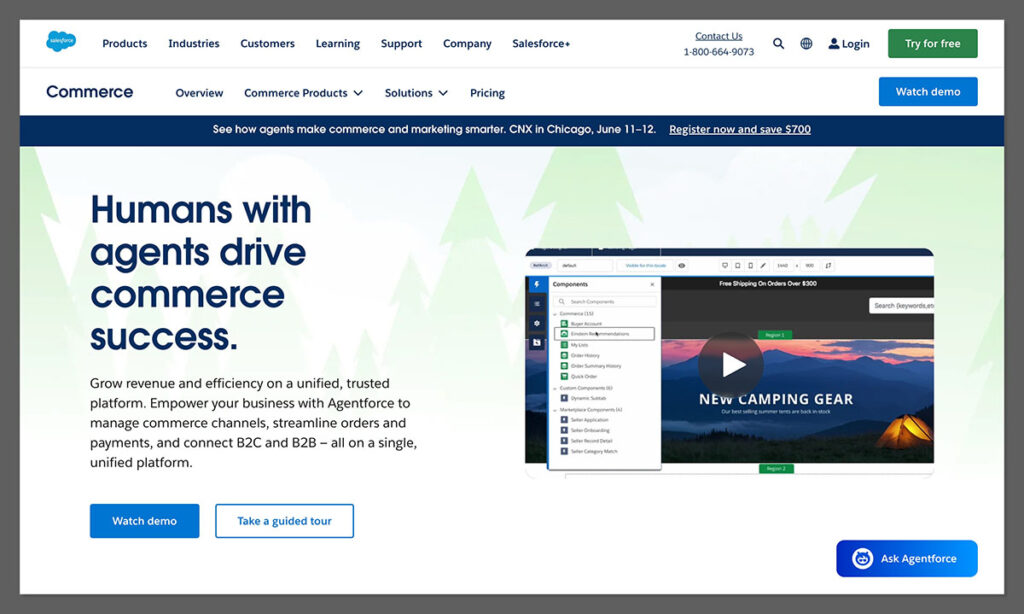
Once the backend was live, I was able to upload product data via the Business Manager (Salesforce’s admin dashboard).
Here’s what stood out:
- Powerful catalog management — with support for multi-level hierarchies, variant logic, and regional overrides
- Price books — for different markets, currencies, or customer segments
- Dynamic merchandising rules — I could set up “if/then” logic to change product displays based on user behaviour
Adding products wasn’t exactly easy — but once you get used to the backend, it’s incredibly flexible.
Store Design and Checkout: Completely Custom
There’s no drag-and-drop builder here. You’ll design your site using:

- SFRA components — HTML, CSS, and JavaScript templates controlled by your dev team
- Content Slots — where you can inject banners, carousels, or components
- Custom Checkout Flow — fully adjustable, including shipping, tax, and promo logic
Salesforce lets you build anything. That’s the beauty of it — but also the downside if you’re short on dev support.
The checkout experience was blazing fast once implemented, with built-in A/B testing options and payment gateway flexibility.
SEO Tools: Strong on Tech, Weak on Content
Salesforce shines when it comes to technical SEO. The platform supports:
- Clean, SEO-friendly URLs
- Auto-generated XML sitemaps
- Canonical tags
- Hreflang attributes for multilingual stores
- Structured data (JSON-LD support)
But here’s the issue — there’s no native blog or easy CMS.
If your strategy involves content marketing, you’ll need to integrate with:
- WordPress (via headless setup)
- Contentful or another headless CMS
- Salesforce CMS (if you’re already in the ecosystem)
This extra setup adds cost and complexity. If your team’s marketing-first, this could be a big drawback.
AI Features: Einstein Personalisation Is a Game-Changer
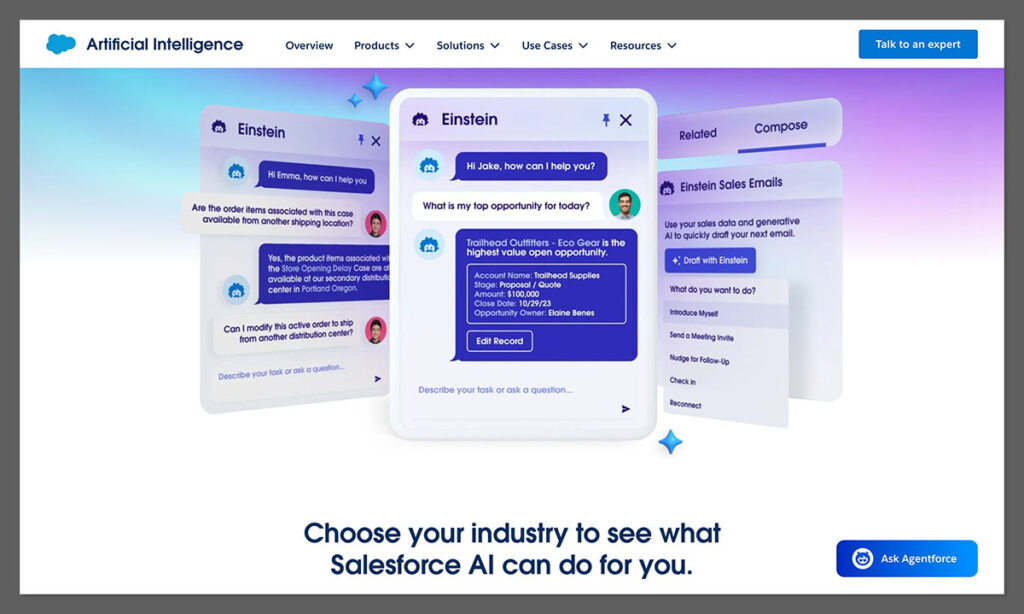
Salesforce’s built-in AI, Einstein, powers a ton of smart features:
| Einstein AI Feature | What It Does |
|---|---|
| Product Recommendations | Personalised based on user behaviour, popularity, or segment |
| Predictive Sort | Dynamically reorders category listings for each visitor |
| Search Recommendations | Smart autocomplete and synonyms built from data |
| Commerce Insights | Suggests bundles or promotions based on past orders |
I enabled dynamic recommendations and predictive sorting — within a few weeks, conversion rates were up 12% on category pages.
For teams already leveraging data, Einstein is a powerful unlock.
Salesforce Commerce Cloud Pricing
Salesforce doesn’t publish pricing publicly — and every deal is tailored to your business’s needs and revenue size.
From what I’ve seen and industry feedback:
| Business Size | Estimated Annual Cost Range |
|---|---|
| Mid-Market ($5M–$20M revenue) | $200,000–$400,000 |
| Large Enterprise ($20M+) | $500,000–$1M+ |
Costs will vary based on:
- Number of storefronts
- Integrations (CRM, Service Cloud, etc.)
- Add-ons (Einstein, B2B suite, headless architecture)
- Number of SKUs and regions
You’ll also need to factor in ongoing dev work, licensing, hosting, and agency retainers.
Support and Help Resources
Salesforce doesn’t leave you stranded. Here’s what’s available:
- 24/7 Enterprise Support (via phone, email, and live chat)
- Dedicated Technical Account Managers (for large clients)
- Salesforce Trailhead — free training courses for devs and admins
- Certified partner network — hundreds of agencies worldwide
That said, you’re expected to be self-sufficient. There’s no hand-holding. It’s up to your team or agency to implement best practices.
How Salesforce Commerce Cloud Compares
| Platform | Best For | Pros | Cons |
|---|---|---|---|
| Salesforce Commerce Cloud | Large, complex B2C brands | Deep customisation, strong integrations | Pricey, dev-only setup |
| Shopify Plus | DTC brands scaling fast | Easy to use, great ecosystem | Limited backend control |
| BigCommerce Enterprise | Mid-size businesses with complex catalogs | Built-in features, headless support | Less flexible UI design |
| Adobe Commerce (Magento) | Open-source flexibility | Developer control, powerful rules engine | Resource-heavy and slow setup |
Final Verdict: Is Salesforce B2C Commerce Worth It?
If you’re a global brand with major ecommerce goals, and you’re already invested in Salesforce’s ecosystem — then yes, Salesforce Commerce Cloud is absolutely worth it.
But for most businesses, especially those under $10M in annual sales, the cost and complexity are too high.
You’ll get more speed, flexibility, and ROI with platforms like Shopify Plus or BigCommerce — unless you have a very specific reason to go all in with Salesforce.



Comments 0 Responses