


Teachable and Graphy are two top-tier platforms for selling online courses and digital products, but which one actually gives you more value for your business?
To find out, I spent over 120 hours researching, testing, and comparing both platforms from the perspective of ecommerce brands, creators, and coaches. After deep testing, Graphy comes out ahead if you’re looking to build a branded platform with community features and mobile apps.
But Teachable still holds its ground if your priority is launching quickly and simply.
Teachable vs Graphy: Quick Verdict
| Teachable | Graphy |
|---|---|
| Best for creators who want to launch quickly and easily | Best for scaling creators who want mobile apps, memberships, and full control |
In this full breakdown, I’ll walk through pricing, sales tools, course features, apps, payment handling, and more – so you can make the best decision for your business.
Quick Comparison: Teachable vs Graphy
Here’s a side-by-side overview of how both platforms stack up across core features:
| Feature | Teachable | Graphy |
|---|---|---|
| Starting price | Free plan available, paid starts at $39/mo | Starts around $49/mo (varies by region) |
| Transaction fees | Yes, on free and basic plans | None on most plans |
| Branded mobile apps | No (unless enterprise-level) | Yes, white-label apps included |
| Community features | Limited (comments only) | Built-in community platform |
| Course builder | Very beginner-friendly | More advanced, but flexible |
| Affiliate marketing | Basic | More detailed and scalable |
| Webinars | Needs external tools | Built-in with Zoom integration |
| Support | Help docs, email, ticketing | Dedicated onboarding, live chat |
Verdict: Use Teachable if you’re new to selling courses. Choose Graphy if you’re building a full brand around your online learning business.
1. Best for Pricing: Teachable Offers Lower Entry Cost
The Winner: Teachable
Teachable is more affordable for beginners, but Graphy becomes more cost-effective once you’re growing.
Teachable and Graphy offer tiered plans, but their pricing models cater to different types of creators. Teachable shines with its free plan and transparent pricing. Graphy, while not publicly priced in full, includes more built-in features that would cost extra on Teachable.
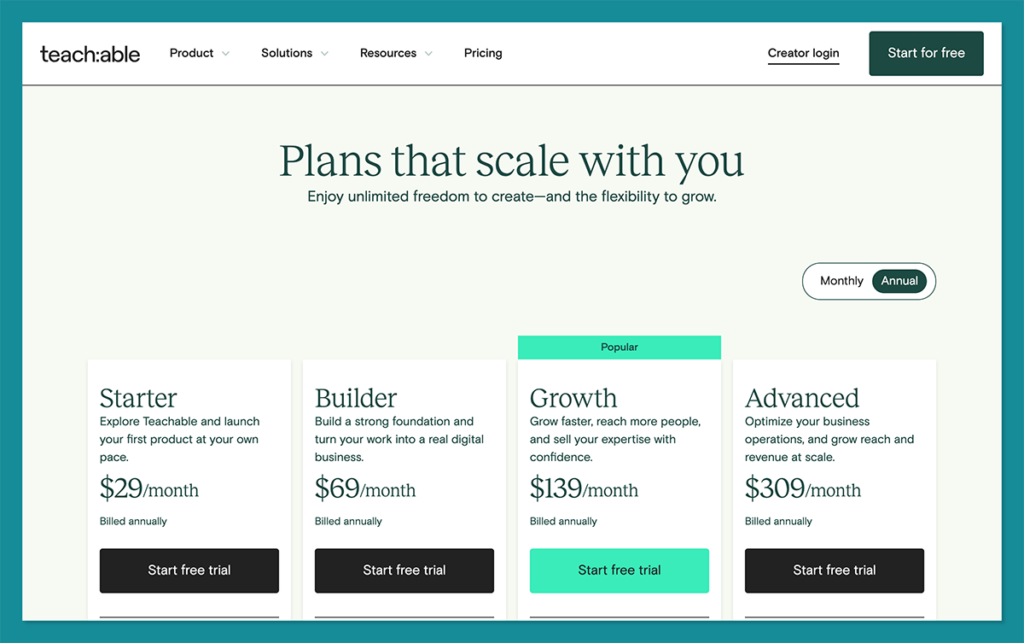
Teachable and Graphy offer tiered plans, but their pricing models cater to different types of creators. Teachable shines with its free plan and transparent pricing. Graphy, while not publicly priced in full, includes more built-in features that would cost extra on Teachable.
Teachable Pricing
| Plan | Price | Transaction Fees |
|---|---|---|
| Free | $0/month | $1 + 10% |
| Basic | $39/month | 5% |
| Pro | $119/month | 0% |
| Business | $199/month+ | 0% |
- Free plan is perfect for testing the waters
- Basic includes custom domain and email marketing
- Pro removes transaction fees and unlocks advanced features
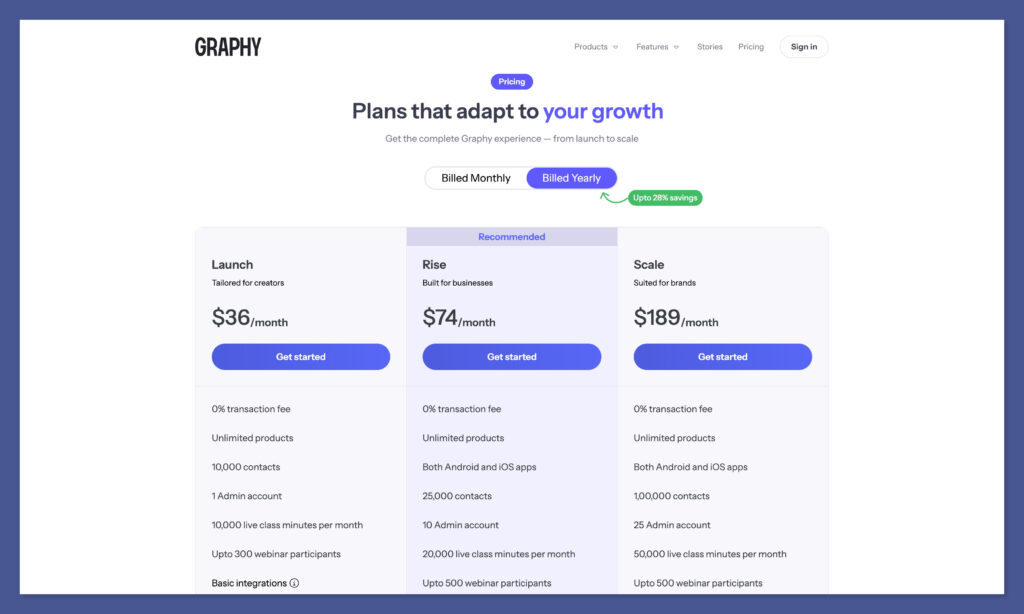
Graphy Pricing (Estimated)
| Plan Type | Monthly Price | Transaction Fees | White-Label App |
|---|---|---|---|
| Starter | ~$49/month | 0% | Included |
| Growth | ~$99/month | 0% | Included |
| Enterprise/Custom | Varies | 0% | Included |
- Plans include everything: courses, webinars, memberships, and apps
- You won’t find hidden upgrade costs or fees
If you’re on a tight budget and want to minimise your upfront investment, Teachable is easier to work with. But once you start layering on tools for webinars, affiliates, or communities, you’ll likely pay more overall on Teachable compared to Graphy’s all-in-one pricing.
Bottom line: If you’re brand new, Teachable’s free and Basic plans are a great place to start. But if you’re building a real business with multiple revenue streams, Graphy gives you more value long term.
2. Best for Selling Products: Graphy Offers More Flexibility
The Winner: Graphy
Among all online course platforms I tested, Graphy stood out with its ability to sell memberships, host live webinars, and run communities — all within one dashboard.
Both platforms let you sell digital products, but Graphy is more versatile. It combines course hosting with memberships, coaching, and built-in webinars. Teachable, while reliable, lacks some of these advanced tools unless you integrate third-party apps.
Sales Features Comparison
| Feature | Teachable | Graphy |
|---|---|---|
| Online Courses | ✅ Yes | ✅ Yes |
| Digital Downloads | ✅ Yes | ✅ Yes |
| Coaching Sessions | ✅ Yes | ✅ Yes |
| Webinars | ❌ No | ✅ Built-in |
| Membership Tiers | ❌ Limited | ✅ Advanced |
| Community Access | ❌ Comments only | ✅ Social-style feed |
| Subscriptions & Bundles | ✅ Yes | ✅ Yes |
Graphy gives you all of the above in one platform, with no need for Zapier or extra costs.
Teachable works best if you’re focused solely on course sales or one-on-one coaching.
Graphy is ideal for creators and brands who want to run a digital product business with multiple offerings and community features.
Even if you’re not planning on using community or memberships immediately, having those tools built in from the start makes it easier to evolve your business without migrating platforms later.
3. Best for Customisation: Graphy Gives You More Control
The Winner: Graphy
Among all online course platforms I tested, Graphy stood out with its ability to sell memberships, host live webinars, and run communities — all within one dashboard.
Both platforms let you sell digital products, but Graphy is more versatile. It combines course hosting with memberships, coaching, and built-in webinars. Teachable, while reliable, lacks some of these advanced tools unless you integrate third-party apps.
Branding Features
| Custom Feature | Teachable | Graphy |
|---|---|---|
| Custom Domain | ✅ Yes | ✅ Yes |
| Remove Platform Branding | ❌ Pro+ Plans | ✅ All plans |
| Branded Mobile App | ❌ No | ✅ Yes |
| Checkout Customisation | ❌ Limited | ✅ Full |
| Language & Currency Support | ✅ Yes | ✅ Yes |
Graphy supports white-label mobile apps – branded with your name, icon, and app store listing. Teachable does offer an app, but it’s Teachable-branded and limited in functionality.

If you care about building a recognisable, standalone brand experience, Graphy is the clear winner.
4. Best for Mobile: Graphy Wins with Branded Apps
The Winner: Graphy
Graphy is one of the few platforms that includes a fully branded mobile app as part of its package. Teachable doesn’t offer that – unless you’re on an expensive enterprise tier.
With mobile learning growing fast, having your own app isn’t just a nice-to-have anymore – it’s a huge advantage for engagement and retention.
Mobile App Comparison
| Feature | Teachable | Graphy |
|---|---|---|
| Mobile App Access | ✅ Yes (Generic) | ✅ Yes (Branded) |
| Push Notifications | ❌ No | ✅ Yes |
| App Store Listing | ❌ Teachable App | ✅ Your App Name |
If you want your learners to download your app from the App Store, not someone else’s — Graphy is the only real option.
Mobile apps also allow you to reach learners where they spend most of their time. Push notifications, app-only content, and improved re-engagement can lead to higher retention and more recurring revenue — something Teachable doesn’t offer without heavy add-ons or third-party solutions.
5. Best for Affiliate Marketing: Graphy Offers More Tools
The Winner: Graphy
Both platforms support affiliate marketing, but Graphy gives you more control, automation, and analytics.
Teachable includes a basic affiliate system on the Pro plan and above, but Graphy’s affiliate dashboard is stronger and available on most plans.
Affiliate Features
| Feature | Teachable | Graphy |
|---|---|---|
| Custom Commission Rates | ✅ Yes | ✅ Yes |
| Affiliate Portal | ❌ Limited | ✅ Yes |
| Tracking and Reporting | ✅ Basic | ✅ Advanced |
| Approval System | ✅ Yes | ✅ Yes |
| Email Notifications | ❌ No | ✅ Yes |
If affiliates are a key part of your sales strategy, Graphy gives you more tools to manage and grow that channel effectively.
6. Best for Ease of Use: Teachable is Easier to Start With
The Winner: Teachable
Teachable is one of the most user-friendly platforms I’ve tested. The onboarding is clean, the interface is intuitive, and it takes minutes to publish your first course.
Graphy, on the other hand, packs in more features – which makes it more powerful but also more complex.
Onboarding and UX
| Factor | Teachable | Graphy |
|---|---|---|
| Setup Time | ~10 mins | ~45 mins |
| Learning Curve | Very Low | Moderate |
| UI/Navigation | Clean and simple | Feature-dense |
| Best For | Beginners | Intermediate+ users |
If you’re just getting started or want something that “just works,” Teachable is easier. If you’re comfortable learning new software or want more control, Graphy is worth the time investment.
7. Best for Support: Graphy Is More Personalised
The Winner: Graphy
While both platforms offer strong support, Graphy offers faster and more personalised help, especially when onboarding.
Support Options
| Support Channel | Teachable | Graphy |
|---|---|---|
| Help Center | ✅ Yes | ✅ Yes |
| Live Chat | ❌ No | ✅ Yes |
| Email Support | ✅ Yes | ✅ Yes |
| 1-on-1 Onboarding | ❌ Limited | ✅ Yes |
| Community Forum | ✅ Yes | ❌ No |
Teachable’s support is reliable but can feel a bit hands-off unless you’re on a Pro or Business plan. Graphy offers dedicated onboarding and chat, which is especially helpful for setting up memberships, apps, or automation.
8. Best Alternatives to Teachable and Graphy
The Winner: Depends on Your Business Goals
While Teachable and Graphy are two of the most talked-about online course platforms, they’re not your only options. If you’re looking for more control, a different feature set, or a platform better suited for internal training or local audiences, there are solid alternatives available.
Below are four noteworthy alternatives to consider in 2025, each with a different strength depending on your needs as a course creator or brand.
1. Thinkific – Best for Customisation and Simplicity
Thinkific is a popular alternative to Teachable. It stands out for its ease of use and greater design control. You can build branded websites, offer various course formats, and use their drag-and-drop builder to customise your layout without touching code.
| Feature | Thinkific |
|---|---|
| Free Plan | Yes |
| Course Builder | Drag-and-drop |
| Mobile App | No native app |
| Community Features | Available via Thinkific Communities |
| Payment Gateways | Stripe, PayPal |
| Branded Site & Domain | Yes |
Best for:
Creators who want an easy-to-use platform with more layout flexibility than Teachable and don’t need mobile-first tools.
2. Learnyst – Best for Indian Educators and Coaching Institutes
Learnyst is purpose-built for the Indian education market, with strong localisation features. It offers secure video hosting, native mobile apps, test prep tools, and built-in support for local payment gateways like Razorpay and PayU.
| Feature | Learnyst |
|---|---|
| White-Label Mobile App | Included on most plans |
| Test & Exam Builder | Yes |
| DRM & Video Security | Yes |
| Payment Gateways | Razorpay, Instamojo, PayU |
| Language & Currency Localisation | Yes |
Best for:
Institutions, coaching centres, or solo educators in India who want secure content delivery and branded learning apps.
3. Acadle – Best for Internal Training and Team Learning
Acadle is a learning management system (LMS) tailored more for internal corporate training, onboarding, and customer education. It’s not ideal for creators selling to the public, but it’s highly effective for businesses building in-house academies.
| Feature | Acadle |
|---|---|
| Custom Domain | Yes |
| User Management | Advanced roles & permissions |
| White-Label Portal | Included |
| App Integrations | Zapier, HubSpot, Slack, more |
| Best Use Case | Internal training, client onboarding |
Best for:
Startups and businesses that want to educate teams, partners, or clients in a controlled environment with progress tracking.
Final Verdict: Teachable for Simplicity, Graphy for Scale
| Use Case | Best Platform |
|---|---|
| Getting started with one course | Teachable |
| Building a brand with your own app | Graphy |
| Monetising community & webinars | Graphy |
| Selling simple digital products | Teachable |
| Managing affiliates & members | Graphy |
Teachable is best for creators who want a straightforward course platform with minimal setup.
Graphy is best for those ready to build a more complete, branded digital business with deeper engagement and monetisation tools.
Try both – but make your decision based on where you want your business to be in 6–12 months.


Comments 0 Responses