


In today’s Wave Accounting software review, we’re going to be exploring all of the key features and capabilities of a top solution for business accounting. It’s no secret that keeping track of business finances can be a complex process. In the average company, there are endless invoices, quotes, and ingoing and outgoing payments to assess.
Wave built its reputation on being free, and in January 2024 it split into a free Starter plan and a paid Pro plan, moving several features that small businesses relied on behind the paywall. This review covers what is still free on Starter, what now costs money on Pro, and who should look elsewhere instead.
Our Verdict
Wave still earns its place as the strongest free starting point for freelancers and micro businesses that need professional invoicing and clean double-entry bookkeeping without paying a monthly subscription. The interface is genuinely approachable for people with no accounting background, and the Starter plan keeps unlimited invoices, estimates and bookkeeping records at $0. At the same time, Wave has never been very scalable next to QuickBooks, Xero and FreshBooks, and payment processing and payroll remain limited by location. Its advisory services are there if you want a human to handle the books, but they add a separate monthly cost.
The shape of the deal changed in January 2024. Starter remains free and still includes unlimited invoicing and real double-entry accounting, but automatic bank feeds, OCR receipt scanning, multi-user access and live chat or email support all sit on Pro at $19 a month, or $190 a year. That makes the decision unusually clear. If you enter transactions manually and work alone, free Wave still does the job; if you want the bank to feed itself, you are comparing $19 a month against Zoho Books' free plan and Xero's $25 entry tier. The paywall turns the old all-free assumption into a real choice for owners who process enough transactions to value automation.
We still recommend Wave for service-based owners who need simple books and invoice payments, and for Canadians who want a genuinely free local option. It is not the place to look for inventory management, deep app integrations or payroll outside the United States and Canada. If you outgrow manual entry or need a second set of hands on the books, QuickBooks and Xero are the usual upgrade paths. For ecommerce sellers, the real question is whether you can live without automatic bank feeds and extra users; if not, the free plan stops feeling free.
At the same time, if you want to optimize your company and improve your chances of success, you’ll need to be able to create regular reports highlighting the financial health of the organization. A solution like Wave accounting can help with all of this.
One of the things that makes Wave’s accounting tools so unique, is they’re designed for anyone. You don’t need to be the owner of a huge enterprise to see the benefits, nor do you need excessive technical knowledge. Wave ensures even the smallest business leaders can get the most out of their cash flow, with convenient tools and services.
Read on for our full Wave accounting review.
What is Wave Accounting Software?
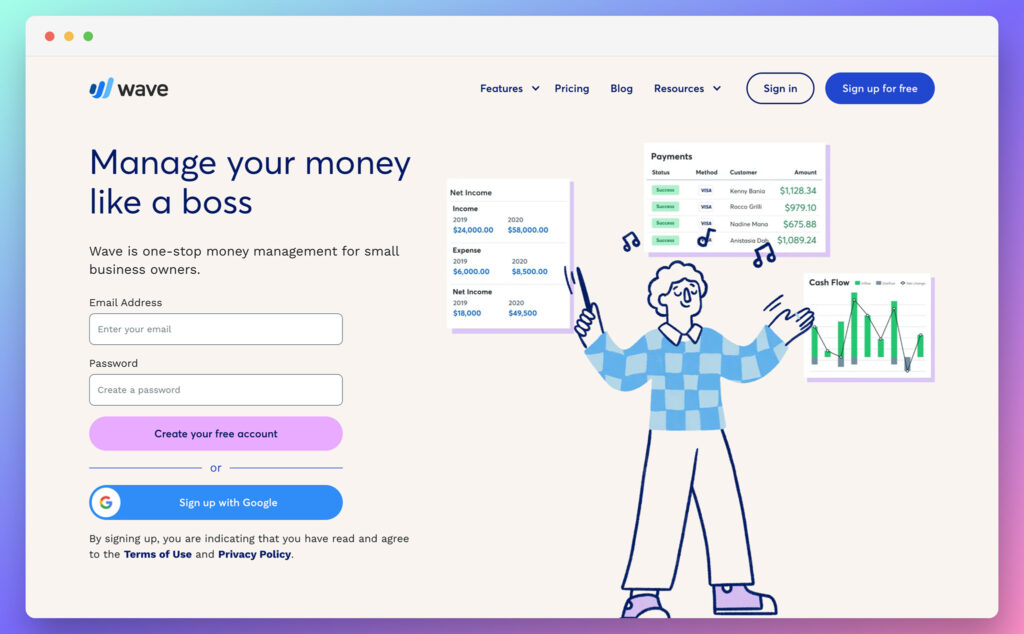
Wave, one of the leading vendors in the SaaS industry, produces state-of-the-art accounting software, targeted specifically at small businesses, micro companies, and freelancers. The finance management platform is approachable, easy-to-use, and relatively feature-rich too. Wave is owned by H&R Block, which acquired the company in 2019 and is now integrating Wave into a broader small business offering.
Even if you don’t have any accounting or bookkeeping experience, you can easily navigate the comprehensive platform to create invoices, cash flow reports, and more. What’s more, the in-built dashboards ensure you can keep a close eye on your financial situation at any time.
Wave’s accounting software is specially designed to appeal to smaller companies and service-based businesses. It supports everything from banking to payroll. Plus, there’s the option to access the support of advisors if you need extra guidance.
However, the platform still lacks the scalability and deep integrations growing companies need, and since January 2024 the features many small businesses assume are standard, automatic bank feeds and receipt scanning, require the paid Pro plan at $19 a month. That change means the free Starter tier asks owners to enter transactions manually, which is the real limitation to weigh before signing up.
Wave Accounting Software Pros and Cons
Wave remains a niche solution aimed at smaller companies. Its strengths and limitations in 2026 break down as follows, separating what is genuinely free from what now belongs to Pro.
Pros 👍
- The Starter tier is genuinely free and still includes unlimited invoices and unlimited bookkeeping entries.
- You get real double-entry accounting rather than a simplified income and expense ledger.
- The interface requires no accounting background, so first-time owners can start quickly.
- Unlimited invoices and estimates are included on every tier, not just the paid one.
- Profit and loss, balance sheet and cash flow reports are included in the free plan.
- Card, bank and Apple Pay payments are built in, and there is no monthly fee to accept them.
Cons 👎
- Automatic bank feeds moved behind Pro in January 2024, so the free plan means manual transaction entry.
- OCR receipt scanning is a Pro feature or requires a paid add-on on Starter.
- The free plan is effectively a single-user account, with only a couple of limited free roles for an accountant.
- Live chat and email support are Pro only, while free users get a help center and the Mave chatbot.
- Payments and payroll are restricted to the United States and Canada, which leaves other regions without Wave's full money tools.
- It does not scale well, with no inventory management and thin integrations compared with QuickBooks or Xero.
The Core Features
Wave’s accounting platform includes access to most of the core features small business owners, freelancers, and contractors will need to maintain good financial health. You can create custom invoices with unique payment terms, track bank statements, and create reports.
The solution remains easy to use, but unlimited collaborators are now a Pro feature rather than a standard feature for everyone, and the free Starter plan is effectively a single-user account with only a couple of limited free roles available for an accountant or bookkeeper and no general staff access at all.
Let’s take a closer look at each core feature:
Wave Accounting Invoicing
At the heart of the Wave Accounting platform is a set of exceptional invoicing features. The built-in invoicing software allows you to create professional-looking invoices with your own pricing, form fields, branding, and any other extra elements you like. The invoice templates are great, and the free accounting software allows you to make changes however you like. You can still create professional invoices on any plan, but custom invoice branding and the ability to remove Wave's own branding are Pro features, and invoices sent from the free Starter plan will keep Wave's branding attached.
You can set up recurring billing for repeat customers, so you can essentially run parts of your business on autopilot. Automated late payment reminders are now a Pro feature, so on the free Starter plan you will need to chase late customers manually instead of relying on Wave to send those overdue nudges for you. All of your payment information and invoices will automatically sync with the accounting software too.
Business leaders can access all of the information they need about their customers in one place, and it’s easy to track payments and communications with each client. You can invoice on the go with a free iOS and Android app, and receive instant notifications when an invoice is viewed, due or paid.
Plus, invoices can include a handy “Pay Now” button, which allows them to make payments using Apple Pay, secure bank connections, or credit card. Payments are processed within as little as one business day, and you can accept payments over the phone or in-person too.
Wave Payments
Wave makes it easy for customers to pay on their own terms, and processing fees are what actually cost most users money. There is no monthly fee to accept payments on either the Starter or Pro plan, so for a low-volume invoicer the processing fee is the entire cost of using Wave.
Credit card transactions (Visa, Mastercard) cost 2.9% plus $0.60 on Starter, while Pro waives the fixed $0.60 on the first ten transactions each month. American Express runs at 3.4% plus $0.60, with the same Pro waiver. Bank payments (ACH/EFT) are 1% per transaction, with a $1.00 minimum. All payments carry bank-grade security on a PCI Level-1 certified platform, and the “Pay Now” button supports cards, bank transfers and Apple Pay. In practice a $100 card payment costs you $3.50 on Starter, or $2.90 on Pro if it is one of your first ten, while the same $100 collected by bank transfer costs $1.00. The bank fee is a straight 1% with no fixed component, so it stays cheaper as invoice values rise.
Payout timing matters when you are waiting on cash, and the two rails differ. Card payments land in your account in 1 to 2 business days, while bank payments take anywhere from 1 to 7, so plan around that gap if you rely on ACH.
Wave Accounting Features
Of course, Wave also comes with plenty of features for standard accounting and financial management. The company will help you to prepare for tax season in no time. After you create your account, you’ll be able to access it anywhere. Plus, your data will be consistently backed up for peace of mind. Connecting an unlimited number of credit cards and bank accounts for automatic transaction import is a Pro feature; on the free Starter plan you enter transactions by hand or import statements manually.
On Pro, once you have linked a bank or card account, transactions appear in your bookkeeping automatically, and OCR receipt scanning, which reads a photographed receipt into a transaction, is also part of Pro, though you can buy it as a separate add-on on Starter for $11 a month. The easy-to-use dashboard also provides at-a-glance views of your financial health, so you can make better decisions for your future.
The accounting reports are easy to use, with options for profit and loss income statements, balance sheets, and cash flow. You can also create monthly and yearly comparisons.
Business owners using Wave don’t have to worry about security, as all connections are encrypted from start to finish. Wave’s servers are also housed using electronic and physical protection, and the company is PCI Level-1 certified.
As an added bonus, you’ll be able to leverage double-entry accounting capabilities. This means you can easily access the help of your accountant when using Wave. The user-friendly ecosystem ensures both you and your accountant can track everything in the same place.
Wave Accounting Payroll
Even small businesses have employees to pay from time to time. Fortunately, Wave makes managing employee payments simple and straightforward. You can pay independent contractors and employees alike, generating 1099 and W2 forms for tax requirements.
The Payroll software, like the rest of the tools on Wave, is connected directly to the rest of the Wave account ecosystem, to reduce the time you spend on bookkeeping. Wave’s payroll service can also automatically pay and file state and federal taxes in a range of different states.
There’s support for self-service pay stubs and tax forms, with user accounts for each of your employees. This means you can spend less time handling payments for your team members yourself. Users can also deposit payments quickly and easily into bank accounts with absolute security.
There’s even the option to leverage annual audits, so you can keep track of your payroll taxes, payments, and other factors.
Payroll costs $40 a month plus $6 per active employee or independent contractor. Wave unified US payroll pricing in April 2025, so the old split between tax-service states at $40 and self-service states at $20 no longer exists, and one price now covers tax payments and filings in all fifty states. US payroll also moved onto a CheckHQ-supported backend around May 2025. In Canada the equivalent runs at approximately $25 CAD a month plus $6 per employee, covering every province except Quebec. Payroll is available in the United States and Canada only.
Wave Accounting Advisors
Although Wave Accounting software does make it easier to manage your financial needs alone, there’s a good chance you’ll eventually need some extra help as your business starts to grow. That’s why the company also delivers personalized support from expert advisors.
You can leverage bookkeeping support, from professionals who can perform transaction categorization, account reconciliation and more on your behalf. Plus, you get monthly review calls built-in. There’s also a service for accountant and payroll coaching.
The coaching services allow you to access extra support when learning how to manage your own books, without the help of additional accountants.
What does that cost? Wave Advisors bookkeeping support is marketed as starting at $149 a month, but Wave's own terms of service list tiers that begin at $179 a month for under 50 transactions and climb past $629 a month once you cross 500, so confirm the tier and the price before you sign. The Canadian equivalent is marketed from $199 CAD a month. Accounting coaching is a $229 one-time fee, not an hourly rate, and includes one to three hours of live one-to-one coaching plus thirty days of follow-up email access.

Pricing
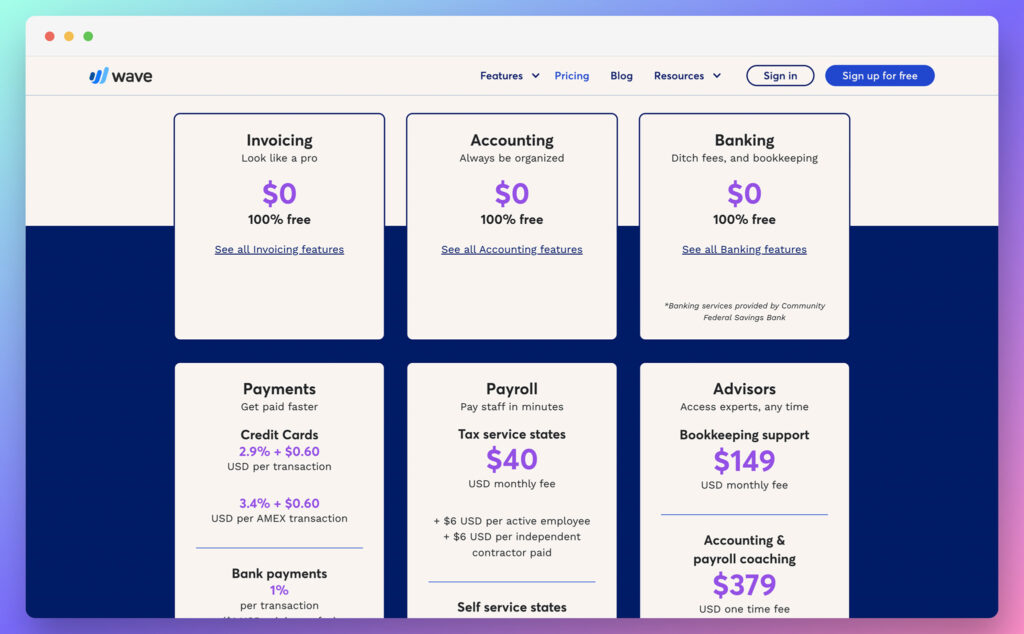
Wave was almost entirely free until January 2024, when it split into Starter and Pro. That change ended the all-free model and moved core features behind a paywall. Today, the pricing is a two-tier story.
Wave Starter costs $0 and gives you unlimited invoices, estimates, bills, and double-entry bookkeeping records, plus profit and loss, balance sheet, and cash flow reports. Pro is $19 a month, or $190 a year, with a promotional $9.50 a month for the first three months for new subscribers. Pro unlocks automatic bank feeds, receipt scanning, multi-user access, automated payment reminders, custom invoice branding, live chat and email support, and discounted payment processing.
Beyond the software plans, the other costs you will actually pay look like this:
- Payment processing: cards at 2.9% + $0.60 (AMEX 3.4% + $0.60), bank payments 1% with a $1.00 minimum. Pro waives the fixed $0.60 on the first ten transactions a month.
- Payroll: $40 a month base plus $6 per active employee or contractor, US and Canada only. Tax payments and filings are included in all 50 states at that one price.
- Wave Advisors bookkeeping: marketed from $149 a month, but the terms of service show tiers starting at $179 a month for under 50 transactions. Confirm the exact tier before you sign.
- Accounting coaching: $229 one-time fee for 1 to 3 hours of live coaching and 30 days of follow-up email access.
- Receipt scanning as a standalone add-on: $11 a month on Starter ($96 a year) or $8 a month on Pro ($72 a year). The add-on only makes sense if scanning is the single Pro feature you want, because the automatic bank feed cannot be bought separately at any price.
For a freelancer who invoices a handful of clients and enters transactions by hand, Wave Starter is still free in a way almost nothing else is. The moment you want the automatic bank feed, however, $19 a month puts Wave in the same conversation as tools that were always paid. If you process more than a few dozen transactions a month, Pro likely pays for itself in saved hours. And if you need multi-user access for a bookkeeper or accountant, Pro is the only option, because Starter limits you to a single user with limited free accountant roles.
Wave Starter vs Wave Pro: What the $19 Actually Buys
If you used Wave when everything was free, the only question is what moved and whether it is worth paying to get it back. Pro is not about new features; it is about giving back the automation and collaboration the free tier removed.
| Feature | Starter (free) | Pro ($19/mo) |
|---|---|---|
| Unlimited invoices, estimates, bills | Yes | Yes |
| Double-entry accounting | Yes | Yes |
| Profit and loss, balance sheet, cash flow reports | Yes | Yes |
| Automatic bank feed import | No | Yes |
| OCR receipt scanning | No (add-on available) | Yes |
| Multi-user and collaborator access | Limited to a single user | Yes |
| Automated late payment reminders | No | Yes |
| Custom invoice branding | No | Yes |
| Live chat and email support | No | Yes (Mon-Fri, 9am-4:45pm ET) |
| Card and bank payments | Yes (standard fees) | Yes (discounted first 10 card txns) |
The free plan genuinely still handles unlimited invoicing and the core reports, which is more than most free tiers offer. For a solo operator sending a few invoices a month and recording expenses by hand, Starter does the job without costing a cent.
The single biggest practical difference is the quiet one: manual transaction entry versus an automatic bank feed. If your business account sees a steady stream of transactions, typing each one in is slow and easy to get wrong, while the feed imports them for you. And if you were grandfathered onto the old free plan with bank feeds and collaborators, Wave migrated those remaining legacy accounts on 30 April 2026, so that access has already gone.
Pay for Pro if manual entry costs you more than $19 of time a month, if you need a bookkeeper in the file, or if you want your own branding on invoices instead of Wave's. Just do not expect round-the-clock help: Pro support runs Monday to Friday, 9:00am to 4:45pm Eastern.
Customer Support
Wave's support is tied directly to the tier you pay for. Starter users get self-service only, with access to the help center and Mave, Wave's chatbot assistant. There is no live human support on the free plan. Upgrading to Pro unlocks live chat and email support with a real person, Monday to Friday, 9:00am to 4:45pm Eastern. That is not 24/7 coverage, so anyone outside North American business hours will need to plan around it.
Customers who pay for payroll, payments or Advisors services get support attached to those products. There is also paid coaching, sold as a one-time $229 accounting coaching session that includes 1 to 3 hours of live one-to-one help and 30 days of follow-up email access. It is a useful way to get your books straight as tax season approaches, especially if you are not ready to hire a full-time bookkeeper.
Users regularly report that support is a persistent weak point, even on the paid tiers. If you need a quick answer, the Wave help center is thorough, but the absence of live chat for Starter users means you should be comfortable troubleshooting on your own before you sign up.
Who Wave Is Best For (and Who Should Skip It)
Use Wave if: you are a freelancer, sole trader, or micro business invoicing a manageable number of clients. You are in the US or Canada and want to accept card payments without a monthly fee. You have no accounting background but still want real double-entry books. You are happy entering transactions manually, or the $19 Pro plan costs less than the time you would spend on data entry. Wave's free Starter plan gives you unlimited invoices and core reports, and the Pro plan adds automation without a huge price jump. If you need payroll, the unified $40 a month plus $6 per employee pricing covers tax payments and filings in all 50 states.
Skip Wave if: you carry inventory, because there is no inventory management at all. You need deep integrations with ecommerce, CRM, or project tools; the Zapier connection reaches over 1,000 apps but is not a substitute for native ones. You are outside the US and Canada, where payments and payroll are both unavailable and the free plan loses much of its point. You need more than one real user, since Starter limits you to a single account with a couple of limited accountant roles. You are growing fast enough that you will migrate within a year, in which case starting on the tool you will end up with costs less than moving later. And if you relied on Wave Money for a free business bank account, that product no longer appears in Wave's lineup. For ecommerce businesses, the whole setup is a mismatch; see our best accounting software for Shopify guide instead. If you land in the skip column, the alternatives below give you a clearer path.
The Best Wave Accounting Alternatives in 2026
Since Wave moved bank feeds and receipt scanning behind a paywall, the useful comparison is no longer “free versus paid” but “what does $19 buy you elsewhere.” The table below lines up the most common alternatives so you can see which one fits your needs.
| Tool | Entry price | Free tier | Card fee | Payroll | Best for |
|---|---|---|---|---|---|
| Wave | $0 Starter / $19 Pro | Yes (limited) | 2.9% + $0.60 | $40/mo + $6/pp | Solo US/CA users |
| Zoho Books | $0 | Yes (<$50K rev) | Varies by processor | Add-on | Free plan with bank feeds |
| Zoho Invoice | $0 | Yes (no cap) | Varies by processor | None | Invoicing only |
| QuickBooks Online | $38/mo | No | 2.4%-3.5% | ~$45/mo + $6/pp | Full ecosystem |
| Xero | $25/mo | No | 2.9% + $0.30 | Via Gusto $36/mo | International operations |
| FreshBooks | $23/mo | No | 2.9% + $0.30 | $40/mo + $6/user | Service businesses |
Zoho Books
Zoho Books' free plan covers businesses under $50,000 in annual revenue and allows up to 1,000 invoices. Crucially, it includes bank reconciliation, the exact feature Wave now charges for, plus expense tracking and project billing, which makes it the closest thing on the market to old free Wave. The catch is a hard revenue cliff: once you cross $50,000 you have to move onto a paid tier, so it suits a steady business better than one about to scale. Pick it if you want the old Wave free experience with automated bank feeds.
Zoho Invoice
Zoho Invoice is free with no revenue cap at all, capped instead at 500 invoices and 2 users. It does invoicing only, with no bookkeeping ledger behind it, so you will still need somewhere else to keep your accounts if you want proper financial statements. For a freelancer whose entire accounting need is sending polished invoices and tracking who has paid, it is the simplest free option here, and unlike Zoho Books it will not push you onto a paid plan as your revenue grows. Pick it if you only need invoicing and nothing else.
QuickBooks Online
QuickBooks Online starts at $38 a month, with a $19 promotional rate often shown, and has no free tier. It offers the deepest ecosystem of integrations, including Shopify and PayPal, plus the inventory management and advanced reporting Wave has never had, which makes it the obvious upgrade path for a growing business. Card fees run from 2.4% to 3.5%, and payroll starts at around $45 a month plus $6 per employee. However, August 2026 price rises pushed Plus to $140 a month and Advanced to $340 a month, so the gap from Wave is now substantial. Pick it if you need every integration and are ready to pay for it. See our QuickBooks pricing breakdown.
Xero
Xero‘s $25 a month Early plan includes bank reconciliation and multi-currency support, but caps you at 20 invoices and 5 bills a month, which is tight for anyone billing weekly. There is no free tier. It is strongest outside the US, with native payroll in the UK, Australia, and New Zealand, while US payroll now runs through Gusto from August 2026 at $36 a month plus $6 per employee. Stripe card fees sit at 2.9% plus $0.30. Pick it if you operate internationally and can live with the invoice limits. Read our Xero review for more.
FreshBooks
FreshBooks starts at $23 a month for the Lite plan, which is single user by default and caps you at 5 clients. There is no free tier, only a trial. It is built for service businesses that live inside invoices, with time tracking, project management, and a client portal included rather than bolted on. Card fees are 2.9% plus $0.30, AMEX runs at 3.5%, and payroll is a $40 a month add-on plus $6 per user. Pick it if you invoice for time and need a polished client portal. Our FreshBooks review covers the details.
For a full comparison across all these tools, see our best accounting software for ecommerce guide.
Wave Accounting Review: Conclusion
Wave is still the most capable genuinely free accounting tool for a solo operator in the US or Canada. It is no longer the automatic answer it was before January 2024, when the all-free model ended, and the right choice now depends on which side of the paywall your must-have feature sits on.
Stay on Starter if you invoice a few clients and do not mind manual transaction entry. Pay for Pro if the bank feed and receipt scanning save you more than $19 of time a month, and take the $190 annual price if you are confident you will stay the year. Look at Zoho Books' free plan first if the reason you came to Wave was that it was free, because that plan includes the bank reconciliation Wave now charges for. If you are already outgrowing Wave, QuickBooks is the obvious upgrade path, while Xero suits international operations and FreshBooks suits service businesses billing for time. If you are outside the US and Canada, remember that payments and payroll are simply not open to you. Your next step: go back to the Starter versus Pro table, find the feature you rely on most, and see which plan it lives on.
Wave Accounting Review: Frequently Asked Questions
Is Wave Accounting still free?
Partly. Wave's Starter plan is free and includes unlimited invoicing, estimates, bills and double-entry bookkeeping. In January 2024, though, Wave moved automatic bank feeds, receipt scanning, multi-user access and live support onto the paid Pro plan. You can still run a business on the free tier, but you will be entering transactions manually.
How much does Wave Pro cost?
$19 per month or $190 per year. New subscribers can get a promotional rate of $9.50 per month for the first three months. Pro adds bank feeds via Plaid, OCR receipt scanning, unlimited collaborators, automated late payment reminders, custom branding and live support.
What happened to Wave Money?
Wave's free business bank account is no longer part of the lineup. It has dropped off Wave's own site and pricing page as the company shifted focus away from banking toward small business workflow tools, and a live help center article on closing a Wave Money account points to a wind-down. There is no public shutdown date to point to, so we are not going to state one. If you still hold a Wave Money account, contact Wave directly for guidance.
Is Wave better than QuickBooks?
It depends on your needs. Wave is far cheaper and easier to learn, and QuickBooks has no free plan at all, starting at $38 a month. It does offer a much deeper ecosystem of integrations, inventory management and advanced reporting. If you are a solo operator who wants free or low-cost accounting, Wave wins. If you carry stock or expect to grow quickly, QuickBooks is the better choice. See the alternatives table above for a direct comparison.
Does Wave work outside the US and Canada?
Accounting and invoicing work in many countries, but payments and payroll are restricted. Wave's payment processing and payroll services are available only in the US and Canada. Without those features, much of Wave's appeal disappears. If you are outside those regions, you can still use the free Starter plan, but you will need a separate payment processor to get paid.
Does Wave do receipt scanning?
Yes, but only on Pro or as a paid add-on. OCR receipt scanning is included in the $19 Pro plan, or you can add it to the free Starter plan for $11 a month, which works out at $96 a year. On Pro the same add-on costs $8 a month, or $72 a year. If receipts are the only Pro feature you want, the Starter add-on is cheaper than upgrading, but if you also want the automatic bank feed, you need Pro anyway.


Hey Joe,
Thanks for this helpful article! I do have a question before signing up with Wave accounting.
Can you use for your Etsy shop accounting without linking to your bank account, credit card, and PayPal? Even if I have to enter things manually for sales, and expenses. I am ok with that.
Thank you,
Liz Graham