

If you’re trying to start or scale a print-on-demand (POD) business, you’re probably deciding between Printify and Redbubble.
Both platforms let you sell custom-designed products, but they work very differently.
- Printify gives you more control—you choose suppliers, set your own prices, and sell on your own store.
- Redbubble is a marketplace—you upload your designs, and they handle the rest.
So, which one is better? Let’s break it down.
While Printify gives you all the tools you need to create a POD business using your own ecommerce website, as well as various online marketplaces, Redbubble is a dedicated online market designed specifically for creators.
Here’s everything you need to know about Redbubble and Printify to determine which solution is best for your company.
Quick Verdict, Pros and Cons
If you want to build a brand, control pricing, and maximize profits, Printify is the better choice. It lets you sell on Shopify, Etsy, WooCommerce, and more, giving you full control over your store and customer relationships. You’ll need to handle marketing and traffic, but the higher profit margins and branding opportunities make it worth it.
If you’re an artist looking for passive income without worrying about marketing, Redbubble is the easier option. It has a built-in audience, but profit margins are lower, and you don’t own your customer data or branding.
👉 Best for entrepreneurs? Printify.
👉 Best for passive income? Redbubble.
Printify Pros & Cons
Pros 👍
- Excellent range of custom products to choose from, with stickers, apparel and accessories
- Easy-to-use mockup generator for design customization
- Various shipping and fulfillment options to choose from
- Easy integration with a range of marketplaces and ecommerce store builders
- High-quality POD products made with sustainable materials
- Variable profit margins, as you can set your own price for items
- Great range of branding options.
Cons 👎
- Printing partner quality can vary
- Requires the creation of your own website
- Some products can be quite expensive
- Delivery times can be lengthy in some areas
Redbubble Pros & Cons
Pros 👍
- Easy to access and use for beginners in the commerce world
- No monthly costs or set up fees
- Various product options from leggings to art prints
- Customizable markup options for profit margins
- Built-in analytics and insights to increase sales
- Low base price for many of the available products
- Excellent global distribution network
- Access to a large existing audience
Cons 👎
- No integrations with existing online tools
- Limited branding options for products and packaging
- Slow payouts when it comes to receiving earnings
- Lots of competition on the platform
- Fewer design tools to work with
Key Differences at a Glance
| Feature | Printify | Redbubble |
|---|---|---|
| Business Model | POD supplier network | POD marketplace |
| Selling Platform | Your own store (Shopify, Etsy, etc.) | Redbubble’s marketplace |
| Product Selection | 800+ products | ~70 products |
| Profit Margins | Higher (you set pricing) | Lower (fixed base prices + Redbubble’s cut) |
| Branding | Full branding control | No branding control |
| Traffic & Sales | You drive your own traffic | Redbubble brings traffic but high competition |
| Payouts | Immediate via your store | Monthly (must hit $20+) |
| Best For | Entrepreneurs who want control | Artists who want passive income |
What is Printify?

First founded in 2015, Printify is a print-on-demand and dropshipping platform, designed to help ecommerce retailers develop and sell customized products.
Ready to integrate with a host of website builders and marketplaces, such as Shopify, Amazon, eBay, and Etsy, Printify helps companies automate the POD sales model.
The solution includes a mockup generator for product design, direct connections to global fulfillment companies, and tools for managing orders and inventory.
Printify handles the whole order fulfillment process on behalf of companies, and offers a wide selection of white label product options to choose from.
What is Redbubble?
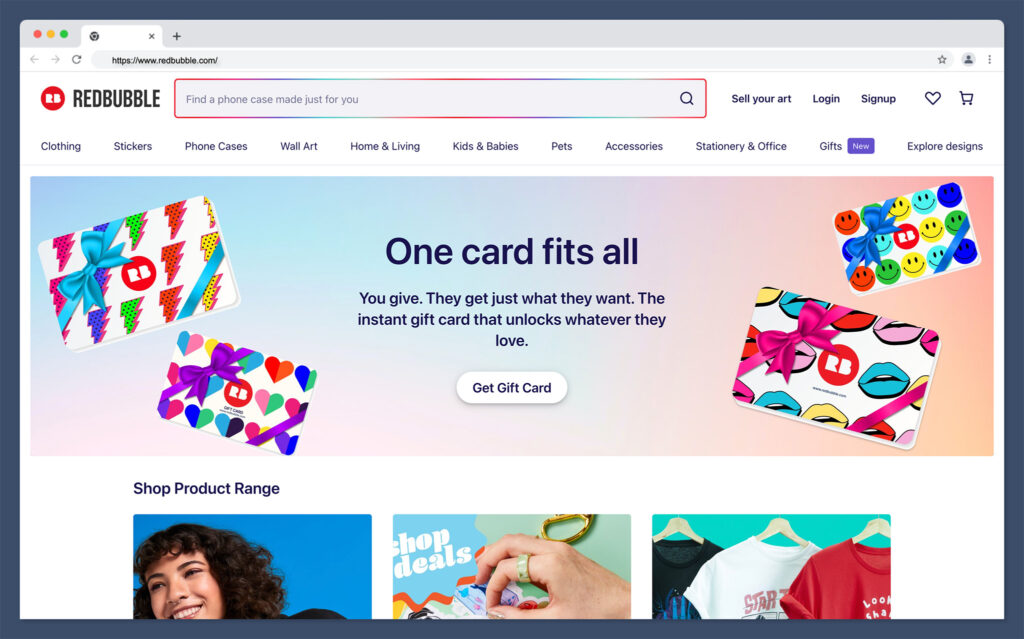
First developed in 2006, long before Printify, Redbubble is a print on demand marketplace. Similar to Printify, Redbubble handles product creation and fulfillment on behalf of vendors, reducing the amount of time you need to spend on logistics and inventory management.
Rather than integrating with existing websites, Redbubble acts as a unique platform where companies can connect with customers from an existing global audience.
Geared towards designers, Redbubble gives creators an easy way to monetize their designs without having to invest in the full website building process.
The platform has its own mockup generator, tools for marketing and sales, and even useful templates to use for product design.
How Does Printify Work?
Printify is a print-on-demand platform that connects you with a network of print providers worldwide. Unlike Redbubble, Printify doesn’t operate as a marketplace—you’re responsible for selling your products through your own store on platforms like Shopify, Etsy, WooCommerce, eBay, or Wix. Printify handles product fulfillment, printing, and shipping, but you control pricing, branding, and customer experience.
If you want to build a long-term brand and maximize profit margins, Printify is a better option than Redbubble. However, since Printify doesn’t have a built-in audience, you’ll need to drive your own traffic through SEO, ads, or social media.
Step-by-Step: How to Sell with Printify
1. Create a Printify Account
Signing up for Printify is free. You just need to enter your email, set up a password, and log in to the dashboard.
Unlike Redbubble, there’s no marketplace—Printify is strictly a supplier network that integrates with your store.
2. Connect Your Online Store

Printify works with several eCommerce platforms, including:
- Shopify (best for scaling a brand).
- Etsy (great for unique, artistic products).
- WooCommerce (for WordPress users).
- eBay (for marketplace selling).
- Wix (for beginner-friendly websites).
Once you link your store, Printify will automatically sync your products. When a customer places an order, Printify forwards it to the print provider for fulfillment.
3. Choose a Print Provider & Products

Printify has over 800+ products from different print providers worldwide. You can choose from:
- Apparel: T-shirts, hoodies, leggings, sweatshirts.
- Accessories: Phone cases, tote bags, backpacks.
- Home Decor: Pillows, blankets, wall art.
- Drinkware: Mugs, tumblers, water bottles.
Since Printify works with multiple print providers, product quality varies. It’s highly recommended that you order samples before listing products in your store.
4. Upload Your Design & Customize Listings

After selecting a product, you can upload your design and adjust its placement. Printify also allows you to:
- Customize product titles and descriptions for SEO.
- Set your pricing and profit margins based on your store’s audience.
- Offer multiple variations (sizes, colors, etc.).
Once you’ve finalized your product, you can publish it directly to your store with one click.
5. Sell & Market Your Products
Unlike Redbubble, Printify doesn’t have built-in traffic—you’re responsible for driving customers to your store. The best ways to get sales include:
- SEO (Search Engine Optimization): Rank your products on Google.
- Social Media Marketing: Promote your store on Instagram, Pinterest, and TikTok.
- Paid Ads: Run Facebook or Google Ads for instant traffic.
- Email Marketing: Build an email list and sell to repeat customers.
The biggest advantage of Printify is that you’re not competing against thousands of other sellers on the same platform like you are on Redbubble. If you can generate traffic, your profit potential is much higher.
6. Printify Handles Fulfillment & Shipping
Once a customer places an order on your store, Printify automatically:
- Processes the order and forwards it to the selected print provider.
- Prints and packages the product (with no Printify branding).
- Ships the order directly to the customer under your store’s name.
Since shipping times depend on the print provider, it’s a good idea to choose fulfillment centers close to your main audience (e.g., a U.S. provider for U.S. customers).
7. Get Paid Immediately
One of the biggest benefits of Printify is instant payouts. Since you sell through your own store, you get paid directly via Shopify Payments, PayPal, Stripe, or Etsy Payments—no waiting for monthly payouts like on Redbubble.
How Does Redbubble Work?
Redbubble is a print-on-demand marketplace, meaning you upload your designs, and Redbubble handles everything else—printing, shipping, and customer service.
You don’t need to worry about managing inventory, fulfilling orders, or even marketing (to some extent). Your main job is to create unique designs that stand out in a competitive marketplace.
Step-by-Step: How to Sell on Redbubble
1. Create an Account
Signing up on Redbubble is free and takes just a few minutes. You’ll need to enter basic details like your email, display name, and password. Once signed up, you can start uploading designs immediately.
2. Upload Your Designs
Redbubble allows you to upload artwork and apply it to multiple products automatically. After uploading, you can:
- Adjust your design’s placement on different products.
- Enable or disable certain products (e.g., only sell stickers and t-shirts, but not phone cases).
- Add titles, descriptions, and relevant tags to help customers find your designs.
Redbubble supports transparent PNG files, which work best for products like t-shirts and stickers.
3. Set Your Prices
Redbubble has fixed base prices for each product, but you can add a markup percentage to set your final selling price.
For example, if a t-shirt has a base price of $15 and you set a 50% markup, the customer will pay $22.50, and you’ll earn $7.50 in profit.
Since Redbubble’s base prices are relatively high, marking up too much can make your products expensive, reducing sales. Many sellers experiment with pricing to find the best balance between profit and affordability.
4. Redbubble Handles Production & Shipping
Once a customer buys your design, Redbubble automatically:
- Processes the payment.
- Prints the design on the selected product.
- Ships the order directly to the customer.
- Handles any customer service or returns.
You don’t need to touch the product or deal with customers—Redbubble takes care of everything.
5. Get Paid
Redbubble pays you through PayPal or direct deposit (for certain countries) once per month, but only if you’ve earned at least $20 in profits. If you don’t meet the threshold, your earnings roll over to the next month.
Control Over Products & Branding
Printify: Full control over your business
With Printify, you own your store and have full control over branding, pricing, and customer experience. You can sell through Shopify, Etsy, WooCommerce, eBay, and more, which means you’re building a real business with repeat customers.
Since Printify is just the supplier, your customers will see your brand name on invoices and packaging, not Printify’s.
You also have the flexibility to create custom branding elements like personalized thank-you notes, branded packaging, and unique product listings. If you want to build a recognizable brand that people come back to, Printify is the better option.
Redbubble: No control over branding
Redbubble is a marketplace, which means customers are shopping on Redbubble’s website, not yours. You don’t get to customize invoices, packaging, or the checkout process.
Redbubble handles everything under their branding, so buyers may not even realize they’re purchasing from you.
Since you don’t control customer interactions, it’s harder to build a loyal customer base. Many sellers on Redbubble struggle with repeat buyers because customers associate their purchases with Redbubble, not the individual artist.
📌 Winner: Printify (if branding and control matter to you).
Printify vs Redbubble: Ease of Use
Printify and Redbubble are both ideal for retailers and artists who want to access a relatively low barrier to entry when monetizing their designs.

With both of these tools, there are no minimum order quantity requirements, so you can avoid worrying about inventory management and high up-front payments.
Additionally, both tools will handle fulfillment on your behalf, dealing with everything from packaging products, to making sure they reach customers as quickly as possible.
Redbubble and Printify also come with tools included to help you make the most of your designs. You can leverage a mockup generator to see what your products will look like in advance, and order samples of each item at a discounted rate.
However, while both tools are extremely straightforward to use, Redbubble might be simpler for those who consider themselves to be true beginners in the ecommerce space.
With Printify, you’re still responsible for establishing your online presence with an online store or marketplace storefront.
You also need to handle all of the work of marketing your items yourself, ensuring you attract enough customers to your store to make a profit.
With Redbubble, you may still need to invest in external marketing strategies, but your products get an instant visibility boost, because they’re listed on a popular marketplace straight away.
There are no store design concerns to worry about. You simply make a dedicated listing for each item you want to sell. Additionally, Redbubble even offers tools and guides to help you increase your sales.
That being said, Redbubble doesn’t give you as many opportunities to develop your own brand identity as you’ll get on Printify.
Since you’re not developing your own online store, you can’t invest in developing a more significant online presence.
However, you can still use SEO in your listings to increase visibility, and leverage tools for marketing, like email and social media separately.
📌 Winner: Printify
Printify vs Redbubble: Product Designs and Quality
Regardless of which niche you plan on targeting with your print on demand business, ensuring you can produce high-quality products is essential.
The better the print options and the quality of the overall products you produce, the more likely you are to earn loyal customers.
The good news is that both Printify and Redbubble partner with a variety of companies and fulfillment centers around the world, to ensure you’ll have a selection of great products to choose from.
There are various types of printing technology to explore, and a huge range of items available on each platform, from apparel to accessories and home décor.
The bad news is that because both Printify and Redbubble use partners for printing, the quality of your products can vary depending on a number of factors.
While both of these platforms do their best to source the help of high-quality, sustainable manufacturers, there’s always a risk that the quality of your items might not live up to expectations.
While the majority of companies using both Printify and Redbubble say the print quality is good, and the materials used are excellent, it’s worth doing your due diligence when using either of these platforms.
Ordering samples of your products before you list them on your website can be a good way to ensure you’re meeting the expectations of your customers.
Pricing
Costs are another important factor to consider when choosing the right print on demand solution for your company.
The print on demand business model often means that prices can vary drastically depending on the items you choose to produce, your customization options, and shipping.
Both Printify and Redbubble offer free plans, which allow you to get started with the service without paying anything.
However, with Printify, you will need to pay for the base cost of the products you produce, as well as any customization fees after a customer places an order.
With Redbubble, you don’t pay anything for the initial item, but you only earn a portion of the profits.
Printify Pricing

Alongside its free plan, Printify offers two paid package options, available either on a pay monthly basis, or an annual basis with a 14% discount. Options include:
- Premium: $24.99 per month with support for 10 stores per account, unlimited product designs, up to 20% discounts on all products, and order management with Printify Connect.
- Enterprise: Custom pricing for merchants with more than 10,000 orders per day, with unlimited stores per account, unlimited product designs, and all the features of Premium.
All plans include access to the Printify mockup generator, integrations with ecommerce platforms, manual and automated order creation, help centers, and custom order imports.
Redbubble Pricing
Redbubble doesn’t have any paid plan options. Instead, it simply pays designers a commission for every product they sell.
Margins usually start at around 20% of the full product price, but it is possible to raise or lower the price of your products depending on your needs.
It’s worth checking the current price for each item you want to sell before adding it to your store, as the base cost can vary, which influences your total profit margins.
Many sellers struggle to make decent profits because they either:
- Raise prices too high (which reduces sales), or
- Keep prices competitive (but earn very little per sale).
📌 Winner: Printify (better margins, more pricing flexibility).
Integrations
As relatively unique print on demand platforms, Printify and Redbubble both take different approaches to integration.
Redbubble currently doesn’t offer any native integrations with third-party platforms like Wix, WooCommerce, or Shopify.
However, there are tools you can download which allow you to showcase your portfolio on your personal website.
Alternatively, Printify relies heavily on its flexible integration options to ensure companies can make the most of the platform.
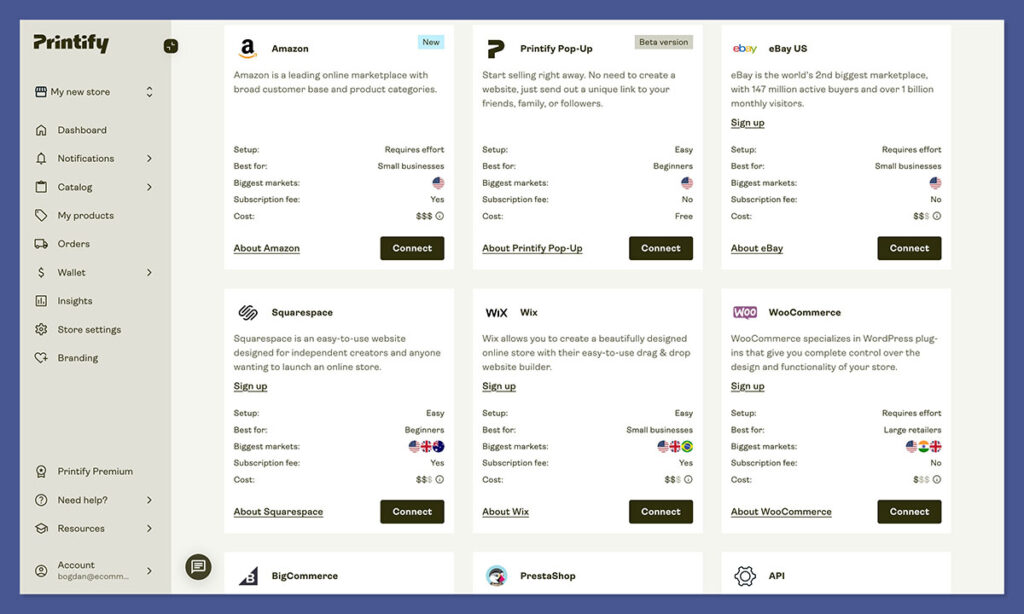
Printify can integrate directly with your Shopify and WooCommerce selling channels, allowing you to upload mockups, manage orders and automate fulfillment in one place.
Printify also integrates with marketplaces like Etsy, as well as platforms like Ebay, BigCommerce, PrestaShop, Squarespace, and Wix Stores.
There’s also a selection of custom API solutions companies can use to create advanced automated workflows.
If you’re looking for a convenient way to create and sell products across a variety of existing channels, Printify is definitely the right option for you.
However, if you want an all-in-one solution that allows you to sell custom merch without designing a website, Redbubble might be the best choice.
Fulfillment and Shipping
One of the biggest differences between Printify and Redbubble is how they handle fulfillment and shipping.
Both platforms offer print-on-demand services, meaning you never have to hold inventory or manually ship products.
However, they operate in very different ways, which can impact your business in terms of delivery speed, quality control, and customer experience.
How Printify Handles Fulfillment & Shipping
Printify acts as a middleman between you and print providers. When a customer places an order on your store (Shopify, Etsy, WooCommerce, etc.), Printify automatically forwards it to the print provider of your choice. The provider then prints, packages, and ships the product directly to your customer.
Key Points About Printify’s Fulfillment Process:
- You choose the print provider – Different providers have different shipping times and quality levels.
- Shipping costs vary – Since different providers handle shipping, rates depend on location and product type.
- No Printify branding – Packages are shipped with your store’s branding, making it look like you fulfilled the order yourself.
Shipping Times & Costs
Shipping times with Printify depend on:
- Which print provider you choose – Some providers ship faster than others.
- Where your customers are located – Local providers = faster shipping.
- The type of product – Apparel takes longer than prints or mugs.
For example:
- U.S. print providers typically deliver within 5-7 business days.
- International orders can take 10-20 days depending on location.
- Express shipping options may be available, but they cost extra.
Since Printify works with multiple print providers worldwide, some orders may ship separately if a customer buys multiple products that are fulfilled by different providers.
How Redbubble Handles Fulfillment & Shipping
Redbubble operates as a centralized marketplace that handles all fulfillment and shipping for you. You simply upload your designs, and when a customer places an order, Redbubble automatically prints, packages, and ships the product under their own branding.
Key Points About Redbubble’s Fulfillment Process:
- No need to choose a supplier – Redbubble handles everything.
- Shipping costs are set by Redbubble – You have no control over pricing.
- All packages are branded as “Redbubble” – Customers won’t associate the order with you.
Shipping Times & Costs
- Redbubble’s shipping times vary based on the product and customer location. On average, orders take 7-14 business days to arrive.
- Customers can choose standard or express shipping, but these costs are determined by Redbubble, not the seller.
- Since Redbubble uses multiple fulfillment centers, customers might receive products separately if they order multiple items.
Key Differences in Fulfillment & Shipping
| Feature | Printify | Redbubble |
|---|---|---|
| Who fulfills the order? | Third-party print providers (you choose) | Redbubble’s internal network |
| Who sets shipping costs? | You (based on provider rates) | Redbubble (fixed rates) |
| Branding on packages? | Your store’s branding | Redbubble’s branding |
| Shipping speed? | Varies by provider (5-20 days) | 7-14 days on average |
| Multi-item orders? | May ship separately if from different providers | May ship separately from different fulfillment centers |
Which One is Better for Shipping & Fulfillment?
Printify is better if:
- You want to brand your orders (customers see your store name, not Printify).
- You want control over pricing and shipping costs.
- You’re willing to research and choose reliable print providers with fast shipping.
Redbubble is better if:
- You want a hands-off experience with no fulfillment management.
- You’re okay with Redbubble handling everything, even if it means no branding control.
- You don’t mind higher shipping costs that you can’t adjust.
If you want higher profits and branding control, Printify is the clear winner. But if you want zero involvement in fulfillment and don’t mind Redbubble’s branding, then Redbubble is the simpler option.
Customer Support
Customer support is an important consideration for any ecommerce business investing in print on demand. If something goes wrong with your order, it’s important to ensure you can contact logistics companies and manufacturers, to get extra help.
Printify offers a range of customer support options, including 24/7 merchant support on all plans, and a self-service help center where you can find crucial articles on a range of topics. You can learn all about troubleshooting common issues, using APIs and integrations, and creating orders.
Printify also runs a fantastic blog which has tips and tricks on how to create the best POD company and increase your profits. Depending on your plan, you may be able to access additional services, like order management with Printify Connect.
Redbubble takes a similar approach to Printify in terms of customer service. There’s a comprehensive help center and knowledge base, as well as FAQs you can check out for extra insights. You’ll also be able to contact Redbubble with questions using the “request submission” form on the website, or by messaging the company on Facebook or Twitter.
Printify vs Redbubble: The Verdict
Ultimately, Redbubble and Printify are two excellent options for companies investing in print-on-demand business models. Both solutions offer fantastic fulfillment services, as well as a range of print on demand products to choose from, including wall art, tote bags, clothing, and accessories.
With both platforms, the shipping costs, times, and core price of products can vary, so it’s worth doing your research on both POD sites before you start building your business. Additionally, both of these platforms are designed to serve a slightly different audience.
Redbubble’s product creation and fulfillment tools are ideal for artists who want to monetize their designs without having to worry about building a website from scratch. You can create a wide variety of different products, list them on an active online marketplace, and start making money fast. However, the profit margins can be low to begin with, and there’s a lot of competition to fight against.
On the other hand, Printify is one of the best tools available if you’re looking for a company to help you produce custom products and ship them to customers, while developing a powerful brand. The solution can integrate with a wide variety of marketplace and ecommerce tools, and gives you plenty of ways to differentiate yourself from competitors.
The right option for you will depend on your ideal business model, but keep in mind there are plenty of other alternatives you can consider too, such as Zazzle, TeeSpring, and Printful.



Comments 0 Responses