

Ultracart is a flexible ecommerce platform with advanced features like subscription billing, affiliate tracking, and custom checkout flows — all designed to support serious sellers who need more than just a simple storefront.
Unlike flashier platforms like Shopify or Wix, Ultracart doesn’t rely on visual appeal or a trendy editor.
Instead, it focuses on performance, backend control, and features that can scale as your business grows.
After testing Ultracart myself and comparing it to 10 other ecommerce platforms, I can confidently say it offers some unique advantages — especially if you're selling digital products or subscriptions.
In this review, I’ll walk through Ultracart’s features, pricing, usability, and performance so you can decide if it’s the right fit for your business.
Why You Can Trust This Review
To give you an honest and practical overview, I’ve spent over 40 hours testing Ultracart — building storefronts, setting up products, connecting payment processors, and checking its affiliate and subscription features.
I’ve compared it directly with platforms like Shopify, SamCart, and WooCommerce using a checklist of criteria focused on:
- Ease of use
- Checkout customization
- Subscription tools
- Affiliate management
- Marketing integrations
- Customer support
You’ll find real pros and cons, tables with feature breakdowns, and pricing comparisons below.
Ultracart Pros & Cons
| Pros | Cons |
|---|---|
| Fast and customizable checkout | Outdated storefront templates |
| Built-in subscription billing | Not beginner-friendly |
| Integrated affiliate management | No drag-and-drop editor |
| No extra app fees | Learning curve can be steep |
| Works well for digital products | Limited design flexibility |
What I Like
- ✔️ Checkout pages are highly customizable and fast-loading, improving conversion rates
- ✔️ Subscription tools are fully built in — no third-party plugins needed
- ✔️ Affiliate program tracking is native, which is rare in this space
- ✔️ Handles digital delivery smoothly and securely
- ✔️ No forced upgrades or extra charges for core functionality
What I Don’t Like
- ❌ The storefront editor is clunky and looks dated
- ❌ Not ideal for beginners — the dashboard is full of options but takes time to master
- ❌ Fewer integrations compared to Shopify
- ❌ No modern visual editor — everything is form-based and less intuitive
My Experience With Ultracart

Signing up was simple — no credit card needed for the free trial, and I was inside the dashboard within seconds.
The onboarding steps are minimal: you choose your industry, product type, and sales method. From there, you land in a traditional-looking backend interface.
It reminded me more of software like Infusionsoft or older versions of Magento. It’s not pretty, but it’s fast and powerful.
Setting Up My First Product
Ultracart’s product setup is form-heavy but thorough. You can configure:
- Variants (size, color, etc.)
- Pricing
- Inventory
- Digital download links
- Recurring billing settings
- Upsells and cross-sells
The platform is clearly optimized for complexity. You can even set logic-based pricing or run automated follow-ups based on customer behavior.
Here’s how long it took me to get set up:
| Task | Time Spent |
|---|---|
| Sign up and access dashboard | 2 minutes |
| Add first product | 10 minutes |
| Set up payment processors | 5 minutes |
| Configure checkout and test order | 8 minutes |
So within 30 minutes, I had a working ecommerce flow with checkout, subscriptions, and affiliate tracking enabled — no third-party apps or coding required.
Customizing My Storefront
This is where Ultracart loses ground.
The storefront builder is basic, and there are only a few free themes to choose from.
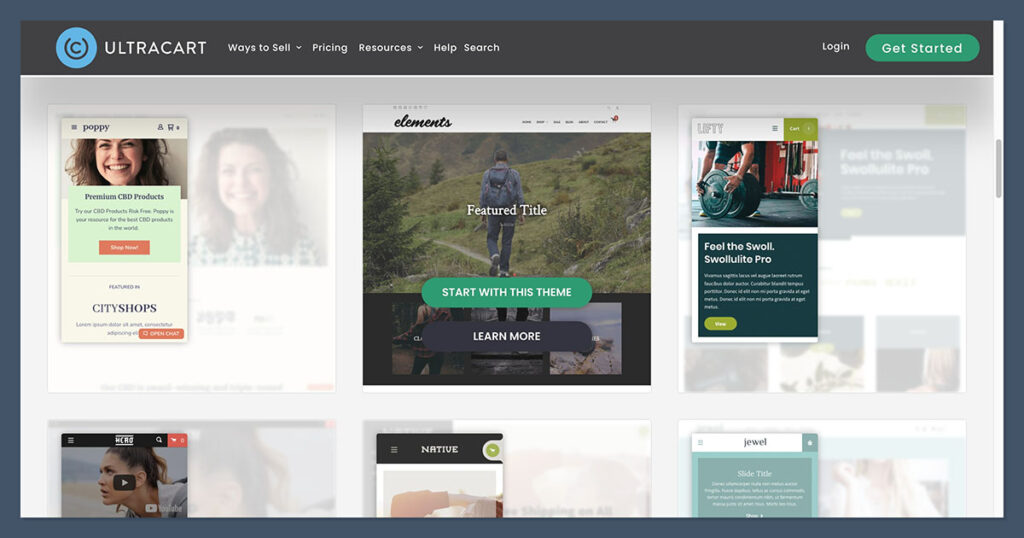
If you’re looking for design flexibility or drag-and-drop editing, this isn’t the platform for you.
That said, if you're planning to embed Ultracart into an existing site — like a blog or landing page built on Webflow, WordPress, or ClickFunnels — you can skip the storefront altogether and just use the cart system.
This is one of Ultracart’s biggest strengths: you can plug in only the parts you need.
Still, I’d love to see more modern templates and a better visual editor in future updates.
Ultracart Features Overview
Here’s a breakdown of Ultracart’s core features and how they compare to competitors:
| Feature | Included in All Plans | Notes |
|---|---|---|
| Checkout builder | Yes | Fully customizable, mobile-optimized |
| Subscription billing | Yes | Includes dunning, trials, flexible billing |
| Affiliate management | Yes | Create portals, track links, issue payouts |
| CRM and tags | Yes | Built-in customer tagging and email logic |
| Digital product delivery | Yes | Auto-send, expiring links, license keys |
| Hosted storefront | Yes | Optional — or embed cart on existing site |
| Email marketing | Yes | Basic, but includes sequences and broadcast tools |
| Theme customization | No | Limited options; better for embedding |
Ultracart’s strength lies in its backend features.
Everything that other platforms require plugins or paid apps for — like affiliate tracking or recurring billing — is included by default.
This reduces monthly costs and eliminates the hassle of managing multiple third-party integrations, which can often lead to compatibility issues or extra troubleshooting.
What also stands out is how tightly integrated all these tools are. The CRM connects directly with checkout behavior, product sales, and affiliate referrals.
This gives you a more complete picture of customer journeys and lifetime value without needing to export or sync data between different systems.
For business owners who prioritize having all tools in one place, this can make managing operations more efficient and less prone to error.

Comparing Ultracart With Other Platforms
To help you decide if Ultracart is the right fit, here’s how it compares with leading ecommerce platforms.
| Feature | Ultracart | Shopify | SamCart | WooCommerce |
|---|---|---|---|---|
| Subscription Billing | Built-in | App-based | Built-in | Plugin required |
| Affiliate Management | Built-in | App-based | Built-in | Plugin required |
| Checkout Customization | Full control | Limited | Moderate | High (with dev) |
| Visual Store Builder | Basic | Advanced | Basic | Depends on theme |
| Apps and Plugins | Minimal needed | Heavy reliance | Some | Required |
| Free Themes | Few | 13 | Limited | Many (via WordPress) |
| Best For | Backend power | All-in-one | Funnels | Flexibility |
Ultracart works best if you want full control over checkout, recurring billing, and affiliate systems — without needing third-party apps.
But if design and frontend customization are key for you, Shopify or Squarespace will likely be a better fit.
You’ll find their templates more appealing and their user interfaces easier to learn, especially if you’re starting out.
Another point worth mentioning is scalability. While Shopify and WooCommerce can certainly scale with apps and integrations, Ultracart is geared toward businesses that want to streamline and scale without depending on a growing list of plugins.
Its architecture is more geared toward operational efficiency than visual flair. If you're a marketer or technical founder who values automation and backend power, this platform leans more in your direction.
Ultracart Pricing
Ultracart has three core pricing tiers, plus an enterprise option for high-volume merchants.
| Plan | Price (USD/month) | Product Limit | Key Features |
|---|---|---|---|
| Small | $49.95 | 250 products | All features included |
| Medium | $79.95 | 1,000 products | Higher performance, extra integrations |
| Large | $229.95 | 5,000 products | Priority support, dedicated account rep |
| Enterprise | Custom | Unlimited | SLA-based support, custom integrations |
All plans include:
- Subscription tools
- Affiliate management
- Checkout and cart tools
- CRM and tagging
- Digital delivery
- Analytics and reports
Ultracart does not charge transaction fees, unlike Shopify, which adds 0.5% to 2% if you don’t use their payment system.
You still pay standard Stripe or PayPal rates, but there are no platform-level fees eating into your margins.
For businesses doing recurring billing or selling digital products, this can save hundreds per month.
The ability to access all core features from the lowest-tier plan also makes it ideal for startups or solo operators who want advanced tools without being forced into a higher pricing bracket.
What’s also notable is that Ultracart doesn’t hold features behind artificial paywalls.
Whether you’re on the Small or Large plan, you get access to nearly everything.
The difference lies mainly in product volume, performance, and support level — not in whether you can use essential ecommerce tools. This levels the playing field for smaller businesses that want powerful functionality without enterprise pricing.
Real User Feedback
To understand how Ultracart performs in real use cases, I reviewed dozens of testimonials and case studies. Here’s a summary of what users say:
What People Like
- “The one-page checkout loads faster than any other cart I’ve tested.”
- “We saved over $200/month by eliminating third-party subscription tools.”
- “Our digital product delivery is seamless and secure.”
- “Affiliate tracking built right in — no extra software needed.”
Common Complaints
- “The dashboard looks outdated.”
- “It’s not beginner-friendly. You need to be technical.”
- “There are only a few themes — nothing fancy.”
Overall, reviews point to a tradeoff: powerful backend tools vs. outdated design options.
Ultracart shines when it comes to functionality but may feel clunky or uninspiring to users who are accustomed to more modern design environments.
A recurring theme among positive reviews is reliability. Many long-term users noted that they’ve been on Ultracart for years without major outages, platform migrations, or technical debt.
While newer platforms may offer trendier interfaces, Ultracart has built a reputation for stability — a critical factor for businesses with high transaction volumes or strict uptime requirements.
Final Thoughts: Is Ultracart Worth It?
If you're an experienced seller looking for control, flexibility, and built-in ecommerce features without relying on third-party apps, Ultracart is worth considering.
It’s especially valuable if:
- You run a digital product business
- You sell subscriptions or memberships
- You need affiliate tracking baked into your platform
- You want full control of your checkout process
It’s not ideal if:
- You want modern, stylish templates
- You’re a beginner needing hand-holding
- You rely heavily on visual editors and drag-and-drop tools
My Recommendation
Go with Ultracart if your priority is functionality and backend power.
You’ll save money on apps and gain deeper control over your customer flow.
But if design, ease-of-use, or a big app ecosystem are more important, Shopify or Squarespace will be a better match.
Ultimately, the right choice depends on your priorities.
If your business relies on selling high-margin digital products, subscriptions, or if you're running a lean operation with few employees, Ultracart can streamline your tech stack significantly.
It’s not about building a beautiful website — it’s about optimizing the engine behind your ecommerce business.
Want to Try Ultracart?
There’s a 30-day free trial, no credit card required. I recommend starting with the Small plan and testing it with a single product — especially if you’re selling digital downloads, subscriptions, or memberships.
Spend time exploring the checkout settings, tagging system, and affiliate tools to see if they match your workflow.
If you're currently using a stack of plugins to manage subscriptions and partner programs, this could simplify your entire setup in one move.


I am considering using ultra art as it looks like a great platform that has just about every feature built in. My other option is woocommerce. I’m a little concerned that with woocommerce I’ll need 10 to 20 plug-ins and that I’ll have a lot of bugs and issues to deal with.the site I am building will be selling physical products and also have a free membership portal.
That being said, the site will be built on WordPress, so I would use the ultracart wpnplugin. Do you know how well the WordPress plugin works? Can I incorporate quantities and product attributes through the plugin?
Compared to woocommerce do you consider ultracart equal, better or worse?