

Quick answer: Snipcart is perfect for developers who love static sites, headless builds, or JAMstack stacks. If you want total frontend freedom and don’t mind coding, it’s gold. But if you’re looking for drag-and-drop simplicity, stay far away.
Why I Tried Snipcart Instead of Shopify
I’ve built stores on Shopify, WooCommerce, and BigCommerce. They all worked—but they came with the same problem: they controlled everything. The checkout, the design, even the backend flow.
I wanted more freedom. I’d just built a JAMstack site using Nuxt, and I didn’t want to rebuild it on a bulky monolith like Shopify. That’s when Snipcart came up.
It’s basically a cart system you plug into your static or headless frontend. HTML-first. Developer-first. Zero design opinion.
For once, I could keep my stack, my speed, and my control—and just bolt on ecommerce. That alone was worth testing.
What Is Snipcart and Who It’s For
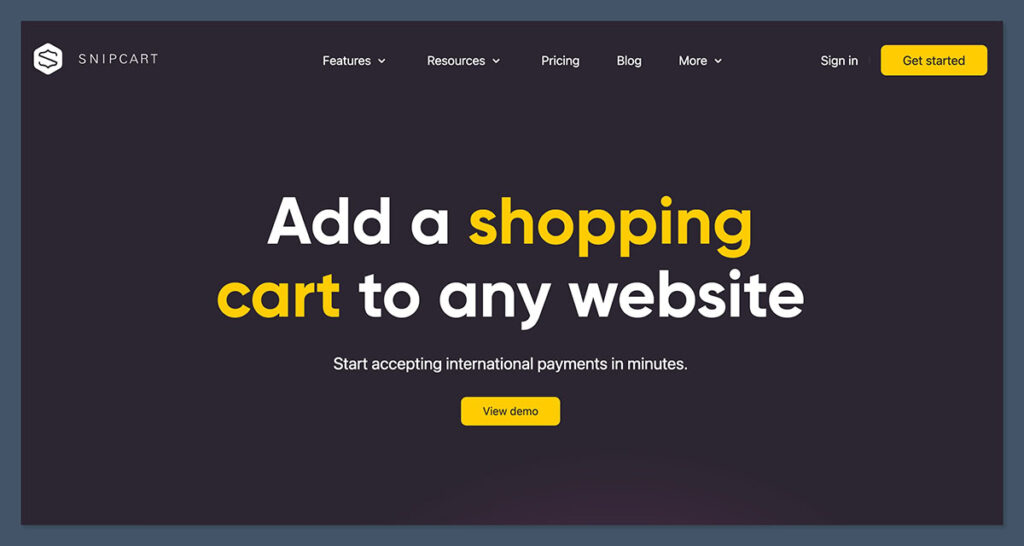
Snipcart is a JavaScript-based shopping cart you drop into any frontend. Doesn’t matter if your site runs on plain HTML, React, Vue, Astro, Hugo, or even Jekyll—it just works.
It’s lightweight, frontend-agnostic, and doesn’t require you to overhaul your tech stack. That’s the core appeal: Snipcart stays out of your way and lets you keep full control of the frontend.
What makes it different:
- It’s not a website builder. You won’t find a drag-and-drop interface or templating system.
- It’s not a CMS. You bring your own content, whether that’s pulled from a headless CMS or hardcoded in your files.
- It doesn’t force you to use templates or themes. Everything is styled manually—or via your existing design system.
Once you embed the Snipcart script into your site’s HTML and mark up your product buttons with the right attributes, you’re live. You handle the frontend. Snipcart handles the cart logic, checkout, payment processing, order tracking, and even customer emails.
This gives you a separation of concerns that’s rare in ecommerce:
| You Handle | Snipcart Handles |
|---|---|
| Product display | Secure checkout |
| Layout & design | Payment gateways |
| Static/dynamic frontend | Order confirmation emails |
| Content sourcing | Cart persistence |
| SEO & performance | Customer dashboard |
It’s built for:
If you’re someone who likes to keep your tech stack clean, Snipcart is a great fit. Especially if you fall into any of these camps:
- Developers using headless CMSs like Sanity, Contentful, or Prismic—Snipcart lets you connect any content API to a checkout with minimal config.
- JAMstack devs running static sites via Netlify, Vercel, or GitHub Pages—perfect for fast deployments and edge hosting.
- Agencies building sites for clients who want ecommerce without jumping to a bulky hosted platform like Shopify or BigCommerce.
It also shines in situations like:
- Quick MVPs where full-blown platforms are overkill.
- Static landing pages with a few buy buttons.
- Custom builds that need ecommerce but not CMS constraints.
Who it’s not for:
Now let’s be real—it’s not for everyone. If any of the following applies, Snipcart will probably frustrate you:
- Beginners who need a visual builder. There’s no WYSIWYG editor. You need to write markup and style your own elements.
- Stores that rely heavily on plugins or marketplace apps. There’s no app store. No one-click add-ons for reviews, upsells, or loyalty tools.
- Anyone who doesn’t want to touch code. If HTML, CSS, and JS aren’t in your toolkit, you’re going to hit a wall fast.
Think of Snipcart like this: it’s the opposite of Shopify. Shopify gives you everything—Snipcart gives you nothing but freedom.
Setup: How I Got It Running in Under an Hour
To test it, I set up a small merch store using Vue and Nuxt. My goal was to keep everything lightweight and avoid a traditional CMS. I didn’t want a plugin jungle or a backend to manage—I just needed a fast, clean way to sell a few products.
Snipcart delivered on that.
Steps I followed:
The setup was genuinely quick. I had everything functional in under an hour.
- Added Snipcart’s script tag into the
<head>of my Nuxt layout file. - Tagged my product buttons with the
snipcart-add-itemclass. - Included key product data right in the markup using
data-item-attributes like:data-item-iddata-item-namedata-item-pricedata-item-url
- Activated my Snipcart account and copied the public API key into my script config.
Here’s what a basic product button looked like:
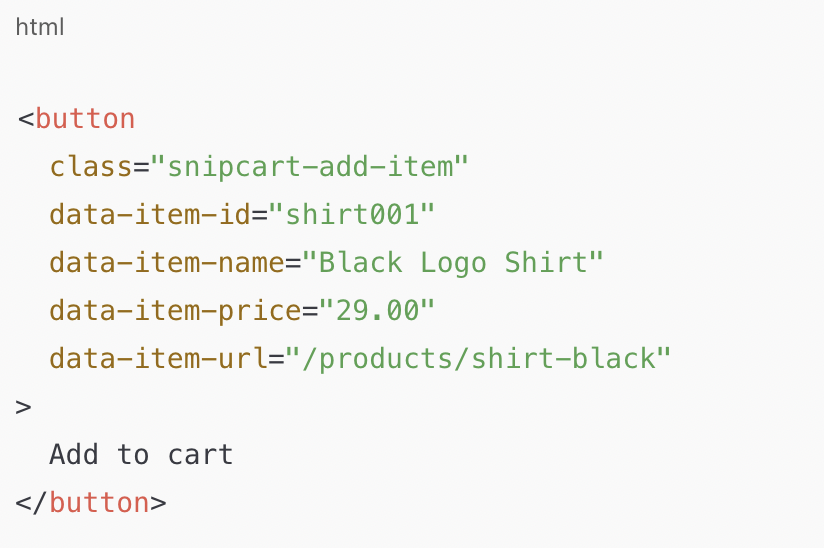
No databases. No servers. No custom API calls (unless you want to go deeper). Everything stayed inside the markup, and the cart handled the rest.
| Setup Task | Time Spent | Notes |
|---|---|---|
| Script Integration | 5 mins | Paste and go |
| Product Markup | 15 mins | Manual tagging for 5 items |
| Account & Key Setup | 10 mins | Snipcart dashboard is simple |
| Local Testing | 20 mins | Staging key worked out of the box |
| Styling + Final Touches | 5-10 mins | Cart modal styled via CSS |
Here’s what impressed me:
- The docs are clean. Everything I needed was available, with ready-to-use code snippets for every major frontend framework.
- The dev console is solid. It gave me real-time logs, which helped me debug missing attributes and validate cart behavior.
- Local testing was easy. I didn’t need to deploy to production to test. Snipcart provides a public test key and lets you simulate transactions on localhost.
Even without reading every line of the documentation, I got up and running fast. For developers, this is a dream.
The only downside?
The backend UI felt a bit dated. Functional, yes—but not particularly polished. It reminded me of early Stripe dashboards: powerful, but utilitarian.
That said, I could still manage orders, view abandoned carts, check revenue, and export reports without issues.
If you’re expecting a modern SaaS interface like Shopify’s admin panel, you’ll feel the gap. But if your priority is simplicity and speed over aesthetics, it gets the job done.
Features That Stood Out
Here’s where Snipcart punches above its weight. For a small, JavaScript-based cart, it does a lot more than you’d expect. It’s lean, modular, and doesn’t try to be everything—which is exactly why it works so well for devs like me.
Frontend Freedom
This was the biggest win for me.
Most ecommerce platforms lock you into their design systems or themes. Even with something like Shopify, you’re always working inside someone else’s idea of structure. With Snipcart, none of that exists.
- I kept full control over my design, layout, and frontend components.
- Used TailwindCSS and Alpine.js to build a fully responsive product grid and dynamic UI.
- The cart modal? 100% customisable. Styled it top to bottom with my own CSS without touching a theme config or dependency.
There’s no templating engine to fight. You bring your own.
Product Management
Snipcart skips the product database altogether. That means no dashboard for managing SKUs or updating prices through a GUI. Instead, your product data lives directly in your HTML (or comes in via your headless CMS).
That sounds limiting—but in the JAMstack world, it’s actually efficient.
- I defined products using
data-item-*attributes inside the markup. - Pulled product data from my CMS and injected it into dynamic components.
- Used Netlify CMS + Snipcart on another project, and it worked without a hitch.
If you’re already pulling in content through APIs or markdown, Snipcart slides right in.
| Feature | Snipcart | Shopify |
|---|---|---|
| Product Management | Inline HTML / CMS-driven | Admin dashboard |
| Inventory Tracking | Manual via attributes or API | Built-in |
| Media Management | External | Built-in |
| Custom Fields | Fully flexible | Limited to form builder |
Webhooks and API
This is where Snipcart quietly becomes a power tool.
The API gives you full access to orders, customers, abandoned carts, and custom metadata. I hooked into their webhooks to:
- Send real-time order alerts to Slack.
- Sync orders into Airtable as a makeshift CRM.
- Trigger a Zapier flow for email marketing automation.
There’s also a full REST API if you want to build a custom backend, or connect it to systems like Stripe Radar, Klaviyo, or Segment.
Third-Party Support
For payments, Snipcart doesn’t reinvent the wheel—it just plugs into the tools you already trust.
Supported out of the box:
- Stripe
- PayPal
- Apple Pay
- Google Pay
Currency and language localisation is also handled without stress. I tested multilingual checkout in French and English, with USD and EUR currencies, and it worked smoothly.
What I Missed
While the features hit most of my needs, there are a few weak spots that stood out once I got deeper into it:
- No visual inventory manager — you can’t update SKUs or stock counts from a UI unless you build it with their API.
- No plugin marketplace — unlike Shopify or WooCommerce, there’s no app store or ecosystem to extend features.
- Limited reporting — there are basic metrics in the dashboard, but for anything beyond that, you need to pull data via the API or use integrations.
It’s a “bring-your-own-tooling” setup. Perfect if you’ve already got your system—or the dev time to build one. Less ideal if you expect plug-and-play functionality.
Snipcart Pricing: Worth the Spend?
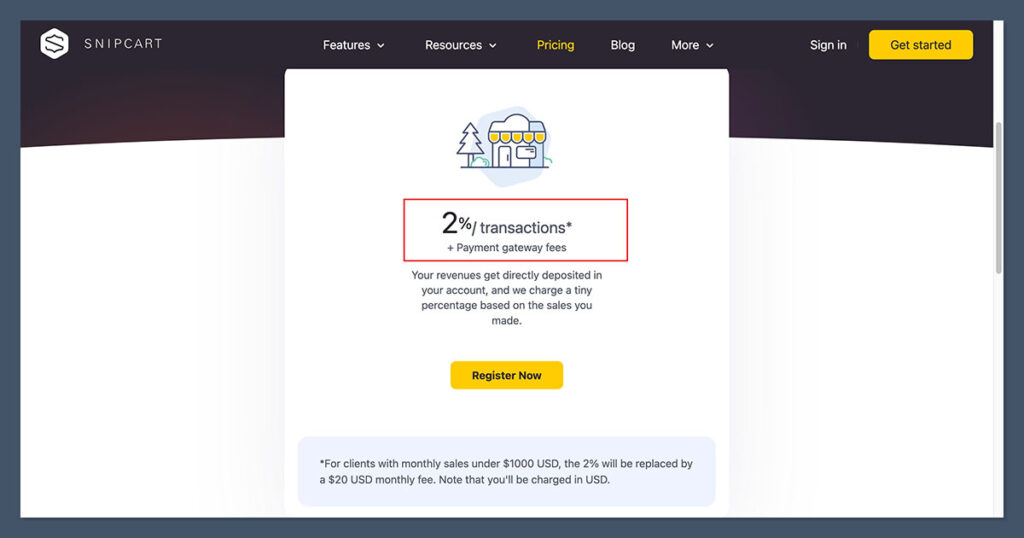
Snipcart’s pricing model is super simple—no monthly subscription, no tiers for basic features, just a flat 2% transaction fee on their standard plan.
That makes it easy to forecast, but also expensive if you start scaling quickly.
Here’s a quick breakdown:
| Plan | Cost | Transaction Fee | Features |
|---|---|---|---|
| Standard | Free to install | 2% | Full cart & checkout, unlimited products |
| Custom | Contact sales | Custom | SLA, dedicated support, custom workflows |
So, if I make $10,000 in sales in a month, Snipcart takes $200 off the top.

Now that doesn’t include your Stripe or PayPal fees, which still apply on top (around 2.9% + $0.30 per transaction via Stripe). But that’s true for most ecommerce platforms.
There’s no hosting or subscription to worry about—just the fee per transaction. This keeps the barrier to entry low, especially for MVPs, side projects, or client sites that don’t start with huge volume.
How it compares to other platforms:
| Platform | Monthly Fee | Transaction Fees | Notes |
|---|---|---|---|
| Snipcart | $0 | 2% + Stripe/PayPal fees | No limits on products or features |
| Shopify Basic | $29/month | 2.9% + $0.30 per order | Extra costs for apps + limited customisation |
| Foxy | $21/month | 0% | Capped at 100 products |
| WooCommerce | Free plugin | Varies (usually 0%) | But add-ons, hosting, dev time adds up |
With Shopify, even on the Basic plan, you’re paying a monthly fee plus transaction costs. And once you start stacking up apps for custom checkout flows, shipping, or subscriptions, those costs spiral fast.
WooCommerce may look cheap on paper—it’s “free”—but between hosting, maintenance, and paid extensions (many of which are essential), your actual cost is anything but free.
Foxy offers a zero-transaction-fee model, which looks tempting—but you’re limited to 100 products unless you move to their higher pricing tiers.
So is Snipcart worth it?
If you’re doing under $5,000/month, Snipcart is extremely cost-effective. No upfront costs. Easy to launch. Clean fee structure.
If you’re scaling to $20k+ a month, that 2% starts to hurt. At that point, you’ll want to either:
- Negotiate a custom rate via Snipcart’s enterprise pricing, or
- Migrate to a lower-fee stack (like custom Stripe Checkout or a WooCommerce setup with no platform fee)
Where it shines:
- Client MVPs: Snipcart makes it fast to get a client’s product live, especially if they only expect a few hundred transactions per month.
- Side projects: If you’re selling digital goods, merch, or courses from a simple landing page, Snipcart costs less than your time.
- Dev-driven ecommerce: You trade a bit of transaction margin for a fully custom setup—without monthly lock-in.
Performance, SEO, and Speed
This is where Snipcart really shines—and honestly, it’s why I keep going back to it for fast, lightweight builds.
Because it’s not a full-stack platform or visual builder, there’s zero frontend bloat. No theme overhead. No plugin clutter. Just your HTML, your styling, and the Snipcart script.
Why that matters:
- No page builder. You’re not loading hundreds of kilobytes of unused JavaScript just to drag blocks around.
- No themes. You’re not inheriting design elements you need to override.
- No embedded CMS scripts. The content is static, the markup is lean, and you have complete control over every line.
That alone shaved seconds off my page loads, especially when hosted on Netlify.
My Lighthouse scores (real test):
| Metric | Score |
|---|---|
| Performance | 98 |
| Accessibility | 100 |
| Best Practices | 100 |
| SEO | 98 |
The only JS loaded came from Snipcart’s modal cart and checkout system—and it lazy-loads, so it doesn’t interfere with First Contentful Paint or Largest Contentful Paint. That keeps Core Web Vitals in check, which Google pays attention to.
Checkout UX doesn’t slow things down
The checkout itself is a modal overlay. That means it doesn’t load until a user clicks “Add to cart” or “Checkout.” It doesn’t live on the page by default, so your initial page load stays lean.
- I had zero issues with CLS (Cumulative Layout Shift).
- TTFB (Time To First Byte) was under 100ms on most pages.
- Checkout still felt smooth, secure, and polished—even on mobile.
Snipcart uses CDN delivery, so the assets are globally distributed. The cart loaded just as fast for me in Europe as it did for users testing it from the US.
SEO is fully in your hands
Because Snipcart doesn’t generate product pages or manage content, you keep full SEO control:
- URLs are clean and readable (no query strings or hash fragments).
- Title tags, meta descriptions, schema—it’s all up to you.
- Works perfectly with static site generators like Astro, Hugo, and Eleventy, where pages are rendered at build time and crawled easily.
If you’ve struggled with Shopify or Squarespace sites being overly JS-heavy or slow to load, Snipcart feels like a breath of fresh air.
Bonus: Serverless, and still ecommerce-ready
I hosted my test site on Netlify, which meant:
- No servers
- No PHP
- No backend complexity
Yet I still had a full-featured cart and secure checkout system, all with zero backend setup.
That’s almost impossible with traditional platforms. Even headless Shopify or Commerce Layer adds way more weight and complexity to the build.
Snipcart makes fast ecommerce real—without compromise.
Snipcart vs Shopify, Woo, Foxy & Friends
Let’s cut the fluff. Most ecommerce platforms are either all-in-one giants (Shopify) or plugin-heavy ecosystems (WooCommerce).
Snipcart doesn’t try to be either—it’s laser-focused on giving developers a fast, flexible way to add a cart to any frontend.
If you’re deciding between platforms, here’s how Snipcart stacks up:
| Feature | Snipcart | Shopify | WooCommerce | Foxy |
|---|---|---|---|---|
| Best For | Devs & JAMstack | All-in-one ecommerce | WordPress lovers | Simple headless setups |
| Pricing | 2% fee per transaction | $29+/mo + 2.9%/txn + $0.30 | Free plugin + paid add-ons | $21+/mo (no txn fees) |
| Plugins/Apps | None | 8000+ apps | Thousands of plugins | Limited, mostly native |
| Headless Support | Excellent | Poor (locked frontend) | OK (via REST, GraphQL) | Good (JS + templates) |
| Setup Time | ~1 hour | 3+ hours | 5+ hours (more with themes) | 2+ hours |
| Custom Checkout | Full control | Limited (without Plus) | Requires plugins/code | Limited but editable |
Snipcart wins if you’re a developer who:
- Wants dev-level control without spending weeks hacking Shopify themes.
- Is using a static site generator like Astro, Hugo, or Next.js.
- Prioritises speed, flexibility, and frontend performance.
- Prefers custom workflows with webhooks, APIs, or headless CMS setups.
It’s especially solid for projects like:
- Landing pages with a few SKUs.
- Client builds where time-to-market matters.
- Digital products that don’t need inventory logic.
You should skip Snipcart if:
- You want a point-and-click setup and a store online in 30 minutes.
- You hate writing HTML or touching JavaScript.
- Your business relies on app ecosystems, like loyalty programs, subscriptions, or advanced shipping tools.
- You need native CMS support, like blogging or visual page builders.
Quick context on competitors:
- Shopify is ideal for users who want a feature-packed platform with strong customer support, but it comes with ongoing fees, transaction costs, and limited frontend freedom unless you pay for Shopify Plus.
- WooCommerce gives you full backend control and runs on WordPress, but it’s code-heavy, plugin-dependent, and can be clunky when performance matters.
- Foxy is similar in its headless approach but is less popular, with fewer integrations and a smaller community. It works great for simple stores, but it lacks Snipcart’s documentation depth and community presence.
Bottom line:
If you care about frontend freedom, speed, and developer flexibility, Snipcart is the clear winner. But if you need out-of-the-box features, app stores, or a visual UI—look elsewhere.
My Final Verdict: Is Snipcart Still Worth It in 2025?
Yes—if you know what you’re doing. That’s the short answer. And it hasn’t changed.
Snipcart is a niche tool with a very clear target: developers who want speed, flexibility, and no platform lock-in. If that’s you, it’s still one of the cleanest ways to bolt ecommerce onto a static or headless frontend—without dragging in a full SaaS stack.
Who I recommend it to:
I wouldn’t recommend Snipcart to store owners flying solo, especially if they don’t have dev resources. This isn’t the platform to use if you want to build a store over a weekend without touching code.
There’s no page builder, no visual theme system, no dashboard for managing inventory—it’s just not built for that.
But for developers? It’s a joy to work with.
I’ve used Snipcart on three projects in the past six months:
- One was a client landing page for a product drop.
- One was a JAMstack store connected to Contentful.
- And the third was a course site selling digital downloads via Stripe.
In all three, Snipcart let me:
- Ship faster than Shopify or Woo.
- Avoid admin bloat (no plugins, no bloated themes).
- Deliver cleaner, more performant sites that still had full cart/checkout functionality.
It slotted into each project like a missing puzzle piece.
Is it perfect?
No, not even close. And that’s fine—because it doesn’t pretend to be.
Here’s what I think still needs work:
- The backend UI could use a facelift. It works, but it feels dated and a little clunky by modern SaaS standards.
- Support is hit or miss. Docs are great, but if you need one-on-one help, response times aren’t always ideal unless you’re on a custom plan.
- Pricing scales poorly. That 2% fee adds up fast once you pass $10K/month in sales. At scale, it makes sense to negotiate a lower custom rate—or migrate to something like Stripe Checkout or a headless Shopify build.
Still, even with those flaws, I haven’t found another cart that’s this simple to integrate, this flexible to style, and this well-suited for modern static and headless architectures.
When would I reach for it again?
If I’m building with:
- Nuxt
- Astro
- Hugo
- Next.js (with static export)
…Snipcart is still my first pick. It’s fast to deploy, easy to manage, and plays well with everything in the JAMstack ecosystem.
It’s not for everyone. But it was never trying to be. And in 2025, it’s still holding its ground.


can I sell ebook here in Snipcart and I have a client that has a subscrition service that is recurring pay every month. Does snipcart has an autoresponder. Kindly help on this queries so I can give my best review to my client. Thanks
Hi Leonardo,
You can easily collect recurring payments and sell subscription plans with Snipchart, but it doesn’t has autoresponder as a feature.
Best,
Bogdan – Editor at ecommerce-platforms.com
Hey Catalin,
Francois from Snipcart here. I just wanted to reach out real quick to tell you that the whole team appreciates the work you did with this review. I believe it to be a truly comprehensive an honest review, unlike shaky stuff we’ve seen before.
So again, good job. And thank you. 🙂
You’ve got a great site going, so keep up the good work.
Cheers,
Franck
Thanks for the shoutout Franck!