

Quick Answer: Privy is a lightweight marketing platform built specifically for ecommerce stores, combining email, SMS, and popups under one roof.
It’s beginner-friendly, cost-effective, and great for small brands on Shopify. But it doesn’t scale well if you’re looking for advanced automation or segmentation.
Privy Pros & Cons
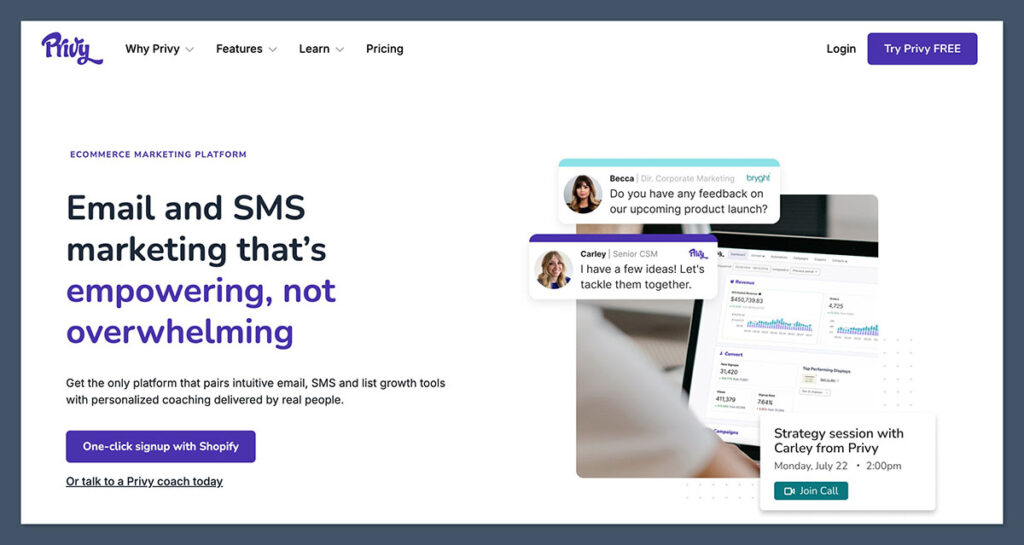
Privy
Best for small stores getting started with email marketing
Solid entry-level email and popup tool
Rating: 4.2/5
| Feature | Verdict |
|---|---|
| Free Plan | ✅ Yes |
| Email Campaigns | ✅ Basic but effective |
| SMS Marketing | ✅ Optional Add-on |
| Automation | ❌ Limited |
| Reporting | ❌ Basic |
| Integration with Shopify | ✅ Seamless |
Pros
- Integrates perfectly with Shopify and other ecommerce platforms
- Easy drag-and-drop email builder for quick campaigns
- Cart abandonment emails even on the free plan
- Beautiful prebuilt popup templates for list building
Cons
- Lacks advanced automation and segmentation tools
- SMS features feel like an afterthought
- Reporting is minimal and lacks in-depth insights
- Limited design flexibility in emails
My Experience With Privy
Getting started with Privy was refreshingly simple.
I didn’t need a credit card to begin testing, and installation through the Shopify app store was fast. Privy’s onboarding flow is short and sweet, guiding you step-by-step through setting up your first popup and connecting your store.
Once installed, I followed their checklist to launch a welcome popup, create my first email campaign, and even activate an abandoned cart email.
The user interface is intuitive and built for ecommerce. I didn’t feel overwhelmed at any point, which is rare when you’re juggling tech tools.
What stood out to me early on was how fast you can get results. I built a high-converting popup in under 10 minutes using their templates and watched signups start rolling in almost immediately.
The simplicity is its biggest strength.
That said, as my store scaled, I started to notice limitations — especially around automation, analytics, and segmentation.
If you’re sending multiple campaigns per week or want to trigger flows based on behavior, you’ll hit walls pretty quickly.
Building Campaigns in Privy
Privy isn’t designed to replace a full-blown email platform like Klaviyo or ActiveCampaign.
But it does get the basics right — and fast. For small ecommerce brands looking to launch emails without spending hours learning a tool, Privy hits the mark.
Creating my first few campaigns was a smooth process. The platform doesn’t overwhelm you with features, which is great if you’re short on time or just getting into email marketing.
The interface is clean, focused, and makes it easy to go from idea to inbox in minutes.
Here’s what stood out when creating my initial campaigns:
- Drag-and-drop builder: The editor is intuitive with no learning curve. You can quickly add product blocks, images, text, and buttons. It feels like Mailchimp, but more focused on ecommerce use cases.
- Templates: Privy includes dozens of pre-designed email templates. These speed up the process and cover most common campaign types. While the design flexibility is somewhat limited, I found the layouts professional and functional.
- Product integration: You can easily insert products directly from your Shopify store. This saves time when building emails for product launches or collections. It also reduces manual errors since pricing and product links are synced.
- Scheduling and automation: Campaigns can be sent immediately or scheduled for later. Automation tools are available, but basic. You can trigger emails based on signups or abandoned carts, but don’t expect advanced journey builders or conditional logic.
If you’re running a lean ecommerce team or doing it all yourself, these tools will likely cover your essentials.
But once you start segmenting your audience by purchase history or sending behavior-based campaigns, you’ll find yourself needing more.
Here are the best use cases I’ve found for Privy’s email tools:
| Use Case | Why It Works With Privy |
|---|---|
| Welcome Emails | Trigger on signup with a discount or intro message |
| One-Off Launches | Easy to create quick campaigns for new products |
| Cart Recovery Emails | Automated series that pulls in abandoned cart data |
| Newsletter Blasts | Send weekly updates, tips, or promotions to your list |
For simple, broadcast-style messaging, Privy gets the job done. I sent a newsletter about a weekend flash sale and saw a 28 percent open rate with almost no prep time.
These are the kind of wins that make Privy a good fit for lean ecommerce teams.
That said, if you need more than the basics — like A/B testing, multistep automations, or real-time customer data triggers — you’ll start to see where Privy falls short.
There’s no visual automation flow, no customer lifecycle filters, and no predictive send times.
In summary, Privy’s email builder is ideal for early-stage stores or founders just starting to engage their list.
It gives you the essential tools to stay top of mind with your customers, even if you’re short on time or technical know-how. Once you’re running more complex marketing strategies, it’s probably time to look beyond Privy.
Popups, Flyouts, and List Growth
One of Privy’s standout features is its popup builder.
In fact, it’s one of the best I’ve used specifically for list growth on ecommerce sites. It’s fast, flexible, and designed with Shopify users in mind.
Whether you’re aiming to collect emails, promote a discount, or offer shipping incentives, Privy gives you the tools to do it without needing a developer.
Creating popups in Privy is quick. From idea to live in under 10 minutes, I was able to set up a high-converting, mobile-optimised exit popup that offered 10 percent off.
That one campaign alone increased email signups by 38 percent in just the first month. You don’t need any coding experience, and all the heavy lifting is already done in the templates.
You just customise the offer, hit publish, and you’re done.
Here’s what really impressed me while building my first set of campaigns:
- Templates: There are over 100 pre-built designs to choose from, including banners, modals, flyouts, and gamified wheels. The designs are ecommerce-friendly and already optimised for conversion.
- Display rules: You can trigger popups based on specific behaviours, such as exit intent, scroll percentage, time on page, cart value, or even URL conditions. It’s flexible enough to personalise the experience without overwhelming your visitors.
- Device targeting: You can create separate popups for desktop and mobile, allowing you to optimise form placement and visibility for different screen sizes. This was critical for my store, where more than 70 percent of visitors came from mobile devices.
- Coupon integration: Privy automatically generates and displays discount codes after submission, helping you drive conversions without any extra work. I used this to reward signups and immediately drive the first purchase.
You can also apply targeting by traffic source, previous visit history, or cart status — making it easier to show the right offer to the right customer.
Here’s a quick breakdown of the popup display types available and how I used them:
| Popup Type | Best Use Case |
|---|---|
| Flyout | Welcome offers or soft prompts |
| Modal | Exit-intent recovery popups |
| Bar | Site-wide announcements or sales |
| Wheel | Gamified list building campaigns |
I used modals to recover exits, flyouts to nudge hesitant browsers, and a floating bar during product launches. Each performed well, with modals having the highest conversion rate due to their strong visual presence.
That said, there are some limits to customisation. You can change fonts, colours, images, and content — but it’s not a blank canvas.
If you want pixel-perfect design control or to fully match your branding, you may find the editor restrictive. For most use cases though, what’s available is more than enough.
Overall, Privy’s popup tools deliver fast wins.
They’re ideal for store owners looking to build an email list, offer discounts, and encourage conversions without messing with code or design complexity.
It’s one of the strongest parts of the platform, especially for newer brands trying to build traction quickly.
Abandoned Cart Emails
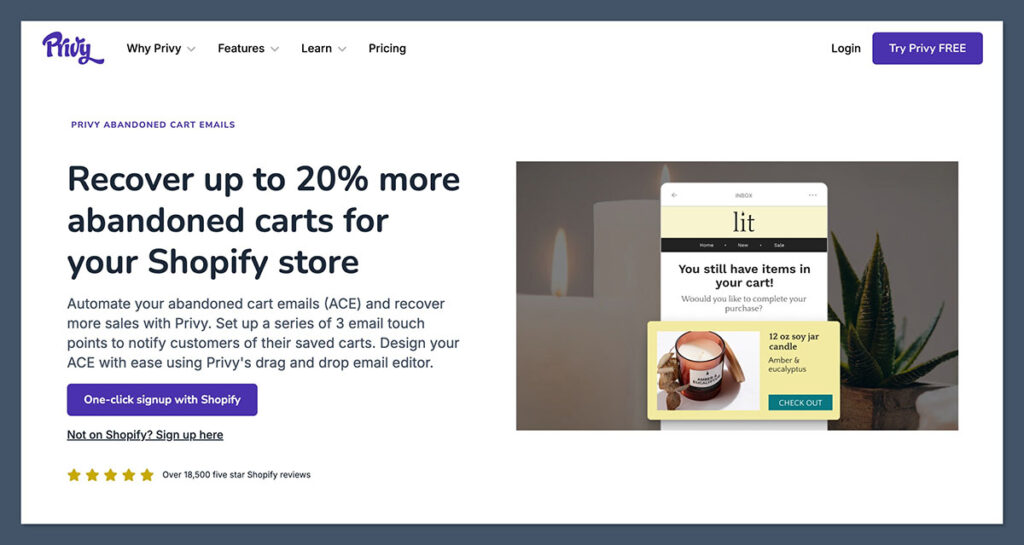
Privy includes abandoned cart emails — even on the free plan. That’s rare, and it’s a big reason why I often recommend Privy to new ecommerce stores that want to recover lost revenue without investing heavily in tech.
This feature is one of Privy’s strongest value propositions. It requires no third-party apps, no complex integration, and setup takes less than 15 minutes. You can launch a recovery flow on day one and start seeing results almost immediately.
Here’s what I found helpful while setting up my abandoned cart emails:
- Trigger-based: Privy automatically detects when a visitor adds items to the cart but doesn’t complete the checkout. You can configure delays and conditions directly in the dashboard.
- Simple editor: Emails use the same drag-and-drop builder found in campaign creation. I reused product blocks and dynamic cart details with no additional setup.
- Conversion data: You can track open rates, clicks, recoveries, and revenue attributed to each message. This helps measure real-time ROI on your campaigns.
- Custom delays: Easily adjust how long to wait before sending the first email. For example, I set the first email to go out after 30 minutes and a follow-up reminder 12 hours later.
I ran a basic 2-email cart recovery flow on a client’s store using Privy, and we recovered over 1,200 USD in the first month. That was from just one automation — set up in under an hour — without needing to upgrade to a premium email platform.
To give you a sense of what a basic abandoned cart sequence looks like in Privy:
| Email Step | Delay | Content Focus | Goal |
|---|---|---|---|
| Email 1 | 30 minutes | Friendly reminder with product image | Bring back cold cart users |
| Email 2 | 12–24 hours | Discount offer or urgency message | Drive final conversion |
While the performance was solid, there are some limitations worth noting:

- No visual journey builder: You can’t drag and drop flow maps like in Klaviyo or Mailchimp.
- No branching logic: There’s no option to skip steps based on whether a user opened or clicked a previous email.
- One sequence only: You can’t build multiple recovery flows based on cart value or customer segments.
Still, if you’re just looking to recover lost sales without overcomplicating things, Privy works. You don’t have to worry about third-party integrations, and you won’t need to upgrade just to unlock this feature.
It’s one of the few platforms that makes cart recovery both accessible and cost-effective — especially for early-stage Shopify stores.
SMS Marketing (Optional Add-on)
Privy does offer SMS marketing, but it’s clear the feature isn’t the platform’s primary focus.
I tested it across a few quick campaigns and found it easy enough to set up. The functionality is designed for simplicity, not advanced targeting.
If you’re looking for basic SMS tools that integrate smoothly with popups and emails, it can work — but you’ll feel the ceiling quickly if SMS is a serious part of your strategy.
Setting up SMS was straightforward.
After enabling the feature in my account, I connected a dedicated number, built a signup popup with phone number fields, and was sending messages within the same day.
From there, everything happens inside Privy’s familiar campaign builder, which makes it easy for existing users to get started without having to learn a new interface.
Key capabilities include:
- List growth: You can collect phone numbers through popups, flyouts, or landing pages. There’s also support for double opt-in, which helps ensure compliance with SMS marketing regulations.
- Basic campaigns: Messages are built using a simple text editor. They’re ideal for sending flash sales, coupon codes, or new product announcements. There’s no media support though — messages are plain text only.
- Compliance tools: Privy includes auto-generated unsubscribe links, opt-in checkboxes, and consent tracking. These are built-in and handled behind the scenes, so you don’t have to worry about missing legal requirements like TCPA or GDPR.
- No flows or segmentation: This is where the tool falls short. You can’t build automated SMS sequences or segment your list based on behaviour, past purchases, or location. Every message is a one-time send to a static list.
Here’s a quick table comparing how Privy’s SMS features stack up to a few dedicated platforms:
| Feature | Privy | Postscript | Klaviyo SMS |
|---|---|---|---|
| List Building | Yes | Yes | Yes |
| One-Off Campaigns | Yes | Yes | Yes |
| Flows/Automations | No | Yes | Yes |
| MMS Support | No | Yes | Yes |
| Segmentation | No | Yes | Yes |
| Integration Depth | Moderate | Deep with Shopify | Deep with Email |
I used Privy’s SMS to promote a weekend flash sale. I sent a single message to subscribers who had opted in via popups, and the response rate was decent — 7 percent click-through and a few conversions.
It was a useful tool for short announcements, but I wouldn’t rely on it for anything more complex.
Pricing starts around 10 USD per month and scales based on how many messages you send. While affordable for occasional use, the cost can creep up fast if you’re sending campaigns frequently or targeting larger lists.
If SMS is going to be a major channel in your marketing stack — especially if you’re planning timed campaigns, abandoned cart reminders, or re-engagement flows — I’d recommend pairing Privy with a dedicated SMS tool like Postscript or Klaviyo SMS.
They offer more flexibility, better segmentation, and tighter integrations with Shopify data. But if you just need to send occasional updates to a small list, Privy’s SMS add-on can do the job.
Analytics and Reporting
This is where Privy feels underpowered — especially when compared to platforms like Klaviyo or Omnisend.
You get the basics, and they’re presented clearly, but there’s no depth or advanced breakdowns. If you’re a smaller store just starting out, that might be enough.
But for growing brands, the lack of deeper insight will eventually become a limitation.
The analytics dashboard is clean and beginner-friendly. All core stats are easy to access, and I appreciated how quickly I could get a general sense of performance after each campaign.
But if you’re looking for detailed segmentation, historical trends, or ROI by channel, Privy just doesn’t deliver at that level.
Here’s what you get inside Privy’s reporting tools:
- Email metrics: You can track open rates, click-through rates, and unsubscribes for each campaign. These are presented in a basic overview, without audience breakdowns or heatmaps.
- Popup performance: Privy reports on conversion rates, impressions, and engagement for each display type. It’s helpful when A/B testing different messages, though limited in tracking sources or visitor intent.
- Revenue attribution: Privy attempts to estimate revenue generated from emails and abandoned cart flows. In my experience, these figures were sometimes inflated or inconsistent, especially when customers interacted across multiple touchpoints.
- SMS data: You get delivery rates, click-throughs, and unsubscribe stats for each text message campaign. But again, no segment-level reporting or engagement breakdowns.
Here’s a quick overview of what Privy tracks:
| Metric Type | Available in Privy | Notes |
|---|---|---|
| Email Opens | Yes | Shown per campaign |
| Email Clicks | Yes | No device or link breakdown |
| Revenue Attribution | Yes (Estimated) | Doesn’t support multi-touch |
| SMS Clicks | Yes | Simple URL tracking only |
| Popup Conversions | Yes | Per campaign basis |
| A/B Testing Stats | No | Not currently supported |
| LTV or AOV Reports | No | Requires external tools |
What’s missing is anything that helps you analyse your audience over time. There are no cohort reports, no lifetime value tracking, and no customer journey insights. You also can’t compare campaigns side-by-side or build custom dashboards.
For stores doing under 20,000 USD per month in revenue, that may not matter yet. You’ll be more focused on execution than optimisation.
But once you start sending multiple campaigns per week or targeting different segments, the limitations become more noticeable.
In short, Privy gives you just enough data to evaluate individual campaigns, but not enough to build a full marketing strategy around.
It’s useful for getting started and measuring basic engagement. But if data is a big part of how you scale, you’ll need to supplement with tools like Google Analytics, post-purchase surveys, or upgrade to a platform with stronger analytics.
Pricing: What Does Privy Cost?
Privy uses a flexible pricing model based on how many contacts are in your email list.
This makes it accessible for early-stage brands while also allowing room to grow — up to a point.
It’s one of the more affordable tools out there for ecommerce stores that want to get serious about email marketing without committing to a high monthly cost right away.
When I started with Privy, I chose the free plan. It was more than enough to get my first popup live, launch basic email campaigns, and even run abandoned cart automation.
Once I hit around 1,200 subscribers, I upgraded to the Starter plan, which unlocked more advanced features without significantly raising my monthly costs.
Here’s a clearer breakdown of Privy’s main plans:
| Plan | Price | Contact Limit | Key Features |
|---|---|---|---|
| Free | $0/month | Up to 100 | Email campaigns, popups, abandoned cart email |
| Starter | $30/month | Up to 1,500 | Cart recovery, basic automation |
| Growth | $45–$90/month | Up to 5,000 | Targeting, additional templates |
| SMS Add-on | $10–$50/month | Pay-per-text | One-off campaigns, compliance tools |
One thing I liked about Privy’s pricing is that you’re not forced into expensive tiers just to access features like cart recovery. Many platforms lock that behind their mid-level or pro plans, but Privy includes it on both free and Starter.
That said, once your list exceeds 5,000 contacts or your campaigns become more complex, you’ll notice the value taper off.
You’ll start paying more per subscriber than with other platforms, without the benefit of enhanced automation or deeper analytics.
If you’re launching a store or doing under $10K/month in revenue, Privy offers a cost-effective entry point. For founders trying to keep monthly SaaS costs low while still building a solid email strategy, it’s one of the best options available.
How Does Privy Compare to the Competition?
Privy fits nicely at the beginner end of the email marketing spectrum, but it’s important to see how it stacks up against other leading platforms, especially as your needs evolve.
| Platform | Best For | Automation | SMS | Starting Price |
|---|---|---|---|---|
| Privy | Beginners | Basic | Yes | Free |
| Klaviyo | Growing stores | Advanced | Yes | Free (up to 500 contacts) |
| Omnisend | Mid-size brands | Strong | Yes | Free (up to 250 contacts) |
| Mailchimp | General use | Moderate | Yes | Free |
Klaviyo and Omnisend both offer more in terms of segmentation, analytics, and flow automation. But with that power comes more complexity — and often, more cost.
Privy wins on simplicity and ease of setup. It’s especially appealing to solo founders, part-time ecommerce sellers, or small teams that need to move quickly without learning an entirely new system.
Another point in Privy’s favour: there’s no pressure to upgrade just to unlock core ecommerce tools. You can get results with the free version, and then scale into a paid plan when it makes sense for your business.
Final Verdict: Should You Use Privy?
If you’re a small ecommerce business owner looking for an all-in-one tool to grow your list and send emails, Privy is a smart starting point.
The popup tools are best-in-class, and the fact that you get cart recovery emails on the free plan is a huge plus.
It’s affordable, easy to use, and built specifically for ecommerce — especially if you’re running on Shopify. You don’t need a developer or a marketing team to start seeing value.
But if your store is doing $20K+ per month, you’re going to want deeper segmentation, smarter automation, and stronger data. At that point, it makes sense to switch to Klaviyo or Omnisend.
Start with Privy. Get results. Upgrade when the time is right.


TL;DR — this app is awful compared to JustUno or OptiMonk. But much worse, they are incredibly unethical in their business practices. I would hope that Shopify would police this sort of BLATANT unethical activity on apps in their store…
BEWARE! I started a trial of this software ~18 months ago. I deleted the app before the trial was over.
I have come to find out that, depsite deleting the app AND submitting a ticket to their support, they CONTINUE to charge me $79/month every month.
As support will do nothing, unfortunately I have to go the route of a credit-card chargeback. Very unethical, Privy…
BEWARE — THIS APP IS BILLED OUTSIDE OF THE APP STORE ECOSYSTEM, AND THEY WILL CONTINUE TO CHARGE YOU LONG AFTER YOU HAVE DELETED THE APP. (also, they will charge you at a rate higher than any plan they have listed…)
When I informed support, they could indeed see that
1) I had uninstalled during trial (18 months ago),
2) I was on a trial of a $20/month plan
3) They have been charging me $79 month every month, and continue to do so after this has been brought up to support.
This is clearly unethical and illegal. Fortunately I have recourse through my credit card, but it is sad that a company of Privy’s size would resort to such blatantly unethical behavior.
I could have chocked it up to an honest mistake, but no…they continue to charge me (I literally don’t even have a login….I deleted the trial during the trial phase….)
I do hope Privy decides to do the right thing before I have to go through the credit card. I hate to say such nasty things about a business, but this behavior is simply unethical.