

Quick answer: X-Cart is a powerful ecommerce platform for experienced sellers who want full control and ownership of their online store.
It’s not the easiest to use, but if you’ve got tech resources or dev skills, it can be a seriously scalable solution without monthly platform fees.
After over a decade of building and scaling ecommerce sites, I’ve tested just about every platform out there.
X-Cart doesn’t get the same hype as Shopify or WooCommerce, but it deserves your attention — especially if you want more flexibility and zero subscription lock-in.
Let me walk you through what works, what doesn’t, and who X-Cart is really built for.
What Is X-Cart?
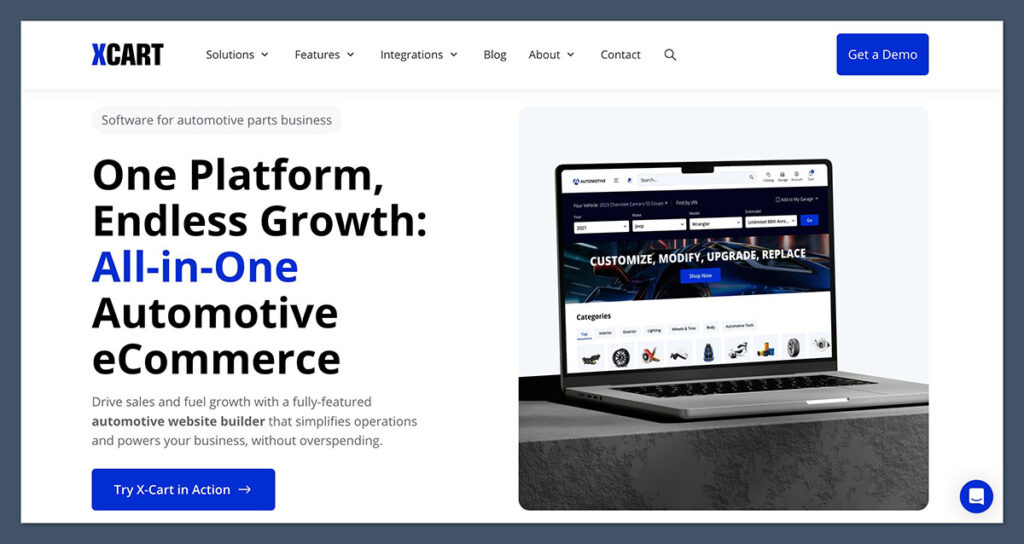
At its core, X-Cart is an open-source ecommerce platform built for customisation and scalability.
Unlike most SaaS platforms, it’s not tied to a subscription model. You can host it on your own server or go with X-Cart’s cloud-hosted solution, depending on how much control you want.
That freedom means no platform lock-in, full ownership of your store, and complete control over how your site is built, secured, and scaled.
You’re not paying monthly fees just to keep your store live. Once it’s set up, it’s yours.
But here’s the trade-off: there’s a steep learning curve. This isn’t the kind of tool you just log into, pick a theme, and hit publish.
If you’re not familiar with backend management or working with code, it’s going to feel like a grind.
That said, for experienced store owners or dev teams, it’s a dream.
You’re not boxed in by limitations. You can customise the checkout, integrate custom payment flows, or build from scratch if needed. It’s a solid foundation for stores that need to do more than just list products.
There are a few different options depending on your budget and needs:
| Version | Hosting | Features | Ideal For |
|---|---|---|---|
| Free/Open Source | Self-hosted | Core ecommerce only | Developers or small teams |
| Business License | Self-hosted | Extra features + support | Growing stores with dev access |
| Cloud-Hosted | X-Cart hosting | Fully managed, monthly pricing | Brands that want less backend work |
| Enterprise | Custom | Full support + advanced features | Marketplaces, high-scale operations |
Key Features:
- Full source code access
- Mobile-first responsive templates
- PCI-compliant checkout out of the box
- Built-in SEO tools like canonical URLs, sitemaps, meta editing
- Multi-vendor marketplace support
- Robust API and 3rd party integration capabilities
Whether you’re building a single product store or something massive with vendor onboarding, X-Cart gives you the foundation. Just know — it’s built for builders. If you want simple, this isn’t it. If you want flexibility and full control, it checks every box.
What I Like About X-Cart
This platform has some standout strengths if you’re the right kind of user. It’s not for everyone, but in the right hands, it’s incredibly powerful.
1. You own everything
This is one of the biggest reasons I recommend X-Cart to experienced ecommerce operators. You’re not paying a monthly subscription just to keep your store online.
You either:
- Use the free open-source version
- Buy a lifetime license once and host it yourself
That means no vendor lock-in, no forced updates, and no surprise price hikes. Your store runs on your terms — not someone else’s.
2. Fast and lean
X-Cart isn’t bloated. It’s built for speed, especially when hosted on a solid server.
Unlike some SaaS platforms that drag you down with features you’ll never use, X-Cart stays lightweight out of the box.
If you configure caching, CDN, and image compression properly:
- Pages load quickly
- Checkout is smooth
- SEO performance improves
Speed is money in ecommerce — and X-Cart gives you the technical base to win.
3. Deep customization
This is where X-Cart shines. Need a custom shipping flow for products from multiple warehouses? Want to redesign your product page layout without restrictions?
You can build it — from scratch or using the template system.
Examples of what you can customize:
- Checkout experience
- Product filtering and category logic
- Admin dashboard functionality
- APIs and external system integrations
This is real flexibility. You’re not limited by theme settings or template lock-ins.
4. Marketplace-ready
The multi-vendor option is a major advantage.
If you’re trying to build something similar to Etsy, Amazon, or even a local marketplace, most platforms require plugins or don’t support it at all.
X-Cart bakes this in at the core:
- Separate vendor dashboards
- Revenue split logic
- Vendor product approvals
- Centralised admin management
This is rare and hard to find without custom development on other platforms.
What I Didn’t Like
X-Cart is powerful, but it comes with its fair share of friction. I’ve used it in real projects, and while the flexibility is amazing, you’ll hit a few walls if you’re not prepared.
1. It’s not beginner-friendly
There’s no drag-and-drop editor. No “what you see is what you get” builder.
You’ll need to understand how to:
- Work with template files
- Use the admin panel efficiently
- Write or manage code for any meaningful customisation
If you’re coming from Shopify or Wix, this will feel like going back in time.
2. Support can be hit or miss
If you’re using the free version, expect to rely on:
- Community forums
- Documentation (which is okay, but not amazing)
- Paid support if things break
Even with a paid license, response times aren’t always fast. If uptime is critical, make sure you’ve got a dev or agency who knows the platform.
3. Outdated app ecosystem
There are extensions, but the marketplace hasn’t seen the same level of growth as Shopify or WooCommerce.
Some integrations feel half-baked or not well maintained.
That means:
- More time spent vetting solutions
- Potential for bugs or unsupported features
- Limited choices for advanced marketing tools or automation
You’ll either need to build your own integrations or live with less polished plugins.
4. Hidden complexity
Yes, you can customise everything — but it also means you have to.
Want a feature that’s native in other platforms (like scheduled discounts or product bundles)? Chances are:
- You’ll need to install an extension
- You’ll have to tweak the code
- Or you’ll hire a dev to build it from scratch
It’s not turnkey. And that can add delays and extra cost, especially if you’re used to feature-rich out-of-the-box tools.
SEO With X-Cart: Not Bad, But Needs Work
From an SEO perspective, X-Cart gives you a solid base to work from — but it’s not going to hold your hand.
There’s potential here, especially for experienced users who know how to configure things correctly. But if you’re used to automated recommendations and beginner-friendly SEO tools, this will feel like a step back.
X-Cart gives you the essentials, but not much beyond that. You’ll need to set most things up manually, and there’s no built-in SEO checklist or workflow.
That means more control, but also more responsibility.
Built-In SEO Features
Here’s what you get out of the box:
- Clean URLs with manual control over structure
- Title, meta description, and header tag customisation per page
- Canonical URL support to reduce duplicate content issues
- XML sitemap generation for search engine indexing
- Mobile-responsive themes for better rankings on mobile
- 301 redirects built into the admin panel
These are the same features you’d expect from most ecommerce platforms, but the difference is how much manual effort is involved. X-Cart doesn’t offer real-time SEO feedback, keyword insights, or built-in optimization prompts.
What’s Missing (And What You’ll Have to Do Yourself)
Here’s where things start to get more technical. Unlike platforms like Shopify (with Semrush integration) or WooCommerce (with Yoast SEO), X-Cart doesn’t guide you toward best practices.
You won’t find:
- Built-in SEO scoring for pages or products
- Automated image optimization
- Structured data (schema) pre-installed on all templates
- Easy bulk editing for SEO fields
- Broken link detection or SEO issue audits
If you want these features, you’ll either:
- Write custom code
- Install third-party add-ons (with mixed reliability)
- Use external tools like Screaming Frog, Ahrefs, or SEMrush
This can slow things down and increase overhead — especially if you’re managing a large store with hundreds of SKUs.
Who This Works Best For
If you’ve got a solid understanding of technical SEO or work with an SEO consultant, X-Cart gives you freedom.
You’re not boxed in. You can create a lean, fast, and fully optimised ecommerce site — exactly how you want it.
But if you’re relying on built-in wizards and on-page hints to stay on track, you’ll probably miss key opportunities and fall short of your competitors using easier platforms.
Pricing: What It Really Costs
On the surface, X-Cart looks like a steal — especially the open-source version, which comes with no monthly platform fees.

For store owners tired of paying $29, $79, or even $299/month just to keep their site live, that’s a breath of fresh air.
But here’s the catch: X-Cart saves you on subscriptions, not setup.
You’ll trade monthly fees for one-off costs and ongoing maintenance. That can be a win — if you’ve got the technical resources to manage everything.
X-Cart Pricing Plans
Let’s break it down:
| Plan | Price | What You Get |
|---|---|---|
| Free | $0 | Core ecommerce features, limited add-ons, self-hosted |
| Business | $199/year | Extra payment gateways, technical support, enhanced features |
| Multivendor | Custom Quote | Tools for managing vendors, commissions, and marketplaces |
| Enterprise | Custom Quote | Full-stack deployment, performance tuning, onboarding support |
The Business plan is enough for most standard ecommerce sites. But if you’re building something more complex — like a marketplace — you’ll need to move into custom territory quickly.
The Free plan sounds great for experimentation, but it lacks support and some integrations that you’ll almost definitely need if you’re serious about launching.
Hidden Costs to Keep in Mind
Here’s where things can add up. Even with a $0 license, your actual operating costs will look more like this:
- Hosting – $30 to $100/month depending on traffic, storage, and speed needs
- Developer costs – $50 to $150/hour for setup, maintenance, and customisation
- Add-ons and extensions – Some are free, but many useful ones cost extra
- Security and patches – Regular updates are needed to stay compliant and safe
- Staging/test environment – You may need a separate dev server if you’re doing active development
If you’re running a lean store with low traffic and standard functionality, these costs can be managed. But once you start customizing or scaling, expect a real investment upfront — both in time and money.
Is It Still Good Value?
It depends on your situation:
- If you hate recurring costs and want full store ownership, X-Cart can be cost-effective over the long term.
- If you don’t have a dev or agency on standby, you might spend more in setup than you’d ever spend on Shopify or BigCommerce subscriptions.
- If you’re a DIY developer, this could be one of the best value platforms out there.
For me, I’ve seen X-Cart pay off when businesses are looking to build once and maintain — not iterate every week or scale overnight with plug-and-play features.
Who X-Cart Is Great For
X-Cart isn’t a platform that tries to please everyone — and that’s actually a good thing.
If you know exactly what you want, and you’re willing to put in the effort (or pay someone who can), X-Cart delivers where many others fall short.
This is who it’s made for:
- Developers building custom stores
If you’re a developer or have one on your team, X-Cart gives you the tools to build out whatever you envision. You’ve got full source code access, which means you can fine-tune every corner of your store — from the checkout flow to backend functionality. - Brands that want full ownership
No SaaS platform lock-in. No forced updates. No hidden limits. If you want to host your own infrastructure and run your business independently, this platform lets you do just that. - Businesses that need extreme flexibility
Have unique shipping rules? Need to integrate with legacy systems? Want to build a headless front-end? X-Cart’s modular design and open framework allow you to work without artificial constraints. - Online marketplaces (multi-vendor)
Most ecommerce platforms struggle when it comes to marketplace functionality. X-Cart includes multi-vendor tools that support:- Separate vendor dashboards
- Commission control
- Product moderation
- Vendor-specific shipping rules
If you’re building something like Etsy, Wayfair, or even a regional B2B marketplace — this feature alone is a game-changer.
Bottom line:
If you’re planning to scale a complex ecommerce operation and don’t want recurring SaaS fees or limitations, X-Cart gives you the canvas to build whatever you want. You’ll need more setup time and technical oversight, but in return, you get complete control.
Who Should Avoid It
On the flip side, X-Cart can be overwhelming — even frustrating — if you’re not prepared. It demands more setup work, technical knowledge, and project management than most mainstream ecommerce platforms.
You should look elsewhere if you fall into one of these groups:
- Newbies or solopreneurs without dev skills
If you’ve never set up a store before and don’t know your way around FTP, cPanel, or config files — this platform is going to feel like a maze. There’s no drag-and-drop editor, and basic tasks often require backend access. - Stores needing rapid launch
Trying to get up and running this weekend? X-Cart isn’t the answer. It takes time to configure, test, and polish — especially when adding custom features or integrations. - Low-budget startups
Yes, there’s a free version, but that doesn’t mean low cost overall. You’ll still need to invest in hosting, development, and support. If you’re bootstrapping or just validating an idea, a SaaS platform might be more practical. - Anyone needing constant hand-holding or live support
There’s support — but it’s limited unless you’re on a paid plan. And even then, it’s not always instant. If you’re someone who relies on 24/7 chat or needs a rep to walk you through every setting, this tool won’t deliver that kind of experience.
To sum it up:
If you’re looking for a simple, guided experience or something with a slick backend and a lot of polish — this isn’t it. But if you’re building for the long-term and need customisation above all else, X-Cart might be exactly what you’re after.
X-Cart vs Shopify vs WooCommerce vs BigCommerce
If you’re trying to choose between X-Cart and the bigger ecommerce names, this comparison will help you get clear fast.
Each platform has its own strengths — and knowing what you’re actually prioritising (ownership, SEO, flexibility, or ease of use) will make your decision a whole lot easier.
Here’s how X-Cart stacks up against Shopify, WooCommerce, and BigCommerce across the features that really matter:
| Feature | X-Cart | Shopify | WooCommerce | BigCommerce |
|---|---|---|---|---|
| Ownership | Full | Limited (SaaS model) | Full | Limited (SaaS model) |
| Customisation | Full | Moderate (some limits) | Full | Moderate |
| SEO Control | High (manual setup required) | Moderate (some automation) | High (via plugins) | High |
| Support | Limited (unless paid) | Excellent (24/7) | Community-based + extensions | Excellent |
| Learning Curve | High (dev needed) | Low | Medium | Medium |
| Cost | One-time or annual licensing | $29–$299/month | Free (but hosting + plugins) | $29.95–$299.95/month |
| App Ecosystem | Small | Massive (8,000+ apps) | Massive (plugins galore) | Moderate |
Quick Observations
- X-Cart wins on ownership and raw flexibility. You’re in control of everything, but you’ll need to be technical (or hire someone who is).
- Shopify wins on ease of use and support. It’s fast to launch, comes with strong native features, but limits deeper customisation unless you go into Liquid code or pay for apps.
- WooCommerce is somewhere in the middle. You get full ownership and huge plugin variety, but it still requires technical know-how — especially around security and performance.
- BigCommerce is SaaS like Shopify but aims to be more enterprise-friendly out of the box. It offers strong SEO and B2B features, though you’ll still deal with limitations around ownership and extensibility.
Who Should Pick What?
- Choose X-Cart if:
- You want total control
- You’re building something custom or large-scale
- You can handle backend setup or hire devs
- Choose Shopify if:
- You need speed, simplicity, and strong support
- You don’t mind paying for convenience
- You value scalability over flexibility
- Choose WooCommerce if:
- You’re already using WordPress
- You want full ownership but with plugin flexibility
- You can manage technical maintenance
- Choose BigCommerce if:
- You want enterprise features in a SaaS format
- You’re focused on omnichannel or B2B sales
- You want less dev work but more SEO control
Final Verdict: Would I Use X-Cart Again?
Short answer:
Yes — but only under the right circumstances.
If I needed full control over every part of an ecommerce operation, or was building something niche like a multi-vendor marketplace, X-Cart would be near the top of my list.
It’s incredibly powerful once you get under the hood and understand what it’s capable of.
No monthly fees, full code access, flexible APIs — that’s a developer’s dream when you’re trying to build something unique or scalable.
That said, it’s not for the faint of heart.
For most small to mid-sized businesses, I wouldn’t start here unless you’ve got the technical firepower ready — either in-house or on retainer.
Without that, you’ll hit roadblocks early on, and what looks like a cost-saving move can quickly turn into a time sink or a tech mess.
Here’s how I’d break it down:
Use X-Cart if you:
- Want to avoid SaaS lock-in
- Need deep customisation or integration control
- Are building a marketplace or complex store
- Have access to developers or know your way around code
Skip it if you:
- Need to launch fast
- Don’t have technical skills or a dev team
- Want a simple backend experience
- Prefer drag-and-drop tools or built-in support
Ultimately, X-Cart is a “build it your way” platform. It’s not plug-and-play. It’s more like plug, code, test, re-code… and then play.
For experienced store owners, developers, or ecommerce teams building long-term infrastructure, it’s an asset.
For everyone else — you might be better off with something more forgiving out of the box.


Now I have more knowledge about X-Cart. I can differentiate now between open-cart and X-Cart
Hello Kathy,
You might also find our OpenCart review useful.
–
Bogdan – Editor at ecommerce-platforms.com