

In this article, I want to give you an in-depth review on what I think about Wix Ecommerce, so keep reading to understand if it’s a viable platform for you.
If you’re a beginner or small business owner looking for an easy way to sell online, Wix Ecommerce is a great place to start.
It’s simple, affordable, and packed with enough features to get your store off the ground without needing a developer.
But if you’re planning to scale fast, sell across multiple channels, or need deep customisation, you’ll likely outgrow it. In this review, we’ll break down what Wix Ecommerce gets right (and wrong) — so you can decide if it fits your ecommerce goals.
I’ve played around with Wix in the past, and I find the tools to be simple and intuitive, but that doesn’t mean that the company’s ecommerce system reflects past achievements.
We know that other newer ecommerce companies like Squarespace have seen their share of hurdles, since making an online store creation interface is rather difficult.
In this article:
What is Wix?
Wix Ecommerce is the ecommerce extension of the well-known Wix website builder. It lets users build an online store with drag-and-drop functionality, no coding required.
It’s a beginner-friendly platform that gives small businesses, creatives, and solo entrepreneurs a quick way to sell online.
Wix Ecommerce is designed to help you sell physical products, digital goods, and even services. It offers various tools out-of-the-box for product listings, shopping cart integration, order management, and payment processing.
Key features include:
- A visual store builder with over 500 templates
- Built-in payment gateways like PayPal and Stripe
- Wix App Market to extend store functionality
- Integrated SEO and marketing tools
- Dropshipping and subscription selling support
It’s aimed at store owners who want control over their site’s look and feel, without hiring a developer or managing complicated backend systems.

- Free Trial
- Starter plans from $8.08
- Simple dashboard
- SEO Friendly
Who Should Use Wix Ecommerce?
Wix Ecommerce is ideal for new store owners who need to get online quickly. It’s best suited for:
- Solo founders and startups
- Small business owners
- Creators, artists, and service providers
- Those who want to test a product idea without investing in custom development
It’s not the best choice if:
- You need advanced inventory systems
- You’re processing high order volumes
- You need a heavily customized storefront
- You plan to run a large international operation
Wix shines in simplicity, but it doesn’t scale as well as Shopify or BigCommerce for complex ecommerce needs.
Wix Ecommerce Pros and Cons
As a solution for building your online store, Wix promises a lot of great things. This is a platform that most people already see as extremely easy to use and convenient.
Additionally, Wix provides good value for beginners too. However, it’s not perfect. Here are some of the pros and cons to consider.
Wix Pros 👍
- Easy to use back-end that’s perfect for beginners
- Quick set up if you want to start selling as soon as possible.
- Lots of customization options if you want to use Wix to stand out
- Wix app market offers access to various forms of functionality
- Wix offers fantastic value as one of the most affordable stores around
- Support for both digital and physical goods
- No sales fees to worry about (or commission requirements)
- Real-time calculator helps with planning shipping
- Various advanced features on premium plans
Wix Cons 👎
- Some issues with limited loading speeds
- Fewer tools than some other dedicated eCommerce solutions
- Some customization options are missing
Wix Ecommerce Features
Wix gives you a broad toolkit to build and manage your store. While it covers most of the basics, some features may feel light compared to dedicated ecommerce platforms.
That said, compared to a solution like Shopify, you find quite a few features that are lacking in the Wix system.
Wix has an easy-to-use dashboard, and the drag and drop interface works well for beginners. It has an app market for including add-ons and other cool things like contact forms and receipts.
However, once again, the Shopify add-on library mainly focuses on ecommerce add-ons, whereas Wix covers everything outside of ecommerce as well.
This is a strong advantage for Wix, since it allows you to expand on every aspect of your website.
You can quickly add a product page, integrate social media, including images and even change around shapes and buttons.
These are all to be expected, but it’s nice to know Wix did well in terms of the basics.
I like how you can add quick product galleries, or even drop in a quick Buy button or showcase sales.
A Thank You Message pops up right after someone makes a purchase, and the seamless checkout process is secure and message-based, sending you emails to stay in the loop.
A full List of Features For Ecommerce
Store Management Features
- Add unlimited physical or digital products
- Create product variations (size, colour, etc.)
- Set custom shipping rules and tax rates
- Create promotional offers like coupons and discount codes
- View customer order history and sales reports
Customization & Store Design
- Drag-and-drop builder to design pages visually
- 500+ mobile-optimised templates
- Full control over product pages, galleries, and checkout experience
Product Page Options
- Add up to 15 images per product
- Video support (not built into all templates)
- Zoom-in product image display
- Embed Buy Now buttons, galleries, and quick views
App Integrations
- Wix App Market: 200+ apps for marketing, logistics, CRM, and more
- Ecwid integration for multichannel selling
- Shippo and ShipStation for fulfilment
It’s a solid foundation, especially for first-time store owners.
Have you seen our Wix Video Tutorial?
In this comprehensive tutorial, you will learn how to use Wix for beginners and unlock the full potential of this powerful website-building platform

Wix Ecommerce Sales & Marketing Tools
Wix packs in a solid range of sales and marketing tools designed to help online store owners convert visitors and retain customers.
One of the most impactful features is abandoned cart recovery. If a shopper adds something to their cart but leaves before checkout, Wix automatically triggers a follow-up email.
You can customise these emails with incentives like discount codes, or simply remind the customer to complete their purchase.
In a market where attention spans are short, abandoned cart automation is no longer optional — it’s essential.
Built-In Ecommerce Sales Tools
Wix gives you native tools to run your store like a marketer, even if you’re just starting out. These include:
- Abandoned cart recovery: Automatically send up to 3 follow-up emails per user
- Coupon codes and discounts: Run site-wide or product-specific promotions
- Buy One Get One (BOGO) offers: Available via advanced pricing rules
- Back in stock alerts: Notify users when sold-out items are available again
- Wishlist functionality: Keep potential buyers engaged
These tools are easy to activate from your dashboard without needing extra plugins or third-party integrations.
Multichannel Selling
Wix makes it possible to sell beyond just your main site by enabling multichannel ecommerce.
You can connect your store to:
- Facebook Shop
- Instagram Shopping
- Google Merchant Center
- eBay and Amazon (via Ecwid app integration)
- Pinterest Product Pins
Multichannel is useful if you want to meet your audience where they already spend time. For example, if your products are visual (like fashion, home decor, or jewellery), selling through Instagram can significantly improve reach.
Note: For platforms like Amazon or Etsy, you’ll need to use third-party apps like Ecwid or Modalyst for full integration.
GEO-Targeted Marketing (Newer Capabilities)
As of 2025, Wix also supports GEO-based marketing features.
This means you can:
- Show different promotions to users based on their location
- Offer country-specific currencies and shipping rates
- Set up region-based tax rules and checkout logic
- Run localised ad campaigns or popups using Wix tools like Site Booster or Wix Popups
For example, you could show a free shipping banner to US users only, or display different product recommendations to UK vs. Canadian audiences.
This level of targeting helps increase relevance and can directly boost conversion rates.
Ease of Use
Ease of use is still one of the biggest strengths of Wix — and that now goes beyond the drag-and-drop editor. While the traditional Wix builder is still incredibly visual and user-friendly, the addition of the AI website builder makes things even simpler, especially for beginners.
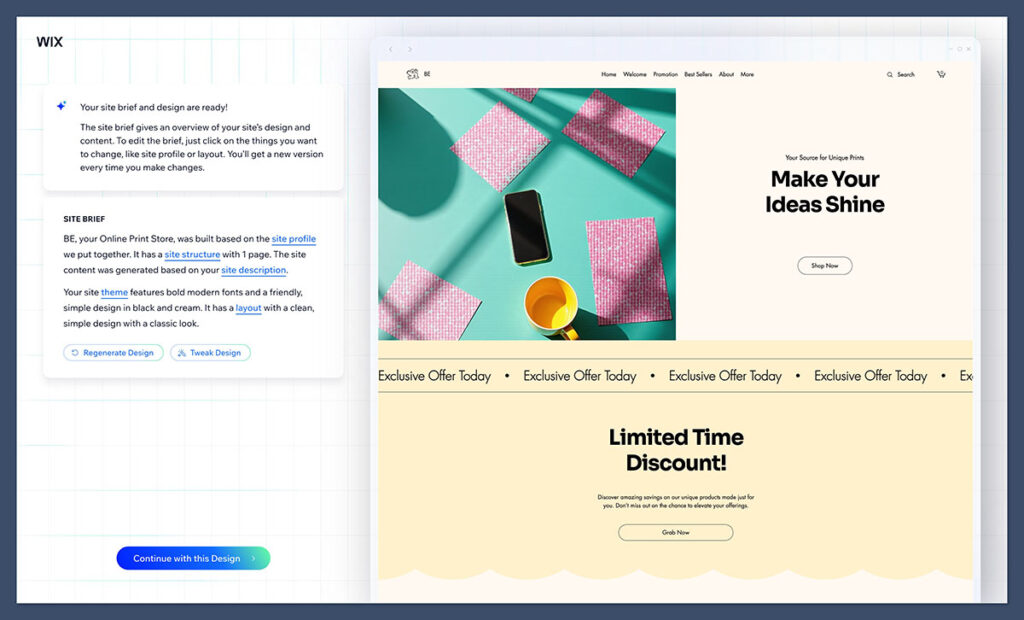
You can now generate a complete ecommerce website by having a short conversation with Wix’s AI. Just answer a few prompts about your business — what you sell, your goals, your brand’s vibe — and the system will build a fully functioning store in minutes.
This includes homepage layout, product sections, placeholder images, and even auto-generated product descriptions or headlines.
Once your store is generated, you still have full control.
The classic drag-and-drop editor is where you can:
- Move or resize elements on your homepage or product pages
- Add product galleries, testimonials, FAQs, or banners
- Click to edit text directly on the screen
- Adjust fonts, colours, buttons, and layout — without any code
The Wix dashboard also keeps things clean. You’ll see a vertical menu on the left-hand side with:

- Page editor
- Add elements
- Store manager (orders, inventory, products)
- Marketing & SEO
- Settings and integrations
There’s also a dedicated Wix Stores section, where you can manage customers, fulfil orders, set up coupons, and review analytics — all in a few clicks.
Everything is laid out logically, and because Wix combines ecommerce, design, and marketing in one place, you don’t have to jump between different tools to get things done.
Whether you’re building the site from scratch or starting with AI-generated layouts, it’s a smooth experience either way.
Wix Ecommerce Pricing
Wix Ecommerce pricing is simple and affordable, especially for beginners and small stores. There are three main business plans, all of which include full ecommerce functionality. The main differences come down to storage, support, and scalability features.
| Plan | Price (USD/month) | Storage | Video Hours | Best For |
|---|---|---|---|---|
| Business Basic | $27 | 20GB | 5 hours | Solo sellers, hobby stores |
| Business Unlimited | $32 | 35GB | 10 hours | Growing stores, multichannel selling |
| Business VIP | $59 | 50GB | Unlimited | High-touch businesses needing priority support |
What’s Included in All Plans:
- No Wix-branded ads
- Free SSL certificate
- Free domain for 1 year
- Full ecommerce tools (product listings, payments, checkout, etc.)
- Abandoned cart recovery
- Accept online payments via Stripe, PayPal, Wix Payments
- Access to Wix App Market
- Mobile-optimized storefront
- 24/7 customer support (email and callback depending on plan)
Business Basic — $27/month
Great for beginners or anyone running a small shop with a handful of products. You get all the ecommerce essentials, but storage and video content are limited. There’s no priority support, but you do get everything needed to launch a simple online store.
Business Unlimited — $32/month
Best for users who plan to grow. You get more storage, more video hours, and access to advanced ecommerce apps. You can connect your site to Facebook, Instagram, and other sales channels. It’s also the first plan that includes the Wix Logo Maker and social media logo files to help with branding.
Business VIP — $59/month
This plan is for serious sellers who want faster support and more control. You get priority customer service, more storage, and unlimited video hours — which is useful for brands that use a lot of content marketing or run video ads. It also unlocks custom reports and advanced analytics.
Things to Keep in Mind:
- No free ecommerce plan: Wix used to offer a free tier, but now you’ll need to pay to access ecommerce features. A 14-day free trial is still available.
- No transaction fees from Wix: You keep more of your profits. However, your payment gateway (Stripe, PayPal, etc.) will still charge processing fees.
- No built-in advanced features like Shopify: Features like multi-currency support, advanced shipping profiles, or native POS are limited or missing altogether.
- Add-ons may cost extra: Tools like Wix Ascend (for marketing and CRM) are separate subscriptions ranging from $10–$49/month.
Is Wix Ecommerce Worth the Price?
For small business owners and new sellers, absolutely. You get a professional-looking store, payment processing, and marketing tools — all for less than half the cost of a Shopify Pro plan.
But if you’re planning to scale or need enterprise-level features, you’ll hit limits fast.

Wix Ecommerce Templates, Design, and AI Features
Wix is well-known for its beautiful templates, and the ecommerce range is no exception — clean, modern, and mobile-ready right out of the gate. Whether you’re selling fashion, tech gear, or baked goods, there’s likely a template that matches your vibe.
But Wix has gone beyond just giving you a set of templates. Now, the platform offers a powerful AI website builder that takes care of the design work for you — based on your business type, goals, and style preferences.
Highlights:
- Over 500 designer-made templates built for ecommerce
- AI-powered site generation: answer a few questions and get a custom store built for you
- Industry-specific layouts (fashion, food, wellness, tech, etc.)
- Responsive and mobile-ready by default
- Pre-built sections for product grids, testimonials, contact forms, and more
- Ecommerce features like product galleries, shopping carts, and checkout already integrated
- Full control to tweak fonts, colours, layouts, and product page designs
AI Design Tools Built Into Wix:
Wix’s AI website builder helps generate a custom site structure for your store, including:
- Suggested page layouts and design styles
- Pre-filled text and product copy
- Image suggestions that match your niche
- Branding and colour palette recommendations
- AI tools for rewriting product descriptions or headlines
After the AI builds your site, you can edit every element using the Wix Editor, or go deeper with tools like Velo for advanced functionality.
If you’re starting from scratch or want a faster way to go live, the AI builder is a huge time-saver — especially for non-designers.
Limitations:
- Once you’ve published your site, you can’t switch to another template without rebuilding it from scratch
- Some templates don’t support video backgrounds or complex animations
- The AI builder won’t give you pixel-perfect customisation — you’ll still need to use the Wix Editor for more advanced tweaks
- Not all AI-generated layouts are perfect on the first try — you might need to regenerate or refine sections manually
Verdict on Design:
If you’re a design-focused brand, Wix gives you more visual control than platforms like Shopify, especially for layout and branding. The new AI tools just make it faster to get started, and you can still go hands-on when needed.
This blend of automated design + manual control makes Wix a strong option for anyone who cares about how their store looks, but doesn’t want to start from a blank canvas.
Wix Ecommerce Inventory
Managing inventory in Wix isn’t all that difficult. You can add a product, track inventory, display how many units are left, include product options and check in on your orders. It has support for collections, tags, store promotions and more.
Wix is also great for selling digital products, since the product page templates are designed differently and ready for you to insert content.
Managing your inventory when it goes out to users has become more manageable. For instance, Wix offers a cool feature for calculating real-time shipping.
You can also scan barcodes to track your shipping and give your customers a better idea of when packages are coming.
Wix AI Website Builder: What Happened to ADI?
Wix used to offer a tool called Wix ADI (Artificial Design Intelligence) — a beginner-friendly feature that helped users build simple websites by answering a few questions. As of 2024, that tool has been replaced with the much more advanced Wix AI Website Builder.
The current AI builder goes beyond just choosing a layout. You can now have a conversation with Wix’s AI to:
- Create a full site tailored to your industry and goals
- Automatically populate pages with content and images
- Adjust branding, themes, layouts, and structure in real time
- Launch a ready-to-go site with ecommerce features baked in
You don’t just get a design — the AI suggests apps, tools, and features based on your business type, whether you’re running a local bakery or a digital download store.
It’s a more intelligent version of ADI, built for flexibility and long-term growth.
The Wix Mobile Apps
Being on-the-go as an ecommerce professional is often unavoidable. That’s why Wix has put together an excellent mobile app for you to manage your entire online store and add products regardless of where you are.
I particularly enjoy this because you can check-in on your orders and make sure that everything is running smoothly when you’re out of the office.
In addition to that, you can chat with your site visitors, adjust your website, and keep track of bookings if you have that functionality on your site. Wix offers an iPhone app and an Android app.
Wix Ecommerce SEO and Marketing
Wix has seriously improved its SEO tools over the years. You’re no longer stuck with clunky page titles or poor site structure.
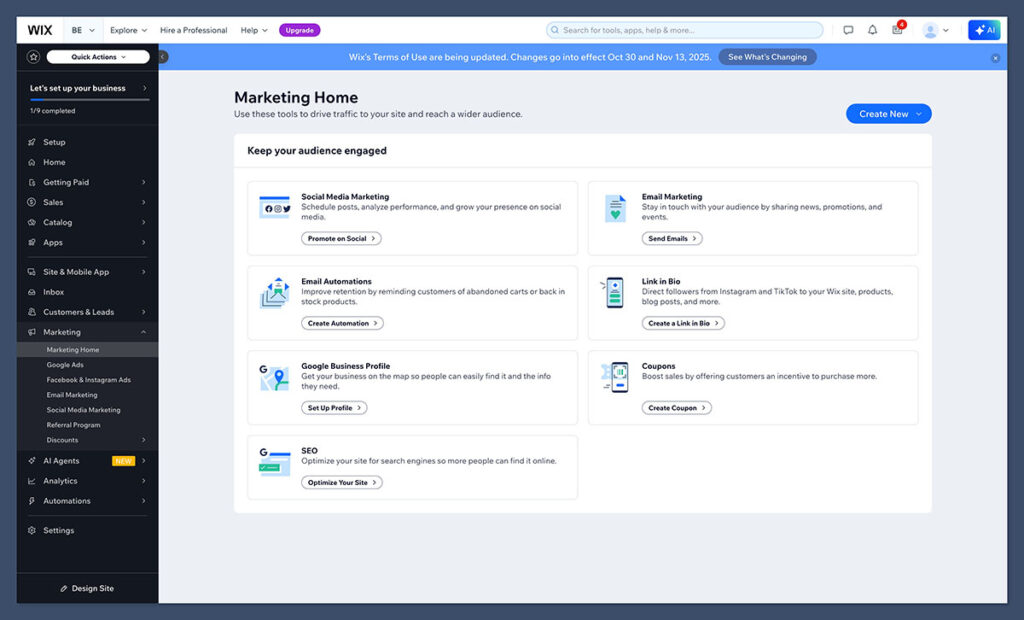
Built-in SEO Features:
- Custom meta titles and descriptions for each page
- Edit URLs and 301 redirects
- Add alt text to images
- SEO-friendly templates with schema support
- Mobile optimisation included by default
Wix SEO Wiz:
- Step-by-step SEO setup guide
- Personalized checklist based on your niche and keywords
- Connect to Google Search Console
Wix still can’t match WordPress + RankMath for deep SEO flexibility, but it gets the basics right. For most beginners, it’s more than enough to start ranking pages.
Wix Ecommerce Payments
The Wix Ecommerce payment options have drastically improved over the years, as the company adds new payment gateways on a regular basis, along with a simple process for connecting and onboarding.
Dozens of gateways are provided, including 2Checkout, Stripe, and Square. Therefore, you can decide on the payment gateway of your choice and accept credit card payments and other payments like PayPal.
Wix supports all of the traditional payment gateways that your customers probably use, including Stripe, Square, PayPal, and many others.
There’s about 15 different payment processing options to explore but do remember that there are some limitations on what Wix can support. It’s not suitable for Apple Pay or Amazon, for instance.
All Wix websites come with access to an SSL certificate, which you need to activate to secure your website. This certificate “SSL” stands for secure sockets layer, and it encrypts all visitor information, making it easier for your online store to keep your customer as secure as possible.
Your customers can store their credit card details in the “wallet” section of the checkout, making it as simple and quick as possible for visitors to purchase products going forward.
Wix Ecommerce Customer Support
Wix is known for its high-quality support, and you receive their premium support package when signing up for an ecommerce site. You don’t get the priority callback service, but you can always upgrade if that’s important to you.
The Wix Support Center delivers documentation, forums, and FAQs for just about any question you might have. You can also call in or send the company an email.
Final Thoughts
Wix Ecommerce is a strong platform for new and growing online stores. It’s user-friendly, affordable, and packed with the essentials.
If you’re just getting started and want something intuitive, it’s an excellent option. But if you’re looking to scale aggressively or run a highly customised ecommerce operation, you’ll likely outgrow Wix in the long run.
Still, for the majority of small businesses, creatives, and new sellers — Wix offers solid value and a clean, easy setup.



Great stuff. I was thinking about building my next website using WIX and your article convinced me to go ahead and do so 🙂
I have one question though that I can’t find any answer to online (not even on the WIX forum). I will be selling audio files through the WIX store / Digital products. How will my customers be able to listen to their purchased file(s)? I don’t want them to receive a MP3 by email that they may have a hard time opening on their devices (especially my non-tech savvy customers) like in the Napster days and would rather them to log in to their personal account on my future WIX website after they make a purchase and stream their audio(s) from there. Is streaming a file on-site an option that WIX provides to customers?
Thank you for your help!
Hey Oscar!
We are glad we we able to help! Regarding you question, maybe someone from the community can help. If not, it’s best to talk to a developer and see if this feature can be implemented easily.
Wix est une bonne plateforme DIY pour se lancer par soi même ! 🙂
👍👍👍
Hi,
One of the main missing feature in Wix Store is Discounts : you can only create a discount by creating a coupon code : NO automated discount can be triggered without coupon codes….
Olivier
what about site speed for wix? the highest bounce rates are for slow page loads
Hello Marshall, site speed isn’t a problem with Wix.
If i want to build an eCommerce system on wix that accepts as well as makes payment, is that an option available or do I need to move to another platform?
Hello Harjeet, yes, the option is available.
I am using WIX, easy to use but not Ecommerce. Wix Ecommerce, as of 01/2021, does not work with and calculate rates for UPS and FedEx. It also does a poor job with USPS. They need to fix this pronto.
WIX has Terrible or NO customer service.
I was charged automatically through my credit card. A credit card which I did not give Wix Authorization to. I can only assume this information was taken from google. My intention was to ask about payment plan options and discuss other subscription options. Now in order to even DISCUSS this information (about a refund) with WIX, I need to cancel my plan which includes taking my website down from it’s current .com status even though I’ve paid full price for this for the ENTIRE YEAR. Needless to say, this is the worst customer service I’ve experienced. That is not a hyperbole.
I see many bad reviews for Wix on here and I think they miss the point that this is a simple website building platform that look so much better than any on the market. You can assist the speed of the site by ensuring all your images are web ready before you upload them. I manage 3 companies websites on Wix and they all are fast, look exceptional and the store front works great for under 100 items.
It tracks my sales and I have no issue with it. You can print out labels your self without expecting the site to do all the work. That’s what a despatch person is for after all. If you need a website that a large corporation would use then of course Wix will not suit you, but it is a very affordable option for those who want a great looking site at a fraction, and I mean a fraction of a web designers costs. a couple go hundred dollars versus many thousands. I think the value speaks for itself. WordPress way too complicated for the beginner unless you want too spend all day making a simple change.
I totally agree with PC’s comments below. I wasted so much time (many months) trying to improve the loading of my WIX site. It was a nightmare! Their technical support was a joke. They kept saying that the website was loading fast enough. I wouldn’t call a 10 second loading time fast! Nothing I did improved the speed. I used Pindom and the webpagetest speed test tools to check every time I tied to change something, in the hope that it improved the speed. In the end I have a beautiful website that is useless. I am currently using the basic ecwid store on its own (I initially purchased it as a separate shopping cart app to be used with my Wix site). I asked a friend here in Australia who maintains a very large corporate business’ website for advice and he said he had another friend who had the same problem with WIX. He tried to help, but he said there wasn’t a lot he could do without rebuidling my site again!
Don’t waste your time with them!
Thank you for the great article.
After spinning my wheels with Shopify for 3 years and never getting my website to quite behave the way I wanted to I decided to try Wix.
I spent about 3 weeks working on the design and adding in products. Wix Made it so easy and fun to customize!
Then, last night I got my first order and I realized Wix forgot something VERY IMPORTANT! I don’t have the ability to create and purchase shipping labels! That is unforgivable in an e-commerce website. Luckily I only take payments through PayPal so I can easily buy and print shipping labels through them.
Also, I paid for a year of the Premium plan which was supposed to include the newsletter function but I ended up purchasing that as an add on because it didn’t give me a free option.
I like that I was able to add another domain but I wish I could direct it to a specific page. I hope they fix this.
All in all, my site is coming together beautifully and for the most part I’m happy with it. I keep seeing that Wix is slow so I’m going to try not to put too much on the homepage.
They also have a mobile app but I find it way too confusing to use. I wanted an easy way to communicate with customers and possibly give them access to private sales.
Thanks for sharing Tamara!
I encourage everyone to run a PCI scan on their Wix site. While they claim PCI compliance I see TLSv1.0 enabled on my site. Their support has been as useless as a butthole with tastebuds in actually disabling this protocol and have this far provided me with scripted non answers and ignored my requests completely. I see Shopify in my future
Wix although easy to use and set up be warned they will charge you for not even publishing a website.
They charged me over $1,300 when I was just playing around with the site for one day, never published.
It is my fault for not looking at my credit card statement and noticing they charged me, but it is heartless of their customer service to charge me for something I never used for over two years and they wouldn’t refund my money. It took me a half a day to even get a hold of them and that was only by email, there is no phone number that works and another half a day to even figure out how to delete my account because you get to a section that says “click here to delete an account” and when I did up pops “you can’t delete your account because you are premium”
I will never ever use this site again, I am also not going to recommend to my startup clients.
What a heartless and immoral company, sad.
I made a wix site in 2013. My google page rank was 5 and decreased to 1 after transferring to wix. stay away from that company and I mean it. It is very very slow. Drag and drop doesn’T work properly and you end up with the heaviest web site. I use woocommerce at worpress and I cannot even compare them.
Great article although there is no mention of file sizes of wix webpages. I’m using https://tools.pingdom.com to see the file size of my webpage and I can see a breakdown of the webpage and most notably the script size. And the script size is huge hence why my website is taking 5 or 6 seconds to load because it’s 1.5mb big. I even removed the images.
This is the breakdown I got.
Script 75.1 % 1.16 MB
Other 17.9 % 283.89 KB
Image 5.1 % 80.46 KB
CSS 1.1 % 18.12 KB
HTML 0.8 % 12.56 KB
Total 100.00 % 1.55 MB
This took 4.7 seconds to load.
The thing is I have already paid for 12 month subsciption with Wix and it wasn’t cheap. But I have been testing wix example webpages and they all seem large in size and the script element is dispropionately large.
Can someone advise? Am I doing something wrong?
Thank you
Daniel
Hey Catalin, great review.
Just wondering, does Wix allow html/css editing & injecting some javascript framework, etc.?
Thanks.
Hi Refia,
We’re glad you enjoyed our review!
You can only insert external HTML/CSS and JavaScript code using the HTML widget. Editing the source code of your Wix site isn’t possible.
Best,
–
Bogdan – Editor at ecommerce-platforms.com
Hi. Do you know if you Can you set up recurring payments using Wix. This is for a subscription service? Thanks
Hi Amanda,
Not at this time but you can use an app like Form Builder Plus+ which allows recurring payments. You can find it on the Wix App Market: http://www.wix.com/app-market/form-builder-plus/overview
Best,
–
Bogdan – Editor at ecommerce-platforms.com
I did this, as I sell 12-week subscriptions to local farm goods. However, I can’t find a way to charge sales tax through Form Builder Plus+. This is EXTREMELY frustrating. Has anyone here found a fix for this?
We really like Wix except it doesn’t have much reporting as far as sales and profit per product goes. Does anyone have a suggestion for an app or another software program that can report profit per item, monthly sales, and inventory along with Wix?
I think the number of stars is a bit high for what Wix provides.
If you are the user that the author describes at the end of the review, Wix will most likely meet your requirements but only just. For anything more it is a real struggle. I’ll post a few of the missing features/functionality that are a deal-breaker for me and will see me switch platform once my sub runs out (roll on summer!).
*No batch upload of products- this makes setup a real pain. Each item must be described, coded, options added, tagged priced and on and on.
*Product pages are just a galley. There is no option for the visitor to customise the view (number of products per page, sort options: price low to high A-Z etc, filters on colour size etc), and the solution or workaround is a real PITA which sees you creating multiple needless pages .
*There are no downloadable reports and any “stock control” that they mention is seriously underwhelming and is not fit for purpose.
*There is no support or integration for providing shipping tracking. Really.
Unless you want to spend your time pulling your hair out trying to find workarounds for what seem like pretty basic requirements I would look elsewhere. Budget dictated our choice, but it has definitely proved a false sense of economy.
I would love to know which platform you end of going with. I have the same issues.
Thanks for your detailed breakdown of why Wix might not be appropriate for some. I’m in the process of choosing and would also love to know which one you chose in the end, particularly as you are also after a budget option?
My Wix plan was cancelled on Nov. 1, 2016. I received a comformation the same day, Nov. 1, 2016 I gave them the reference number from Nov. 1st. I never received a credit. It’s now 17 days later and I am still waiting. I spoke to the representative today and she again cancelled my account and stated it could take 10-20 days to receive the credit. So in addition to the first 17 days, I now have to possibly wait an additional 20 days. I am not happy! My feedback is very poor.
Sorry to hear that, banks also cause huge delays when it comes to refunding money.
Hello,
I’d like to know if you mean 100 different products of 100 in quantity ?
Hi Carolina,
The phrase in the conclusion refers to 100 different products.
Best,
Bogdan – Editor at ecommerce-platforms.com
The crucial feature wix is lacking is a confirmation email of orders. The seller gets such, the buyer not. This already is lacking for years and they still did not fix it and have no clue when that will be. So if this feature is important to you, choose a different platform.
Hey, highly helpful review. One doubt though, I am building a video chat site with the help of the Skype button. Is Wix a good tool? And is it trustworthy with the payment system. And also, after the site is built using Wix, can I use a domain other than Wix?
Thank you.
Hey, very helpful! I have already built a site, but need a privacy policy for my bank (Chase) to hook up merchant services. Wix provides no template or example (as shopify does) Do you have any suggestions or examples? ?
Unfortunately they do not provide a privacy policy template at the moment, you can start with their own example or you can try to find other legal documents on Google. Contacting a lawyer to help you would be a good idea too.
Be careful, don’t use Wix website. Wix is maybe the WORST provider ever seen. Wix team always make false advertising everywhere. Wix website are totally unfunctionals. No answer from support, or stupid answers with no solutions to problems.
Very SLOW websites, or if you made a page with very few (2 or 3) elements : They seem being able to give you a very nice and beautiful website but you can’t use it when you use apps. It is totally false advertising. Images send to socials are very very little and absolutely not interesting, many bugs and more and more and more….
The only answer from Wix team, if we can call them a team, is to clean history and cache. Did you ever said to your clients : “hey buddy, if you want to access our website, clear your cache !!!” RIDICULOUS !!!
Don’t forget that : with Wix, you have a low price initial webpage, but after ALL is paying.
Never use Wix websites, they are dishonest and unscrupulous about their product and services.
————————————–
N’utilisez jamais de site internet chez Wix, probablement le pire provider qui existe. Wix passe son temps à faire de la publicité mensongère partout, vous faisant croire à de somptueux sites qui en réalité ne fonctionnent jamais et sont très, très lents, à tel point que même vous avez envie de partir de votre propre page. Sauf évidemment si vous ne mettez que deux ou trois apps dessus, auquel cas il ne ressemble à rien.
Leur équipe ne résout aucun problème, ne donne aucune solution. La seule réponse est en permanence la même : videz vos caches, redémarrez votre navigateur !
Avez vous déjà dit à vos clients : “Si vous souhaitez accéder à notre site, videz donc vos caches Monsieur, enfin, comment faut-il vous le dire ?” On rêve d’entendre ce genre de nullité comme réponse de la part d’un support de provider de nos jours, et jamais aucune autre solution.
Les sites Wix sont définitivement à proscrire, n’utilisez Jamais ce provider.C’est une publicité totalement mensongère, et malhonnête. De plus, après une page installée presque gratuitement, chez Wix, tout est payant !!! La nullité, c’est comme le minimalisme artistique, cela coute très cher.
Wix : Fuyez ce provider, c’est le seul conseil à donner.
Hi, Could Wix do a registry add on where clients would create their own site within our site so their friends could come and purchase off their registry?
Thanks
Hi,
Not at the moment. You will need to open a separate account for each client.
Cheers.
I’ve recently built an site from wix just like flipkart and Amazon,so I am confused about its payment method is it safe for online transactions
The Wix Stores checkout process is secured by HTTPS / TSL encryption and all the payment gateways offer the highest level of security certification. It is safe for your customers to purchase from your Wix site.
Hey, thanks for the reviews! These are very helpful for someone starting out. I was wondering if you had any recommendations if I am primarily going to sell downloadable exercise and nutrional counseling videos, etc.
I would not be interested in redirecting my customers to a different site so wix would probably not be a good choice. I’m also the type of person that doesn’t mind spending a little extra for bonus quality, etc.
I will be starting the website and would want to be able to implement this type of software but I have not chosen the website development software yet at all. Any help is appreciated!
Thank you!
Aaron
Hi Aaron, this post will help.
I want to set up an e-commerce platform where my major suppliers register on my website as traders and we take the 30% from the retail price if its sold from our website but orders go to the supplier for delivery. We pay these suppliers once a month. We pay them the money once a monce or even more regularly minus the 30% we take out for selling our platform -can Wix do this?
This might be too complex of a contraption to manage it via WIX. I would look into Magento and speak with a developer. Cheers
Hi Catalin –
Thanks for the overview. I do have a quick question. I will only be offering a few packages. I am a health coach and will offer things like Detox packages, Monthly Fitness packages, etc. Everything I sell will be in some sort of file format and downloaded not SHIPPED. Do you know if I have the capability within WIX to launch an executable via DropBox that would download this? Do you happen to know what others are doing? Thank you! Connie
Hi Connie, I know for sure that Shopify allows you to do this via Fetch, but not sure about WIX. Did you get in touch with their support team?