



Quick answer: If you want full control and already have a dev team (or you're technical), go with Snipcart. If you want to get selling fast with everything built-in, go Shopify.
After 10+ years building ecommerce stores for everything from indie merch shops to high-growth DTC brands, I’ve tested just about every platform out there.
Today, I’m putting Shopify and Snipcart head-to-head. These two tools cater to very different types of sellers — but most folks don’t realise the tradeoffs until they’re knee-deep in dev work or stuck paying for apps they didn’t budget for.
Let’s fix that.
Quick Comparison: Shopify vs Snipcart
| Feature | Shopify | Snipcart |
|---|---|---|
| Hosting | Fully hosted platform | Add-on cart (you host your own site) |
| Best For | Beginners, marketers, non-tech founders | Developers, JAMstack sites, custom builds |
| SEO | Good, but limited control | Full control, depends on site |
| Cost | Monthly fee + app/add-on fees | Pay-as-you-go (2% per transaction) |
| Ease of Use | Very easy | Dev required |
| Customisation | Medium (theme + app-based) | High (code-level flexibility) |
| App Ecosystem | 8,000+ apps | Niche but dev-extensible |
| Payment Methods | 100+ built-in, Shopify Payments | Stripe, PayPal, more via API |
| Mobile Optimised Checkout | Yes (built-in) | Yes (custom or default Snipcart UI) |
What is Shopify?

I’ve built more than 50 ecommerce stores on Shopify over the last decade — everything from simple one-product shops to full-scale DTC brands with thousands of SKUs.
And here’s the truth: Shopify just works. That’s why it’s become the go-to platform for so many founders and agencies.
At its core, Shopify is a fully hosted ecommerce platform. That means you’re not fiddling with servers, updates, or plugins. You sign up, pick a theme, and start selling.
You can go from idea to live site in under an hour — and I’ve seen non-tech founders do it in less time.
Here’s what makes Shopify popular:
- All-in-one setup – Hosting, security, SSL, payments, cart, inventory — all handled out of the box. You’re not stitching together five tools just to process a sale.
- Templates – You get a range of sleek, mobile-optimised themes. Some are free, others cost between $100 and $500. All are easy to tweak using the built-in Theme Editor — no code needed if you’re sticking to the basics.
- App ecosystem – Shopify has more than 8,000 apps. You want subscriptions? Reviews? SMS marketing? You’ll find an app. This is a huge win if you’re growing fast and need to plug in features as you scale.
- Shopify Payments – Their own payment gateway. Clean integration, fast payouts, and you save on third-party transaction fees. If you're in a supported country, this is a no-brainer.
One thing I’ll say — Shopify’s magic is in its convenience. Everything is built to get you selling fast. But that comes at a cost, and not just financially.
Here are the downsides:
- Customisation is capped – Yes, you can tweak things with the Theme Editor. But if you want total control, you’re going to need to learn Liquid — Shopify’s templating language. It’s powerful but not super intuitive for non-devs.
- Costs add up – The $29/month plan sounds fine until you add $19/month for upsells, $15/month for reviews, $49/month for subscriptions, plus a $250 theme. It’s easy to cross $150–$200/month without blinking.
- SEO control is limited – Shopify handles technical SEO well, but certain things — like the
/collections/and/products/folder structure — can’t be changed. That’s frustrating if you’re doing advanced SEO.
Still, for most businesses, the pros outweigh the cons. You’re buying speed, stability, and a support ecosystem.
If you’re focused on sales, growth, and operations — and not coding — that tradeoff makes sense.
Verdict:
Use Shopify if you want a reliable, scalable, beginner-friendly platform. It’s the clear choice for founders who don’t want to get into the weeds of code.
You’re paying for speed and support — and for most businesses, it’s worth it.
What is Snipcart?
Snipcart isn’t your typical ecommerce platform — and that’s exactly why some devs swear by it.
It’s not an all-in-one solution. It’s a lightweight shopping cart you add to your existing site. If you’ve got a static site, a custom CMS, or a headless setup, Snipcart gives you full ecommerce functionality without forcing a full rebuild.
I’ve worked with brands that wanted ecommerce without moving off their stack. Snipcart was the best fit because it just plugged in, didn’t mess with their frontend, and let us customise the checkout logic however we wanted.
What makes Snipcart different:
- Add it to anything – Snipcart works with any HTML, CSS, or JS framework. I've used it on sites built with Hugo, Gatsby, WordPress, and even plain HTML. JAMstack-friendly by design.
- Frontend stays yours – Unlike Shopify, Snipcart doesn’t touch your site’s structure or design. You manage everything from layout to load times.
- Deep API control – You can hook into Snipcart’s API to build custom carts, use advanced product logic, add dynamic pricing, collect custom fields at checkout, and trigger backend automations.
- Pay-as-you-go model – No monthly fee. You pay a 2% transaction fee on each sale (plus Stripe or PayPal fees). If you're selling occasionally or want to keep overhead low, this model works well.
It’s lean, modular, and developer-first. That makes it powerful — but it’s not for beginners or time-poor marketers.
But it’s not beginner-friendly:
- No site builder – You need to bring your own frontend stack. No drag-and-drop tools. If you can’t build a responsive site or work with templating engines, Snipcart’s not for you.
- No app marketplace – There’s no “app store” to add email marketing, reviews, or subscriptions. You build or integrate it yourself using APIs or third-party tools.
- All growth tools are manual – Things like SEO setup, analytics, UTM tracking, Facebook Pixel, schema markup — it’s all up to you. Great if you want control. Time-consuming if you don’t.
That said, Snipcart is clean, documented well, and built by devs who care about performance and flexibility. You’re not locked into a theme or a platform. You’re just adding ecommerce to your stack — your way.
Verdict:
Use Snipcart if you’ve already got a site and want ecommerce without compromise. It’s dev-first and super flexible, but not “plug-and-play.”
You’ll need to build, integrate, and test things yourself — but if that’s your world, it’s a dream setup.
For custom sites or headless builds, Snipcart often makes more sense than forcing Shopify into the workflow.
Hosting and Setup
This is where things split fast between Shopify and Snipcart — and your comfort with tech is going to matter a lot.
Shopify
Shopify handles everything on the backend.
You sign up, and your store is already live on a temporary subdomain like yourstore.myshopify.com. From there, adding a custom domain is a couple of clicks. No FTP. No cPanel. No DNS headaches.
Here's what you're getting:
- Fully hosted platform – No need to touch servers or mess with firewalls.
- SSL included – Shopify automatically issues and installs an SSL certificate. Google-friendly and secure out of the box.
- Automatic scaling – Traffic spike? Doesn’t matter. Shopify handles it. I’ve seen stores go viral overnight and nothing broke.
- Uptime and speed – Shopify sites are fast and reliable. No caching plugins or CDN setups needed.
It’s a platform built for people who want to run a store, not manage servers. If you’ve ever wrestled with hosting or had a WordPress site go down mid-campaign, Shopify feels like a breath of fresh air.
Snipcart
Snipcart flips the model. They don’t host anything. You bring the site. They bring the cart.
That means:
- You choose your hosting – Could be Netlify, Vercel, Cloudflare Pages, or your own server.
- You manage the CMS or static site – Could be WordPress, Ghost, Hugo, Next.js, Jekyll, or plain HTML.
- You handle deployment – Build it locally, push to Git, deploy to production.
You also need to install Snipcart’s script manually, set up your product markup using specific classes or attributes, and test everything before launch.
To be clear — this isn’t bad. It’s just dev-first. If you already have a static site, you’re probably using one of these tools anyway. And Snipcart’s documentation is solid. But there’s a learning curve.
If you're not technical or don’t have a dev on standby, this part alone can stall your entire project.
Verdict:
Shopify wins hands down for simplicity and speed. You don’t need to know what DNS propagation means or how to deploy from GitHub.
If you're technical or already have a stack in place, Snipcart gives you freedom. But if you're not, Shopify saves you from a massive time suck right out the gate.
Checkout Experience
Let’s be honest — checkout is where you win or lose money. If it’s slow, clunky, or confusing, people bail.
Shopify and Snipcart take two very different paths here.
Shopify
Shopify’s checkout is probably the most battle-tested on the market. Millions of stores use it. Customers know it, trust it, and can fly through it on mobile.
Here’s why it works:
- Mobile-first, clean UX – It’s fast, no distractions, and designed to get out of the way.
- One-page checkout (on Shopify Plus) – Higher plans give you tighter control and faster flows.
- Trust and speed – Pre-filled info for returning customers, Apple Pay, Google Pay, and other express checkouts built right in.
- Security handled – PCI compliance, fraud detection, and SSL are already baked in.
The tradeoff? Even then, you’re still working within Shopify’s sandbox.
You can’t:
- Remove Shopify branding on lower-tier plans
- Redesign the flow entirely
- Inject custom logic freely without hacks or third-party apps
Still, for most brands, it converts like a machine.
Snipcart
Snipcart gives you way more freedom — but you’ve got to work for it.
Out of the box, it gives you a clean, minimal checkout UI that sits as an overlay on your existing site. It’s decent — but basic.
Where it shines is in:
- Custom styling – You can fully style the cart with your own CSS or override templates.
- Flexible checkout logic – Add custom fields, extra steps, validation rules, shipping flows, whatever you want.
- Embeddable everywhere – Your cart and checkout live natively on your site, not a separate domain.
But all of this means more setup. Want to tweak the layout? You’re in HTML/CSS. Want to add address validation or conditional fields? You’ll be writing JavaScript.
And because you’re in control, you’re also responsible for making sure it all works across browsers, devices, and edge cases.
Verdict:
Shopify wins for conversion-driven simplicity. Snipcart wins for checkout freedom and frontend control.
If you care about speed, trust, and mobile UX — go Shopify.
If you’re a dev building a branded experience — Snipcart is a solid pick, but you’ll need to build it right.
Payments and Fees
This is one of those areas where pricing looks simple on paper — until you start doing volume.
Shopify and Snipcart both take a cut, but how they do it and what you end up paying long term are totally different stories.
Shopify
Shopify gives you 100+ payment gateways out of the box — everything from PayPal and Apple Pay to Klarna and crypto gateways. The real player here though is Shopify Payments — their in-house gateway.
Here’s how it breaks down:
- Use Shopify Payments? You just pay the standard credit card rate:
- 2.9% + $0.30 per transaction on the Basic plan
- 2.6% + $0.30 on the Shopify plan
- 2.4% + $0.30 on the Advanced plan
- Use PayPal, Stripe, or anything else? Shopify adds an extra 2% on top — unless you’re on Shopify Plus, where that fee drops or is negotiable.
That extra 2% might not seem like much, but it adds up fast.
Let’s say you sell $10,000/month using Stripe on the Basic plan — that’s $200/month straight to Shopify, just for not using their gateway.
But as you scale, you can upgrade to higher plans or switch to Shopify Payments, which helps control those fees.
If you’re doing real volume and using Shopify Payments, the blended fees can be lower than Snipcart in the long run.
Snipcart
Snipcart keeps things lean — it’s pay-as-you-go. No monthly fee. No forced gateway. You just plug into Stripe, PayPal, Square, or other supported processors.
Here’s the math:
- Flat 2% per transaction to Snipcart
- Plus whatever Stripe/PayPal/Square charges (typically 2.9% + $0.30 in the US)
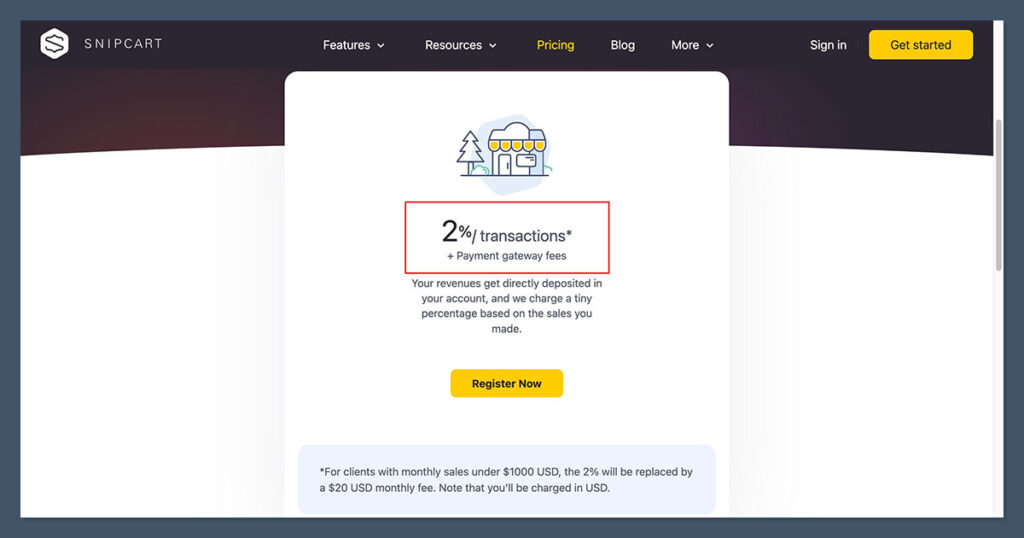
So your all-in fee per sale is around 4.9% + $0.30 unless you're on custom enterprise pricing with one of your gateways.

This works great if:
- You sell occasionally (low monthly volume)
- You want no recurring platform cost
- You need full gateway control (e.g. crypto, regional providers)
But if you're doing $50K/month in sales, you're paying $1,000/month to Snipcart on top of your Stripe fees.
At that level, Shopify is actually cheaper — especially if you're using Shopify Payments.
Cost Comparison Example
| Platform | Monthly Sales | Fee Structure | Estimated Cost |
|---|---|---|---|
| Shopify Basic + Shopify Payments | $10,000 | 2.9% + $0.30 | $290 + ~$10 |
| Shopify Basic + Stripe | $10,000 | 2.9% + $0.30 + 2% | $490 + ~$10 |
| Snipcart + Stripe | $10,000 | 2.9% + $0.30 + 2% | $490 + ~$10 |
The tipping point? If you're doing over $15–20K/month and using Shopify Payments, Shopify starts saving you real money.
Verdict:
Snipcart is cheaper for low-volume stores, hobby projects, or one-off sales.
Shopify becomes cheaper as you grow, especially if you use Shopify Payments and move up to higher-tier plans.
If you're building for scale and want predictable costs, Shopify is the better long-term deal.
If you're bootstrapping or doing infrequent sales, Snipcart lets you keep overhead to zero until you sell.
SEO and Marketing
SEO isn’t just about ranking anymore — it’s about speed, structure, and control.
If you’re driving organic traffic or scaling content-heavy ecommerce, how your platform handles SEO can make or break your strategy.
Here’s how Shopify and Snipcart stack up.
Shopify
Shopify handles the basics of SEO pretty well — and it’s more than enough for most stores that aren't playing an aggressive content game.
Here’s what you get out of the box:
- Clean HTML – Lightweight templates and good markup structure make most Shopify stores perform well by default.
- Fast themes – Most of the paid themes are optimised for speed, which helps with Core Web Vitals.
- SEO settings UI – Meta titles, descriptions, image alt text, and product URLs are all editable in the admin.
- Built-in blog – It’s not the best blog editor, but it’s functional and helps add content without needing a separate CMS.
But… here’s where Shopify gets in the way:
- Rigid URL structure – You’re stuck with formats like
/products/product-nameor/collections/category-name. You can’t change the folder structure, which limits canonical control and URL planning. - Duplicate content risk – Tag pages and collections can create index bloat if not managed correctly.
- Limited schema control – You’ll need apps or custom dev work to manage structured data beyond the basics.
So, if you’re an SEO pro or managing a content-heavy site, Shopify might feel a bit restrictive. But for most sellers — it’s enough to get you ranking and moving.
Snipcart
Snipcart flips the script. It doesn’t touch your frontend — and that’s exactly why developers love it.
With Snipcart:
- You control the markup – Full access to how your HTML is written, styled, and rendered. No template limitations.
- Perfect for JAMstack – If you’re using a framework like Nuxt, Astro, Hugo, or Eleventy, you can build a lightning-fast site with total SEO control.
- Custom sitemaps, robots.txt, schema – You manage everything. You’re not relying on apps or plugins.
- Decoupled architecture – Since the frontend is separate from the cart, you can optimise page speed, LCP, CLS, and everything else Google cares about.
But there’s a flip side:
- Nothing is built in – Want a sitemap? You’ll need to generate it manually or through your framework.
- No admin UI for SEO – Everything is in the codebase. If you want to update meta descriptions, you do it in your CMS or your markdown files.
- You’re responsible for tracking – No native support for GA4, Meta Pixel, or any analytics — you wire it all up yourself.
Snipcart gives you total freedom, but freedom requires work. You can create a technically flawless SEO setup — but only if you know how to build it.
Shopify vs Snipcart: SEO Features Snapshot
| Feature | Shopify | Snipcart |
|---|---|---|
| Meta tags & SEO fields | Built-in UI | Managed manually or via CMS |
| URL structure | Fixed (/products/, /collections/) | Fully custom |
| Blog support | Basic built-in blog | Depends on your stack |
| Schema markup | Basic, extendable via apps | Fully custom via code |
| Sitemap & robots.txt | Auto-generated, limited control | Full control (manual or programmatic) |
| Page speed & CWV | Theme-dependent | Stack-dependent (usually faster) |
Verdict:
Snipcart wins for technical SEO — you control everything, which is gold if you're building a fast, content-driven site with complex structure.
But Shopify wins for marketing teams who want a friendly UI, plug-and-play tools, and SEO that “just works” without touching code.
If your growth is organic and SEO-led, Snipcart can give you an edge — as long as you've got the dev chops to unlock it.
Support and Ecosystem
When something breaks at midnight — or when you need to extend functionality without building from scratch — support and ecosystem become mission-critical.
This is where Shopify and Snipcart really start to diverge.
Shopify
Shopify is a massive ecosystem. That comes with real advantages, especially if you’re not a developer or you're managing multiple tools and stakeholders.
Here’s what you get:
- 24/7 support – Live chat, help center, community forums — someone’s always there. I've used their live chat dozens of times, and while you’ll sometimes get templated answers, urgent issues do get escalated quickly.
- Enterprise support available – On Shopify Plus, you get access to dedicated account managers, priority queues, and deeper integrations with enterprise tools.
- Extensive documentation – Their docs cover everything from theming to checkout APIs. Not always deep for edge cases, but reliable for 95% of common needs.
- Huge community – There are hundreds of active Shopify Facebook groups, subreddits, Discord servers, and YouTube channels. You’ll find solutions fast — and probably five different apps for the same problem.
- 8,000+ apps – This is the big one. From loyalty programs to custom product builders, there’s likely a prebuilt solution for whatever you want to do.

The result? If you hit a wall, you can usually fix it with a quick support chat or an app install. No need to write code. No need to wait on devs.
Snipcart
Snipcart takes a very different approach — one that’s developer-first and lean.
Here’s the reality:
- Dev-focused docs – The documentation is well-written and clear — but assumes you’re comfortable with frontend frameworks, APIs, and basic JavaScript. It’s not built for non-technical users.
- Support is lean – No live chat. No phone support. There’s a support form and email address, but response times can vary. Most of the problem-solving happens via GitHub issues or by digging through past forum posts.
- No app marketplace – You don’t browse a store to add subscriptions or product reviews. You build those features or stitch together external tools via API.
- API-first mindset – This is a strength if you know how to build. Everything from cart logic to checkout steps can be extended with custom code.
In my experience, Snipcart is built by a small team that genuinely cares — but you’ll need to be more self-reliant.
When you run into issues, you’re either digging into docs or checking GitHub for workarounds. There’s no hand-holding here.
Shopify vs Snipcart: Ecosystem and Support Overview
| Feature | Shopify | Snipcart |
|---|---|---|
| Support hours | 24/7 | Business hours, email only |
| Live chat / phone support | Yes | No |
| Documentation | Beginner-friendly and deep | Dev-first, technical |
| App marketplace | 8,000+ apps | None (API integrations only) |
| Community size | Massive | Niche and technical |
| Developer tools | Theming + API | Full API control, webhooks, sandbox |
Verdict:
Shopify wins on ecosystem, scale, and ease of support. You’ve got tools, apps, and answers at your fingertips — even at 2 a.m. on a Sunday.
Snipcart has a small but committed developer community, and support is solid for devs who know their stack. But you’ll be writing more code and solving more things yourself.
If you're building fast and need help often, Shopify is the safer bet. If you're comfortable in a terminal and like owning your stack, Snipcart gives you that freedom.
Use Cases
Let’s strip it back to what really matters: what are you building and what resources do you have?
Because Shopify and Snipcart aren’t just two ways to build a store — they’re built for entirely different workflows.
Here’s how I break it down after working with hundreds of store owners and dev teams.
Go Shopify if you…
- Want to start selling fast
You don’t want to wait on a developer. You want to launch your product, set up checkout, and get sales rolling today. Shopify is made for this — everything is ready out of the box. - Don’t want to deal with code
You’re not a dev, and you don’t want to pretend to be one. Shopify’s admin UI handles everything from SEO to email campaigns without touching the backend. - Are dropshipping or running a typical DTC brand
Shopify integrates seamlessly with apps like Oberlo, DSers, Printful, and others. If your business model is based on suppliers, fulfilment partners, or fast product testing — Shopify is built for that. - Need built-in marketing tools, email, and analytics
You get Shopify Email, discount codes, customer segmentation, Facebook/Instagram sync, abandoned cart recovery, and analytics — without leaving the dashboard. No integrations required. - Want support, apps, and growth options
As your business scales, you can layer in loyalty programs, custom bundles, and internationalisation — all without moving platforms.
Best for:
Solo founders, startups, DTC brands, dropshippers, small teams, people validating products fast.
Go Snipcart if you…
- Already have a site or dev team
If your site is already live and built with something like Next.js, Nuxt, Hugo, or even WordPress — Snipcart plugs in without asking you to rebuild from scratch. Great for dev-led teams. - Care about performance, SEO, or JAMstack
If you’re obsessed with load speed, lighthouse scores, or want to use a headless CMS like Sanity or Strapi — Snipcart gives you ecommerce without sacrificing control. - Sell custom services, digital products, or one-off items
You’re not running a traditional product catalogue. Maybe it’s tiered consulting packages, license keys, custom quotes, or event tickets. Snipcart’s API and custom fields let you handle weird checkout flows. - Need full control over UX and checkout
You don’t want to use the same checkout as everyone else. You want custom fields, logic, validation, styling — all coded to your spec. Snipcart is built for this level of control. - Don’t want monthly fees
If you’re running a side project, a niche product, or you just sell once in a while — Snipcart’s usage-based pricing can save you money when you’re not actively selling.
Best for: Agencies, devs, JAMstack sites, custom services, digital products, content-driven businesses.
Bottom line?
If you want speed, support, and simplicity — go Shopify. If you want control, customisation, and code freedom — Snipcart wins.
It’s not about which platform is better. It’s about which one matches your actual stack, budget, and business model.
Final Recommendation
After a decade of building ecommerce stores, I’ve learned that the “best” platform doesn’t exist — only the best fit for your situation.
If you’re starting from scratch, not technical, or just want a clean system that takes care of everything?
Shopify is the move. It’s built for scale, it has every feature you’ll need to grow, and it gets out of your way so you can focus on selling. Yes, the costs stack up over time.
And yes, you give up some control. But what you gain in speed, support, and simplicity is worth it for most sellers.
If you’re a developer — or working with one — and your site is already live, fast, and custom-built?
Snipcart is a brilliant solution. It doesn’t mess with your stack. It lets you own the frontend and still gives you everything you need to sell. It’s especially powerful if you care about speed, SEO, and keeping your codebase tight.
I’ve used both on real client projects.
- I’d recommend Shopify for 8 out of 10 stores, especially for founders, agencies, and growth teams that want to move fast without worrying about code.
- But the 2 out of 10 stores where Snipcart fits? It fits like a glove. Especially for JAMstack builds, service-based products, or digital goods where traditional ecommerce platforms feel bloated.
If you’re unsure, here’s a simple way to decide:
- Do you want to launch fast with no dev work? Go Shopify.
- Do you already have a custom-built site and want to add lightweight ecommerce? Go Snipcart.
It’s not about trends or hype. It’s about choosing the tool that works with how you work.


Comments 0 Responses