




Working with, and for ecommerce teams for years has made one thing clear: the right CRM software can double your sales efficiency, but the wrong one can slow everything down.
HubSpot and Pipedrive are two of the biggest names in CRM for ecommerce companies for a few reasons. They’re easy-to-use, comprehensive, and can be pretty affordable. I wanted to see how they stacked up for myself.
I connected both to online stores, tracked live campaigns, and watched how each handled leads, automations, and customer data once orders started coming in.
Here’s what I found. Pipedrive keeps things simple and fast, which is great if your team just needs a clean sales pipeline. HubSpot CRM, though, does a lot more.
It links marketing, sales, and service in one platform, so you’re not juggling separate tools to track abandoned carts, send follow-ups, and close repeat orders.
This review isn’t about who’s bigger, it’s about what actually works when you’re trying to grow online sales without hiring a full tech team.
Quick Comparison: HubSpot vs Pipedrive at a Glance
Here’s a quick look at how HubSpot and Pipedrive compared when I ran them side by side for a few weeks with real ecommerce data plugged in.
| Category | HubSpot CRM | Pipedrive CRM |
| Setup & Onboarding | Guided onboarding, free CRM ready in minutes | Plug-and-play pipelines; live within a day |
| Core Focus | Sales + Marketing + Service + CMS + Commerce | Pure sales pipeline management |
| Automation & AI | Breeze AI Agents, Smart Workflows, predictive lead scoring | AI Sales Assistant, Pulse deal scoring, rule-based automations |
| Integrations | 2,000+ native apps; Data Sync, API-friendly | 400–500 native apps; best with Zapier or Outfunnel |
| Marketing Tools | Full inbound suite (email, forms, ads, SEO) | Optional Campaigns and LeadBooster add-ons |
| Reporting | Multi-touch attribution, AI summaries, advanced dashboards | Deal and activity reports, easy visuals |
| Pricing Model | Free forever CRM, paid hubs scale with use | Flat per-user tiers + paid add-ons |
| Best For | Inbound-driven teams, ecommerce growth, connected workflows | Lean sales teams focused on closing deals |
Pipedrive impressed me with how quickly it got out of the way. I set up a pipeline, added a few test products, and by lunch, the team was logging deals and calls without training.
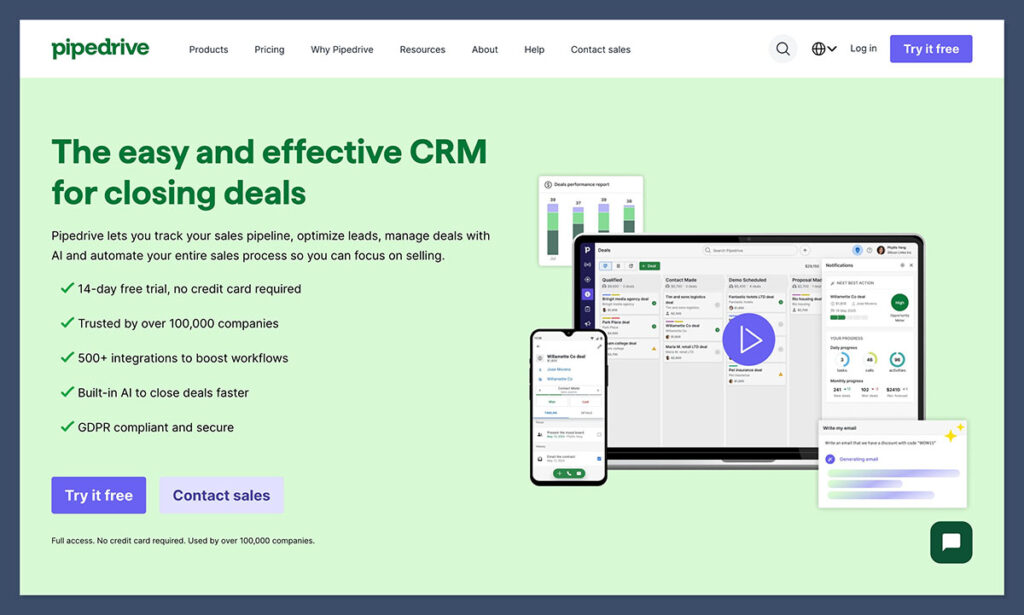
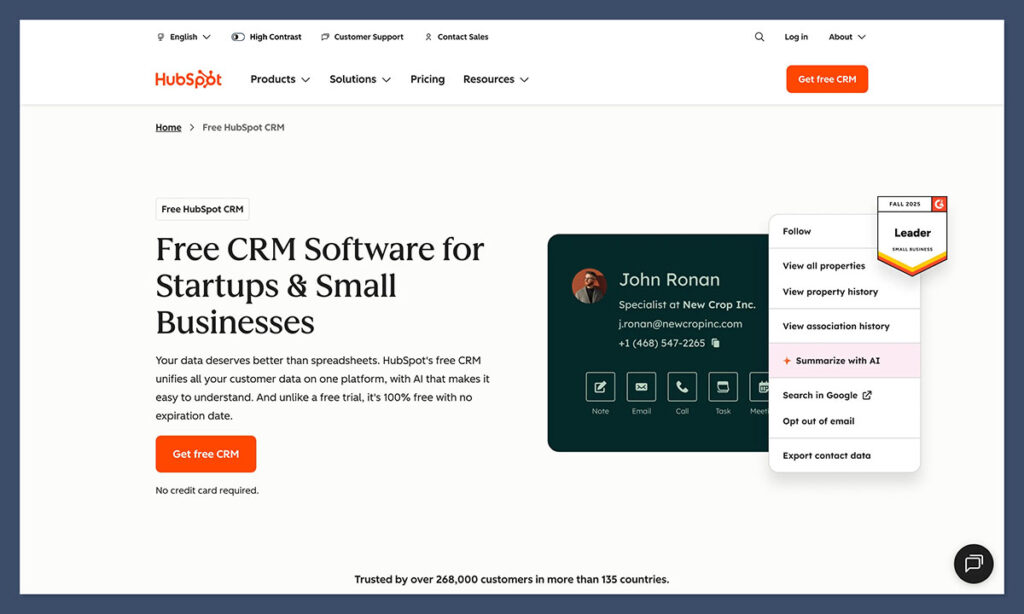
HubSpot, though, went deeper. Once I connected our store and email list, the CRM started pulling in customer data automatically. I could see ad clicks, form fills, and purchases tied to the same contact record.
Core Philosophy: What Each Platform Is Really Built For
After a few days running both tools, it was clear that HubSpot and Pipedrive aren’t really trying to do the same thing. HubSpot CRM feels like the all-in-one software bundle most ecommerce teams are waiting for, even if they don’t know it yet.
When I linked a store, ads, and email campaigns, HubSpot’s Data Hub instantly tied every contact to their activity history. I could see how someone first found us, which campaigns they clicked, and whether that ad actually turned into a sale.
That kind of visibility is gold for ecommerce teams trying to connect marketing spend to revenue.
The newer Breeze AI Agents also surprised me. I used one to generate follow-up emails based on a customer’s order notes, and another to flag high-value repeat buyers.

Add in AI CPQ inside Commerce Hub, which auto-builds quotes and checkout links, and it’s obvious HubSpot’s pushing to become an all-in-one sales and marketing platform.
Pipedrive, by contrast, is narrower, and that’s exactly what makes it appealing to some. It’s built for people who just want a clean pipeline, simple tracking, and a fast way to move deals forward.
When I first logged in, the interface was empty but intuitive. You drag deals across columns, add notes, and watch the numbers update in real time. Within an hour, my test team was fully operational.
Its 2025 updates like AI voice commands, AI-written reports, and Pulse deal scoring, add a touch of automation without turning the tool into something bloated. You still feel in control, just more informed.
HubSpot vs Pipedrive: Hands-On Experience
When I review anything, I like to go deep. With a CRM, I connect it to a live store, sync real customer data, and see how it holds up once the orders start rolling in. That’s when you find out if a platform actually saves time or just adds another tab to your day.
Ease of Use & Onboarding
HubSpot CRM takes a bit of setup, but it’s straightforward. I started with the free plan, imported contacts from Shopify, and HubSpot matched everything automatically, names, emails, past orders.
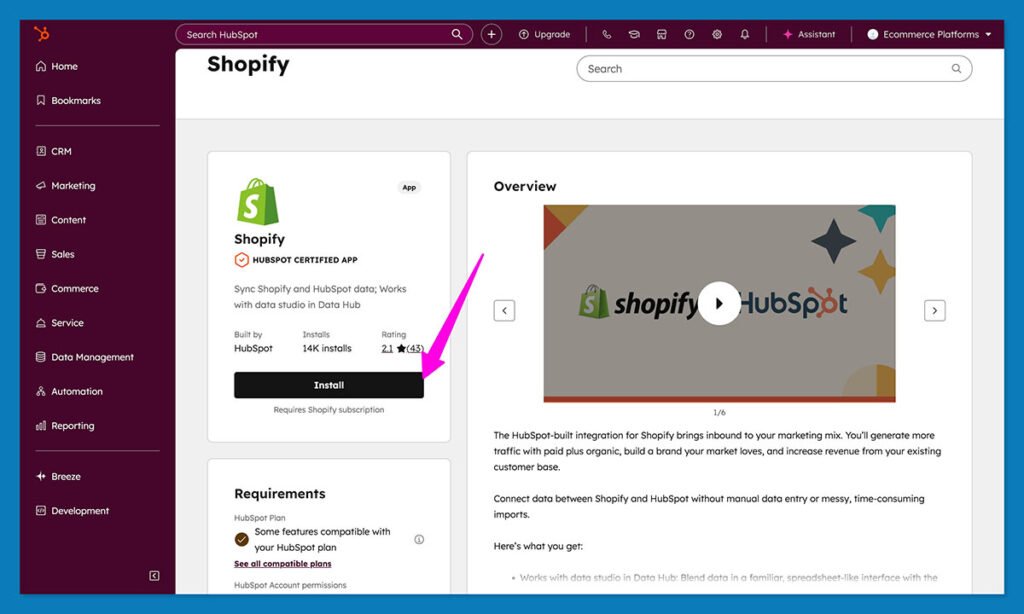
The setup guide walks you through creating a deal pipeline, and the short HubSpot Academy videos make sense even if you’ve never touched a CRM before.
HubSpot takes a few days to feel natural. But when it does, it feels complete; one place to track leads, automate follow-ups, and report on performance without stringing together five different apps.
Pipedrive, by contrast, is quick. I built a sales pipeline in under an hour. The layout is visual: drag, drop, done.
The 2025 update adds a short, guided setup that recommends automations as you go, which helped me get the basics running fast. For small ecommerce teams that just want structure, it’s about as easy as it gets.
Pipedrive is faster to start with, but HubSpot is stronger once you’re moving.
Day-to-Day Sales Management
After setup, the real test begins: keeping track of customers and follow-ups while orders keep coming in. With HubSpot, everything sits in one view.
Each contact record shows the full story: when they subscribed, what they bought, every email, chat, or support ticket.
The Commerce Hub made it simple to send quotes or checkout links, and Breeze AI handled small but useful jobs like writing follow-up messages and flagging repeat buyers worth a call.
That level of connection pays off. One brand I looked at, Allied Wire & Cable, replaced five different tools with HubSpot and saw a nine-fold increase in marketing-attributed revenue along with higher customer satisfaction.
It’s a good example of how consolidating everything into one system actually frees people up to sell.
Pipedrive, meanwhile, is lighter and faster. The visual pipeline gives an instant sense of where things stand. The AI Sales Assistant quietly reminds you who to contact next, and Smart Docs makes quoting painless.
It’s less about deep insight and more about keeping momentum.
HubSpot vs Pipedrive: Marketing & Lead Generation
This is where HubSpot CRM immediately pulls ahead. I connected our store, ad accounts, and email signups, and the system started tracking new contacts automatically. Every action showed up in one place, no spreadsheets, no copy-pasting between tools.
The Marketing Hub built into HubSpot makes a noticeable difference. You can create landing pages, run ads, send out campaigns, and check results all inside the same system.
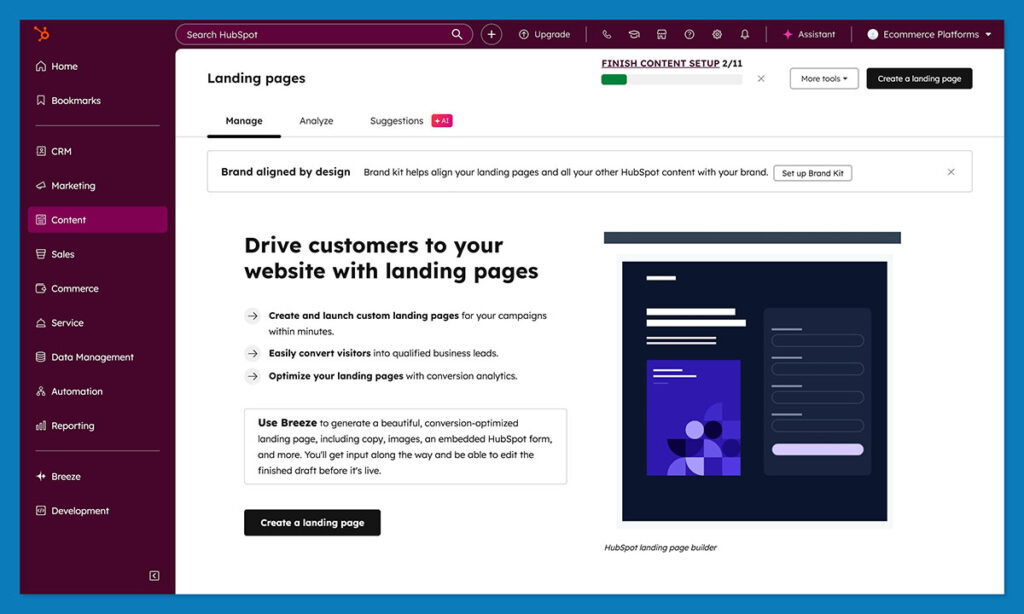
The Data Hub connects every piece so you can finally see which campaigns bring in actual revenue instead of just clicks.
In fact, HubSpot gives you just about everything you need to master growth, email marketing, social media management, and customer service tools to keep the conversation going.
Pipedrive isn’t really built for top-of-funnel work. It handles leads well once they exist, but you’ll need add-ons to capture them. I tried LeadBooster for web forms and Campaigns for basic email outreach. Both did the job, but they felt separate from the main event.
For stores that only need to manage incoming leads, it’s fine. But if you want to track a campaign from the first click to checkout, you’ll end up juggling a few integrations.
Automation & AI
Ecommerce moves fast. When a shopper leaves a cart or clicks a promo email, you only have a short window to respond. That’s where automation either saves time or adds stress. I wanted to see how much HubSpot and Pipedrive could actually handle once orders started coming in.
HubSpot’s automation feels more advanced. It isn’t just simple rules but workflows that adapt based on data. I set one up so that when a visitor filled out a form, HubSpot automatically scored the lead, assigned it to sales, and queued a follow-up email.
The Prospecting Agent inside HubSpot automatically sorts leads by priority. Another, the Customer Agent, handles routine support messages so your team could focus on closing actual sales.

HubSpot’s Data Hub also cleans and enriches contacts as it goes. When you import an old customer list, it spots duplicates, corrects missing details, and syncs everything across marketing and sales. That sort of maintenance usually takes a person half a day.
Pipedrive’s automation is lighter but still useful. Its AI Sales Assistant watches your pipeline and nudges you when deals stall.
The new Pulse deal scoring feature ranks open opportunities by their likelihood to close. It’s simple but handy when you’re juggling dozens of active leads.
Setting up automations in Pipedrive feels more manual. You can create triggers for things like sending an email or moving a deal between stages, but it doesn’t connect across marketing or service the way HubSpot does.
For smaller teams, that’s often enough, it keeps you organized without overcomplicating things.
When I ran both side by side, HubSpot felt like autopilot, analyzing patterns and acting before I asked. Pipedrive felt more like cruise control, smooth, steady, and easy to steer, but you’re still driving.
HubSpot vs Pipedrive: Reporting & Analytics
Once the sales start coming in, the real question isn’t how many deals closed, it’s where they came from. That’s where most CRMs either earn their keep or fall short.
When it comes to reporting, HubSpot clearly leads. Every part of the customer journey flows into the same reporting layer.
If someone clicks an ad, joins your mailing list, and later makes a purchase, HubSpot shows that complete path rather than just the final step.
The multi-touch attribution reports changed how I looked at campaign results. I could finally see which ads and emails generated sales instead of guessing.
The Data Hub goes further by cleaning and combining data from multiple tools automatically. I linked Shopify, Google Ads, and our email campaigns, and the data synced instantly.
The built-in AI even wrote short notes explaining trends, which made it easier to review results.
The Data Hub adds another layer by cleaning and merging data from different sources automatically. You can link Shopify, Google Ads, and email, and the dashboards update in real time. The built-in AI even summarizes key trends in plain language.
Pipedrive’s analytics are cleaner and lighter. The dashboards are easy to read and update instantly as deals move through the pipeline.
I liked the activity overview, which shows what your team’s been doing each day, and the forecast reports that estimate monthly revenue.
The 2025 update added an AI report builder, which lets you type “show me this month’s closed deals by source,” and it generates a chart. It’s a nice touch, but the data stays within sales, it doesn’t track back into marketing or support.
For small teams that only need to track closed deals, Pipedrive’s reports do the job. But if you want to see performance across ads, campaigns, and returning customers, you’ll reach its limits fairly quickly.
Integrations & Ecosystem
What makes HubSpot stand out isn’t just what it does, but how much it connects with. There are over two thousand apps that slot right in: Slack, Zoom, QuickBooks, LinkedIn Ads, Meta, you name it.
The Data Sync feature keeps all of them in sync, both ways. You change something in Shopify, and it shows up in HubSpot instantly.
A good example of that in action is Brauer Ecommerce. They linked their Shopify store and brought everything into one place.
After that, their contact list exploded by 325 percent, and their email click rates nearly doubled. That’s what happens when your data stops living in ten different tabs.
Pipedrive plays it simpler. You get around 400 to 500 integrations, and the main ones: Google Workspace, Slack, Zoom, Xero, work fine. If you’re in ecommerce, you’ll need to rope in tools like Zapier or Outfunnel to make it all connect. It’s not bad, just more manual work to keep everything in sync.
HubSpot Vs Pipedrive: Pricing & Total Cost of Ownership
Pricing looks simple until you’ve run both tools for a few months. I’ve learned that the sticker price rarely tells the full story. What matters is how much you end up not paying for other tools once your CRM takes over more work.
I started testing HubSpot CRM on the free plan. It’s not a limited demo, it actually lets you manage contacts, track deals, and send basic emails. For a small ecommerce store, you can get a lot done before spending anything.
Once you need automation or more detailed reporting, you’ll need a paid tier. Here’s roughly how it breaks down:
- Starter: about $15 per user per month – adds simple workflows and email marketing.
- Professional: includes advanced automation, custom reporting, and team permissions.
- Enterprise: made for larger setups or multi-brand teams with more data rules.
Pipedrive is more transparent. You pay per user, and plans run from about $14 to $99 a month, and you can add extras like LeadBooster or Smart Docs. There are no contact limits, which keeps pricing simple if you’ve got a large list.
If your main goal is straightforward sales tracking, Pipedrive stays more affordable and easy to predict. If you’re looking for one platform that handles both sales and marketing, HubSpot costs more upfront but often saves money once you drop a few separate tools.
Future Outlook: CRM in 2026 and Beyond
After testing these platforms, I always ask the same question: If I stick with this tool for the next few years, will it still make sense?
HubSpot’s direction is clear, it’s betting hard on AI and deeper automation. At INBOUND 2025, they rolled out Breeze Studio and a full set of AI agents that can handle everything from prospecting to customer follow-ups.
They’re also expanding the Commerce Hub, which lets you send quotes, collect payments, and manage repeat orders without touching another platform.
What stood out in my testing is how all these pieces now talk to each other. Data from the Data Hub feeds AI models that suggest smarter campaigns and cleaner reports.
It’s not just features for the sake of features, it’s HubSpot tightening the loop between marketing, sales, and service.
Pipedrive’s roadmap is focused on improving what already works. The team is refining the AI Sales Assistant, adding voice commands, and simplifying automation setup. That keeps the platform fast and approachable for smaller teams.
While testing, I saw early versions of better deal scoring and automatic activity summaries. These updates won’t transform the product, but they make it faster and smoother to use which suits Pipedrive’s focus on simplicity.
HubSpot vs Pipedrive: Which CRM Fits You Best?
If your team needs a quick, visual way to track deals, Pipedrive delivers. It’s light, clean, and easy to understand. You can set it up in a single afternoon, and your sales team can start closing before you’ve even explained the workflows.
If your business is growing, HubSpot CRM goes further. It connects sales, marketing, and service in one system, so you’re not jumping between platforms to see what happened before or after a purchase.
When I used it, the real difference was how HubSpot linked store data, customer behavior, and automation.
HubSpot gives you a system that grows with you. You can start free, connect your store, and keep adding features without changing platforms down the road.
If you’re curious, start with a free HubSpot CRM account or try a demo. Once you see your sales and marketing data sitting together in one place, it’s tough to switch back to anything else.
FAQs
HubSpot fits teams that want one system for everything, sales, marketing, and customer follow-up. It’s especially useful for ecommerce because it tracks the whole path from a first click to a repeat order.
They feel totally different. Pipedrive helps you stay on top of your pipeline: move deals, send reminders, that sort of thing. HubSpot goes wider. It can trigger emails, update contacts, assign tasks, and even write follow-ups based on customer behavior. For a busy online store, that wider automation makes a difference.
Yes, and not in the “14-day trial” kind of way. You can sign up and start tracking leads right away. When you need more, like automations or AI tools, you upgrade. I ran the free version for about two weeks and didn’t hit a wall once.
Yes, you can. I tested it through Zapier and Outfunnel, and syncing contacts worked fine. Updates were sometimes delayed, though, so if your marketing already runs on HubSpot, it’s usually easier to keep your sales there too.
HubSpot’s Breeze AI suite does more. It can help score leads, draft outreach, and clean data automatically. Pipedrive’s AI Assistant is simpler, mostly task suggestions and deal scoring. Both save time, but HubSpot’s tools reach further.
Export your contacts and deals from Pipedrive as a CSV. In HubSpot, there’s a guided import tool, it matches fields automatically. I tested it with a few hundred contacts, and everything came through correctly, even custom fields.


Comments 0 Responses