

Shogun Landing Page Builder is a premium visual page editor for Shopify, offering merchants advanced control over product pages, landing pages, and collections without needing a developer on speed dial.
It’s one of the pricier Shopify page builders on the market, but it backs up the cost with built-in A/B testing, personalization, and a polished drag-and-drop editor that goes well beyond what Shopify’s native tools can do.
Our team has tested and compared the leading Shopify page builders side by side, so I can confidently say that Shogun is one of the strongest options if you’re serious about conversion optimization and custom page design.
In this review, I’ll take a closer look at Shogun’s pricing, features, and templates, so you can see exactly why it stands out — and where it falls short.
Why you can trust us
We’ve conducted extensive research and hands-on testing of Shopify page builders to bring you accurate and fair reviews. Our recommendations are independent and backed by real testing data, providing you with all of the information you need to find the right page builder for your store.
This review reflects pricing and features as of early 2026.
Shogun Pros and Cons
| Shogun Landing Page Builder | |
| Best for | Scaling Shopify stores focused on CRO |
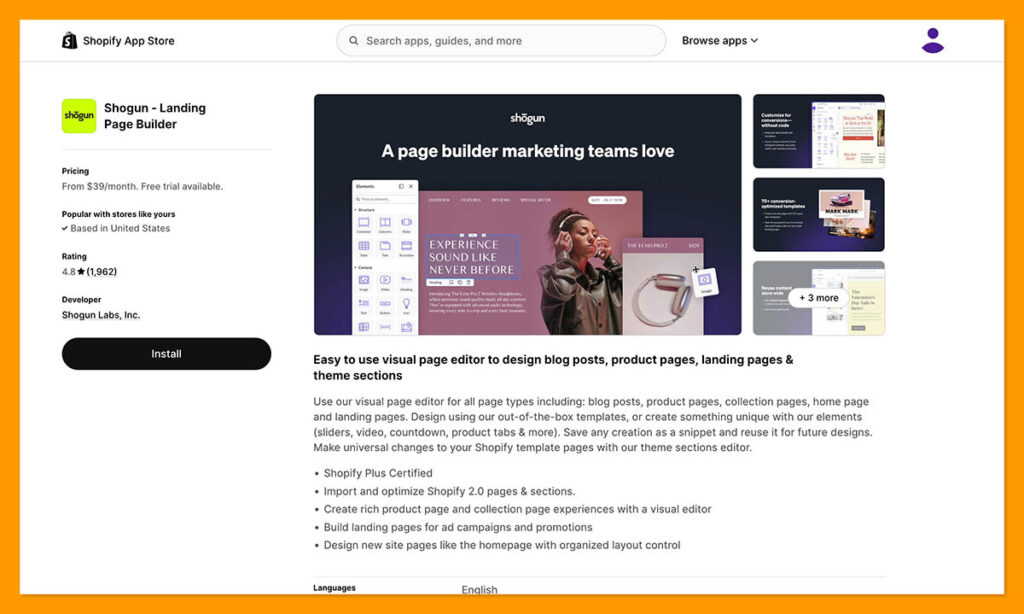
| Rating | Outstanding — 4.8 out of 5 (Shopify App Store) |
| Ideal for | Growing ecommerce brands | CRO-focused teams | Multi-store operations |
| Free trial | 10-day free trial available |
| Paid Plans | $39 – $499 per month |
Pros
- Built-in A/B testing and personalization
- Intuitive drag-and-drop visual editor
- 70+ ready-made page templates
- Shopify Plus certified
Cons
- More expensive than PageFly and GemPages
- Overkill for very small stores
- Advanced features have a learning curve
- Shopify-only — not platform-agnostic
Shogun Review
Need a quick summary of Shogun? I’ve collected Shogun’s best and worst features below:
What I Like
- The best conversion toolkit of any Shopify page builder, with native A/B testing, page-level analytics, SEO controls, and personalization baked right into the editor workflow
- A smooth, grid-based drag-and-drop editor that even non-technical team members can pick up quickly — reviewers consistently describe it as intuitive and easy to learn
- Over 70 professionally designed templates for product pages and landing pages, including seasonal and holiday-specific layouts that save significant design time
- A hybrid no-code and developer-friendly model — marketers can own day-to-day page changes while developers build reusable custom elements using Liquid, HTML, CSS, and JavaScript
What I Dislike
- Shogun is significantly more expensive than budget-friendly alternatives, especially once you need unlimited pages or higher traffic allowances for experiments
- If you’re a micro-store or early-stage dropshipper, you probably won’t fully exploit A/B testing, personalization, and advanced CMS features — meaning a lot of the value goes unused
- It’s built exclusively for Shopify (and to a lesser extent BigCommerce), so if you’re considering moving platforms or want a standalone page builder, Shogun becomes less attractive
- While the basic drag-and-drop is simple, getting full value from experimentation, personalization rules, and custom code elements still requires some expertise and setup time
My Experience With Shogun
Getting started with Shogun was straightforward. I installed the app directly from the Shopify App Store and was immediately dropped into the visual editor with a 10-day free trial — a more generous window than the three days you get with Shopify itself, and enough time to genuinely explore the platform before committing.
The editor uses a grid-based, drag-and-drop approach. I could click on any element and edit it directly on the canvas, which felt natural and responsive. Unlike Shopify’s native section-based editor — where I was stuck stacking sections on top of each other and editing text in a sidebar — Shogun gives you true layout freedom with columns, tabs, accordions, sidebars, and more complex structures.
How I Built Pages
I started by creating a product page. Shogun lets you either import your existing theme template and add custom drop zones for new content blocks, or build a completely custom product page layout from scratch. This is particularly useful when you want to create long-form, story-driven product detail pages with rich content — something Shopify’s default editor really struggles with.
The template library is solid. I had access to over 70 ready-made layouts covering product pages, landing pages, and seasonal campaigns. These aren’t just placeholder designs — they’re well-structured starting points that saved me significant time compared to building from scratch.
For content elements, I could drag in everything from rich text and image sliders to countdown timers, custom forms, and add-to-cart buttons. Video backgrounds, parallax effects, hover animations, and social icons are all available without writing any code.
I also used Shogun’s SEO controls to tweak meta titles, descriptions, and page slugs directly within the builder. It’s not as deep as a dedicated SEO tool, but it covers the basics you need when publishing landing pages and product pages.
Reusable Sections and Global Content
One feature that stood out was the ability to create reusable content blocks. I could build a section once — say, a promotional banner or a trust-badge row — and sync it across multiple pages. When I updated the master block, every page using it updated automatically. This is a huge time-saver for stores managing dozens of landing pages.
Global content sections are available on the Grow and Advanced plans, so you’ll need to upgrade from the entry-level Build plan to unlock this.
Author’s Testing Notes:
Shogun’s editor is a clear step up from Shopify’s native page-building experience. Where Shopify’s editor had me stacking sections and editing text in a sidebar, Shogun let me build truly custom layouts with inline editing. The experience felt closer to dedicated landing page tools like Unbounce than to a typical Shopify app. That said, the more advanced features — like personalization rules and custom code elements — do require some learning investment before you’ll get full value from them.
How Much Does Shogun Cost?
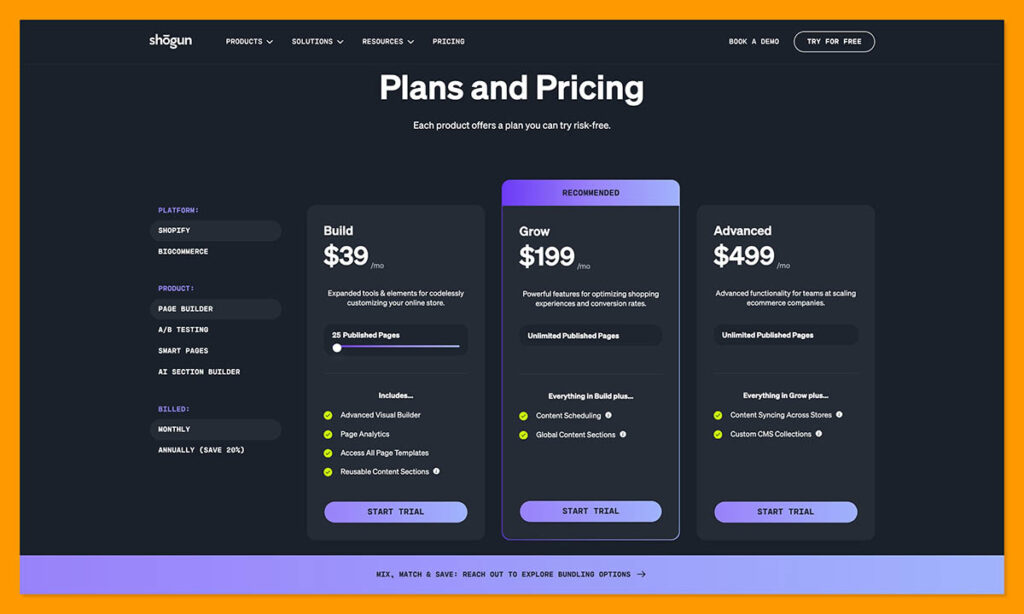
Shogun’s pricing is split between three plans, ranging from $39 to $499 per month. You can get started with a 10-day free trial on any plan, which gives you a solid window to explore the platform before you need to upgrade.
Build ($39/month) — For growing stores building custom pages
Grow ($199-$249/month) — For established stores that need unlimited pages
Advanced ($499/month) — For multi-store brands and dev teams
| Plan | Monthly Price | Key Features |
|---|---|---|
| Build | $39/month | Around 25 published pages, full visual builder, page analytics, all templates, reusable sections, A/B testing, basic personalization (2,000 MTUs) |
| Grow | $199-$249/month | Everything in Build, plus unlimited pages, advanced media management, content scheduling, global sections |
| Advanced | $499/month | Everything in Grow, plus content syncing between stores, custom CMS collections, custom code elements |
All charges are in USD, billed every 30 days, with roughly 20% discounts available on annual billing.
Note: Some third-party sources show slightly different mid-tier pricing (for example, $199 vs $249 for the Grow plan). I recommend verifying current pricing on Shogun’s Shopify App Store listing before purchasing.
Is Shogun Good Value for Money?
Shogun’s plans are expensive, especially in comparison to the likes of GemPages, which starts at $29 per month, and PageFly, which starts from around $24 per month. You’re paying more at every tier with Shogun, so this isn’t the builder to choose if your primary concern is saving money.
However, the value equation changes significantly if your store actively runs A/B tests, uses personalization, or manages multiple Shopify stores that need synced content.
These are features you’d otherwise need separate apps — and separate subscriptions — to replicate. For stores where even small conversion lifts translate directly into meaningful revenue, Shogun’s pricing can pay for itself quickly.
The Build plan includes A/B testing and basic personalization with 2,000 monthly tracked users (MTUs), which means there may be overage costs for high-traffic stores even on the entry-level plan.
Author’s Testing Notes
I recommend starting with the $39 per month Build plan, especially if your store is still testing whether built-in experimentation tools are worth the investment. The cheapest plan includes A/B testing and page analytics — the features that truly differentiate Shogun from cheaper alternatives. You’ll only need the more expensive Grow or Advanced plan if you’re publishing at scale, need unlimited pages, or manage multiple storefronts.
Building Pages With Shogun
Shogun provides over 70 page templates out of the box, covering product pages, collection pages, landing pages, blog posts, and seasonal campaigns. All templates are designed with ecommerce in mind and can be fully customized in the visual editor.
The drag-and-drop editor includes a wide range of structural and content elements:
Layout Elements
Sections, rows, columns, tabs, accordions, sidebars, and tables give you precise control over page structure. This is a massive upgrade over Shopify’s native editor, which limits you to stacking premade sections with a single layout option each.
Content and Media
Rich text, images, video backgrounds, carousels, image sliders, parallax scrolling, social icons, maps, and hover effects are all available as drag-and-drop elements. I could control spacing, alignment, and layering at a granular level, which made a noticeable difference in the finished result.
Conversion Widgets
Countdown timers, custom forms, add-to-cart buttons, and sales or discount tags help you build pages optimized for action. These are the elements that separate a page builder designed for ecommerce from a generic website builder.
Top Tip
For Shopify product pages, you can either import the default theme template and add drop zones for custom blocks, or build entirely custom product page layouts from scratch. I recommend the drop-zone approach if you want to keep your existing theme’s header and footer intact while adding rich content sections in between.

Shopify 2.0 Compatibility
Shogun is Shopify Plus certified and fully aligned with Shopify 2.0 section standards. This matters for stores planning to grow with Shopify’s ecosystem — it means Shogun pages work nicely with your existing theme, product catalog, and any future Shopify platform updates. If you’re on Shopify Plus or planning to upgrade, this compatibility is important to future-proof your store.
Shogun’s A/B Testing, Personalization, and Analytics
This is where Shogun genuinely separates itself from every other Shopify page builder I’ve tested. Most competitors require you to install separate apps for split testing. Shogun builds experimentation directly into the page creation workflow, and it makes a real difference.
A/B Testing
I could clone any page, create variants, and split traffic between them to test different layouts, headlines, hero sections, or offers. The setup was intuitive — I didn’t need to configure any external tools or tracking scripts. Results are displayed within Shogun’s dashboard alongside page-level metrics.
Personalization
On supported plans, Shogun lets you set rules to display different content to different visitor segments. This means you can show returning customers a different hero banner than first-time visitors, or tailor landing pages by traffic source. It’s a feature typically reserved for enterprise-level tools, so having it inside a Shopify page builder is a meaningful advantage.
Analytics
Shogun provides page-level metrics including sessions, conversion rates, and click-through data on key elements. These integrate with your existing SEO settings and Google Analytics, giving you a single view of page performance without toggling between multiple dashboards.
Shogun also offers a separate Shogun AB Testing app in the Shopify ecosystem, focused specifically on testing themes, templates, and even pricing — suggesting a broader experimentation stack for merchants who need it.
What’s new with Shogun?
Shogun has continued to expand its experimentation and personalization features heading into 2026, with deeper Shopify 2.0 integration and improvements to how A/B tests are set up and reported within the dashboard. If you tried Shogun in previous years and found the testing features limited, it’s worth taking a fresh look.
Shogun’s Developer-Friendly Features
Although Shogun is marketed as a no-code tool, it doesn’t lock developers out. This hybrid approach is one of its strongest selling points for growing teams where marketers and developers need to collaborate.
Custom code elements: Developers can build branded blocks using Liquid, HTML, CSS, and JavaScript. Once created, these custom elements become drag-and-drop blocks that marketers can reuse without touching code — maintaining brand consistency while giving the marketing team independence.
Custom CMS collections: On the Advanced plan, you can create custom content models and collections, making it easier to manage complex content relationships beyond Shopify’s native metafields.
Content syncing: For brands running multiple Shopify stores (multi-region or multi-brand setups), the Advanced plan supports syncing design and content across stores — a feature that can save significant time and reduce inconsistency.
Author’s Testing Notes
This hybrid no-code and developer model is what makes Shogun practical for real teams. In my testing, I could see how a marketing team would handle routine page updates and campaign launches independently, while a developer sets up a library of branded, reusable blocks. It’s the kind of workflow that reduces bottlenecks without sacrificing design quality — something most Shopify page builders don’t offer at this level.
Using Shogun’s Customer Support
Shogun’s support was a consistent highlight in my testing and across merchant reviews. The app maintains a 4.8 out of 5 rating on the Shopify App Store, with support quality frequently cited as a reason for high scores. Here are the support channels available:
- In-app help — Shogun provides contextual guidance within the editor to help you troubleshoot as you build
- Email support — I could reach the support team directly for technical questions and setup issues
- Knowledge base — detailed documentation and tutorials covering features, integrations, and common use cases
- Custom video walkthroughs — multiple reviewers mentioned receiving personalized video recordings from support agents to walk through specific problems
The team also ships continuous feature updates and improvements based on merchant feedback, which is a good signal that the product is actively maintained and evolving.
Unfortunately, Shogun doesn’t offer 24/7 live chat or phone support at this time — something that larger competitors like Shopify itself do provide. If real-time support is critical for your team, this is worth noting.
How Does Shogun Compare to Competitors?
If you’re not sure about investing in Shogun, there are other Shopify page builders worth considering. You can see how Shogun compares with other popular page builders in the tables below:
Shogun vs GemPages
| Shogun | GemPages | |
|---|---|---|
| Starting Price | $39/month | $29/month |
| Mid-Tier Price | $199-$249/month | $59/month |
| Top-Tier Price | $499/month | $199/month |
| A/B Testing | Built-in on all plans | Limited |
| Personalization | Visitor segment rules | Smart optimization assistant |
| Templates | 70+ | 80+ |
| Best For | CRO-focused scaling stores | Budget-conscious stores needing flexible funnels |
GemPages is the more budget-friendly option and emphasizes sales funnels, seasonal templates, and a smart optimization assistant for landing pages. Shogun leans more heavily on structured A/B testing, analytics, and Shopify-Plus-friendly architecture.
If budget is your primary concern and you don’t need advanced experimentation, GemPages is a strong alternative. If CRO and content governance are strategic priorities, Shogun is worth the premium.
Shogun vs PageFly
| Shogun | PageFly | |
|---|---|---|
| Starting Price | $39/month | Around $24/month |
| Plan Structure | 3 tiers | More gradual scaling |
| A/B Testing | Built-in | Requires third-party tools |
| Content Syncing | Yes (Advanced plan) | No |
| Custom Code Elements | Yes (Advanced plan) | Limited |
| Best For | Premium experimentation-first workflow | Mass-market builder for all store sizes |
PageFly’s plans start cheaper and scale more gradually, making it attractive for a wide range of store sizes. Shogun’s plans are fewer and more expensive, but they bring stronger native experimentation, personalization, and multi-store content syncing. Think of PageFly as the mass-market builder and Shogun as the premium, experimentation-first option.
What’s more important for your store?
If you’re still deciding between Shopify page builders, here’s a quick guide:
- GemPages is the best budget-friendly Shopify page builder — it’s a comprehensive tool with flexible funnel-building features and lower pricing across every tier
- PageFly is the most cost-effective way to start building custom pages — its plans scale gradually and it works well for stores of all sizes
- Shogun is the best choice for CRO-focused stores — if you actively run A/B tests and need built-in experimentation, it’s worth the higher price
How We Test Shopify Page Builders
To bring you fair and accurate reviews, we regularly test Shopify page builders and put them through a rigorous evaluation process. Our team has carried out extensive hands-on testing, allowing us to create data-driven recommendations so you can find the right fit for your store. I’ve also personally used Shogun’s page builder and tried its features so I can share genuine insights and tips with you.
Our testing covers several key areas of investigation:
Page Building Features — 30%
Looking at the design capabilities, element library, templates, and layout flexibility of the page builder
Conversion and CRO Tools — 20%
We review A/B testing, personalization, analytics, and SEO features
Ease of Use — 20%
We test each page builder ourselves to evaluate the learning curve and editor experience
Pricing and Value — 15%
We look at pricing plans, free trials, and what you get for your money at each tier
Help and Support — 10%
We test what support channels and resources are available
Developer Features — 5%
Looking at custom code options, CMS capabilities, and multi-store support
Shogun Review: Should You Use Shogun for Your Shopify Store?
Shogun is the best Shopify page builder for stores that take conversion optimization seriously. It helps you build high-performing custom pages thanks to its built-in A/B testing, personalization, page-level analytics, and a genuinely intuitive visual editor.
Plus, the hybrid no-code and developer workflow makes it practical for growing teams where marketers and developers need to collaborate.
Shogun’s plans can be expensive, so I recommend Shogun for growing or established Shopify stores as opposed to very small businesses looking to spin up a few simple landing pages.
It’s ideal for building custom product pages and landing pages, but only if you need the advanced experimentation features that Shogun provides, such as A/B testing, visitor personalization, and multi-store content syncing.
If you’re not sure you need Shogun’s premium features, GemPages and PageFly are both excellent alternatives at lower price points.
But if your store has reached the point where testing headlines, layouts, and offers can move the needle on revenue, Shogun is a smart investment that can pay for itself.
And, don’t forget, you can get started with Shogun’s 10-day free trial on any plan — giving you plenty of time to explore the platform and see if the conversion tools justify the investment for your specific store.


Comments 0 Responses