

Graphy and Kajabi are two popular platforms built for creators selling digital products like online courses, coaching, and memberships. I’ve spent over 150 hours using both platforms inside real ecommerce funnels — and here’s the short answer:
Kajabi is the better choice for serious digital entrepreneurs who want an all-in-one solution with advanced automation, marketing, and premium branding.
Graphy is better for beginners or creators looking for a budget-friendly launchpad with decent monetization tools.
Let’s break it down across pricing, course creation, ecommerce tools, marketing, templates, ease of use, and support — so you can see which one fits your business.
Graphy vs Kajabi At a Glance
| Feature | Graphy | Kajabi |
|---|---|---|
| Starting Price | $29/month | $149/month |
| Free Trial | 14 days | 14 days |
| Course Builder | Good | Excellent |
| Funnels & Email | Basic | Advanced |
| Checkout Tools | Built-in | High-converting |
| Payment Options | Stripe, Razorpay | Stripe, PayPal |
| Templates | Limited | High quality |
| Community Features | Built-in | Kajabi Communities |
| Best For | Beginners, low budget | Pro creators, coaches |
Best for Pricing: Graphy is More Affordable, But It Shows
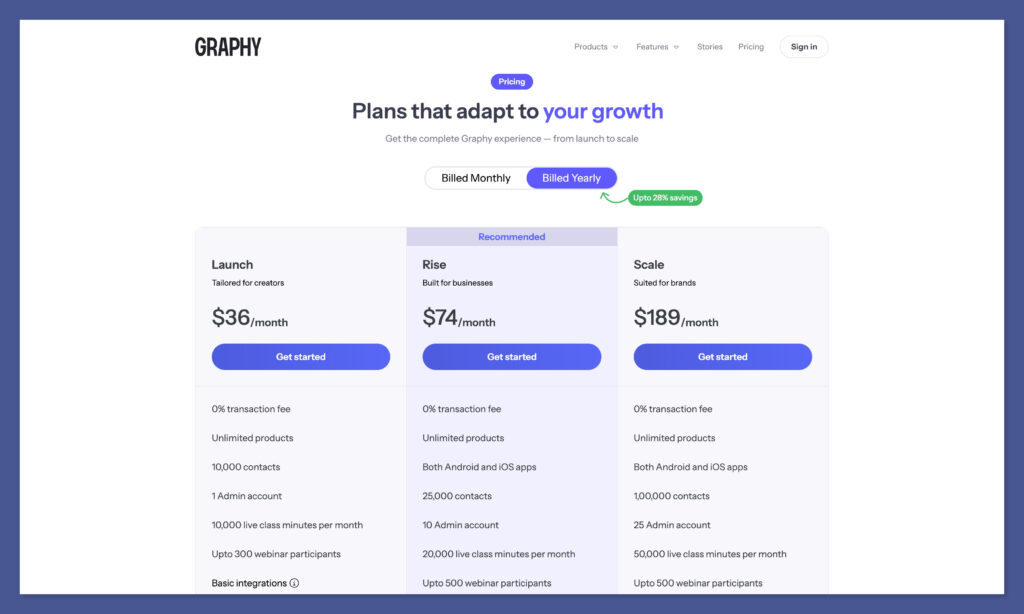
Graphy still comes out ahead when it comes to affordability. Plans start at $36/month, and even the most advanced plan is $189/month. There are no transaction fees, and you get generous limits across products, contacts, webinars, and live classes — even on the base plan.
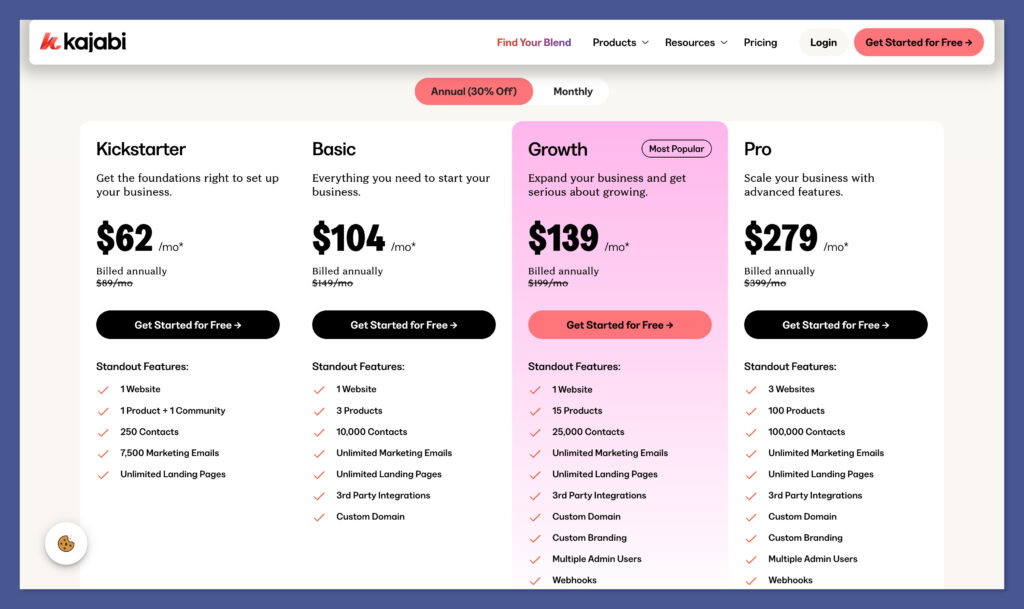
Kajabi, in contrast, starts at $89/month (billed monthly) and scales to $399/month. It’s a much steeper upfront investment.
But that higher price includes a full funnel builder, CRM, marketing automation, and advanced customization tools — all built in, no third-party tools required.
So while Graphy gives you great value for basic needs, Kajabi bundles in more advanced tools for scale.
Graphy Pricing Plans
| Plan | Price/Month | Key Features |
|---|---|---|
| Launch | $36 | Unlimited products, 10K contacts, 1 admin, 10K live class mins, 300 webinar participants, 5K marketing emails, basic integrations |
| Rise | $74 | 25K contacts, 10 admins, Android & iOS apps, 20K live class mins, 500 webinar participants, 10K marketing emails |
| Scale | $189 | 100K contacts, 25 admins, full API & SSO, all integrations, 50K marketing emails, remove Graphy branding |
Every Graphy plan includes unlimited digital products and 0% transaction fees, which helps with margins, especially if you’re running a high-volume course or coaching business. The Scale plan is ideal if you’re looking to white-label and run a branded learning platform at the enterprise level.
Kajabi Pricing Plans
| Plan | Price/Month | Key Features |
|---|---|---|
| Kickstarter | $89 | 1 product + 1 community, 250 contacts, 7,500 marketing emails, 1 website, unlimited landing pages |
| Basic | $149 | 3 products, 10,000 contacts, unlimited marketing emails and landing pages, 3rd party integrations, custom domain |
| Pro | $399 | 100 products, 100,000 contacts, custom branding, 3 websites, multiple admin users, webhooks, custom code editor |
Kajabi’s pricing includes more out of the box — funnel builder, automation engine, CRM, email marketing, and advanced design tools. You’re paying for convenience and integration, not just feature checkboxes.
Verdict: Graphy is far more affordable, and for smaller creators or solo operators, the value is hard to beat. But if you’re planning to scale and don’t want to patch together multiple tools, Kajabi gives you more depth, automation, and polish — just at a higher cost.
Best for Selling Digital Products: Kajabi Has the Edge
Both platforms let you sell courses, digital downloads, memberships, bundles, and coaching.
So on the surface, they seem pretty evenly matched. But once you go deeper into how sales are handled — from checkout to post-purchase — Kajabi clearly comes out on top.
Kajabi’s checkout flow feels like it was built for serious ecommerce. It’s sleek, secure, and conversion-driven. You can build full funnels with custom logic, add upsells directly at checkout, and trigger automations the moment someone buys.
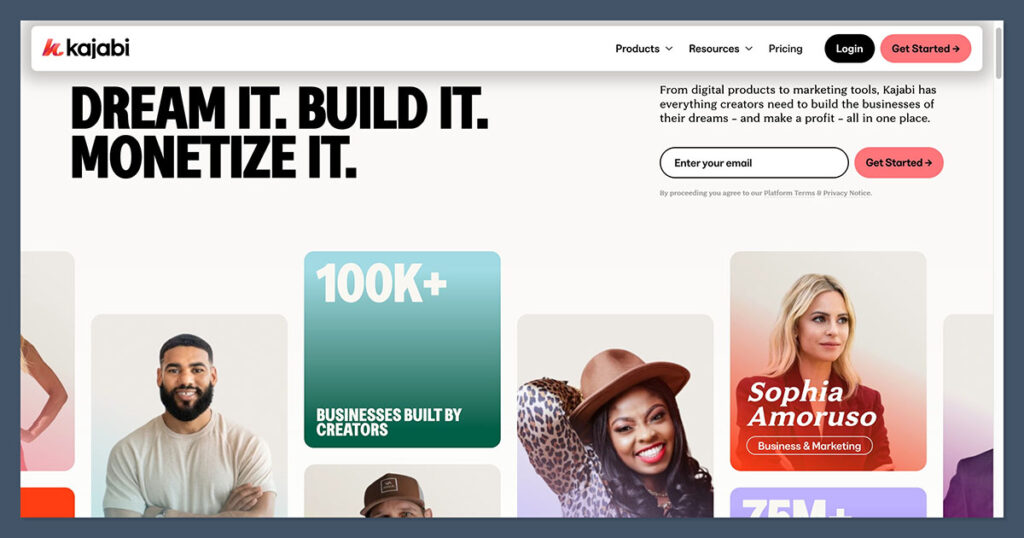
It’s all native — no plugins or third-party tools needed.
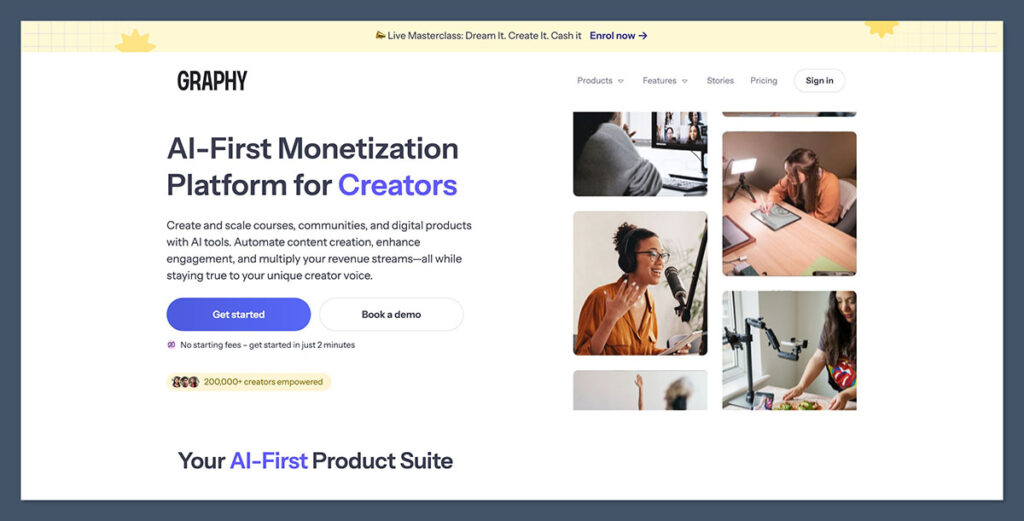
Graphy, by contrast, keeps it simple. You get standard payment links, coupon codes, and basic affiliate features.
It works well enough if your sales process is straightforward. But if you want to stack upsells, segment customers, or run limited-time offers dynamically, you’ll run into roadblocks.
Where Kajabi Wins
- One-click upsells and order bumps built directly into the checkout
- In-app checkout that supports A/B testing and multiple pricing options
- Post-purchase automations to trigger emails, tag users, or unlock new content
- Detailed revenue reporting, including churn tracking and subscriber metrics
Where Graphy Falls Short
- Checkout is basic with no option for in-checkout upsells
- Limited automation triggers post-purchase
- No funnel builder or logic for progressive offers
- Less control over checkout branding and experience
Comparison Table
| Feature | Graphy | Kajabi |
|---|---|---|
| One-click upsells | No | Yes |
| Order bumps | No | Yes |
| Funnel builder | Limited | Yes (Pipelines) |
| Post-purchase automations | Basic | Advanced |
| Subscription billing | Yes | Yes |
| Checkout A/B testing | No | Yes |
| Revenue dashboard | Basic | Advanced (MRR, LTV, churn) |
Graphy will get the job done for basic course sales or a few product SKUs.
But if your revenue model includes upselling, recurring subscriptions, and deep funnel segmentation, Kajabi was clearly designed with that in mind.
Verdict: Kajabi is built to sell, scale, and optimise every part of the checkout journey.
Graphy works, but it’s not designed for long-term growth or high-volume sales.
Course Creation & Content Delivery: Graphy is Great, Kajabi is Elite
Both platforms make it easy to create online courses — but there’s a big gap in polish.
Graphy’s course builder uses a drag-and-drop system and supports a mix of media formats like video, text, quizzes, and PDFs.
You can also drip content over time, enforce pre-requisites, and offer completion certificates. For the price, this is a strong feature set.
Kajabi, however, operates at a different level. Its builder is intuitive, mobile-friendly, and built with performance in mind.
You don’t just get content delivery — you get content experience. Every part of the learning flow feels optimized for engagement and retention.
What I Liked in Graphy
- Easy to use builder — no coding required
- SCORM & PDF support — ideal for structured learning
- Drip scheduling & pre-requisites — to control pace and progress
- Course analytics — monitor lesson completion and quiz performance
Kajabi’s Course Features
- Chapter-based layouts — clean and easy to navigate
- Video streaming with speed controls — no ads or YouTube distractions
- Custom branded mobile app — learners can access content on the go
- Completion tracking and certificates — for both students and coaches
Feature Comparison Table
| Feature | Graphy | Kajabi |
|---|---|---|
| Drag-and-drop builder | Yes | Yes |
| Drip content & prerequisites | Yes | Yes |
| Built-in video hosting | Yes | Yes (Higher quality) |
| Mobile app | No | Yes |
| Assessments/quizzes | Yes | Yes (with logic) |
| Completion tracking | Basic | Advanced |
| Community tools | Yes | Yes (Kajabi Communities) |
Verdict: Graphy is strong for beginners and covers the basics well.
But if you’re after a polished, branded learning experience that feels premium, Kajabi gives you more depth and control.
Best for Marketing & Funnels: Kajabi Dominates
Marketing is where Kajabi blows Graphy out of the water — and it’s not close.
Graphy gives you some solid basics. You can build email sequences, manually segment contacts, and connect with tools like ConvertKit and Zapier.

You also get simple affiliate marketing functionality built in. These are decent if you’re just starting.
Kajabi, on the other hand, is a full-blown marketing platform. You get built-in CRM tagging, visual funnel builders (called Pipelines), email broadcasts, drip sequences, and advanced segmentation.
Plus, it syncs easily with Stripe, Facebook Pixel, and Google Analytics for campaign tracking.
Graphy’s Marketing Tools
- Email sequences with limited triggers
- Manual segmentation of contacts
- Affiliate tracking tools
- Integrations with third-party tools via Zapier
Kajabi’s Marketing Tools
- Visual Pipelines (pre-built or custom funnels)
- Automated email campaigns with advanced tagging
- Lead capture pages, popups, and landing pages
- CRM features like customer tagging and filtering
- Tight ad platform integrations (Meta, Google)
Comparison Table
| Feature | Graphy | Kajabi |
|---|---|---|
| Funnel builder | No | Yes |
| CRM tagging | No | Yes |
| Email automation | Basic | Advanced |
| Landing pages | Yes | Yes |
| Popups & forms | Limited | Yes |
| Affiliate tools | Yes | Yes (more integrated in Graphy) |
| Facebook/Google Ads | Via Zapier | Direct integrations |
Verdict: If you’re serious about selling, nurturing leads, and building funnels that convert, Kajabi is the clear winner.
Graphy covers the basics, but Kajabi gives you everything you need in one place.
Templates & Customization: Kajabi Feels More Polished
Graphy gives you the basics. You’ll get homepage templates, course pages, and the ability to add your brand elements like colours and logos.
It’s enough to launch a simple, clean-looking site — but the customization depth is limited.
Kajabi’s templates feel more premium. They’re built for conversion and customer experience. You can modify layouts, CTAs, button placements, headers, fonts, and preview how they’ll look on mobile and desktop.
Whether you’re launching a sales page, blog, or funnel, Kajabi’s editor gives you more flexibility.
Kajabi Has:
- Dozens of modern, responsive themes
- Templates designed for funnels, landing pages, sales, and webinars
- Mobile-first design tools
- Full support for branded domains and custom styling
Graphy Offers:
- Basic course and homepage templates
- Focused on education-first layouts
- Fewer drag-and-drop editing options
- Branding limited to logos, fonts, and colours
Feature Comparison Table
| Feature | Graphy | Kajabi |
|---|---|---|
| Number of templates | Limited | Dozens of modern options |
| Landing pages | Yes | Yes |
| Mobile customization | Limited | Full preview and control |
| White-labeling | Business Plan only | Growth & Pro plans |
| Funnel-specific designs | No | Yes |
Verdict: Kajabi’s templates are cleaner, faster to load, and easier to customize for high-converting pages.
Graphy can get you live, but Kajabi takes your design to the next level.
Ease of Use & Setup: Graphy is Simpler, Kajabi is More Robust
If you’re new to online course creation or not tech-savvy, Graphy’s setup is fast and user-friendly.
You can go from sign-up to course launch in under an hour. The backend is simple and focuses on just what you need.
Kajabi is more powerful, but that comes with a steeper learning curve.
There are more tools to learn — Pipelines, Automations, Product types, Email Sequences — and it can feel overwhelming at first.
But once you’re inside the system and understand the layout, it becomes a very efficient platform.
My Experience:
- Graphy was faster to set up and easier to navigate out of the gate
- Kajabi required onboarding time, but once mastered, it felt more scalable
- Kajabi’s dashboard is smoother, especially when working with multiple funnels and assets
- Graphy’s UI is clean but can feel restrictive when scaling up
Comparison Table
| Feature | Graphy | Kajabi |
|---|---|---|
| Setup time | Fast | Moderate |
| Learning curve | Low | Medium-High |
| Dashboard experience | Simple | Feature-rich |
| Multi-product handling | Limited | Robust |
| Onboarding support | Basic | Full onboarding & Kajabi University |
Verdict: Graphy is easier to get started with, especially for solo creators.
But once your business grows, Kajabi gives you the infrastructure to manage more products, automations, and customer segments.
Customer Support & Community: Kajabi Wins With Depth
Graphy offers email support and a small help centre. It gets the job done for simple issues, but more complex support or “how-to” style questions can take time to resolve.
Live chat isn’t always available, and documentation is light.
Kajabi offers 24/7 live chat, detailed support docs, step-by-step tutorials, webinars, and a strong user community. Whether you’re stuck building a funnel or wondering how to launch a podcast, the resources are right there.
Kajabi’s Support
- 24/7 live chat support (even on Basic plan)
- Active Facebook group with creators helping each other
- Kajabi University for training and tutorials
- Step-by-step articles and in-app guidance
Graphy’s Support
- Email ticketing system
- Basic help documentation
- Response times can slow on weekends
- No large user community or live events
Comparison Table
| Feature | Graphy | Kajabi |
|---|---|---|
| Live chat | No | Yes |
| Help center depth | Basic | Extensive |
| Webinars/Live events | No | Yes |
| Community groups | Small | Active Facebook + Kajabi Heroes |
| Training resources | Light | Full training academy |
Verdict: Kajabi’s support ecosystem is much deeper, with faster help, a larger community, and tons of resources.
Graphy is more limited, which can slow you down if you hit a wall.
Final Verdict: Which Platform Should You Choose?
If you’re just starting out or on a strict budget, Graphy is a solid entry point. You’ll be able to build and sell your first course quickly, without spending a fortune.
It’s a lean tool that works well for testing an idea or running a low-overhead product.
But if you’re building a business with long-term goals — one that needs funnels, automation, premium content delivery, and a strong brand presence — Kajabi is the better long-term investment.
It’s more expensive, but you get a serious return in flexibility, automation, and professional tools.
Summary Table
| Use Case | Best Platform |
|---|---|
| Budget course launch | Graphy |
| Full coaching brand | Kajabi |
| Advanced email marketing | Kajabi |
| Mobile-first education | Kajabi |
| White-label solution | Graphy (Business Plan) |
| All-in-one funnel + CRM | Kajabi |
Alternatives Worth Considering
Teachable – Cheaper than Kajabi, easier than Graphy.
It’s ideal for solo course creators who want a clean, simple experience without too many bells and whistles. You won’t get advanced marketing tools, but it handles course delivery and payments very well.
Thinkific – Great free plan, better than Graphy for basic courses.
Their free tier lets you publish one course with full video hosting and quizzes, making it a strong entry point. You’ll need to upgrade for sales funnels and advanced features, but it’s reliable and well-supported.
Podia – All-in-one with lower pricing tiers.
Podia includes email, memberships, and digital downloads — all under one roof with no extra transaction fees. It’s less powerful than Kajabi but much more approachable if you want to get going quickly without plugins.
Systeme.io – Funnel builder with course hosting, very affordable.
It’s surprisingly robust for the price and includes email marketing, automation, and affiliate management. While the UI is a bit dated, it’s a solid Kajabi alternative for anyone who needs a full-stack tool on a tight budget.
LearnWorlds – Excellent for interactive video-based courses.
You can add quizzes, overlays, and real-time note-taking inside videos, which is great for education-first businesses. The platform is more focused on academic-style delivery, so it suits training companies and schools well.


Comments 0 Responses