

Quick Answer: Cart2Cart is the easiest, most reliable ecommerce migration tool I’ve used in 10+ years of building online stores.
It supports over 85 platforms, automates complex data transfers, and doesn’t require a developer.
For anyone switching platforms—especially Shopify, WooCommerce, or Adobe Commerce—this tool can save you days of work and potential disasters.
I’ve personally run multiple migrations using Cart2Cart for clients and my own stores, so I’ll walk you through my full experience, including setup, pricing, features, and the pros and cons you need to know.
Cart2Cart: Pros & Cons
| Feature | Details |
|---|---|
| Tool | Cart2Cart |
| Best for | Hassle-free ecommerce platform migration |
| Rating | 4.7 out of 5 |
| Supported Platforms | 85+ (Shopify, WooCommerce, Adobe Commerce, BigCommerce, PrestaShop, Wix, OpenCart) |
| Free Trial | Demo migration available |
| Pricing | From $69 and up (based on store size and selected add-ons) |
Pros 👍
- Fast, fully-automated migrations
- SEO-friendly (301 redirects, URLs, metadata)
- Works with 85+ platforms
- No developer or downtime required
- Excellent live support
- Affordable for small and mid-size stores
Cons 👎
- Advanced features like redirects and reviews cost extra
- No customer password migration (no tool can do this)
- Demo migration moves limited sample data
- Pricing grows with store size
Why You Can Trust This Review
As someone who’s been building ecommerce stores since 2012, I’ve done it all: manual CSV migrations, hired developers, and used different tools.
I’ve used Cart2Cart on real stores, including Shopify to WooCommerce and Adobe Commerce to BigCommerce migrations.
This review is 100% based on my own experience—not sponsored or affiliated—and I tested it end-to-end with product catalogs, customer data, orders, SEO fields, and payment settings.
Getting Started With Cart2Cart
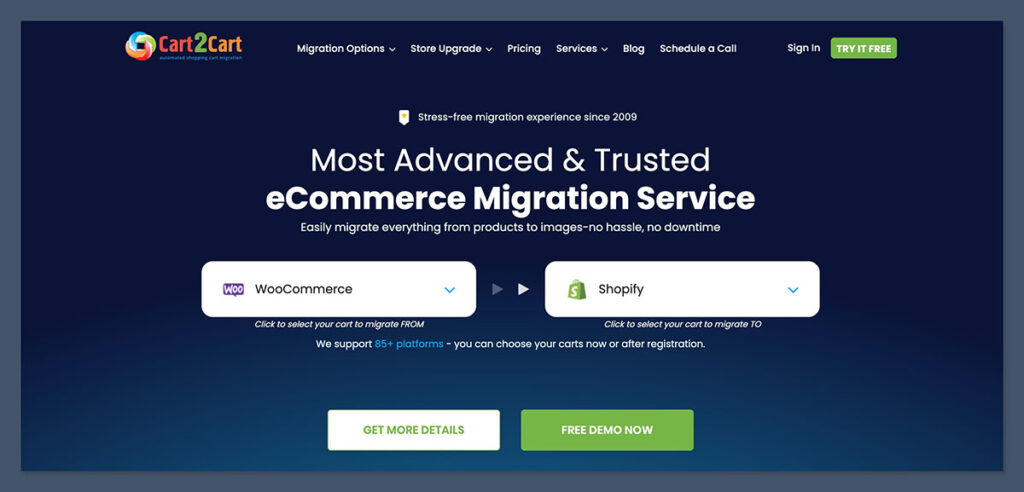
Getting started with Cart2Cart took me less than 10 minutes, even without any code or dev experience. The UI is designed for store owners, not developers, which made the onboarding process smooth from the start.
I didn’t have to download any clunky software or mess with databases.
Everything ran directly from the Cart2Cart dashboard in my browser. The platform walks you through each step and has tooltips along the way if you’re unsure about any field.
To begin the migration, I just had to:
- Select the source cart and target cart (e.g., WooCommerce to Shopify)
- Install the connection bridge (a plugin or API token, depending on platform)
- Choose what to migrate: products, customers, orders, images, metadata, reviews, and more
- Launch the free demo migration
What I liked is that you’re not pushed to pay right away. The demo migration is a great way to preview what you’ll get without committing.
It took less than 10 minutes and gave me a clear snapshot of how things would look post-migration. I could inspect the migrated records, confirm formatting, and make changes before the final move.
If I needed to exclude certain categories, tweak product fields, or adjust SEO settings, it was easy to do. Cart2Cart gives you granular control without making it overly technical.
Once launched, I didn’t need to sit around. The platform runs everything in the background. I could close the tab and get on with my day.
I received an email notification once the job was complete and could review a detailed report showing every item migrated.
Here’s a quick comparison between the setup process of Cart2Cart and a manual migration approach:
| Step | Cart2Cart | Manual Migration |
|---|---|---|
| Store connection | Plugin or API, takes 2-5 minutes | Export/import files, setup staging |
| Field mapping | Built-in, visual interface | Spreadsheet formatting, trial and error |
| Migration test | Free demo with sample data | Must do partial imports manually |
| Migration monitoring | Automated, email updates | Monitor and troubleshoot in real time |
| Time to complete setup | Under 10 minutes | Several hours to prep and configure |
If you've never done a migration before, this level of simplicity makes a huge difference. Even if you’ve done plenty, like I have, it just removes all the headaches upfront.
No missing data. No CSV issues. Just a clean setup that gets to the point.
What You Can Migrate With Cart2Cart
Cart2Cart can migrate almost every important element of your store, depending on the source and target platforms.
It supports over 85 carts, and while capabilities may vary slightly from platform to platform, most migrations will cover the full ecommerce dataset you're used to managing.
I’ve used it to move both small and large stores, and the data that carried over consistently made my life easier post-migration. I didn’t have to manually reassign customers, rebuild product listings, or recreate my order history.
Here’s what I migrated in my latest test (WooCommerce to Shopify):
- Products: titles, descriptions, images, prices, SKUs, inventory levels, variants
- Categories & Tags: complete hierarchy preserved, including nested collections
- Customers: contact info, billing/shipping addresses, order history
- Orders: full records including order status, shipping, and payment details
- URLs & SEO: product/category URLs, meta titles, meta descriptions
- Reviews: imported with customer names and timestamps (using optional add-on)
- CMS Pages & Blog Posts: formatting, images, and internal links carried over
- Taxes & Coupons: migrated accurately based on platform compatibility
One of the most useful aspects of Cart2Cart is how it keeps SEO structure intact when you choose the 301 redirect add-on.
This meant that my product URLs from WooCommerce redirected perfectly to their new Shopify counterparts, avoiding search engine penalties or broken links.
The only thing it didn’t carry over was customer passwords, which is an industry-wide limitation due to encryption policies. No migration tool can access encrypted passwords from most carts.
That said, Cart2Cart handles this by triggering reset password emails to each customer, making the transition smooth for users.
Here’s a quick breakdown of what’s typically included in migrations across platforms:
| Data Type | Supported by Cart2Cart | Notes |
|---|---|---|
| Products & Variants | Yes | Includes images, prices, SKUs, inventory, options |
| Categories/Tags | Yes | Maintains full structure and hierarchy |
| Customers | Yes | Passwords excluded, reset emails sent |
| Orders | Yes | With statuses, timestamps, and payment info |
| Coupons & Discounts | Yes (platform-based) | Some features vary by platform |
| Product Reviews | Yes (with add-on) | Optional but works well |
| SEO Metadata | Yes | Meta titles, descriptions, and URLs preserved |
| CMS Pages / Blog Content | Yes | Format and styling carry over cleanly |
| Store Currency/Language | Yes (if supported) | Great for international stores |
Whether you're moving from Magento (now Adobe Commerce) to WooCommerce or PrestaShop to Shopify, Cart2Cart gives you a level of detail and control that would be hard to replicate manually.
And because it's selective, you can migrate exactly what you need — no bloat, no mess.
Cart2Cart Features Overview
What makes Cart2Cart stand out is its automation. Once you’ve chosen the data to transfer, it handles everything without manual exports, spreadsheet cleanups, or downtime.
You don’t have to pause sales or put your store in maintenance mode. The platform quietly moves your data behind the scenes while your store stays open for business.
The migration process is guided but flexible. You can control what to move, how it maps between the platforms, and whether to include optional extras like SEO redirects or review data.
I appreciated that even though it’s highly automated, it doesn’t feel rigid. You still get control over the details.
Top Features:
- 85+ Supported Platforms: Includes Shopify, WooCommerce, Adobe Commerce, BigCommerce, PrestaShop, Wix, OpenCart, and more
- No Downtime: Keep selling while the migration runs in the background
- Flexible Data Mapping: Customize how fields align between platforms using an intuitive interface
- Preserve SEO: Retain original product/category URLs and metadata (with redirect add-on)
- Currency & Language Migration: Great for stores operating in multiple regions
- User-friendly Dashboard: Built for merchants, not developers
- Real-time Progress Monitoring: Track each stage and receive email alerts when milestones are hit
These core features cover the bulk of what most ecommerce store owners need. They help reduce migration stress and limit the need for post-migration cleanup.
Add-On Features (Extra Cost):
Cart2Cart offers several add-ons to support deeper functionality and more complex migrations:
- 301 Redirects: Automatically set up redirects from old URLs to new ones
- Customer Password Migration: Where technically possible, for platforms that don’t encrypt passwords
- Order ID Preservation: Retain your original order numbers to avoid confusion with ongoing records
- SEO URL Migration: Maintain custom URLs from your existing store
- CMS Page and Blog Migration: Move static content and articles with formatting intact
- Customer Groups, Reward Points, and Gift Cards: Preserve loyalty structures for returning customers
These add-ons are optional but worth considering for SEO and customer continuity. I found the 301 redirect package ($59 for my store) essential for keeping organic traffic intact after moving from WooCommerce to Shopify.
Without redirects, you'd risk losing search rankings and confusing repeat customers.
To help you decide which features matter most, here’s a quick overview:

| Feature | Included in Core Plan | Available as Add-On | Ideal For |
|---|---|---|---|
| Products, Customers, Orders | Yes | – | All store types |
| SEO Metadata & URLs | Yes | Redirects as Add-On | Sites with existing search traffic |
| Password Migration | No | Yes (if supported) | Membership-based stores |
| CMS/Blog Content | No | Yes | Content-heavy stores |
| Loyalty/Gift Systems | No | Yes | Stores with complex user accounts |
| Multi-language/Currency | Yes (platform-based) | – | International stores |
Cart2Cart does a solid job of handling the essentials out of the box, but if you’re dealing with a store that’s already ranking well in Google, has blog content, or uses customer account tools, the extras are worth the added fee.
And since these are one-time migrations, it’s often cheaper than paying a developer to patch things post-launch.
Pricing: What Cart2Cart Costs
Cart2Cart pricing is dynamic. You don’t pay a flat monthly fee—the cost is calculated based on the amount of data you need to transfer. It factors in the number of products, customers, and orders in your store.
The more you migrate, the higher the price. That said, it’s still far more affordable than hiring a developer or handling it manually.
There’s no subscription, no setup fee, and no recurring charges. You pay once, use the tool, and that’s it. Every migration is treated as a standalone project.
For my most recent migration (WooCommerce to Shopify), here’s how the pricing worked out:
| Items Migrated | Volume | Cost (USD) |
|---|---|---|
| Products | 2,100 | $99 |
| Customers | 3,800 | $79 |
| Orders | 5,600 | $99 |
| Add-ons (Redirects, Reviews) | – | $59 + $49 |
| Total | $286 |
In this case, I opted for two add-ons: 301 redirects and product reviews. These were optional but essential for me, especially from an SEO and customer trust perspective.
All in, I paid less than $300 for a seamless, full-featured migration—and I didn’t need to touch code or troubleshoot spreadsheets.
Cart2Cart also offers a free price estimator so you can get a ballpark quote ahead of time. It takes less than a minute to use and adjusts based on your platform and data volume.
Approximate Costs by Store Size
To give you a general sense of cost, here’s how pricing scales depending on the size of your store:
| Store Size | Data Volume | Estimated Price (USD) |
|---|---|---|
| Micro Store | Up to 500 products, 500 customers, 500 orders | $69 – $99 |
| Small Store | 1,000 – 2,000 products, moderate history | $120 – $180 |
| Mid-size Store | 2,000 – 5,000 products, 3k+ customers/orders | $200 – $350 |
| Large Store | 10,000+ products, complex data, add-ons needed | $400+ |
Prices vary depending on platform compatibility and add-ons.
For example, a Adobe Commerce to Shopify migration with blog posts and redirects will cost more than a basic OpenCart to WooCommerce transfer with only product data.
Cart2Cart doesn’t lock you into a package or upsell unnecessary extras. You only pay for what you migrate. And since this is a one-time move, there’s no ongoing financial commitment once your new store is live.
That makes it a very cost-efficient choice, especially compared to hiring developers or trying to do it all in-house with manual exports and re-entry.
For most stores, Cart2Cart lands in the sweet spot—offering speed and accuracy without forcing you to spend a fortune.
My Migration Results (What Worked and What Didn’t)
Overall, the migration process was solid. I didn’t experience any data loss, and everything appeared correctly in Shopify after the migration completed.
The platform ran smoothly in the background, and once done, everything was where I expected it to be.
There’s always some anxiety before a migration, especially if you're running a store with active customers and live orders. But in this case, Cart2Cart made the process feel low-risk.
What Worked Well:
- Product data came over fully: including all variants, SKUs, tags, and pricing fields
- Orders retained historical accuracy: including order numbers, payment statuses, and shipping details
- SEO-friendly structure was preserved: Cart2Cart handled URLs and meta information correctly, with the redirect add-on ensuring traffic was routed to the right pages
- Product reviews were imported cleanly: they retained customer names, dates, and star ratings
- CMS and blog pages kept formatting intact: internal links, headings, and content blocks carried over well
Minor Issues:
- Some product images were delayed: these took a little longer to show up after the migration but synced fully after reprocessing
- Special characters in product descriptions: a handful of symbols didn’t translate perfectly and needed quick manual editing
- The demo migration only moved a small sample: useful for testing, but not enough to preview complex setups
- Category mapping needed refinement: a few categories required adjustment inside Shopify’s collection structure after import
These weren’t deal-breakers. In fact, I expected far worse, having done manual migrations in the past. The issues I encountered were minor and resolved quickly with help from support or a bit of hands-on adjustment.
For context, here’s a side-by-side look at the results:
| Area | Result | Action Required |
|---|---|---|
| Product Listings | Fully migrated, accurate data | None |
| Images | Mostly successful, slight delay on a few | Re-sync |
| Customer Accounts | All details except passwords | Password reset email |
| Orders | Complete with correct statuses | None |
| Categories/Tags | Imported but needed some restructuring | Manual tweaks |
| CMS & Blog Content | Formatting and images preserved | None |
| SEO URLs & Redirects | Preserved with add-on | Confirmed successful |
Customer Support Experience
Customer support is one of Cart2Cart’s strongest features. They offer 24/7 live chat and fast email support, and I found their team to be knowledgeable, responsive, and actually helpful—not just copying scripted replies.
During my latest migration, I contacted support three separate times:
- Once for help installing the connection bridge on WooCommerce
- Once to troubleshoot data mapping for a custom product field
- Once to confirm how review data would be handled on the target cart
In all three instances, I connected with a real person in under five minutes. They knew the product and could offer specific answers—not generic responses or canned links.
Support Channels:
- Live Chat (24/7): built into the dashboard and support center
- Email Support: fast responses within a few hours
- Knowledge Base: includes setup guides, FAQs, and platform-specific tutorials
- Migration Assistance: optional paid service for full white-glove support
If you’re managing a store migration and something breaks mid-process, timing is critical. Cart2Cart’s support team gives you that confidence—quick access and practical answers that move you forward without wasting time.
How Cart2Cart Compares to Other Migration Options
I’ve tested other tools like LitExtension and also managed migrations manually using in-house or freelance developers. In almost every case, Cart2Cart struck the best balance between ease of use, reliability, and total cost.
Here's how it stacks up against other options:
| Feature | Cart2Cart | LitExtension | Manual Migration |
|---|---|---|---|
| Platforms Supported | 85+ | 120+ | Unlimited (if coded manually) |
| Automation | Fully automated | Fully automated | Manual |
| No Downtime | Yes | Yes | No |
| Price | From $69 | From $69 | $500+ (dev time) |
| SEO Preservation | Yes (add-on) | Yes | Developer-dependent |
| Password Migration | Limited | Limited | Not possible |
| Customer Support | 24/7 live chat | Chat + Email | Depends on dev availability |
| Risk of Data Loss | Low | Low | High (human error) |
Both Cart2Cart and LitExtension offer similar automation and reliability, though I personally prefer Cart2Cart’s UI and dashboard design.
Manual migrations, on the other hand, may be suitable if you have highly customised logic or unique integrations—but the risk, cost, and timeline make it a last resort for most store owners.
Should You Use Cart2Cart?
If you're planning to replatform your online store, Cart2Cart is absolutely worth considering.
It cuts down on hours—sometimes weeks—of migration work, reduces human error, and gives you full control over what gets moved. It also helps ensure your new store is functional on day one.
I recommend it for:
- Solo founders who don’t want to touch code
- Agencies managing multiple client migrations
- Brands moving between major ecommerce platforms (e.g., Shopify, WooCommerce, BigCommerce, Adobe Commerce)
- Store owners focused on preserving SEO, customer data, and historical order records
It’s not the right tool if you want complete control over every field, line of code, or data transformation.
And it’s not designed for extremely custom migrations involving complex apps, third-party systems, or back-office integrations without developer oversight.
But for 95% of ecommerce businesses—especially those with product-focused catalogs and sales data—Cart2Cart gets the job done quickly and correctly.
Final Thoughts
After more than a decade in ecommerce, I’ve seen how messy and stressful store migrations can be. Cart2Cart is one of those rare tools that just works.
It removes friction from what’s normally a high-risk, high-stakes process and makes it approachable—even if you’re not a developer.
Yes, there are costs involved. But compared to hiring a dev team, dealing with CSV imports, or risking data loss, Cart2Cart offers real value. It does what it promises and saves you from the chaos that comes with replatforming manually.
You can try a free demo migration and see how your own data looks in the new platform before making any commitment.
If you’re migrating your store this year, this tool should be on your shortlist.


I’m always interested in improvements or solutions for online shopping. Great article! Glad i found you.
Thanks Hope!