

IM Creator is our top pick for budget-conscious artists, students, and nonprofits, offering a fully free Premium plan for qualifying users and a $7.95/month entry tier that undercuts Wix and Squarespace.
In this IM Creator review, I’ll take a closer look at IM Creator’s pricing, editor, templates, and ecommerce capabilities, so you can see exactly who this builder fits and who should look elsewhere.
Key Takeaways 🔍
- IM Creator is the cheapest credible site builder we’ve reviewed, with Premium starting at $7.95/month on annual billing (versus Wix at $17 and Squarespace at $16)
- Students, artists, and registered nonprofits qualify for a fully free Premium plan with custom domain, no ads, and ecommerce included, an offer no major competitor matches
- The XPRS editor uses stripes (stacked full-width sections), not drag-and-drop, so customization is more restrictive than Wix or Squarespace
- Ecommerce is included on every paid plan but caps out at roughly 10 products, with no discount codes, inventory tracking, or abandoned cart recovery in the UI
- The live product has no AI features (Cosmos beta is separate) and 2025 brought reliability complaints around SSL outages and publishing delays
1. IM Creator Pros and Cons at a Glance
The unvarnished snapshot before we dig into each area.
What I Like
- ✔️ Genuinely cheap Premium plan. $7.95/month on annual billing sits well under Wix at $17 and Squarespace at $16, with no clever asterisks.
- ✔️ Free Premium for students, artists, and nonprofits. Full feature set at $0 once you submit proof of eligibility. No competitor matches this.
- ✔️ Ecommerce included on every paid plan. Wix forces you to a $29/month Core plan to sell; IM Creator does not.
- ✔️ HTML export on annual plans. Download a zipped HTML source file and host it elsewhere, something Wix flat out refuses.
- ✔️ Multilingual sites up to 10 languages at no upcharge, where Wix typically wants extra.
What I Dislike
- ❌ No real drag-and-drop. The XPRS editor uses stacked stripes (full-width blocks), not free element placement.
- ❌ No AI in the live product. The Cosmos beta has AI; the version you actually pay for has none.
- ❌ 2025 reliability problems. SSL certificates failing for weeks, publishing delays of 12+ hours, and unanswered support emails show up across recent reviews.
- ❌ Ecommerce capped at tiny stores. One image per product, plain-text descriptions, no abandoned cart, no inventory tracking in the UI.
- ❌ No app marketplace. Wix has 300+ third-party apps. IM Creator has zero. Email marketing, CRM, social scheduling: none of it plugs in.
2. IM Creator Pricing and Plans

The headline number is $7.95/month for Premium on annual billing, climbing to $350/year for the white-label tier. There is no month-to-month option at any level. If you see $5.95 or $6.95 quoted elsewhere, those come from older two-year or three-year commitments, not current pricing.
The active 2026 tiers:
- Free ($0). 50MB of hosting, an imxprs.com subdomain, IM Creator ads, no custom domain.
- Premium ($7.95 to $9.95/month). Custom domain, 10 email addresses, unlimited bandwidth, ecommerce included.
- Pro and White Label ($350/year). Reseller control panel, removes XPRS branding, supports unlimited client sites.
- Host It Yourself ($2,500/year) and Servers Control ($25,000/year). Agency and infrastructure tiers most readers can ignore.
| Plan | Monthly cost | Custom domain | Ecommerce | Best for |
|---|---|---|---|---|
| Free | $0 | No | No | Testing only |
| Premium (annual) | $7.95 | Yes | Yes | Most users |
| Premium (biannual) | $9.95 | Yes | Yes | Shorter commitment |
| Pro & White Label | $29.17 ($350/yr) | Yes | Yes | Agencies, resellers |
Is IM Creator Good Value for Money?
- Significantly cheaper than mainstream rivals. Premium at $7.95 versus Wix at $17 and Squarespace at $16. Creative Bloq calls it roughly half the price for comparable features.
- No free trial on paid plans. You either use the free plan or commit to a paid term.
- No month-to-month billing. Six-month is the shortest paid term, a friction point if you want to test briefly.
- The free Premium license is the real value play. Qualifying students, artists, and nonprofits get every feature at $0, covered in the next section.
3. The Free Plan for Students, Artists, and Nonprofits

This is the one IM Creator pricing angle that earns its own section, because the offer is unusual enough to change the buying decision for the right reader. IM Creator hands out a fully free Premium license to students, artists, and registered nonprofits. No Wix, Squarespace, Hostinger, or Weebly equivalent exists. The catch: you have to apply with proof.
What’s Included in the Free License
- Custom domain connection. Bring your own .com or .org, no IM Creator subdomain.
- Ad-free site. None of the banner or footer ads that scar the standard free plan.
- Unlimited hosting and bandwidth. Same caps as paid Premium.
- Full template library. Every category, not a stripped-down free tier.
- Ecommerce capability. Sell prints, digital downloads, or services through ShopRocket.
- 24/7 email support. Same ticket queue as paying customers.
How to Apply
- Go to imcreator.com/free_license_application.
- Submit your name, email, and a written description of why you need the site.
- Attach proof: a student ID or enrollment letter, nonprofit registration documents, or artist portfolio and exhibition evidence.
- Wait for manual approval. IM Creator does not publish a turnaround time.
- Once approved, your account is upgraded to free Premium.
If you qualify, the math is simple. IM Creator costs zero where Wix would cost around $204 a year and Squarespace $192. If you don’t qualify, the paid Premium plan is still cheaper than both.
4. Editor and Ease of Use: Stripes, Not Drag-and-Drop
Before describing what the editor feels like, I have to clear up confusion every other IM XPRS review skips. When you sign up for IM Creator in 2026, you are actually choosing between three different builders, and they are not the same product.
- Cosmos Builder (beta). Newest, includes AI onboarding, an integrated CMS, full ecommerce, and flexible hosting.
- Standard IM Creator (XPRS). The live product most reviews describe, stripe and block editor, what this review focuses on.
- Classic drag-and-drop editor. Legacy, discontinued for new signups.
Building With Stripes (Not Drag-and-Drop)
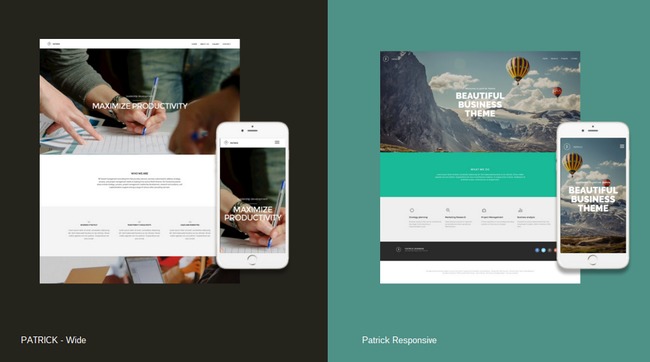
The XPRS editor uses stripes: pre-built, full-width sections you stack vertically like Lego blocks. You pick a stripe, swap it for another of the same function, then click elements inside it to edit. The platform ships with 20+ stripe categories, 11 visual effects, 9 menu layouts, and 3 scrolling effects.
What Works Well
- Fast to launch. A single-page site can go live in under an hour, faster than the equivalent Wix build.
- Mobile-responsive by default. Every template adapts without manual breakpoints.
- Stock photos and fonts built in. No asset hunting before you publish.
- Mobile editing via the IM Self app. Uncommon at this price.
- HTML/CSS/JS embed inside stripes. An escape hatch when the visual editor runs out of options.
What Frustrates Users
- No undo button. Every change is committed. Mistakes mean manual repair, which Capterra reviewers flag repeatedly.
- Cannot change template after publishing without rebuilding from scratch. Switching templates is a content-loss event.
- Customization is hidden. Users report guessing which items are editable and digging through three-dot menus.
- No automatic backups. Version history does not exist.
Use IM Creator XPRS if you want a fast-build, structured editor and can live without pixel-level control. If you need true drag-and-drop, look at Wix or Hostinger.
5. Templates and Design Options
Template counts in other reviews swing from 30 to “hundreds” because IM Creator runs multiple builders with different libraries. For XPRS specifically, the verified figure is roughly 70 to 100 mobile-responsive templates across 14 categories. That doesn’t match Wix’s 2,700+ or Squarespace’s 199 in raw count, but the category coverage is broader than the small number suggests.
Template Categories
- Business. Corporate, consulting, agency layouts.
- Photography. Heavy emphasis, image-forward grids.
- Architecture. Minimalist, portfolio-style.
- Restaurants and Food. Pre-built menus and gallery stripes.
- Music. Band sites with audio embed support.
- Weddings. Event-page templates.
- eCommerce and Retail. Store stripe pre-included.
- Fashion and Beauty. Lookbook layouts.
- Art and Design. Gallery and portfolio first.
- Health and Wellness. Practitioner sites with booking forms.
- Technology. Startup landing pages.
- Lodging. Hotel and short-let templates.
- Bio and Resume. Personal pages, popular with students.
- Reseller. Designs for the white-label market.
The design DNA leans heavily toward photography, fashion, and art. Those are the strongest templates. Business and ecommerce templates feel less modern, and Capterra reviewers note templates “get old or outdated” with no replacements. If your aesthetic standard is set by Squarespace, IM Creator will feel a step behind. Photographers, artists, and creatives will find the strongest options here. Service businesses and modern startups should weigh Squarespace.
6. Ecommerce: Can You Actually Run a Store on IM Creator?
Direct answer: yes, but only for stores with fewer than 10 products. WebAppMeister’s ecommerce review settles on the same ceiling, and I agreed once I worked through the feature list.
IM Creator’s ecommerce runs on ShopRocket, a third-party engine plugged into the stripe editor. ShopRocket itself is capable, but only part of its feature set is surfaced through IM Creator’s interface.
What IM Creator’s Ecommerce Actually Includes
| Feature | Available | Notes |
|---|---|---|
| Physical products | Yes | Powered by ShopRocket integration |
| Digital products | Yes | Downloads with license keys via ShopRocket |
| Stripe payments | Yes | Primary gateway |
| PayPal | Yes | Standard option |
| Apple Pay, Google Pay, Klarna | Yes (via ShopRocket) | May not be surfaced in IM Creator UI |
| Multi-currency | Yes | ShopRocket feature |
| Automated tax calculation | Yes | ShopRocket feature |
| Discount codes | No | Reported missing in IM Creator’s UI |
| Inventory tracking | No | Reported missing in IM Creator’s UI |
| Abandoned cart recovery | No | Reported missing in IM Creator’s UI |
| Order notifications | No | Users report no new-order emails |
| Subscriptions, recurring payments | No | Not supported |
| Multiple product images | No | One image per product limit |
| Rich-text product descriptions | No | Plain text only |
Where the Store Breaks Down
- Brands needing photo galleries per product. One image is a deal-breaker for fashion, jewelry, and craft sellers.
- Stores running promotions. No discount code engine in the UI.
- Anyone tracking stock. No inventory in the UI, though ShopRocket supports it on the backend.
- Recurring revenue businesses. No subscriptions or recurring billing.
- Stores over roughly 10 SKUs. Admin becomes painful without bulk tools.
Transaction Fees: What Will You Actually Pay?
Transaction-fee numbers in older reviews conflict. ShopRocket itself charges 0% platform fee. Some third-party sources cite a 2% or 5% IM Creator commission, which appears tied to older plan structures that no longer apply. The real cost is the payment gateway fee: Stripe at 2.9% + 30¢ and PayPal at 2.99% + 49¢. Treat any 5% IM Creator cut claim with skepticism.

For an artist selling five prints, IM Creator at $8/month is hard to beat. For a serious store, limitations show up by your tenth SKU. Shopify or Wix is the better landing spot.
7. AI Features (Or the Lack of Them) and the Cosmos Beta
IM Creator’s live XPRS product has zero AI features in 2026. No AI site generator. No AI copywriting. No AI image editing or background removal. I confirmed this across eight independent reviews, and the absence is glaring next to Wix ADI, Squarespace’s Blueprint AI (named to TIME’s 2025 best inventions list), and Hostinger’s AI site builder.
What Cosmos Builder (Beta) Promises
IM Creator’s answer is Cosmos, a separate beta product at cosmos.imcreator.com.
- AI-powered onboarding that generates site copy, images, structure, and design from a prompt.
- Integrated CMS for proper content management instead of stripe-only editing.
- Full ecommerce with Stripe and PayPal, including digital products, shipping, and product options.
- Flexible hosting to publish to Netlify, AWS, or download files for self-hosting.
- Positioned to compete with Webflow and Squarespace, not just Wix.
Cosmos has no published pricing and no confirmed general-availability date as of May 2026. Beta means feature gaps, possible breaking changes, and no clear migration path from XPRS sites. If AI is non-negotiable today, skip XPRS and look at Wix or Hostinger.
8. Marketing, SEO, and Blogging Features
The absence of an app marketplace ripples through every marketing feature. Wix has 300+ third-party apps. Squarespace has a curated set of integrations. IM Creator has zero. That single fact explains most of what this section lists.
What’s Built In
- Google Analytics integration for basic traffic tracking.
- Facebook Pixel support for ad retargeting.
- Meta tags editing with page-level control over title and description.
- Basic blogging via dedicated blog stripes.
- Multilingual SEO so each language version can be indexed separately.
What’s Missing
- Email marketing. No built-in tool, no Mailchimp app, no automation.
- Schema markup. No advanced structured data for rich search results.
- CRM and lead-management apps. Nothing to plug HubSpot, Pipedrive, or Salesforce into.
- Social media scheduling. No publishing tools, no Buffer-style integration.
- SEO audit or keyword tools. No Semrush or Yoast equivalent.
WebAppMeister flags “limited SEO tools” for growth-focused businesses. The IM Creator marketing toolkit feels closer to a 2018 builder than a 2026 one. If your growth plan depends on SEO, email, or content, Wix and Squarespace save you a lot of third-party patchwork.
9. Reliability and Customer Support in 2025-2026
This is the section other reviews skip past, and the one prospective customers most need to see. IM Creator’s support model is thin even on paper, and 2025 brought a run of operational complaints that change the risk calculation.
Support Channels
- Email ticket support. The primary channel; no live chat, no phone.
- 24/7 ticket coverage on Premium. Average response around 12 hours when the system is functioning.
- FAQ and Knowledge Center. Text-based self-serve.
- Dedicated business consultant. Pro plan only.
- No live chat, no phone support on any plan, at any price.
What 2025 User Reports Show
- SSL certificates failing for weeks, with the support email reported as invalid by a WebsitePlanet reviewer in mid-2025.
- Publishing delays of 12+ hours, sometimes stretching to a full day, where edits don’t reflect on the live site. Multiple Capterra reviewers describe this.
- Billing failures and offline sites. One WebsitePlanet reviewer summed it up as “worst billing system and zero client support.”
- Unresponsive support email across several recent reports, including bounced messages.
Capterra users rate IM Creator 4.8/5 across 42 reviews. WebsitePlanet’s expert score is 4.1/5 and ranks it 190 of 252 builders tested. That gap is striking. My read: loyal Capterra users built years ago, before the 2025 incidents, and are not currently fighting SSL outages. IM Creator’s support floor is low in good times and has cracked in 2025. Build with this in mind, especially if your site generates revenue.
10. IM Creator vs Wix vs Squarespace vs Shopify
IM Creator is rarely the wrong choice on price, but price is rarely the only factor. Here’s how it stacks up against the three platforms most readers cross-shop.
| Feature | IM Creator | Wix | Squarespace | Shopify |
|---|---|---|---|---|
| Starting price (annual) | $7.95/mo | $17/mo | $16/mo | $29/mo |
| Ecommerce on entry plan | Yes | No ($29/mo) | No ($23/mo) | Yes |
| Free plan | Conditional (students, artists, nonprofits) | Yes (ad-supported) | No | No |
| Editor type | Stripe and block | Drag-and-drop | Section-based | Section-based |
| Templates | ~70–100 | 2,700+ | 199 | 1,016 |
| AI features | None (Cosmos beta only) | Yes (Wix ADI) | Yes (Blueprint AI) | Yes (Shopify Magic) |
| App marketplace | No | 300+ apps | Curated | 8,000+ apps |
| HTML export | Yes (annual+) | No | No | No |
| White-label, reseller | Yes ($350/yr) | Limited | No | Yes (Plus) |
| Editorial rating (WebsitePlanet) | 4.1/5 | 4.9/5 | 4.9/5 | N/A |
Wix is the best overall pick if you want flexibility, AI assistance, and a real app market. It costs more once you add ecommerce, but the feature ceiling is much higher and 2025 reliability has been steadier.
Squarespace is the call if design quality decides it. Its templates are in another league, and Blueprint AI guides setup for non-designers. Worth the premium for image-heavy brands and creative service businesses.
Shopify is the only serious choice if you intend to sell more than 10 products or grow into a real store. IM Creator’s ecommerce will limit you fast. Shopify is built for the opposite end of the spectrum, with unlimited products, inventory, and an 8,000-app ecosystem.
11. Who Should Use IM Creator and Who Should Avoid It
The build-or-skip call comes down to who you are and what you sell. The honest split:
Pick IM Creator If
- You qualify for the free Premium license. Students, artists, or registered nonprofits get $200+/year of features at $0.
- You’re an artist or photographer with a portfolio and light sales. The design DNA fits, and a handful of prints will sell fine through ShopRocket.
- You want HTML export as an escape hatch. Annual subscribers can download their site, unusual at this price.
- You need multilingual without an upcharge. Up to 10 languages at zero extra cost.
- You’re a small agency wanting cheap white-label. $350/year for unlimited client sites is the lowest verified entry.
Skip IM Creator If
- You want to sell more than 10 products. The ecommerce ceiling is real and arrives faster than you think.
- You need AI today. Cosmos is beta; the live product has none.
- You depend on app integrations. Email marketing, CRM, and social tools all require external workarounds.
- You expect rock-solid uptime and support. The 2025 reports are not encouraging.
- You want pixel-level design control. Stripes will frustrate you within an afternoon.
IM Creator Review: The Bottom Line
IM Creator is a genuine bargain wrapped in a quirky, somewhat dated package. The stripe editor is fast and structured, the price is unbeatable, and the free license for students, artists, and nonprofits is the rare offer that lives up to its billing. The trade-off is real. There’s no AI in the live product, no app marketplace, an ecommerce experience that breaks past 10 products, and 2025 reliability reports I can’t brush off.
For artists, students, nonprofits, and tiny agencies, IM Creator earns my recommendation, especially if you qualify for the free Premium license or want a $350/year white-label tier for client work. For anyone running a real ecommerce store (more than a small product set, abandoned cart, discount codes, inventory tracking), the answer is no. Shopify is where to look. For general small businesses, Wix is the safer pick at $17/month thanks to AI, apps, and a more reliable 2025 track record. Squarespace is the choice if premium design is your priority.
If you’re inside the right use case, apply for the free license at imcreator.com/free_license_application or pick the $7.95/month annual Premium plan. If you’re not, save the click and read our Wix and Shopify reviews instead.
IM Creator Review FAQ
What is the difference between IM Creator and IM XPRS?
IM Creator is the brand and company. IM XPRS is the current stripe-based editor product. As of 2026, the company offers three builders: Cosmos (beta), XPRS (live, what most reviews cover), and a discontinued legacy drag-and-drop editor. Most reviews use “IM Creator” and “IM XPRS” interchangeably to mean the XPRS stripe product.
Is IM Creator really free for students and nonprofits?
Yes, but you have to apply with proof. Students need an enrollment letter or ID, nonprofits need registration documents, and artists need portfolio or exhibition evidence. The application lives at imcreator.com/free_license_application. Once approved, you get the full Premium feature set, including custom domain, no ads, ecommerce, and unlimited hosting.
Can IM Creator handle an online store?
For under 10 products, yes. For anything larger, no. Ecommerce runs on ShopRocket and supports Stripe, PayPal, digital downloads, and tax calculation. The platform lacks discount codes, inventory tracking, abandoned cart recovery, and multi-image products in practice. Serious stores belong on Shopify.
Does IM Creator have AI features?
Not in the live XPRS product. The beta Cosmos Builder at cosmos.imcreator.com includes AI-powered onboarding that generates site content, images, and structure from a prompt, but Cosmos has no published pricing or general-availability date as of May 2026. Wix, Squarespace, and Hostinger all offer AI today.
Can I export my IM Creator site to another host?
Yes, but only on annual or longer Premium plans. Annual subscribers can download a zipped HTML source file, edit it, and host it anywhere via FTP. Free-plan and six-month subscribers cannot export. This is unusual at this price point. Wix, for example, offers no HTML export at all.
What payment gateways does IM Creator accept?
IM Creator’s ecommerce runs on ShopRocket, which supports Stripe, PayPal, Authorize.net, PayU, Verifone, and Bitcoin. In the IM Creator interface, Stripe and PayPal are the practical options most users access. ShopRocket charges zero platform transaction fees. Only the gateway’s own fees apply (Stripe: 2.9% + 30¢; PayPal: 2.99% + 49¢).
What are the best alternatives to IM Creator?
For general sites, Wix ($17/month) with drag-and-drop and AI. For design-led brands, Squarespace ($16/month). For serious ecommerce, Shopify ($29/month). For free general use without eligibility requirements, Wix’s free plan. For agencies wanting white-label, Duda or Weblium are stronger picks.



Comments 0 Responses