

HubSpot Service Hub is the better choice for ecommerce teams that need CRM, marketing, and support unified in one place. Zendesk is stronger for high-volume contact centers focused on pure ticket management and voice support.
It’s hard to find a single company that doesn’t rely on at least some form of support software these days. Even the smaller ecommerce businesses I’ve worked with know how important it is to be able to track customer tickets, order histories, and resolutions.
But if you’ve ever tried a handful of service tools (like I have), you’ll know some seem to understand the chaos of support workflows better than others. HubSpot and Zendesk are two of the companies with the best reputations for a reason.
At one time, HubSpot was mainly known as that “inbound marketing company”, but now it handles so much more. HubSpot CRM and the Service Hub, mixed with an ever-growing range of AI tools are driving serious results for big companies. Liquidity Services, for instance, cut support costs by 50% just by consolidating with HubSpot’s ultra-connected platform.
Zendesk has a slightly different vibe. It’s a grown-up ticket management system built for high-volume service teams. If you’re running a contact center or your ticket queue never stops growing, Zendesk could feel like the extra set of hands your team desperately needs.
So choosing between them really comes down to one thing: what are the problems you need to solve?
HubSpot Service Hub vs Zendesk: An Overview
HubSpot cut its teeth in the marketing world, pioneering inbound marketing concepts that actually focus on empowering and delighting customers, rather than just bombarding them with messaging. That’s probably why it slipped so smoothly into the customer service market.
The HubSpot CRM (infused with Breeze AI) is the data backbone that fuels the rest of HubSpot’s accompanying hubs. For support teams, Service Hub is the big one, linking together every part of the customer journey and making it incredibly easy to automate tasks.
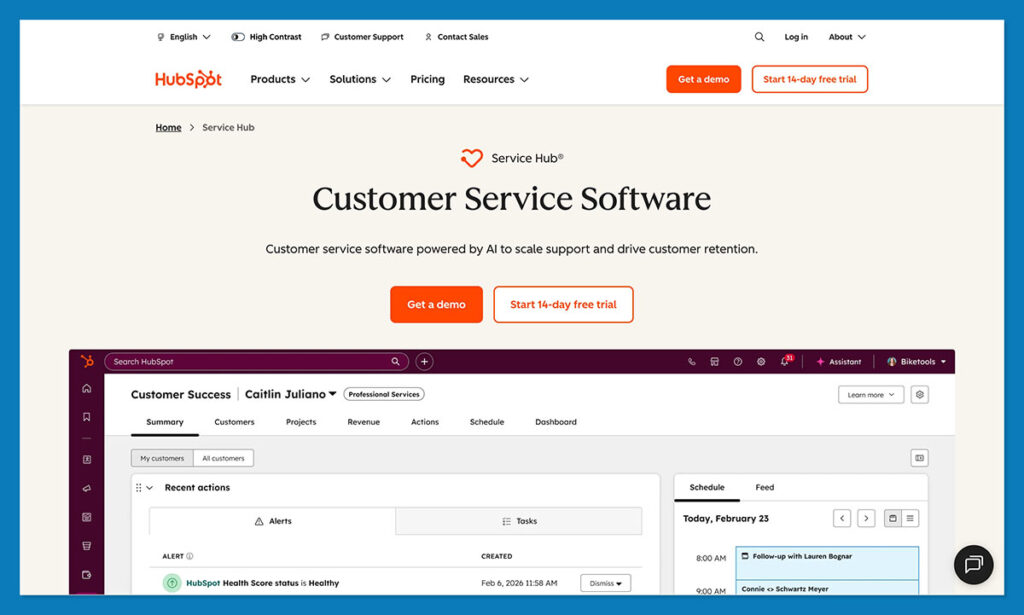
The AI tools HubSpot’s been rolling out, like the customer agent, the reply suggestions, the routing logic are extremely helpful too. They behave like they’ve been trained on the CRM itself, which is why you end up with assistants and generated text that sounds like your brand.
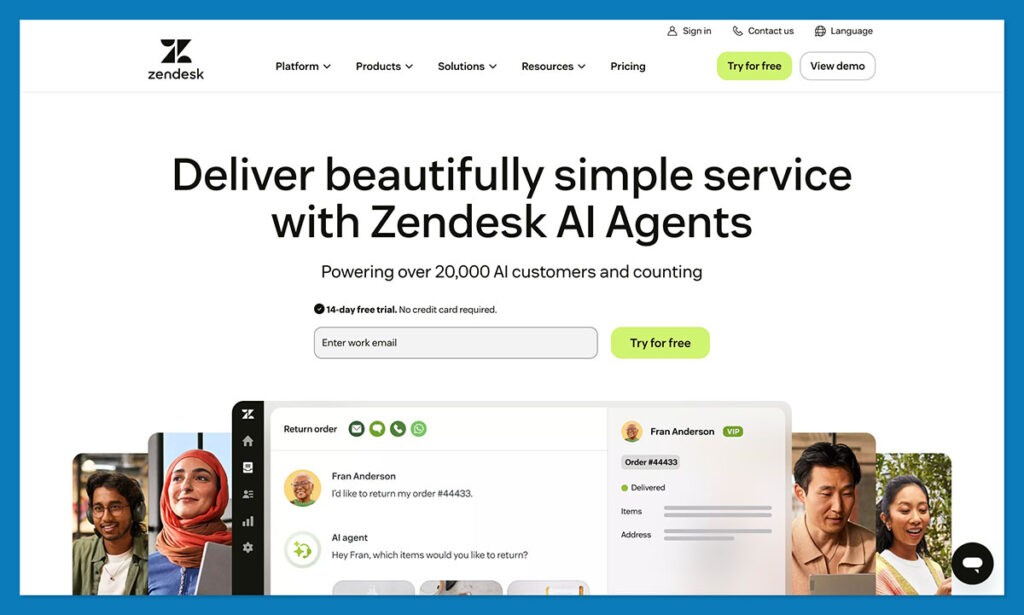
Zendesk is usually considered the platform for teams who deal with volume. There’s a reason long-time support managers swear by it. The workspace is clean, fast, predictable, and built for people who live inside queues all day.
The Zendesk Suite is the heart of it, combining email, chat, SMS, social messages, and phone calls. The voice setup is especially strong. If your team does a lot of phone support, Zendesk still has one of the better experiences out there.
Zendesk Sell, their CRM, is a different story. It works, but it never quite blends in. You can feel that it was brought in from the outside (it used to be Base CRM). HubSpot’s CRM is a true engine; Sell feels more like an add-on with its own way of thinking. When agents need customer history, they sometimes hop back and forth, which gets tiring fast.
How I Tested HubSpot vs Zendesk
As a person who reviews platforms constantly, I always kind of enjoy putting two big players head to head. But in the case of HubSpot and Zendesk, it was a little tricky. They might both help you out with support, but they’re very different under the hood.
To keep things simple I focused on a few things:
- Ease of use: The whole “how fast can an agent get comfortable” question matters more than most vendors admit. No one has time for a three-week learning curve.
- Product capabilities: The features that actually matter to service teams, like shared inboxes, ticket routing, workflow triggers, AI suggestions and CRM context.
- Pricing: I always say the cheapest option isn’t always the best, but it’s important to look at the value you’re actually getting for your budget.
- Scalability: A lot of systems, particularly those built for small teams, can struggle when you start to scale. So my tests included stress points (just in case).
- Integrations and ecosystem: Support shouldn’t be a separate section of your workplace. Everything needs to connect: your CRM, marketing tools, ecommerce systems, and more.
HubSpot vs Zendesk: Comparison Table
| Feature Category | HubSpot Service Hub | Zendesk Suite |
| Core Positioning | Built around HubSpot CRM + inbound marketing + sales tools. Everything connects. | Built for high-volume support teams; ticketing and voice at the center. |
| AI & Automation | Breeze AI writes replies, routes tickets, checks CRM context, and triggers workflows across the whole platform. | Strong for service-only teams: AI agents, voice automation, summaries, QA, WFM. |
| Ticketing & Channels | Help desk sits inside the CRM. Email, chat, WhatsApp, Messenger, forms all land in one place. | Broader mix of messaging channels, especially SMS and app-level chat. |
| CRM Connection | CRM is the foundation. Every ticket pulls full customer history instantly. | Zendesk Sell exists, but it’s separate. Agents often hop between tools. |
| Reporting | Service analytics tied to CRM data, sales notes, and marketing behavior. | Explore dashboards tuned for contact-center performance. |
| Integrations | Big ecosystem. Data Hub gives clean two-way sync with ecommerce and sales systems. | Larger marketplace, but <10% supports Zendesk Sell. More glue work needed. |
| Voice | Basic calling with recordings and logs in the CRM. No AI voice yet. | One of the strongest voice setups around. IVR, queue tools, summaries, the works. |
| Pricing | Free CRM + low-cost Starter tiers. Costs rise if you lean into enterprise features. | No free option. Core features often locked behind higher plans. |
| Best Fit | E-commerce teams that want customer history, marketing, and service all in one spot. | Support-heavy orgs that live in queues and rely on voice and QA tools. |
Deep Feature Comparison: HubSpot vs Zendesk
Alright, let’s get into the deeper stuff. For this particular comparison, I’m going to be focusing on a few key areas, based on what I hear most from support teams (in ecommerce), looking for tools they can trust to manage customer service. Let’s start with ease of use.
Ease of Use, Onboarding & Support
One of the things that usually attracts smaller companies to both HubSpot and Zendesk, is that they’re often described as being easy to use. I can definitely see that.
Zendesk feels like walking into a workshop someone’s already set up for you. Everything is exactly where you’d expect it, and the tools run fast even when your queue is building.
New agents can find their footing easily, and honestly, the mobile app is surprisingly useful. You don’t get a watered down platform, you get a place where you can respond, reassign, check customer info, even handle voice actions on the go.
Zendesk also offers all support channels (email, chat, phone) on every paid plan. If your team needs to talk to a human on day one, you get that option.
HubSpot is inviting in a different way. It’s a little busier than Zendesk as a platform, but it makes sure you have everything you need to onboard new users in no time.
The learning curve is shorter than expected. Even people who don’t love software tend to pick it up quickly because everything follows the same logic: one CRM, one timeline, and one record.
Where HubSpot leans more DIY is support access. Free users don’t get one-to-one support, and phone support doesn’t show up until the Professional tier. Thankfully, HubSpot Academy is massive. Most teams solve questions through videos and docs faster than they would with a human assistant.
AI & Automation: HubSpot Breeze AI vs Zendesk’s Service AI
You really can’t fully compare HubSpot and Zendesk these days without talking about AI. Both companies have definitely “ramped up” their intelligence features lately. HubSpot’s AI play is Breeze, the comprehensive intelligent system that works alongside you throughout the whole platform.

The Breeze Assistant helps you track down information and generate responses to questions. The HubSpot Agents, like the customer agent, automate end-to-end customer service tasks. HubSpot says the customer agent even resolves up to 65% of conversations automatically for most teams.
Breeze Intelligence is one feature I think is particularly impressive. It helps unify and clean your data, simplify forms, and unlock insights that would take weeks to uncover otherwise.

Zendesk’s AI goes heavier on classic service work: suggested replies, auto-triage, call summaries, QA scoring, and workforce tools that help big teams stay organized. It’s impressive if you’re handling constant volume. The phone features especially shine when your team spends hours on calls.
The really big split here is that Zendesk really hyper-focuses on the support queue, HubSpot handles the whole customer journey, giving you AI tools that connect sales, marketing, and customer support.
Omnichannel Support & Ticket Management
A shared inbox seems like a basic thing until you use one. HubSpot funnels email, chat, WhatsApp, Messenger, and form submissions into a single view that sits inside the CRM. That means agents can switch from “Why hasn’t my package shipped?” to “I think I ordered the wrong size” without losing context.
The ticket pipelines are easy to manage, which helps teams keep returns, complaints, VIP messages, and general questions separate.
Zendesk’s channel list is longer. It handles SMS, in-app messages, and more social channels than most teams will ever need. If your store runs support on multiple fronts, like chat, email, Instagram DMs, phone, Zendesk’s workspace does feel a bit more comprehensive.
However, Zendesk’s workspace doesn’t pull full CRM history unless you integrate it. So while the channel coverage is great, the context isn’t always there unless you stitch things together.
CRM Strength and Product Extras
The CRM layer is where the real difference between these tools feels incredibly obvious.
HubSpot’s CRM is the heart of the business. Everything runs through it. The second a ticket shows up, the agent sees the customer’s full timeline of purchases, abandoned carts, email engagement, service history, even notes from the sales team.
Zendesk Sell is decent. But it’s not woven into the support experience. It used to be Base CRM before the acquisition, and it still behaves like a tool with its own agenda. Agents who need customer history often jump between the support workspace and the CRM, which adds up over a week of busy shifts.
From an “extras” perspective, HubSpot also adds small perks that make service feel connected to the rest of the business:
- The meeting scheduler
- A solid chatbot builder
- Video messaging
- HubSpot payments for fast b2b checkout flows
- Built-in lead scoring and sales automation
Zendesk’s extra features are aimed at operations:
- Prospecting Credits For Zendesk Sell
- A Power Dialer
- Call Monitoring
- QA Scoring
- Workforce Management Tools
It’s built for leaders who watch reply-time dashboards like hawks.
Reporting & Customer Success Tools
HubSpot’s reporting always stands out to me, because everything connects. Tickets sit next to deals, marketing campaigns, order histories, and subscription data. You can see how service affects revenue and retention, not just how fast an agent replied.
The customer success workspace, health scoring, NPS tracking, and playbooks give smaller teams surprisingly mature tools without needing extra software.
Zendesk’s reporting feels more like a classic support analytics suite. Explore gives strong ticket metrics, queue trends, QA scoring, and staffing insights. Contact-center managers love this stuff.
But Zendesk doesn’t connect the dots between support and the rest of the customer lifecycle without extra integrations.
Pricing & Scalability: HubSpot vs Zendesk
I like to combine these two things together because they’re more connected than you think. You don’t just need an affordable system; you need something that continues to deliver real results as your business grows.
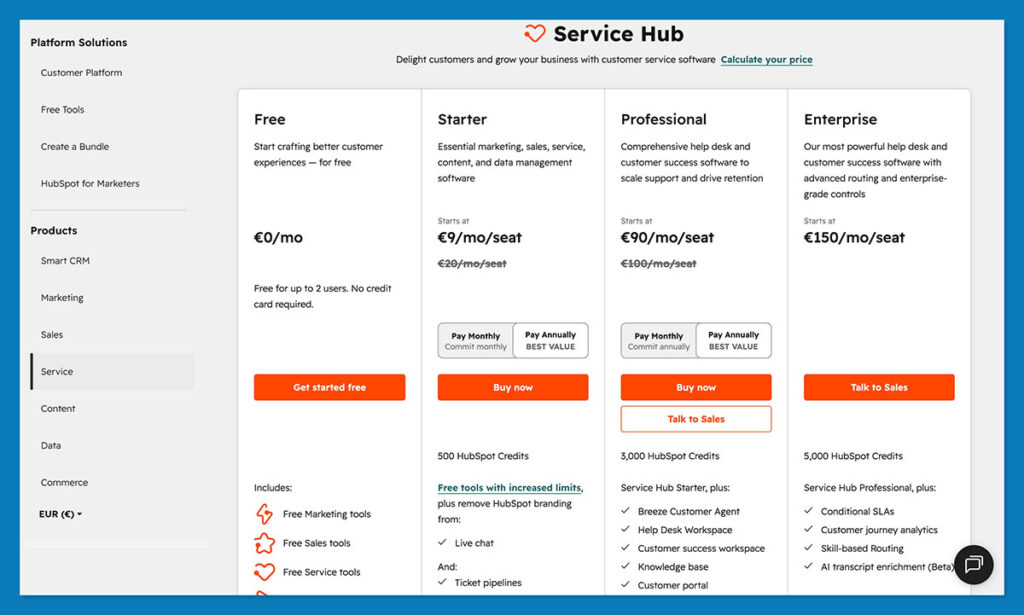
HubSpot’s pricing is pretty simple. First, you get the free CRM which is genuinely useful (not just a watered down version of the main platform). There are also free service-focused tools available, like the knowledge base, help desk automation tools, and customer feedback surveys. After that, prices for Service Hub include:
- Starter: $15/month/seat
- Professional: $100/month/seat
- Enterprise: $150/month/seat
Obviously, there’s a slight leap between tiers there, but trust me when I say HubSpot can actually save you a decent amount of cash if you’re currently stacking together different tools.
Zendesk doesn’t do a “free” tier, although you can get a demo. Entry-level prices are a bit higher, starting at $19 per month, but there’s a smaller gap between tiers:
- Support team: $19
- Support Professional: $55
- Support Enterprise: $115
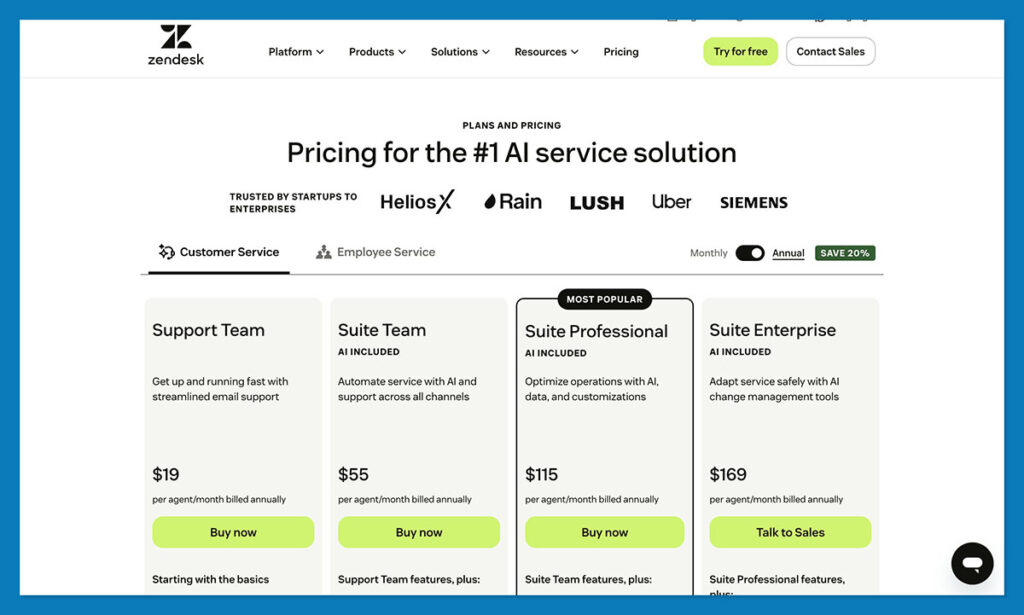
Overall, Zendesk is cheaper, but you don’t get all the features you get from HubSpot. Zendesk Sell costs extra, and even then, you’re working with two separate tools. When you add up the cost of Suite + Sell + integrations, the total gets surprisingly close to enterprise pricing even for mid-size stores.
Scalability: Where Each Platform Holds Up
HubSpot ages well if you’re building a system around one shared customer record. Adding more seats, more workflows, and more data is easy. The CRM was built to stretch, and it does. The catch comes with costs at higher tiers, especially if a store adds multiple hubs across the platform.
Zendesk handles growth differently. It stands up to heavy ticket volume better than almost anything. A queue of 800 angry holiday shoppers doesn’t make it sweat. But as the business grows, so does the need for more tools outside support, and that’s where its “service-first” architecture shows its limits. You may scale your support team easily… while the rest of the business keeps leaning on disconnected tools.
Integrations & App Ecosystems
E-commerce support shouldn’t live in a vacuum. There’s always a checkout tool that needs hand-holding, a marketing platform sending promos at the worst possible time, or a sales rep adding notes no one told you about. The way a service platform handles integrations makes or breaks the day-to-day flow.
HubSpot’s ecosystem grew into something surprisingly useful for stores. There’s the HubSpot App Marketplace, the Data Hub sync engine, and more Shopify/WooCommerce/BigCommerce connectors than you’d expect at first glance. The part that stands out is how clean the data sync feels compared to most tools.
Data Hub does real two-way syncing. If a customer updates their email in Shopify, HubSpot sees it. If a support agent updates a record in the CRM, your ecommerce system gets the memo. Plus, because Service Hub lives inside the HubSpot CRM, every integration automatically benefits support, sales, and marketing at the same time.
Zendesk’s marketplace is big too. You can connect it to almost anything if you’re patient enough. The thing is, the quality varies. A lot of apps work beautifully for the support workspace, but fewer plug into Zendesk Sell cleanly. And since Sell already lives a separate life from Zendesk Suite, the integrations feel split down the middle.
Plenty of stores run on Zendesk + a separate CRM + a separate marketing stack + a handful of homegrown scripts. It works, but it’s the kind of setup that becomes fragile during busy seasons. The connectors do the job, though some of them rely on Zapier-style relays, and that introduces lags and weird one-off bugs when order volume spikes.
HubSpot vs Zendesk: The Verdict
I’ll be honest, the choice feels pretty obvious to me. When you test these tools yourself, you’ll see they’re both excellent, but HubSpot edges ahead constantly in the things that really matter. It keeps all of the parts of your customer-centric business connected in a way that other tools just can’t.
Zendesk still does the classic support job better than almost anyone. If your team lives in queues, all day, every day, you feel how sturdy it is.
But when a store depends on more than pure ticket volume, HubSpot feels more natural, easier to manage, and more effective at saving time.
If you’re leaning toward HubSpot, just create a free HubSpot CRM account and throw a few real tickets and customer records at it. You’ll see if it’s right for you.
FAQ
How does HubSpot compare to Zendesk?
HubSpot ties support to the entire customer journey. Zendesk focuses on ticket flow. If you care more about context, HubSpot wins without trying. If your world revolves around queues, SLAs, and heavy phone volume, Zendesk still feels faster.
When should you use HubSpot for e-commerce?
Use HubSpot when your store depends on repeat customers and clear visibility. Support, marketing, and sales all pull from the same CRM, so teams see what triggered the ticket. It’s perfect for shops trying to grow retention and LTV.
Is HubSpot affordable for small businesses?
Yes, HubSpot is affordable for small businesses. The free CRM includes contact management and basic ticketing for up to 2 users. Service Hub Starter starts at $15/seat/month. Costs increase significantly at Professional and Enterprise tiers.


Comments 0 Responses