


Running your site on WordPress but want to sell with Shopify? That used to be complicated. Not anymore.
Shopify recently launched a dedicated WordPress plugin, and it’s changed everything. I’ve used both platforms for years—WordPress for content and SEO, Shopify for serious ecommerce. Now you don’t have to choose.
In this guide, I’ll walk you through how to use Shopify with WordPress using the official plugin. I’ll also compare this new setup to the old methods, show you exactly how to get started, and help you figure out if it’s right for your business or your clients.
Quick Answer: How to Use Shopify with WordPress in 2025
You can now use Shopify with WordPress through Shopify’s official WordPress plugin—no need for manual Buy Button embeds or custom code.
Just install the free plugin from the WordPress Plugin Directory, connect your Shopify store, and start adding products or collections directly into your WordPress pages or posts.
Your customers will check out using Shopify’s high-converting, secure checkout, while you continue managing your content on WordPress.
| Step | What to Do |
|---|---|
| 1. Install Plugin | Go to your WordPress dashboard → Plugins → Add New → Search “Shopify” → Install and activate the official Shopify plugin. |
| 2. Connect Store | Log into your Shopify account when prompted and connect it to your WordPress site. |
| 3. Add Products | Inside the WordPress block editor, click Add Shopify Product or Add Shopify Collection to insert them into any post or page. |
| 4. Start Selling | Customers browse your products on WordPress and checkout through Shopify’s secure, high-converting system. |
Why this matters:
- No more Buy Button workarounds
- Full Shopify backend features (inventory, orders, analytics)
- Shopify’s checkout converts 17% better than WooCommerce
- Works with any WordPress theme or builder
You get the power of Shopify ecommerce without leaving your WordPress site.
Why Use Shopify with WordPress?
I’ve worked with clients who needed both a flexible website and a powerful ecommerce engine. WordPress is unbeatable for content, blogging, and customization. But when it comes to selling—Shopify outperforms almost every alternative.
Here’s why combining them makes sense:
Benefits of Shopify + WordPress:
- Best-in-class checkout: Shopify’s checkout converts 17% better than WooCommerce (according to Shopify).
- Simple product integration: Add products directly into WordPress posts or pages with one click.
- No code needed: The plugin works directly in the WordPress block editor.
- Fewer tech headaches: You don’t need to manage a bunch of ecommerce plugins like you would with WooCommerce.
- SEO + Content: Keep using the SEO tools and plugins you already love in WordPress.
This combo is perfect if you’re a content creator, blogger, service-based business, or agency building sites for clients. You get the flexibility of WordPress with the conversion power of Shopify.
How It Worked Before: The Buy Button Method
Before this new plugin, the only real way to use Shopify with WordPress was through the Buy Button sales channel.
Here’s what that looked like:
Old Shopify + WordPress Setup:
| Feature | Buy Button Method |
|---|---|
| Checkout | Shopify-hosted |
| Product display | Manually embedded via code |
| Installation | Copy/paste HTML or JavaScript |
| Maintenance | Manual updates |
| Limitations | No styling control, harder to scale |
To use it, you had to:
- Create products in Shopify
- Generate a Buy Button
- Copy the embed code
- Paste it into WordPress pages manually
It worked, but it wasn’t ideal. Styling the Buy Button to match your theme was tricky. If you updated products in Shopify, you had to double-check everything still worked in WordPress. It didn’t feel native.
That’s where the new plugin changes the game.
The New Way: Shopify’s Official WordPress Plugin
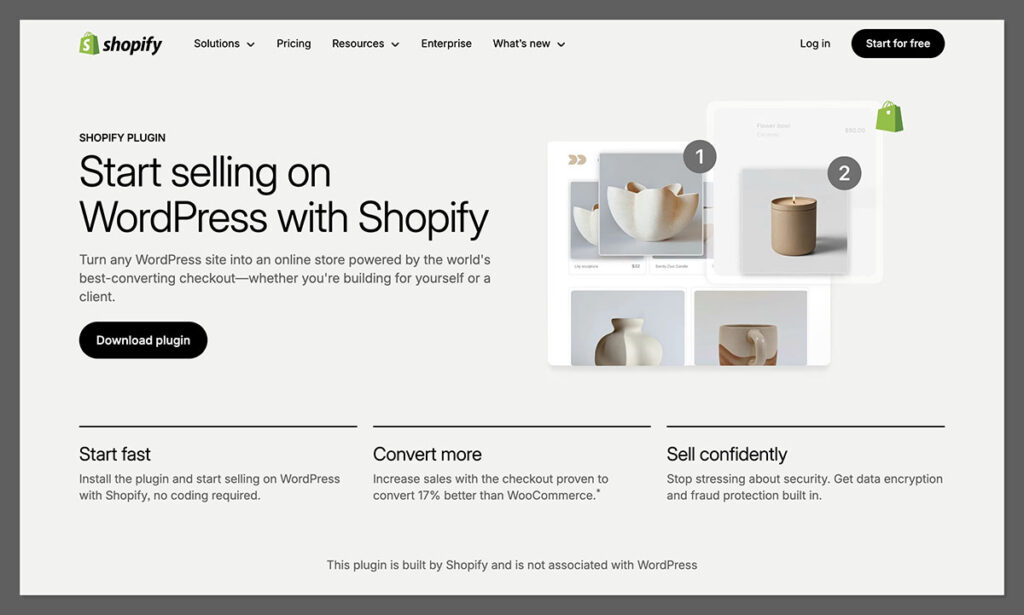
Shopify’s new plugin lets you turn any WordPress site into a fully functional ecommerce store—without custom code, without theme conflicts, and without duct-taping platforms together.
What You Can Do With the Plugin:
- Add products and collections directly into your WordPress editor
- Sell with Shopify’s secure checkout (on your domain)
- Track orders, inventory, and analytics from Shopify’s dashboard
- Use advanced ecommerce features like shipping, taxes, discounts, and customer accounts
It’s a true integration, not a workaround.
Step-by-Step: How to Set Up Shopify on WordPress
I’ll walk you through how I set this up on a test site recently. You’ll need a Shopify account and a WordPress site (self-hosted or via a host like WP Engine, Kinsta, etc.).
Step 1: Create a Shopify Account
If you don’t already have a Shopify account, you’ll need to create one.
- Go to Shopify
- Choose a plan (starting at $29/month)
- Set up your store name, contact info, and payment methods
Step 2: Install the Shopify Plugin in WordPress

- Log into your WordPress dashboard
- Go to Plugins > Add New
- Search for Shopify
- Click Install on the official plugin by Shopify
- Activate the plugin
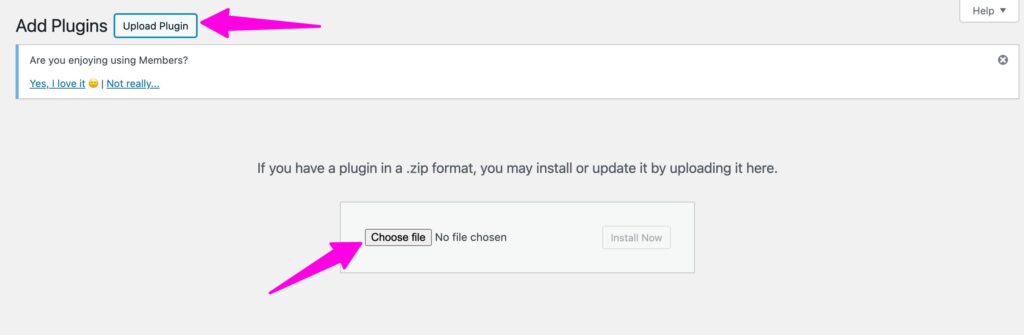
Once activated, you’ll see a Shopify menu in your WordPress admin sidebar.
Step 3: Connect Shopify to WordPress
- Click the Shopify menu item
- Log into your Shopify account when prompted
- Authorize the connection between WordPress and Shopify
Your products and collections from Shopify will now be accessible inside WordPress.

Step 4: Add Shopify Products to Your Pages
This part is shockingly easy.
- Open any post or page in the WordPress editor
- Click the + block button
- Search for Shopify Product or Shopify Collection
- Choose what to embed
You can customize how products appear using the block settings. Everything pulls in from Shopify—images, descriptions, prices, and variants.
No copy/paste. No HTML. Just native blocks.
How Shopify Checkout Works on WordPress
When a customer clicks “Add to Cart” or “Buy Now” on your WordPress site, they’re taken to a Shopify-hosted checkout. This is where Shopify really shines.
Shopify Checkout Advantages:
- Built-in fraud protection
- Mobile-optimized
- Accepts Apple Pay, Google Pay, PayPal, and 100+ payment gateways
- PCI compliant
- Customizable branding
- Fast load times (Shopify reports 99.9% uptime)
If you’ve used WooCommerce’s checkout before, you know how many plugins it takes to get something similar. With Shopify, it’s built-in from day one.
Managing Products and Orders
All your ecommerce management still happens inside Shopify. That’s a good thing.
WordPress handles your pages, blog posts, and theme. Shopify handles the business side.
Shopify Admin Features:
- Product setup with images, descriptions, SKUs, inventory
- Pricing, sales, discount codes
- Shipping rates, fulfillment, tracking
- Customer database
- Analytics and reporting
- Order management and refunds
If you’re used to WooCommerce’s admin interface, you’ll find Shopify’s backend much cleaner and easier to navigate.
How It Compares to WooCommerce
I’ve used WooCommerce on dozens of WordPress sites. It works—but it needs a lot of babysitting.
Shopify vs WooCommerce:
| Feature | Shopify Plugin | WooCommerce |
|---|---|---|
| Setup time | 10 minutes | 2–4 hours |
| Security | Built-in | You manage |
| Maintenance | Shopify handles it | You maintain plugins |
| Checkout | Shopify (proven high converting) | Customizable, but needs plugins |
| Cost | $29/month+ | Free core, paid plugins |
| Speed | Fast, cloud hosted | Depends on your host |
WooCommerce can still be the right choice in some cases—especially if you need 100% control or want to avoid monthly fees. But if conversions and ease of use matter? Shopify wins.
Pros and Cons of Using Shopify on WordPress
Let’s be honest. No setup is perfect. Here’s what I like—and what I’d watch out for.
Pros:
- Easy integration with WordPress
- No coding required
- Shopify checkout built in
- Works with any WordPress theme
- Fast setup and launch
- Less plugin maintenance
Cons:
- Requires Shopify subscription ($29/month minimum)
- Checkout happens off-site (hosted by Shopify)
- Custom styling may be limited depending on your WordPress theme
- Analytics split across two platforms (WordPress + Shopify)
Overall, the benefits outweigh the drawbacks for most use cases.
Who This Is Best For
Based on working with clients and running my own stores, this setup is ideal for:
- Bloggers and content creators: Add a store to your existing WordPress blog without switching platforms.
- Agencies and freelancers: Build scalable ecommerce solutions for clients without using WooCommerce.
- Service businesses: Sell physical or digital products alongside services or appointments.
- Developers: Use WordPress for frontend flexibility, and Shopify for backend simplicity.
Pricing Breakdown
Here’s what it costs to run Shopify on WordPress:
Shopify Plans (2025):
| Plan | Monthly Cost | Features |
|---|---|---|
| Basic | $29 | Unlimited products, checkout, POS, reports |
| Shopify | $79 | Professional reports, better shipping rates |
| Advanced | $299 | Custom reports, lower transaction fees |
There’s no additional fee for the plugin itself. The plugin is free to install from the WordPress repository.
You’ll also need to factor in your:
- WordPress hosting (around $20–$50/month)
- Domain name (if not included with hosting)
- Email marketing or CRM (optional)
If you’re migrating from WooCommerce, you might even save money by reducing the number of premium plugins you need.
FAQs About Using Shopify with WordPress
Can I use Shopify with WordPress without switching my whole site to Shopify?
Yes. That’s the point of the plugin. Your site stays on WordPress. Shopify handles only the ecommerce side.
Does the plugin work with Elementor or page builders?
Yes. It works with block editor and most modern page builders that support shortcode or custom blocks.
Is Shopify SEO-friendly on WordPress?
Absolutely. You can continue using your SEO plugins like Yoast or Rank Math on WordPress. Shopify’s checkout and product URLs are SEO-safe too.
Can I use Shopify for digital products?
Yes. You can sell digital downloads, memberships, and even services.
What happens if I cancel my Shopify account?
Your product blocks in WordPress will stop working. The plugin depends on your Shopify store being active.
Final Thoughts
If you’ve ever felt stuck choosing between WordPress and Shopify, you don’t have to anymore.
This plugin gives you the best of both worlds. You get to keep your WordPress site exactly as it is—while adding powerful ecommerce features that scale with your business.
Setup takes less than an hour. No code. No mess. And it’s backed by the Shopify platform that powers millions of stores and billions of transactions.
For content creators, freelancers, and small businesses looking to sell online without leaving WordPress—this is one of the cleanest solutions I’ve seen in years.


Comments 0 Responses