

Sell a $4.99 kiss-cut sticker with free shipping and you lose $1.69. Base cost $1.95, first-item US shipping $4.29, Shopify processing $0.44. That’s the trap nobody mentions when they explain how to sell print on demand stickers on Shopify.
Stickers are still the best first print on demand product: near-zero startup cost, no inventory risk, impulse price point. It only works if you fix the offer and the pricing before you open the store.
This guide assumes nothing: no Shopify store, no POD account, no design experience. Ten steps from now you’ll have a live store, a synced sticker product, a supplier chosen on real base costs, and prices that survive shipping. The global print on demand market is estimated at $13-15 billion in 2026 (Grand View Research and Mordor Intelligence).
What this costs to follow:
- Shopify: $5/mo Starter, or $39/mo Basic ($29 annually)
- POD supplier: $0 on Printful’s or Printify’s free plan, paying per order
- One sample: $7-15, the expense not to skip
Step 1: Run the Sticker Math Before You Design Anything
Shipping the first sticker costs more than twice what the sticker costs. Before you open Canva, work out what one order costs to fulfil. That number decides everything you design afterwards.
Here’s a single $4.99 sticker sold with free shipping through Printful, start to finish.
What a $4.99 sticker order actually costs you
| Line item | Amount | Where it comes from |
|---|---|---|
| Retail price (3x3in kiss-cut, free shipping) | +$4.99 | Your product page |
| Printful base cost, 3x3in kiss-cut | -$1.95 | Printful free plan pricing |
| Printful US shipping, first item | -$4.29 | Flat rate on the first sticker in an order |
| Shopify Payments fee (2.9% + $0.30) | -$0.44 | Basic plan processing |
| Net per order | -$1.69 | You pay $1.69 for the privilege of a sale |
The number that fixes this is Printful’s second-item rate. The first sticker in an order ships for $4.29; every additional sticker in that same order ships for $0.99. Shipping is a per-order cost, not a per-sticker cost, and that one fact dictates your entire product strategy. Step 2 is built on it.
Three costs beginners leave out of the spreadsheet:
- Processing fees hit shipping revenue too. Your payment processor takes 2.9% of the shipping you charge, not just the product revenue.
- Packaging, if you ever self-ship. Poly mailers, tissue, thank-you cards. Small numbers that stop being small at volume.
- Reprints and lost parcels. One long-term Printful merchant reports carriers losing a package every 7 to 10 days.
The pricing breakdown these numbers come from doesn’t hedge:
The math doesn’t work on single stickers. A $1.95 kiss-cut with $4.29 shipping costs $6.24 to fulfill, and most operators retail single stickers at $3 to $5.
Compare that with the pricing formulas circulating in other sticker guides. “Charge 2 to 3x your base cost.” “$1.20 cost plus a 40% margin plus $0.30 equals $2.10.” Neither touches shipping, platform subscriptions, or processing, the three costs that actually decide your sticker business profit margins.
The verdict: at Printful’s rates, a loose single sticker with free shipping has to retail near $8 to break even, and nobody pays $8 for one sticker. The fix isn’t a higher price. It’s a different unit of sale, which is Step 2.
Step 2: Fix Your Offer With Sticker Sheets, Packs and a Free Shipping Threshold
The same five stickers at the same $14.99 price can be a $3.74 loss or a $4.92 profit. The only variable is how the order gets fulfilled.
So before you decide what to design, decide what one order looks like.
Three ways to sell five stickers
| Format | What you pay to fulfil | Retail | Net per order |
|---|---|---|---|
| Five $4.99 singles bought one at a time (5 separate orders) | $33.40 | $24.95 | -$8.45 |
| One 5-sticker pack, fulfilled as five loose stickers | $18.73 | $14.99 | -$3.74 |
| One printed sticker sheet, 5.83 x 8.25in | $10.07 | $14.99 | +$4.92 (~33% gross) |
The sheet wins because it is one item, so it pays the $4.29 first-item shipping charge once instead of five times.
Three levers, in the order I’d pull them:
- Make a sheet or a pack your default SKU. Singles become the add-on, not the hero product. Each extra sticker in the same order costs $0.99 to ship instead of $4.29.
- Set a free-shipping threshold around $15. It pushes a buyer from one sticker to three, which makes it the highest-leverage pricing change on this list. You’ll configure it in Shopify in Step 8.
- Attach stickers to a higher-ticket item. A buyer already taking a $30 tee who adds a $7 sticker pack costs you nothing extra to acquire.
One honest caveat: Printful’s bulk discounts don’t start until 25 units, and a bulk printer like Sticker Mule beats POD badly on unit cost ($1.20 each at 50 units with free shipping and roughly four-day production, falling to about $0.12 each at 10,000). That’s inventory you’ve paid for before anyone has bought it. Step 4 covers when that trade makes sense.
Best for: multi-design aesthetic niches where buyers want the set, not one sticker.
Skip if: your designs are large statement pieces. Then price up instead. Printful’s 15 x 3.75in bumper sticker has a $4.95 base and its 5.5in die-cut is $4.50, which supports a $12-15 single-item price without any of the sheet gymnastics.
Step 3: Pick a Sticker Niche With Proven Demand Using Free Tools
Every “trending sticker niches” list you’ll find answers the wrong question. The filter that matters for a Shopify sticker store isn’t what’s popular. It’s whether buyers in that niche buy four at a time.
You don’t need a paid tool to work that out. My free stack:
- Etsy’s search bar. Autocomplete shows real query volume; bestseller badges and review counts on the top listings are your demand proxy.
- Pinterest Trends. The best signal for aesthetic niches, because Pinterest is where the aesthetics get named.
- Google Trends. Use the 12-month view to check you’re not building on a dead fad.
- TikTok hashtag view counts. A fast read on whether an aesthetic still has an audience.
- Everbee (paid, optional). One niche researcher’s rule: run an idea through it for real listing sales data before you spend design time. Useful, not a day-one buy.
Where demand sits according to 2026 Etsy trend data:
- Coquette and bow aesthetic, dark academia, retro Y2K
- Mental health and affirmation stickers, neurodivergent and ADHD themes
- Cottagecore botanicals, frog and goblincore
- The evergreen lanes: planner and journal stickers, plus occupation niches (nurse stickers are among the highest-converting on Etsy, with buyers decorating water bottles and badge reels)
Now read that list again through Step 2’s math, because the trend lists never do. Planner, journal, nurse and aesthetic-set niches are strong precisely because their buyers add four to six stickers to a cart, the only order shape where POD shipping economics work. A niche where buyers take one large statement sticker isn’t impossible, but at $4.29 first-item shipping you’ll fight the format every month.
One legal line before you sketch: no fan art, no brand logos, no copyrighted characters. Full answer in the FAQ.
My recommendation if you’re staring at a blank page: pick one aesthetic niche and one occupation niche, make 8 to 12 designs, and package them as one sheet SKU plus singles.
Step 4: Choose Your Print on Demand Sticker Supplier
Guides on print on demand sticker suppliers tell you to “choose a reliable printing partner” and then hand you a list of adjectives. Adjectives don’t show up in your margin. Prices do.
Shopify-compatible sticker suppliers compared (2026)
| Supplier | Sticker types | Base cost per unit | Shipping | Monthly plan | Shopify app rating |
|---|---|---|---|---|---|
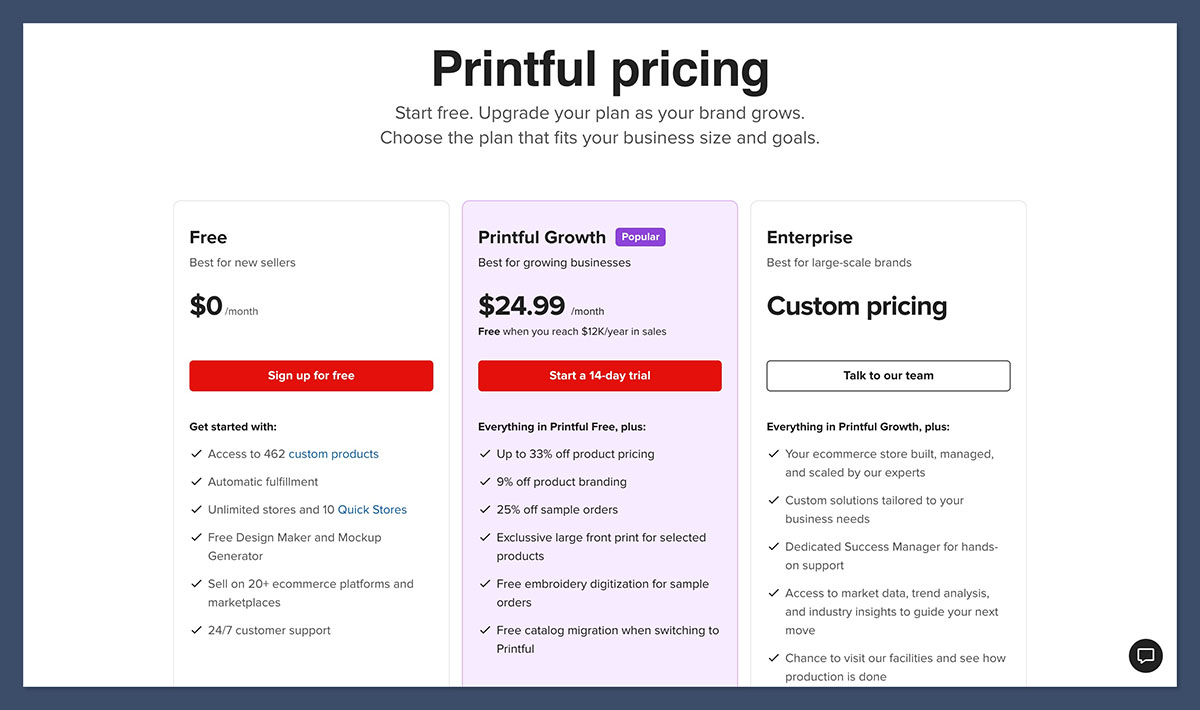
| Printful | Kiss-cut, die-cut, holographic, bumper, sheets | 3x3in kiss-cut $1.95, 4x4in $2.95, 5.5in $3.95; die-cut $2.50-$4.50; holographic $3.50-$4.50; bumper $4.95; sheet $5.05 | $4.29 first sticker, $0.99 each additional (US) | Free; Growth $24.99/mo with a 90-day trial, free past $12K/yr in sales | 4.8 stars, 3,662 reviews |
| Printify | Kiss-cut, die-cut, sheets | Kiss-cut roughly $1.02-$1.39 on Premium | Varies by print provider | Free (5 stores); Premium $39/mo or $24.99/mo billed annually, up to 33% off products | 4.7 stars, 4,280 reviews |
| Gelato | Kiss-cut and die-cut via a local production network | Not published publicly (the sticker product page returned a 403 when I checked) | Local production cuts international cost and transit time | Free forever; Gelato+ $19.99-$23.99/mo; Gold $129/mo for the deepest discounts | Not listed |
| Sticker Mule (bulk pre-order, not POD) | Die-cut vinyl | $1.20/ea at 50 units, $73 per 100, $152 per 500, $232 per 1,000, about $0.12/ea at 10,000 | Free, roughly 4-day production | None | Not listed |
Now the parts the affiliate roundups leave out:
- Printful. A long-term merchant writes that “quality control has gone super downhill and the carriers they use seem to lose a package every 7-10 days which is costing us bad reviews.” Another says support was “delayed and they couldn’t help me.”
- Printify. Reviewers describe the product-creation flow as “glitchy” and report samples arriving with melting and poor print. The recurring verdict is that quality varies by which print provider fulfils your order.
- Sticker Mule. Cheapest per unit by a wide margin, and you’re buying inventory before you have customers.
The decision comes down to base cost versus consistency. Printful’s $1.95 3x3in kiss-cut costs roughly double Printify’s $1.02-$1.39, real money at volume. But Printful prints in its own facilities, while Printify routes your order to whichever third-party provider you picked, and that provider is the variable behind most quality complaints.
For a first store I’d start on Printful’s free plan and pay the higher base cost for print consistency I don’t have to manage. Move to Printify when volume makes that gap matter more than the variance does, and vet the print provider with a sample before you hand it a catalogue.
Sticker Mule’s crossover point: $232 per 1,000 die-cut stickers is about $0.23 a unit, roughly an eighth of Printful’s 3x3in base cost.
Already decided on Printify? Our dedicated Printify sticker walkthrough goes deeper on that platform than this guide will.
Best for / skip if
- Printful: best for a first store that needs predictable print quality. Skip if base cost is your binding constraint.
- Printify: cheapest per unit once you’re willing to test providers. Skip if you don’t want to manage that variable yet.
- Gelato: best for selling internationally from day one. Skip if you need published sticker pricing before committing.
- Sticker Mule: best once a design is proven and you’re reordering. Skip on day one, when you don’t know which designs sell.
Step 5: Create Print-Ready Sticker Files: DPI, Bleed and Cut Lines
Six checks separate a file that prints the way it looks on screen from one that comes back with clipped text and dull colours. Printful publishes the clearest file spec of any print on demand supplier. Six things:
- Set your canvas to 300 DPI. Anything less prints soft, and small text is where it shows first.
- Add at least 0.125in (3mm) of bleed on every side so ink prints to the trimmed edge instead of leaving a white sliver.
- Keep all text and logos inside a 0.125in (3mm) safe zone from the cut line. Cutting has tolerance, and this is where beginners lose the last letter of a word.
- Add a visible outline or stroke around the artwork for a custom die-cut shape. The cutter needs an edge to follow.
- Export as a transparent PNG (or high-quality JPEG) in sRGB. Printful asks for sRGB because converting colour profiles shifts your colours.
- Order a physical proof before you publish. That’s Step 9, the only item here that costs money.
Point five is the one people learn the hard way. “The printer ruined my colours” is almost always a colour-profile problem on the seller’s side, not the printer’s.
Your tools can be free:
- Canva has a built-in sticker maker, exports transparent PNGs, and recommends a 500x500px or 1000x1000px canvas.
- The free-tier catch: background removal (magic eraser) is Canva Pro only.
- Photopea is free, browser-based, opens PSD files, and finishes a transparent background if you’re on Canva’s free tier.
Total design spend for a bootstrapper: $0.
The cut type changes the file. A die-cut design needs a clean silhouette with breathing room, because the blade follows your artwork. A kiss-cut keeps its square backing border, so busy edges are more forgiving.
Sheets need elements spaced far enough apart for the cutter to separate them. The full kiss cut vs die cut stickers comparison is in the FAQ.
The four that matter: 300 DPI, 3mm bleed, 3mm safe zone, transparent PNG in sRGB. Hit those and stop fiddling. The sample tells you the rest.
Step 6: Set Up Your Shopify Store From Scratch
The beginner trap in week one is fonts. You can lose a week on a theme and still have nothing anyone can buy. To sell stickers on Shopify, six things need to exist, and a theme redesign isn’t one of them. Then you connect a supplier in Step 7.
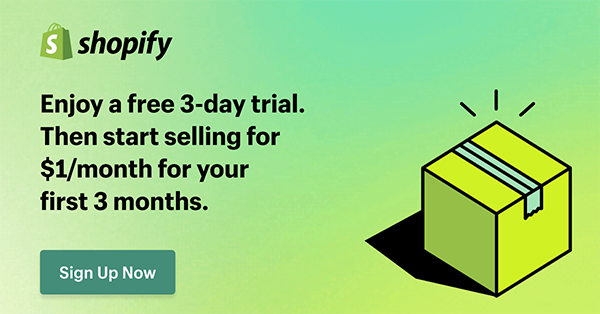
The signup path:
- Go to shopify.com and start the free trial.
- Name your store. You can change the display name later; the .myshopify.com URL you can’t, so pick something you can live with.
- Skip the plan selection prompt until the trial is nearly up. No benefit to paying early.
Six things have to exist before a supplier connection is worth making:
- A free theme. Dawn is fine. Customisation later.
- Policy pages. Refund, privacy, terms, shipping. Use Shopify’s built-in policy generator instead of writing them yourself.
- A shipping origin address. Set it under Settings > Shipping and delivery. It drives your rates and taxes.
- Store currency and market. Trivial now, annoying to change after your first order.
- Contact and About pages. A store with neither converts badly and reads like a dropshipper.
- A domain. Buy through Shopify for the simple path, or connect one you own. Not needed to test.
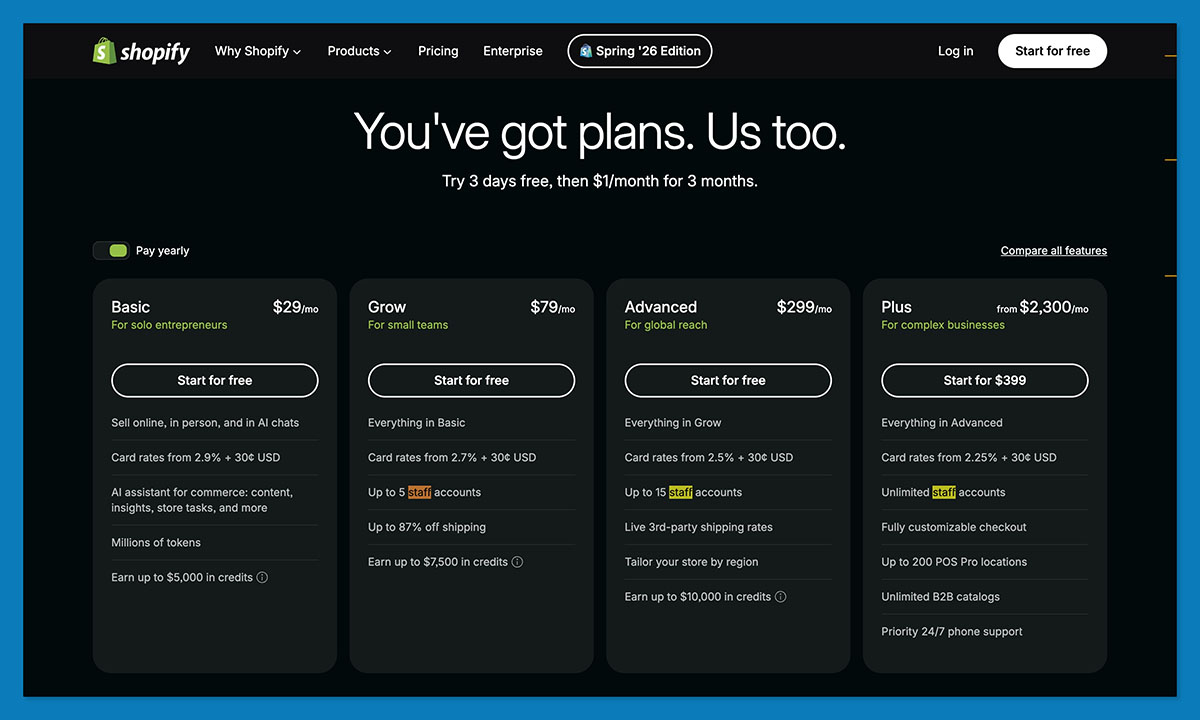
On the plan: Shopify Starter is $5/mo but charges a 5% transaction fee on every sale, even with Shopify Payments. Basic is $39/mo, or $29/mo billed annually, with 2.9% + $0.30 processing and no extra transaction fee. Full math in Step 8.
What to skip: theme customisation, upsell apps, analytics dashboards. Design tweaks come after your first sale, and I mean that literally.
Quick comparison. At sticker order values, Starter’s 5% of a $15 order is $0.75, so Starter stays cheaper than Basic until your monthly volume covers the $34 plan difference. Step 8 puts a number on that line.
Step 7: Connect Your POD App to Shopify and Publish Your First Sticker
The connection takes five minutes. What you check afterwards saves you a refund. Two routes, pick one.
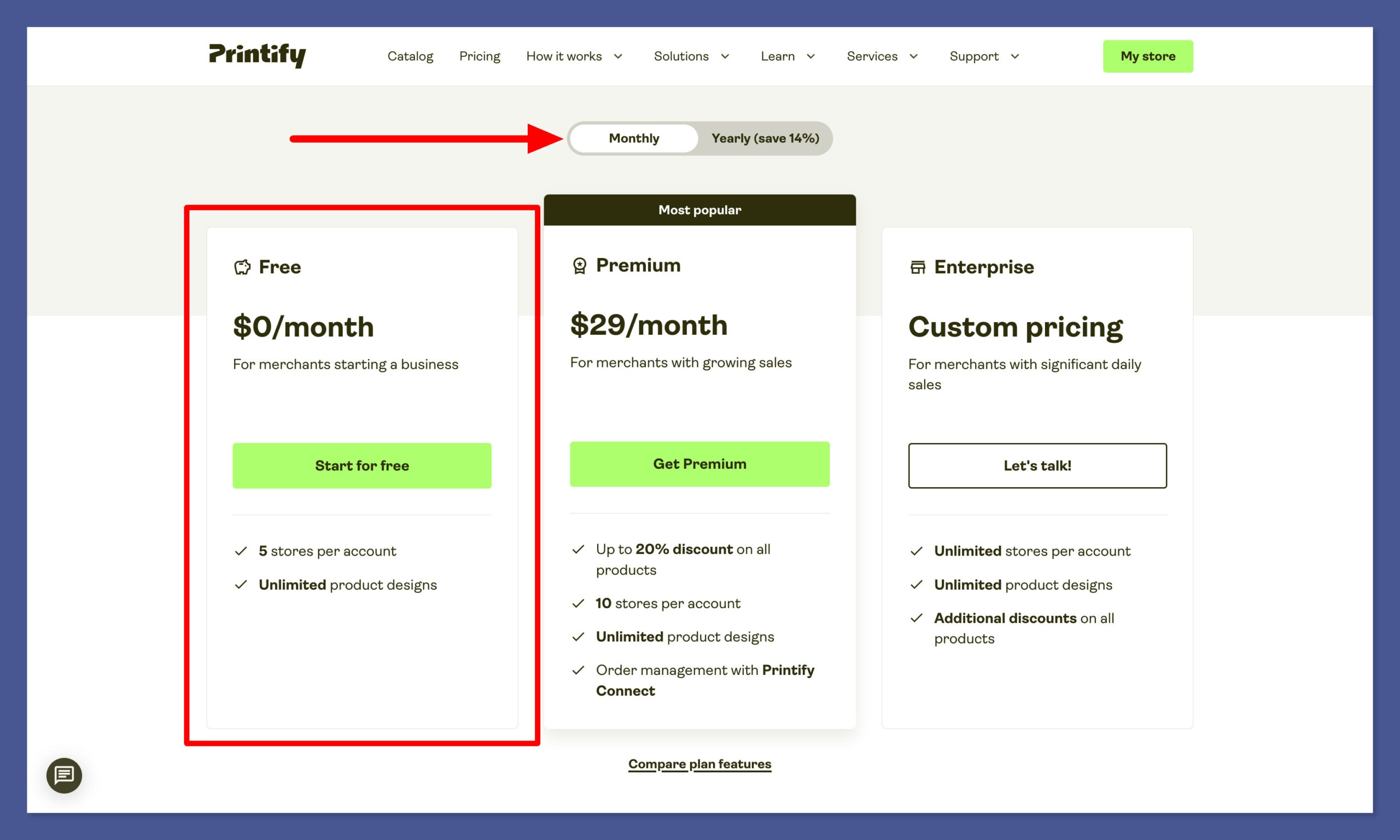
Method A, starting in Printify
- Create a free Printify account or log in.
- Open the account drop-down at top right and select Manage My Stores.
- Click Connect and choose Shopify.
- Paste your store URL as https://yourstore.myshopify.com/ and click Connect.
- Click Install app to add Printify to your Shopify admin.
A typo in the store URL is usually the only thing that breaks this screen.
Method B, starting in Shopify
- From your Shopify admin, open the App Store, search for Printify (or Printful), and click Add app, then Install app.
- Log in or create your supplier account when prompted to finish linking.
Now build the product:
- Open your supplier dashboard and go to Catalog.
- Pick your sticker type: kiss-cut, die-cut or sheet, per Step 2.
- Upload your print-ready file in the mockup editor and place it on the template.
- Set variants for the sizes you’ll sell and delete the rest.
- Save, then Publish to push the product, mockups and price to Shopify.
A sync can report success and still file the product in the wrong collection. I check the list myself.
Check these four before you tell anyone:
- The product landed in the right Shopify collection
- Mockups look right on mobile, not just desktop
- The price isn’t still the app’s default placeholder (you set that in Step 8)
- Inventory is set to keep selling when out of stock (POD has none to track)
When a sale comes in:
- The order lands in Shopify and routes to your supplier automatically
- The supplier charges your card for base cost plus shipping
- Tracking syncs back to the customer
Your card funds fulfilment, not your payout, and payouts take days. On a bootstrapper’s cash flow, that gap is real money.
You now have a live product page you could buy from yourself. Don’t send traffic yet. Step 9 explains why.
Step 8: Set Your Retail Prices and Add Up What Shopify Really Costs
What sinks beginner sticker stores isn’t the per-sticker cost. It’s the monthly total. On Basic plus a paid POD plan, you need about 16 sheet orders a month before you’ve earned a single dollar.
Price from your fulfilled cost, never from a multiple of base cost. Retail = base cost + shipping + processing + packaging, then margin on top of all of it. That’s why the circulating formulas fail: “2 to 3x your base cost” and “$1.20 + 40% + $0.30 = $2.10” both price a product whose shipping costs more than the product does.
Type the retail price into the POD app before publishing so it syncs, or edit it on the Shopify product afterwards. Either habit works, just pick one.
Then configure shipping:
- Go to Settings > Shipping and delivery and edit your rate.
- Add a free-shipping rate conditional on order value, using the ~$15 threshold from Step 2.
- Add a flat rate for orders below the threshold, so single stickers pay their own way.
What a beginner sticker store actually costs per month
| Cost | Cheapest path | Comfortable path | Notes |
|---|---|---|---|
| Shopify plan | $5 Starter | $39 Basic ($29 annually) | Starter adds a 5% transaction fee on every sale |
| Payment processing | 2.9% + $0.30 | 2.9% + $0.30 | A third-party gateway instead of Shopify Payments adds a 2% Shopify fee on top of the gateway’s own cut |
| POD app | $0 free plan | Printify Premium $39 ($24.99 annually) or Printful Growth $24.99 | Growth becomes free at $12K/yr in sales; Premium unlocks up to 33% off products |
| Design tools | $0 (Canva free + Photopea) | Canva Pro | The free tier needs the Photopea workaround for transparent backgrounds |
| Samples | ~$7-15 once per format | One per format you sell | One-time, not monthly. Don’t skip it (Step 9) |
| Marketing | $0 organic | $100-300 to test | Premature before the store converts |
| Total to be live | ~$5 | ~$45-80/mo | Plus your per-order fulfilment costs |
Now the division, because this is the number that matters. On the comfortable path, $39 Basic plus $39 Printify Premium is $78 a month in fixed costs. At the +$4.92 gross margin on a $14.99 sheet from Step 2, $78 ÷ $4.92 = 15.9, so 16 sheet orders a month before you keep a cent. On the cheapest path, $5 Starter plus free supplier plans, the 5% transaction fee trims your margin to about $4.17, so $5 ÷ $4.17 puts you square after a little over one order.
That also settles the Starter-versus-Basic question from Step 6. Basic costs $34 more a month, and Starter’s 5% fee on a $14.99 order is $0.75, so $34 ÷ $0.75 says Starter stays cheaper until roughly 45 orders a month.
Printify Premium needs its own line of math. Up to 33% off a $5.05 sheet base saves about $1.67 an order, so $39 ÷ $1.67 means the plan needs roughly 23 orders a month to pay for itself. Until then, stay free.
The verdict: start on the cheapest path, a trial or Starter plus free supplier plans, and upgrade when order volume forces it. Never when a feature list does.
Step 9: Order a Sample and Check Quality Before You Spend on Traffic
The first person to hold your sticker in real life should not be a paying customer. A $10 sample is the cheapest insurance in print on demand.
Order one unit of every format you plan to sell: a kiss-cut single, the sheet, a die-cut if you offer one. You buy through the app at base cost plus shipping, so expect $7-15 all in. It’s a one-time cost, not a subscription.
Inspect it in this order:
- Colour against your screen. The sRGB shift from Step 5 shows up here first.
- Cut accuracy. Does the die-cut follow your outline? Is any text clipped?
- Backing and peel. Does it lift cleanly, or tear?
- Adhesive after a week. Stick one on a water bottle and one on a laptop, then wait. Your buyers do exactly this.
- Small-text sharpness. The giveaway for a resolution problem.
- Packaging and transit condition on arrival.
- Actual delivery time against what your product page promises.
If the sample is bad, diagnose before you redesign. On Printify, quality varies by provider, and reviewers report samples arriving with melting and poor print, so switch providers before you blame your file. On Printful, the complaints run to carriers and support, so test delivery as hard as the print.
Then take the free upside: photograph the sample. Real photos on a real water bottle convert better than supplier mockups, cost nothing, and are the honest version of a product page. No other store selling the same catalogue sticker has them.
What I’d actually do: one sample per format, wait the week, then open the store. If you can afford only one thing in this guide, spend it here.
Step 10: Get Your First Visitors Without an Ad Budget
Over 80% of stores launched on Shopify make zero revenue in their first 90 days. Not low revenue. Zero.
Most of those stores aren’t broken. They’re invisible. Shopify is tooling, not a marketplace: Etsy hands you roughly 96 million active buyers already searching, while a new Shopify store starts with zero organic discovery, and installing a POD app changes none of that.
Tactics that suit stickers:
- Short-form video of the physical object. Packing orders, sheet reveals, peel shots, time-lapses. Few POD products film this well.
- “Which one would you pick” polls on Reels and TikTok. Free design validation plus comment-driven reach.
- Pinterest as a search engine. Coquette, dark academia and cottagecore are searched there by name.
- Sticker packs attached to a higher-ticket item. Step 2’s upsell logic, applied to whatever else you sell.
- Email capture with a first-order code. The only channel you own.
- Local markets and stockists. Unglamorous, but real cash flow while the online side compounds.
Now the sequencing advice a Shopify-affiliate-funded guide won’t give you. The recommended beginner progression is Etsy first for one to three months, to get your first 50 to 100 sales on traffic you didn’t buy, then your own Shopify store around months 6 to 12 once you have an audience. With no audience today, Shopify is where your brand lives, not where your first customers come from.
Don’t budget for ads until your product page converts free traffic, and treat the first 90 days as validation, not revenue. That 80% figure is why. The stores that break through early share three traits: fast execution, a warm audience already in place, and conversion basics from day one.
Quick comparison for month one. Etsy: buyers already there, listing fees, marketplace rules, one of thousands of sticker shops. Shopify: no buyers, full margin, your own brand and data. Use Etsy for demand, Shopify for the brand.
Either way, you’ve built a store priced correctly from its first order. Most sticker shops can’t say that on day one.
FAQ
What’s the difference between kiss-cut and die-cut stickers?
Kiss-cut stickers are cut through the top vinyl layer only, leaving a square or rectangular backing around the design. Die-cut stickers are trimmed all the way through to the artwork’s exact outline. Kiss-cut is cheaper and better for multi-design sheets; die-cut looks custom and costs a little more (Printful charges $1.95 for a 3x3in kiss-cut versus $2.50 die-cut).
How much does it cost to start selling print on demand stickers on Shopify?
Under about $60 to be live with a real product. Shopify runs $5/mo on Starter or $39/mo on Basic, a Printful or Printify free plan costs $0, one physical sample is roughly $7-15, and design is free with Canva plus Photopea. There’s no inventory purchase, because your supplier only prints after a sale.
What profit margin can I expect on print on demand stickers?
Around 33% gross on a well-structured order, and negative on a badly structured one. The same five stickers at $14.99 lose $3.74 as loose singles and make $4.92 as a single printed sheet. Format decides your sticker business profit margins more than price does. See Step 2 above for the full breakdown.
Does offering free shipping hurt print on demand sticker profits?
Yes on single-sticker orders, no on packs and sheets. Printful charges $4.29 to ship the first sticker and $0.99 for each additional one, so free shipping on a $4.99 single means absorbing a carrier cost bigger than the product itself. A free-shipping threshold around $15 captures the conversion benefit without the bleed.
Can I legally sell fan art or logo stickers through print on demand?
No, not safely. Copyright holders control derivative works, and fair use is a defence you argue after a takedown, not a permission slip beforehand. Your safer paths are original art, a formal licence from the rights holder, or a platform that already holds a licensing deal. POD suppliers also pull listings on complaint, so the risk is your store, not just a lawsuit.
Should a complete beginner sell stickers on Etsy or Shopify first?
Etsy first, if you have no audience. Roughly 96 million active buyers are already searching there, and visibility costs nothing to start. Shopify is the better long-term home once you’ve validated designs and can drive your own traffic: better margins, your own brand, no marketplace fees. Plenty of sellers run both.
Fix the offer format before anything else. A sticker sheet behind a $15 free-shipping threshold turns a store that loses money on every order into one that makes $4.92, and that decision costs you an afternoon. Everything else here gets easier once it’s right.


Comments 0 Responses