

I’ve been running ecommerce campaigns long enough to know one thing: a CRM can either double your sales or drain your week. When it works, it’s incredible, getting all your leads, emails, and sales data all flowing in one place. When it doesn’t, you’re lost in tabs, chasing follow-ups that slipped through the cracks.
HubSpot CRM is the one I usually use as a benchmark. It’s just so comprehensive, with all those different hubs for sales, marketing, service, and even commerce working together. But ActiveCampaign has its value too, particularly if you want to get real about automating your marketing strategies.
So, which one do you really need? In this review, I’ll break down exactly how each platform handled everything from setup to sales automation, and why, if you’re growing an ecommerce brand, HubSpot CRM still comes out on top.
Quick Comparison Table: HubSpot vs ActiveCampaign
Before diving into the details, here’s the snapshot I wish someone had shown me before I started testing.
| Feature | HubSpot Marketing Hub | ActiveCampaign |
|---|---|---|
| Setup & onboarding | Guided onboarding, free CRM ready in minutes, unified workspace | Quick campaign setup, but CRM integration needed for full tracking |
| AI tools | Breeze AI Agents (Content, Social, Prospecting), AI CPQ, Data Hub Intelligence | Predictive Sending, Content Optimization, Active Intelligence agents |
| Marketing automation | Full inbound engine – email, ads, SEO, landing pages, workflows | Strong email automation and branching; solid CRM layering |
| Omnichannel messaging | Email, social, ads, SMS (via integration) | Native email + SMS + WhatsApp + transactional email |
| CRM & pipeline management | Native Smart CRM; pipelines capped by plan | Built-in CRM with unlimited pipelines on all plans |
| Reporting & analytics | Multi-touch attribution, custom dashboards, Data Hub warehouse integration | Campaign-level analytics; excellent for email flows, limited cross-channel view |
| Integrations & ecosystem | 2,000 apps; deep two-way data sync (Shopify, Slack, Stripe etc.) | 1,000 apps; good email integrations, heavier reliance on Zapier |
| Pricing & cost | Free CRM, tiered hubs (users + features) | Contact-based pricing; cheaper start but scales fast |
| Onboarding & support | HubSpot Academy, docs, partner network, optional paid migration | Free 1:1 migration (Pro +), good support for email teams |
| Deliverability & localization | Strong deliverability; web content translation via DeepL | Excellent deliverability; native support for 75 languages |
| Best for | Growing ecommerce or B2B brands needing unified data + automation | Email-driven teams needing fast, powerful flows on a budget |
HubSpot vs ActiveCampaign: What Each Platform Is Really Built For
Ok, so both tools are CRM products, but with very different definitions. HubSpot Marketing Hub is part of HubSpot’s complete smart CRM ecosystem. Everything’s built to work in one place: your emails, your ads, your deals, even payments.
The beauty of that setup is what happens behind the scenes. When someone fills out a form, HubSpot logs it, scores the lead, and triggers a workflow, maybe an email, maybe a task for your sales rep.
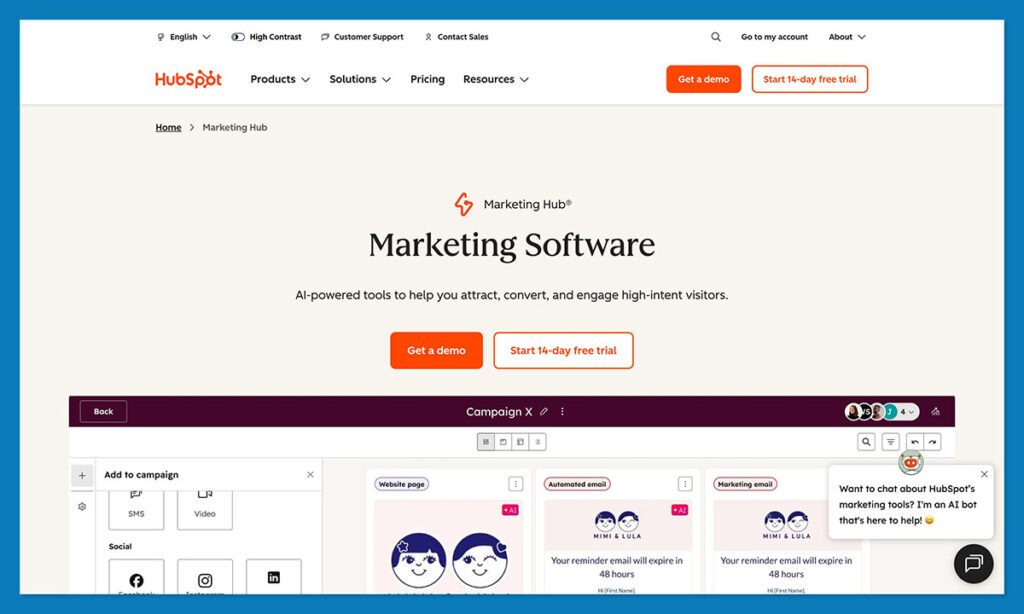
The data flows automatically. Add in Breeze AI, and suddenly the system isn’t just tracking activity; it’s helping you act on it. For ecommerce, that means one clear timeline from first ad click to checkout.
ActiveCampaign has a different energy. It’s fast, it’s focused, and it’s unapologetically built for marketing people. Particularly marketing automation people invested in email. You can spin up a campaign, drop in conditions, and start firing personalized automations in less than an hour.
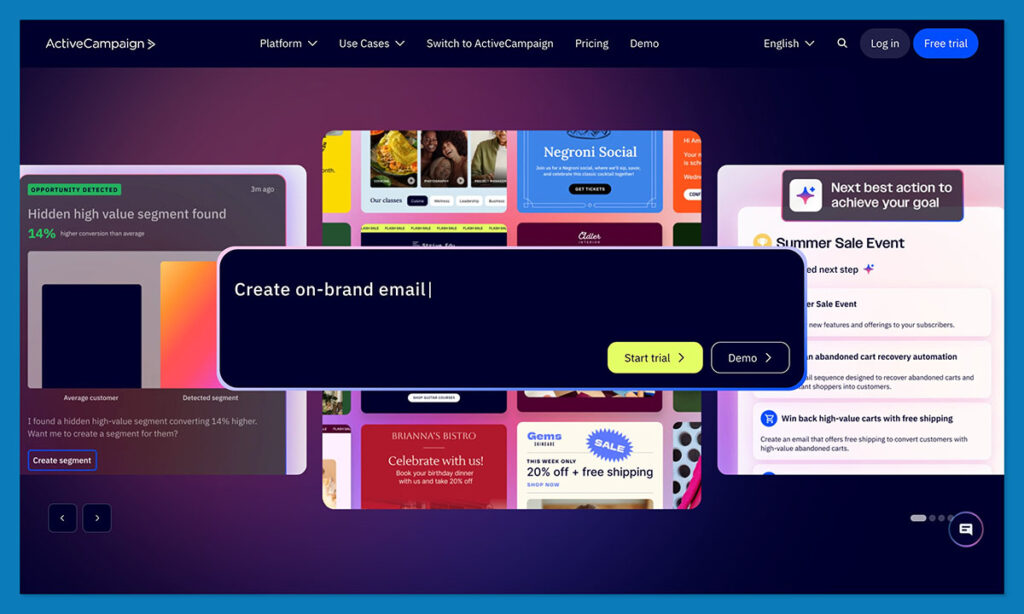
It shines when timing is everything: things like post-purchase follow-ups, nurture sequences, and high-frequency offers. The Predictive Sending and Active Intelligence tools are genuinely clever, and they’ve improved a lot in 2025.
Getting Started: Setup & Ease of Use
Getting started with new CRM software can go either way. Some tools make you feel like you’re climbing a wall of settings before you even send your first email. Others guide you just enough to make things click.
Getting started with HubSpot doesn’t feel like setup in the traditional sense. You open a free account, plug in your store, maybe your email and ad tools too, and the system just starts pulling things together.
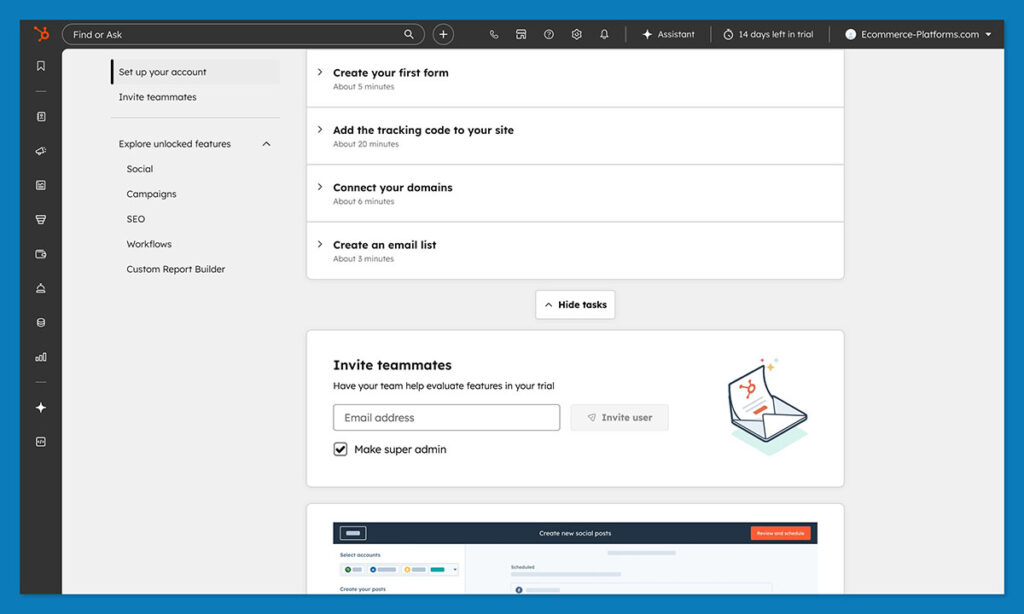
Within a short time, you’ll notice patterns forming on their own: where leads are coming from, which pages actually drive sales, and which products keep pulling shoppers back.
The onboarding steps feel practical, too. You can skip straight to something useful, like creating your first workflow or customizing the sales pipeline for your team.
You can also shape the workspace however you like. If you want your dashboard to show average order value and abandoned-cart recovery instead of email clicks, it’s a few clicks away.
Every hub: Marketing, Sales, and Commerce, shares the same data, so there’s no back-and-forth exporting between systems later.
ActiveCampaign takes a leaner path. You’ll be sending a campaign within half an hour, and its automation builder feels intuitive right from the start. Where it slows down is when you connect deeper ecommerce data.
Mapping store fields or syncing purchase history takes a bit more trial and error, and you may find yourself double-checking that triggers are firing as planned.
AI & Automation Showdown
With HubSpot, the AI feels like it’s already part of your day-to-day tools instead of a bolt-on feature. When you’re writing a campaign, the editor quietly suggests a stronger subject line or a shorter paragraph. The Breeze AI tools sit right there next to the text box, so you can tweak tone or translate a message without leaving the page.
The Social Agent works the same way, when you post an update, it recommends timing or wording that tends to perform better for your audience. Over time, it starts to feel like a junior marketer who actually learns your style.
Everything connects through HubSpot’s Data Hub, giving you a single record of what your customers do. You can build an automation that notices someone viewing the same item twice, bumps their lead score, assigns a task to sales, and sends a friendly follow-up. It runs quietly in the background, so you spend more time planning campaigns and less time moving data around.
ActiveCampaign handles AI with a narrower focus, but it’s very good at what it does. The Predictive Sending tool studies when each contact tends to open emails and sends messages at that exact window.
The Predictive Content option swaps in headlines or buttons that have worked better in the past. Automated workflows are incredibly easy to set up and control.
If your marketing lives inside the inbox, ActiveCampaign feels quick and comfortable. If you want a system that understands what happens before and after that email goes out, HubSpot’s automation gives you the bigger picture.
Marketing Automation & Campaign Building
Once you start building campaigns from scratch, each platform’s personality comes through. Both handle automation well, but the way they approach it, and the way it feels to work inside them, couldn’t be more different.
With HubSpot, the process feels bigger in scope. You’re not just lining up messages, you’re designing how every piece of your marketing connects. Say someone views a product twice but doesn’t buy.
You can have HubSpot send a quick email written by Breeze AI, assign a task for a sales follow-up, and even trigger an ad on Facebook if there’s still no response. It’s all on one screen, and you can see every step linking together.
The new Marketing Studio update makes this even easier. Instead of juggling separate tools, you drag each action onto a single visual map and watch how customers move through it. The Living Segments feature updates automatically as people buy, click, or unsubscribe.
Creating supporting content is simple too. HubSpot’s Content Hub lets you spin up a landing page or blog post without touching another platform. You don’t have to copy-paste tracking codes or reconnect analytics later; everything ties straight back to your campaigns.
ActiveCampaign feels leaner. Its automation builder is fast and familiar, great if you’re focused mainly on email. You can build a flow where anyone who opens a campaign and clicks a product link gets a follow-up discount two days later, while non-openers get a softer reminder. It’s visual, quick to learn, and incredibly effective for that one channel.
The only real limit with ActiveCampaign is that it lives mostly in the inbox. For ads, landing pages, or SEO reporting, you’ll need a few other tools in the mix.
That’s fine if email is your main marketing channel. But once you start managing customers across different touchpoints, HubSpot’s all-in-one setup saves you from switching between tabs and apps all day.
Sales & CRM Integration
Here’s where the story changes. You can get by with basic marketing automation for a while, but once the leads start rolling in, you need a place to see what’s happening. Not just clicks or opens, but what those actions actually mean in terms of revenue.

That’s the part HubSpot gets right. Its Smart CRM sits at the center of everything, and it feels like it was built that way from day one. When you open a contact record, you see the whole trail from the ad they clicked, to the first page they landed on, every email, every deal, even payments if you’re using Commerce Hub.
It’s all there, and it updates instantly. You can sort deals, assign tasks, or drag a customer from “interested” to “won” without losing a single thread.
You can even send quotes and take payments directly through the same system, which sounds small but saves an absurd amount of time. The only limitation is that the number of pipelines grows with your plan, though most ecommerce teams won’t hit that ceiling.
ActiveCampaign’s CRM feels a little like an add-on. It does the basics, you can build pipelines, add notes, and track deals, but it doesn’t always sync neatly with the rest of your data. To pull in full order info or site behavior, you’ll need a few integrations working in the background.
Reporting, Analytics & Data
Reporting is usually the point where you find out how well a platform is really built. When numbers start coming in, a good CRM makes you feel like you’re looking through a clean window. A bad one feels like staring at fog.
The data experience in HubSpot feels effortless. Every contact, campaign, and deal shows up in the same dashboard, so you don’t waste time digging for answers. You can pull up your Marketing Hub reports and see which campaigns actually made money, which pages converted, and which emails led to purchases instead of clicks.
This year’s INBOUND update to the Data Hub pushed things further, now you can link Shopify, Google Ads, or a data warehouse, and it all stays synced automatically.
Reporting has become genuinely useful: drag-and-drop dashboards, multi-touch attribution, and AI summaries that spell out trends in plain English. You stop exporting CSVs the moment you see how clean it is.
ActiveCampaign gives you strong visibility inside your campaigns but not much beyond them. The reports are clear and easy to read, showing opens, clicks, goal completions, but if you’re trying to connect that to sales or repeat orders, you’ll probably need another tool. It’s solid for marketers who live and die by email data, but it doesn’t give the same joined-up view of a customer’s entire journey.
Integrations & Ecosystem
The first week with any CRM usually turns into a wiring job. You start plugging in your store, your email system, your ads, your payment processor, and more, hoping it all works. The good news? HubSpot and ActiveCampaign both play nicely with others.
HubSpot just gives you more. All the big apps like Shopify and Slack connect in a few clicks, and there are more than 2000 integrations to explore. What matters more is how “native” they feel. You don’t sense that you’re duct-taping one tool to another.
When you add QuickBooks, for example, invoices appear right inside the CRM timeline. Connect Meta Ads, and HubSpot automatically links conversions to campaigns. It’s tidy and oddly satisfying.
ActiveCampaign still gives you about a thousand integrations, and most of the common ones are there. The basics like Shopify, WooCommerce, and Facebook Ads, connect fine, but deeper data often needs a Zapier bridge or a bit of field mapping. Nothing painful, just more tinkering.
If you like lightweight setups and mostly care about email-based triggers, ActiveCampaign gets the job done. But if you want one system quietly tying your tools together while you get back to selling, HubSpot’s ecosystem feels steadier and far less hands-on.
Email & Messaging Performance
Email is still the workhorse of most ecommerce marketing, but customers now bounce between inboxes, DMs, and texts like it’s nothing. A good platform doesn’t just send messages, it knows where and when to reach people.
ActiveCampaign was clearly built by email people. Deliverability is one of its strongest suits. Campaigns go out quickly, land where they should, and rarely trip spam filters. The platform does a lot behind the scenes: list cleaning, bounce management, engagement tracking, and you feel the effect in steady open rates.
In my tests, messages through ActiveCampaign tended to hit inboxes slightly more reliably, especially when sending high volume.
The system also has an edge when it comes to multichannel messaging. You can send SMS or WhatsApp messages directly from the same automation builder, and if you need transactional emails, ActiveCampaign integrates neatly with Postmark, which keeps order confirmations and shipping updates running separately from your marketing sends. For brands that rely on quick follow-ups or reminders, that’s a real advantage.
HubSpot, meanwhile, plays a longer game. Deliverability is excellent, but its real strength comes from smarter targeting. Because the CRM holds so much context on purchase data, lead scores, and service interactions, you can slice audiences by behavior rather than just engagement. That usually means fewer sends, but better results. Click rates often climb once you stop shouting at everyone at once.
HubSpot’s messaging channels are expanding too. You can send SMS through integrations, connect WhatsApp, and tie all conversations into the shared inbox. It’s not as instant as ActiveCampaign for outbound texts, but it gives your team a single thread for every customer touchpoint.
Pricing & Total Cost of Ownership
HubSpot starts with a genuinely free CRM. You can track contacts, send basic emails, manage deals, and get real reporting without spending a cent.
The real investment comes when you add hubs. The Marketing Hub, Sales Hub, and Service Hub each scale by user count and feature depth. For a small team, the Starter tiers are usually enough: around $20 per user per month for Sales, slightly more for Marketing. But the jump to Professional or Enterprise brings the heavy automation, AI, and advanced reporting that make HubSpot shine.
That upgrade can feel steep at first, but once everything’s under one roof, you start dropping other subscriptions. The sticker price looks high until you notice what you’ve stopped paying for.
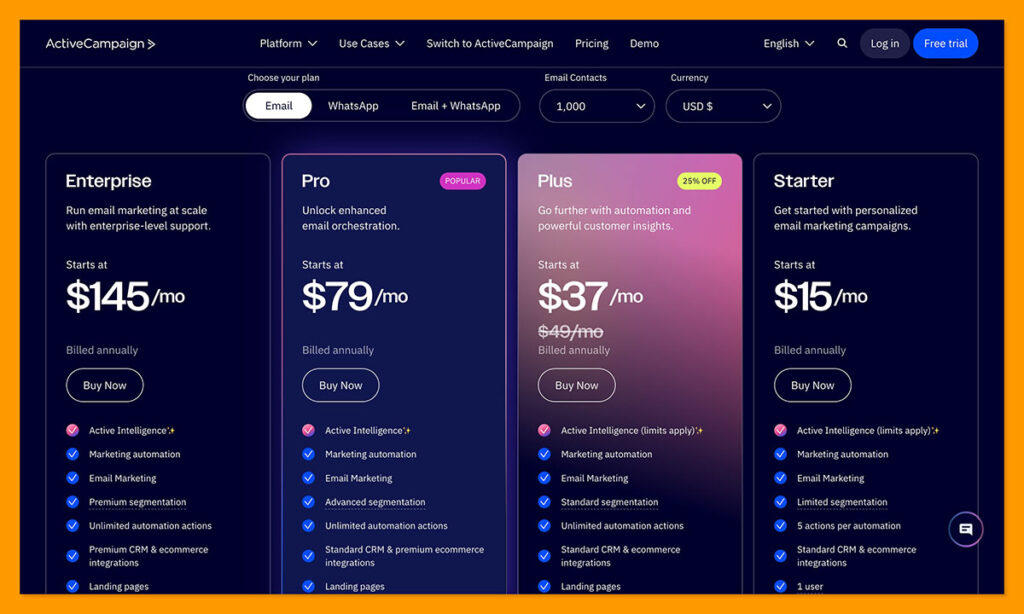
ActiveCampaign flips that model. The entry cost is low because it charges by contacts, not users. You can get started for about $39 a month for 2,500 contacts. It’s a solid deal if your list is small, but as it grows, the price climbs quickly.
A few thousand extra subscribers and you’re already pushing into the next tier. The essentials are all there in ActiveCampaign, but you’ll still lean on other tools for landing pages, detailed CRM functions, or deeper analytics, and those add up.
Over time, it’s often cheaper to have one system handle everything. That’s where HubSpot’s pricing starts to make sense. It’s not the lowest upfront cost, but it tends to replace several tools at once, and becomes the only one you need to maintain.
Verdict: HubSpot vs ActiveCampaign
HubSpot gets my vote, for a few reasons.
ActiveCampaign is one of those tools that wins you over fast. It’s clean, responsive, and brilliant at what it does best: email automation. If your focus is running targeted sequences, keeping engagement high, and sending beautifully timed messages, you’ll feel right at home.
It’s fast to learn, easy to run, and affordable to start. The downside is that it doesn’t stretch far beyond the inbox. As soon as you mix in sales pipelines, ads, or heavier analytics, ActiveCampaign starts leaning on outside apps to keep up.
HubSpot feels different. It’s structured like a control center rather than a plugin stack. The Smart CRM sits in the middle, linking marketing, sales, support, and ecommerce so that data moves on its own. You’re not stitching it together; it just works, and everyone on your team sees the same thing.
Overall, HubSpot CRM will save you more time and confusion down the road. The best part? You can try it yourself, set up a free HubSpot CRM account and get a feel for it.
Most ecommerce teams figure it out within the first week: it’s the kind of platform that makes everything else easier, and the one you usually end up sticking with.
FAQs
What’s HubSpot really best for?
Honestly, for running the whole show in one place. If you’ve got marketing, sales, and ecommerce all moving at once, HubSpot keeps it together. You don’t have to wonder where a lead came from or dig through tools to see what happened after someone clicked “buy.”
Can you actually run an ecommerce store through HubSpot?
Yeah, you can. It syncs with Shopify or Stripe, and you can send quotes, take payments, even automate “cart abandoned” emails without leaving the CRM. Once it’s up and running, it feels weirdly calm, like things just happen without you babysitting every campaign.
Is HubSpot free?
The base part is, and it’s not one of those 14-day trials. You get the CRM, contact management, email tools, all that. The paid hubs unlock once you’re ready for the advanced tools like deeper automation, AI, the deep analytics.
Which has better AI?
Depends on what you need. ActiveCampaign’s AI is built to make email work smarter: timing, content, that sort of thing. HubSpot’s AI stretches across the whole business. It writes posts, finds leads, builds reports, even connects patterns in your sales data. It’s like comparing a smart email assistant to an all-around strategist.
When does HubSpot make more sense?
HubSpot makes the most sense when you need marketing, sales, and CRM working together in one system. If you're only sending campaigns for now, ActiveCampaign is easier to start with.


Comments 0 Responses