


Shopify pricing starts at $5 per month for the Starter plan, and can go as high as $2,300+ per month depending on the plan you choose.
After testing Shopify for over 100 hours and launching multiple stores across different plans, I can confidently say this platform is built for serious ecommerce growth.
But it doesn’t come cheap, and the listed prices are just the start. Between monthly plans, apps, and hidden fees, your actual Shopify cost can vary a lot.
In this breakdown, I’ll walk through everything you need to know about Shopify pricing, including core plans, hidden fees, what each plan includes, and how to avoid spending more than you need to.
Let’s start with the pricing plans.
Shopify Pricing Plans (2026)
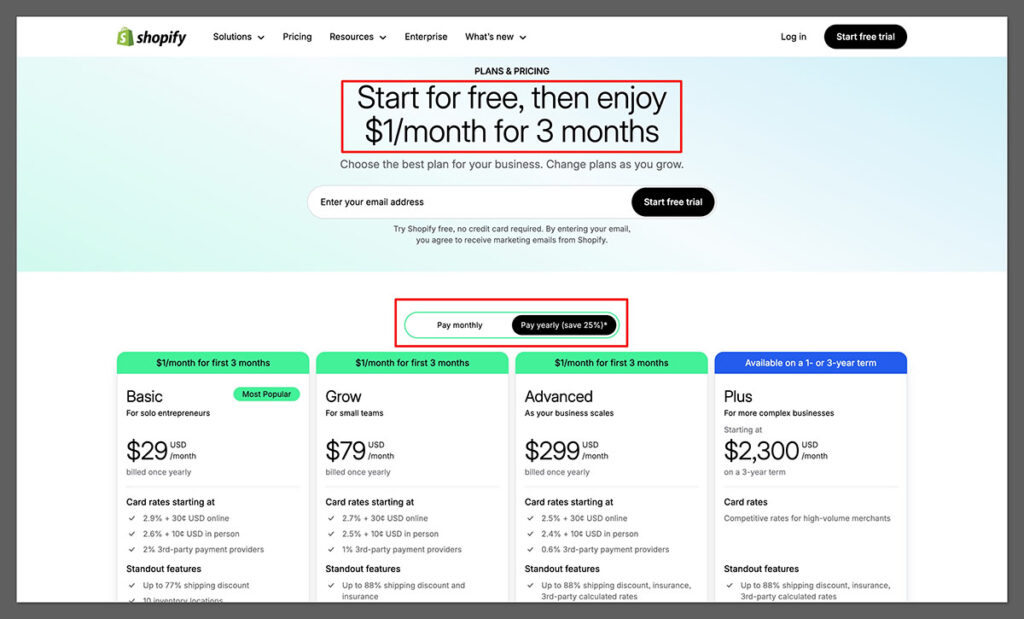
Shopify offers five public-facing plans. Here’s a quick overview:
| Plan Name | Price (Billed Monthly) | Price (Billed Annually) | Best For |
|---|---|---|---|
| Shopify Starter | $5 | $5 | Side hustles selling on socials |
| Basic | $39 | $29 | New ecommerce stores |
| Shopify (Grow) | $105 | $79 | Established businesses |
| Advanced | $399 | $299 | High-volume stores |
| Shopify Plus | From $2,300/mo | Custom Quote | Large enterprise ecommerce brands |
Key takeaways:
- You can save 25% by choosing annual billing
- Shopify doesn’t offer a free plan, but you can get 3 days free, followed by 3 months at $1/month
- All plans include unlimited products and multichannel selling
- Higher-tier plans reduce transaction fees and add better reporting tools
How to get Shopify for $1 per month for the first 3 months?
Shopify has begun offering a special deal for sellers who sign up for a new Shopify plan. That deal?
Pay Shopify $1/month for the first 3 months of full access to the platform!
This offer is is now available on all standard plans: Starter, Basic, Grow, and Advanced.
Shopify Starter – $5/month
Shopify Starter is made for people who want to sell with minimal setup. You don’t get a full website; instead, you get a checkout link and product pages that can be shared across platforms like Instagram, Facebook, or email.
What you get:
- Product link checkout
- Order management dashboard
- Basic analytics
- Social selling tools
- Access to Shopify Payments
What you don’t get:
- A custom domain
- Website builder
- Blogging or SEO tools
💡 Who it’s for: Creators, influencers, and hobby sellers who want to test the waters or sell casually without committing to a full ecommerce store.
For side hustlers who sell via DMs or TikTok comments, this plan gets you a way to collect payments quickly without building a store from scratch. It's also a great way to validate demand for a product before investing in a full site.
Just remember that you won't be building a long-term brand here, Starter is built for convenience, not growth.
Another benefit is that it’s incredibly simple to use. You won’t need any web design skills or development experience to get going. You just upload your product, generate a link, and start sharing it wherever your audience hangs out.
This makes it ideal for people selling digital products, services, or small-batch handmade goods.
However, the limitations kick in fast. There's no cart system, no blog, and very little customization. If your business grows or you want to build your SEO presence, you'll have to upgrade to a full Shopify plan.
Think of it as a quick-start solution, not a foundation for scaling.
Basic Shopify – $29/month (Annually)
This is the entry point for most new online stores.
Here’s what you get:
- Full online store with customizable themes
- Unlimited products
- Two staff accounts
- Standard analytics
- Shipping discounts (up to 77%)
- Blog functionality
- SSL security + fraud analysis
- Shopify POS Lite
- Shopify Tax + automations
- Abandoned cart recovery
You’ll also get access to Shopify Magic (Shopify’s AI writing tool) and support through the chatbot 24/7. In my experience, the chatbot is fast, faster than most SaaS tools I’ve used.
Credit card fees:
- Online: 2.9% + 30¢
- In person: 2.6% + 10¢
- Transaction fee (if not using Shopify Payments): 2.0%
💡 Who it’s for: New businesses building a brand and planning to scale. If you’re launching your first ecommerce store, this plan is perfect to start with.
It’s one of the most balanced plans available. You get access to core ecommerce features without going overboard on cost. For businesses making their first $1,000–$10,000 in revenue, it provides enough power to operate efficiently.
I especially like that you still get discount codes, blogging tools, and product collections.
You’ll also be able to add up to 10 inventory locations, which is helpful for stores shipping from multiple suppliers or using local pickups. I’ve used this for a side project where we dropshipped from different warehouses across the US—it worked seamlessly.
If you're trying to build a long-term business, Basic is a great foundation. You can easily scale up by adding apps, tweaking your theme, and optimizing the checkout flow without needing to upgrade right away.
Grow – $79/month (Annually)
As you start making consistent sales, it might be time to level up. The Shopify plan includes everything in Basic, plus:
- 5 staff accounts
- Lower credit card fees (2.7% online, 2.5% in person)
- Standard + professional reports
- Up to 88% shipping discount
- USPS shipping insurance up to $200
- International pricing and domains
This plan bridges the gap between just getting started and scaling your operations. I recommend upgrading once your monthly sales start passing $5,000.
💡 Who it’s for: Stores with a team, multiple products, and steady monthly revenue. You’ll get better analytics and save on processing fees over time.
The reporting upgrades alone are worth it. You gain access to deeper sales data, customer behavior insights, and customizable filters. This makes it easier to optimize your marketing spend or A/B test product pages.
If you’re selling internationally, the Grow plan’s support for local currencies and domains makes a huge difference. I had a store targeting both the US and Canada, and this made managing regional pricing seamless. It helped reduce refund requests and built more trust with local customers.
The shipping perks here are also more robust. With better USPS discounts and built-in shipping insurance, you can confidently fulfill high-ticket orders. This added trust goes a long way, especially if you're operating a DTC brand.
Advanced Shopify – $299/month (Annually)
This is where Shopify gets powerful, and expensive. The Advanced plan gives you deeper analytics and support for businesses handling high-volume orders.
What you unlock:
- 15 staff accounts
- Advanced reporting and custom reports
- Third-party shipping rate calculations
- 10x faster checkout performance
- International duties + import tax estimation
- Lower fees: 2.5% + 30¢ online
The key value in Advanced is how much smoother things run at scale. If you’re handling hundreds of orders a day, the faster checkout alone can justify the cost.
💡 Who it’s for: Large businesses or stores with international customers and serious logistics needs. If you’re doing 6-figures a month, this is probably where you belong.
Another big benefit is custom reporting. You can drill into things like returning customer rates by product line, top-performing SKUs by region, or abandoned cart rates by device. This kind of granular insight is critical for optimizing at scale.
One feature that helped me personally was the third-party shipping rate support. If you're using fulfillment centers or negotiating your own UPS/FedEx rates, this lets you plug those in directly. It saved us about $300/month in shipping alone.
If you're planning big promotions like BFCM, the checkout performance boost is worth the price. You won’t have to worry about cart crashes or slowdowns. That peace of mind is huge when your revenue depends on uptime.
Shopify Plus – From $2,300/month
Shopify Plus is made for the biggest brands. Think Gymshark, Allbirds, and Heinz. You won’t find a pricing page, you’ll need to speak with sales.
What you get:
- Dedicated account manager
- API integrations and automation tools
- Multi-store functionality
- Wholesale channel
- Advanced custom checkout
- Exclusive Shopify features (e.g. Flow, Launchpad)
💡 Who it’s for: Brands that are generating $1M+ per year, need complex integrations, or operate in multiple markets. Not for beginners.
If your business relies heavily on automation or complex backend systems, Shopify Plus will give you more flexibility. You get access to the Shopify Scripts editor, Launchpad for automated product drops, and Flow for multi-step workflows.
One of my clients used Shopify Plus to run 5 stores under one backend, with different languages, currencies, and tax rules. It streamlined their entire operation and let them manage everything from one place.
The support is also different. You’ll get priority access to technical support and strategic account guidance. For large teams or enterprise-level operations, this kind of hands-on support can be a game-changer.
Shopify Fees: What You Might Not Expect
Beyond the monthly subscription cost, Shopify comes with a number of additional fees. Here’s what you need to be aware of:
1. Credit Card Fees (Shopify Payments)
| Plan | Online Fee | In-Person Fee |
|---|---|---|
| Basic | 2.9% + 30¢ | 2.6% + 10¢ |
| Grow | 2.7% + 30¢ | 2.5% + 10¢ |
| Advanced | 2.5% + 30¢ | 2.4% + 10¢ |
Shopify Payments helps you avoid third-party processing fees, but you're still charged a standard credit card rate.
That said, Shopify Payments is very stable and widely supported. It’s the easiest way to get up and running with credit card processing, especially if you're in the US.
The dashboard makes it easy to track payouts and refund customers directly within Shopify, without needing to log into a separate gateway.
There’s also support for local wallets like Apple Pay and Shop Pay, which can boost your mobile conversion rate. I’ve seen checkout abandonment drop by 10–15% on mobile just by enabling these one-click payment options through Shopify Payments.
Keep in mind that Shopify Payments isn’t available in every country. If you’re selling in regions where it isn’t supported, you’ll have to use PayPal, Stripe, or another provider, and that’s when the extra fees kick in.
2. Transaction Fees (If You Use PayPal, Stripe, etc.)
- Basic: 2.0%
- Grow: 1.0%
- Advanced: 0.5%
These fees apply in addition to card fees if you don’t use Shopify Payments. That means you could be paying up to 5% per transaction if you’re using PayPal on the Basic plan.

If you're running a store with tight margins, like dropshipping or selling lower-priced items, those fees add up fast. For example, on a $50 order, you could lose an extra $1–$2 just in transaction fees. That might not sound like a lot, but across 1,000 orders, it’s thousands of dollars.
This is why I always recommend enabling Shopify Payments if it’s available in your country. Not only do you save on fees, but you also simplify your bookkeeping since all payments are processed in one place.
PayPal and Stripe integrations are still useful, but they should be optional, not your main checkout method.
One small benefit of using third-party gateways: it gives customers more choice, which can increase conversions in some cases. But unless you’re seeing demand for a specific provider, I’d stick with Shopify Payments to keep your profit margins healthier.
3. Theme Costs
- Free themes: 24 options (including new Horizon themes)
- Paid themes: $180–$350 (one-time fee)
Shopify now offers 24 free themes, including its brand-new Horizon Theme Framework, launched in 2025.
Horizon marks a major upgrade from the old Online Store 2.0 system, introducing a faster, more flexible, and easier-to-customize layout experience.
It’s fully block-based, letting you nest blocks within sections, rearrange elements visually, and build clean, modern pages without touching code.
Horizon themes also come with built-in performance improvements and accessibility standards baked in, so your store loads faster and works better for all shoppers, out of the box.
They follow modern ecommerce design principles, which helps boost conversions from the start.
Paid themes are still a great option if you need advanced features like mega menus, built-in upsells, or high-end visual design. Some premium themes can replace multiple paid apps, which makes the one-time cost worth it.
Just make sure to preview any theme on mobile, and check for regular updates and reviews before buying.
4. App Costs
Shopify’s app store is powerful, but it’s easy to overspend. The average store I’ve audited runs between 3–7 paid apps.
- Most apps: $5–$50/month
- Email marketing, upsells, SEO tools often cost more
- Some apps charge based on usage or number of orders
Apps are where a lot of first-time store owners blow their budgets. It’s tempting to install 10+ apps at launch, thinking they’ll all boost sales. But every app adds to your monthly bill, and too many can slow down your site.
I suggest sticking to essentials: reviews, email marketing, upsells, and maybe a currency converter if you sell internationally.
One tip: look for all-in-one apps that combine multiple features. Tools like Vitals or Booster Bundle can save you hundreds per month by bundling everything into one subscription. I used Vitals on a client’s store to replace five separate apps and cut their monthly spend in half.
Make sure to uninstall apps you're not using. Even if they’re free, some still inject code that can bloat your theme and slow down your page speed. This affects SEO and user experience, two things you don’t want to compromise on.
5. Domain Name & Email Hosting
- Domain: $14–$20/year through Shopify
- Custom email: Requires third-party like Google Workspace ($6/month/user)
Shopify doesn’t include domain or email hosting in their plans, so factor that into your budget.
If you want a branded email address like [email protected], you’ll need to pay separately. I usually go with Google Workspace because it’s reliable and easy to connect to Shopify’s DNS. It also comes with Gmail, Docs, Drive, and Calendar, useful if you’re building a team.
For domains, I sometimes recommend using external registrars like Namecheap or Porkbun. They're often cheaper than Shopify and give you more control over DNS settings. That said, buying your domain through Shopify is faster and easier, especially if you're not tech-savvy.
Regardless of where you buy your domain, securing one early is important. It's part of your brand, SEO, and trust factor. Avoid using generic subdomains like mystore.shopify.com if you're serious about building a brand.
How Much Does Shopify Really Cost Per Month?
Here’s a realistic monthly estimate of what you might pay, depending on your business size:
| Plan | Base Cost | Theme | Apps | Estimated Total |
|---|---|---|---|---|
| Starter | $5 | $0 | $0 | $5/month |
| Basic | $29 | $0–$300 | $50–$100 | $80–$150/month |
| Grow | $79 | $0–$300 | $100–$200 | $200–$300/month |
| Advanced | $299 | $0–$300 | $200+ | $500–$700/month |
Of course, this varies depending on how you build and scale your store. I’ve worked with stores doing $10K/month with just the Basic plan and a couple of free apps.
The biggest factor in your monthly spend will likely be your apps. Many essential features, like upsells, reviews, SMS marketing, or email flows, are app-dependent.
These add convenience and sales, but the costs can add up fast if you're not tracking them. I've audited stores spending more on apps than their core Shopify subscription.
Another hidden cost to consider is your time. Shopify makes a lot of ecommerce easier, but that doesn’t mean it’s set-it-and-forget-it.
Between managing apps, optimizing the store, handling customer service, and running ads, there's still a real operational workload – even if your monthly software bill is under $300.
If you're scaling, think about tools like Zapier or automation apps like Shopify Flow (on higher-tier plans). These can reduce manual tasks, save money on staff, and help you streamline operations as your costs increase.
Shopify vs Other Ecommerce Platforms
If Shopify feels expensive, you’re not wrong. Here's how it stacks up against alternatives:
| Platform | Starting Price | Good For | Downsides |
|---|---|---|---|
| Shopify | $29 | Scaling ecommerce brands | Higher cost, short trial |
| Wix | $29 | Small business & visual brands | Less powerful inventory tools |
| Squarespace | $16 | Creatives & services | Limited shipping functionality |
| BigCommerce | $39 | Larger inventories | Slightly steeper learning curve |
| Hostinger | $13.99 | Low-budget beginners | Limited integrations |
If your business is product-focused, Shopify’s higher cost often pays off in features, speed, and integrations.
Where Shopify really shines is in scalability. If you're planning to grow, it’s much easier to do that on Shopify than Wix or Squarespace.
You won't need to rebuild your store or migrate to a new platform. I’ve migrated clients from Squarespace to Shopify more than once, it’s doable, but it takes time, and you lose some SEO momentum in the process.
BigCommerce is probably the closest competitor in terms of power, but its interface is less intuitive and its app ecosystem isn’t as rich. Shopify’s app store is a major asset if you need flexibility without hiring a dev team. It’s plug-and-play for nearly every need.
That said, if you’re on a tight budget or only selling a handful of items, platforms like Hostinger or even Etsy might make more sense at the beginning.
But once you’re ready to build a full-scale brand, Shopify gives you the tools to go from $100/month to $100K/month without switching platforms.
Ways to Save on Shopify
If you’re trying to keep expenses low, here are a few smart ways to cut down costs:
- Use annual billing: Saves up to 25%
- Use Shopify Payments: Avoid extra transaction fees
- Stick with free themes and limit apps: Only install what you absolutely need
- Look for bundles: Some apps combine multiple tools
- Buy domains outside of Shopify: Namecheap and Google Domains often cost less
Annual billing is probably the easiest way to save. On the Basic plan, you’ll pay $348/year instead of $468 – a $120 savings for doing nothing other than committing for a year. I do this for every store once it’s proven and generating consistent revenue.
Free themes can also take you surprisingly far. I’ve launched multiple client stores using just Dawn or Sense with custom copy and high-quality images. Focus on your product photography and brand message first, design comes second.
For apps, do a cost/benefit check every quarter. If an app isn't generating clear ROI (sales, conversions, saved hours), replace it or uninstall it. And check the app store for all-in-one options before buying separate apps for reviews, upsells, timers, and so on.
Shopify’s AI Website Builder
If you’re on the Basic plan or higher, you now get access to Shopify’s new AI Website Builder, a tool that builds your store for you.

It auto-generates product pages, homepages, and layouts based on your products. You can also edit everything later. It even suggests headlines, product copy, and brand colours using Shopify Magic.
I tested it, and in less than 15 minutes, I had a complete store. No devs. No templates. Just click, generate, and tweak.
💡 If you're starting from scratch, this tool saves hours of setup time. It's not perfect, but it gives you a done-for-you base you can build on.
This makes the Basic plan even more valuable. You’re not just buying a blank store, you’re getting a fast, AI-assisted launchpad.
Is Shopify Worth It?
If you’re just looking to test the waters, Shopify might feel expensive. But if you’re building a serious ecommerce brand, it’s one of the most scalable, reliable platforms out there.
You get access to the best payment systems, world-class security, fast checkout speeds, and a community of millions of users.
That said, the true cost of Shopify is rarely just $29/month. Be prepared to spend between $100 and $300 per month to run a functioning store, especially once you add apps and marketing tools.
If you’re someone who values speed, stability, and tools that just work, Shopify is well worth it. I’ve worked with brands that tried WooCommerce or Squarespace first, only to migrate to Shopify a few months later.
It saves you time, integrates with everything, and is backed by constant product updates.
The one area where Shopify lacks is value for ultra-small businesses or those that don’t need ecommerce-specific tools. If you’re just selling one digital product or booking appointments, you might be better off using a simpler site builder like Squarespace.
But if your goal is to run a long-term ecommerce store, with custom branding, scalable systems, and international reach, Shopify gives you the framework to do it right, from day one.
My Recommendation
Start with the Basic plan. It gives you all the essential tools you need to get started without overcommitting. Use free themes, Shopify Payments, and focus on validating your products first.
Only upgrade to Grow or Advanced when:
- You’re consistently making sales
- You have a team
- You need advanced shipping or reporting
If you’re still in the idea stage, Shopify Starter is a cheap and simple way to get selling.



If I already have a domain/e-commerce site via Shopify, but I use square up in my retail shop is there an easy way to integrate the two without us having to entirely rebrand our site into square up or vis versa having to completely abandon our current POS system?
Hey Brittany, you will be able to integrate Square Payments and POS with Shopify, but you will have to pay some extra fees. So, you might consider migrating to Shopify Payments and Shopify POS.
Hi is there any way that I can Enable third-party calculated rates at checkout in my Shopify Lite plan?
they quoted us 2.25% transaction fee on plus and we process half a million to a million a month
Thank you for the calculator! I have been using Shopify for a few years now and was curious about the different plans and what the threshold is for when the Basic plan starts to cost more. I had a hunch that I crossed that threshold and the calculator has confirmed it.
The only thing I would like to have seen is dual payment gateways. Paypal makes up about 70% of my transactions. It wasn’t hard for me to figure it out. Overall though, a dual payment gateway calculator doesn’t really add to the point of this article but it is something that people need to consider if they do accept paypal.
On Shopify basic plan can I have more than one product categories? for example, health & beauty category & accessories category. Can have sub categories as well to separate men accessories & women accessories?
Yes, you can have as many categories as you like!
Will Shopify handle my customer service or am I responsible for supporting my own customers?
Hello Cathy,
You will have to offer support for you customers.
Great article AND comments. Thanks.
We have two business offices – One in Vietnam and one in Portugal.
Our current Shopify Basic store is set up in Euro and sells only to the EU.
Should I set up a new site in $USD to sell to other regions of the world? Or try to integrate all regions into the current site?
Thanks
Hello Adam, you can try using a currency converter. There are plenty available in the Shopify App Store.
So I’ve been looking for a platform that’s low price as I’m a newbie to this ecommerce thing.
My question is the 29.00 plan is it really 29.00 a month or do I have to pay the full year in advance first?
I tried to sign up with another and the ad said something like 142.97 a yr( monthly 11.91 for 12 months) when I went to pay they tried to take the 142.97 which to me as being very skeptical about all this ecommerce stuff drove me right away from there platform and I will never even consider that company again. When a business pulls a stunt like that I know there’s more lil tricks up their sleeves in the future and they’re obviously not upfront with they’re customers. Can you please tell me what I would need to pay upfront if I did this right now and opened my store what would I need to have as far as all costs is it just the 29.00 for the basic to open and sell on my store no other apps added or whatever else can be added I just want to open and sell can I do this for 29.00 and that is the final cost ???? And will the payment come out today or at the end of the month ex:30days from now?
Hello Jason,
The Basic Shopify plan is $29. If you pay for an annual plan you will get a 10% discount. So the price forf the entire year will be $313 instead of $348.
As a Shopify Plus user, I’ve learned the hard way that even the highest tiers of Shopify just don’t have what you need to run a full fledged store. You’re not going to run a Nordstrom or a Vitacost.com site on Shopify, ever.
You can’t do a BOGO50 or BOGO30 natively, or any of the other sales strategies most normal stores use everyday. You can’t stack promotions, which drives users INSANE. User “accounts” are meaningless. People can’t even change their own email address, nor can you do it for them. Even at $2k+ per month, it’s ridiculously underpowered. Hundreds or even thousands of dollars of apps don’t improve the condition much, since many are too “hacky” in nature.
Shopify is a good exercise in minimalism that can help you get a nice looking site up fast and prove a concept. It’s a truly wonderful way to build your dream TODAY, and get it tested. To prove your concept. But when your concept is proven, and you’re going to run it for many years, it’s much easier to run that site on a piece of software or a service that has more features integrated. BigCommerce, Magento, WooCommerce, etc.
Personally, I’m going to try BigCommerce next, but with a different checkout solution (their so-called “one page” checkout is inferior to Shopify’s). It can save credit card numbers, it can do Amazon like promotions and all types of things Shopify cannot — all before you even add apps.
That said, I don’t have any answers to what the ultimate cart is. I don’t think there is one, but at least I better understand what Shopify is really good for. It’s useful, but you gotta remember, Tesla and other major brands left Shopify Plus for a reason. Shopify is a nice proving ground, but it’s kind of a headache for shops that are dug in and here to stay. The things Shopify left out are really kind of shocking. Things you’d never think anybody could possibly leave out. It’s truly odd.
Can you please explain the meaning of the 2.5% and 30¢ per transaction in Basic Shopify and Shopify plans?
Thanks .
Hello Eniola,
That is the credit card rate you will pay for each transaction.
With the Shopify Baic plan do I get to add a custom domain?
Hey Kenn, the answer is yes 🙂
Thanks so much for this write up. Please,can the Shopify lite plan be applied on Facebook page for sales?
Hey Joy,
The answer is yes 🙂
You can read our Shopify Lite review for more info.
can I install my own plugins, extensions and theme on Shopify to get the desired functionality?
if I get the basic or any of the higher plan, do they have an API that I can copy and integrate into my own WordPress website?
Hello Moses, the only way to integrate Shopify with WordPress is by adding the buy button using the Shopify Lite plan. You can install extensions for your Shopify store but only from their App Store.
Hi, I have two questions. How many domains / stores can you have with the basic plan? And, can you directly advertise on Facebook from your store?
Thank you
Judit
Hello Judith,
You can have one store with a single domain name. But, you can redirect as many domain names as you want to this primary domain.
–
Bogdan – Editor at ecommerce-platforms.com
Is there anyone out there that can set up a shopify web/account for me? I am not technical at all.
Hello Graeme,
Here’s a list of Shopify Setup experts that can help launch your store and assist with basic tasks.
Hope this helps,
–
Bogdan – Editor at ecommerce-platforms.com
Shopify Plus credit card rates are 2.1% + $0.30, not 1.6%
The account fee is 0.25% gross merchant sales volume, minimum $2,000 (eg. $800,000/month).
And there’s a 0.15% transaction fee for non-shopify payment methods.
Thanks Todd!
Thank you for your great article. I have a shop on PrestaShop and would like to migrate to Shopify or Woocommerce. People around me do not advise me to go with woocommerce because I would have more fees to pay for the updates. is it the same with Shopify (if I add extensions)? is there any other fees that I have to consider (design, programming,..)
Hello Yassine,
PLease check out our Shopify vs WooCommerce comparison for more info.
–
Bogdan – Editor at ecommerce-platforms.com
Hi…If I were to add the Lite plan to my existing site, is there a catalog page that shows up such as in the 14 day trial? For instance, it shows image selected, Plus either other views of item (artwork in my case) or similar artworks.
Also can I set up options as in trial. I need various sizes, with various substrate options all at different prices. I also looking at Art Store Fronts as a solution. Thanks
Hello Monika,
Please check out our Shopify Lite review for more info.
–
Bogdan – Editor at ecommerce-platforms.com
I like the article though I have a question. Are there Shopify online stores in Kenya and if so, can I customize to Kenya only?
Hello Ernest,
Shopify is available in Kenya. Here you can find a list with payment gateways available in your country.
–
Bogdan – Editor at ecommerce-platforms.com
Hi!
I have been using The Basic Plan for the last 2 years with sales of $5000-$6500 a month, which it seems to be the best plan for me since my sales are not that high.
BUT, I was wondering how much would I be saving on Shipping fees if I move to the next plan? Is there any place to compare the Shipping discounts between plans?
Thanks in advance for the time you use to help me.
Hello,
Please use the Shopify pricing calculator from this page and see show much each plan will cost for your specific volume of sales.
–
Bogdan – Editor at ecommerce-platforms.com
Hello there,
You are such a great help!thank you!
I want to know if the $79 plan includes a website.
Thanks
Hello Malou,
Of course. The same applies for all three plans.
Cheers!
–
Bogdan – Editor at ecommerce-platforms.com
Hi,
I live in Indonesia, which shopify payment doesn’t support in my country, and I only market my product just for indonesian customer. So I want to ask you, will I get charge of transaction fees?
*sorry for my bad english
Hello Candra,
When using external payment gateways you will pay a transaction fee, from 0.5% for the Advanced Shopify plan, up to 2% for the Basic Shopify plan.
–
Bogdan – Editor at ecommerce-platforms.com
Is there a revenue limit on the Shopify Advanced Plan?
Hello, no, there is no limit.
Cheers!
Thanks for the info. Does shopify have any thanksgiving or cyber monday deals on their pricing?
I don’t remeber them offering discounts for their Shopify plans but some of the apps from the App Store might be discounted.
Bogdan – Editor at ecommerce-platforms.com
Great article.
Thanks Suat, glad you liked it!
Hello, great article, I’ve got a question though, what if my website were to use a pay on delivery service, would that be violating any shopify terms and conditions?
Hello,
Not at all, manual payment methods (cash on delivery (COD), money orders, and bank transfers) are available to all Shopify plans.
Bogdan,
Can you accept COD payments on the lite plan? tried to find info on the shopify website but found nothing.
Hello Husam,
Here’s a list of online international payment gateway providers that integrate with Shopify.
Best.
How does the $79 plan’s cart abandonment compare to downloadable apps such as Kit Carts, MailChimp or the likes?
Using Mailchimp would definitely be an improvement. For more info, check out our Mailchimp review.
Hi
I am looking for a solution to have a bilingual page (English and Arabic ) , is there any feature for this?
Regards
Hello,
Using Langify you can provide multilingual storefronts on Shopify.
Hello, do I need to buy the basic package if i bought $9 lite?
Not necessarily Jean. You can use only the Shopify Lite plan if you want to sell your products via Messenger or add a buy button on your existing website.
Cheers!
–
Bogdan – Editor at ecommerce-platforms.com
Great article…thankfully I found the answer to my question in the comments. I was looking to see if the awesome Facebook messenger app was included with the more expensive plans (basic, shopify, & advanced). I just bought some soap from a local artisan who uses shopify and it was the BEST customer service experience I’ve ever had with an online shop! It sold me on making the switch to Shopify, which I’ve been wanting to do for a few years now but couldn’t justify the cost when I could design my own wix site for less than half of what Shopify costs. Wix is great, but it’s just not robust enough to keep up. Thanks!
Happy to hear that Angelica 🙂
Hello
We have a shopify store which we love on the ‘Shopify Plan’ but need to now create a solution for wholesaling. We can not justify the $299 for the next level. Would you sugest running a shadow store using ‘Shopify Basic’?
Please advise.
Thank you
Hickory Hill
Hello,
Have you tried one of the apps below?
https://apps.shopify.com/best-wholesale-pricing
https://apps.shopify.com/wholesaler
Bogdan – Editor at ecommerce-platforms.com
Thanks for the article. So if I wanted to use my current payment gateway (Stripe), I would still have to pay Shopify a fee? I get a much better percentage than even the Advanced plan but would really only need the $79 plan. This is stearing me away from moving to Shopify. We currently do about $20 to $30k per month if that helps. I am currently on Prestashop and utilize shopping cart abandonment, mailchimp for mail after purchase emails, etc etc. I would only be moving to Shopify because I love the front end features, especially the checkout process.
Hello, Shopify Payment is powered by Stripe so you will actually be able to use Stripe and do not pay any extra transaction fees.
I have the Shopify plan (the middle plan) and pay the added $20 fee. I am trying to add another shipping option, DHL, but am having trouble integrating it. Is it possible to add 3rd party shipping options to this plan?
Hi Debbie, have you tried using an app like InXpress – DHL at Checkout?
Cheers!
Hi Bogdan,
that’s what i’m trying to get onto my site. I have downloaded it but the rates aren’t showing up…this was why i wanted to check whether this version accepts 3rd party live shipping rates. Any ideas? I’ve checked whether any of my current apps are conflicting with it but that doesn’t seem to be the case.
With the shopify plan how much (ballpark?) would I need to be prepared to spend up front in order to have a functional site that can conduct transactions, without adding much (paid) customization other than shipping calculator, and using the month to month option?
Hey Jaya, it all depends. If you have some minimal web design/development skills you’ll have no trouble setting up your store. Otherwise you might have to hire an expert to help you with the initial setup.
Hi! I am going to launch a site selling services. I want to upload daily pages including some information but i want those pages to be visible only to those who have bought my services. Is this possible with shopify and ecommerce platforms in general or i should just start looking elsewhere?
Thanks in advance.
hey Dionysis,
selling digital products or a service is easy on Shopify, check out thisk link for more info: https://www.shopify.com/sell/services
–
Bogdan – Editor at ecommerce-platforms.com
I have 3 questions:
1. If you use the Shopify Lite, do you get the same functionality for shipping as with the basic? 2. Also, with the Buy Button, can customers buy more than one item? 3. And Last, is Pay Pal the only option with Shopify Lite or is it set up to use all credit cards?
Hi Nancy,
With the Shopify Lite plan you can sell as many items you want (on your website, on Facebook and in person). There are more than 70 payment gateways accepted.
Originally my goal was to conserve money, but having read the perks of some of the higher price plans, it became clear that marketing and future growth are worth an extra $50, or so, per month. Excellent information in a concise, easily digested article. Thank you.
You’re welcome Laura.
Can you enter the cost of your product with any of the plans?
O course, you can set the price for your products no matter what plan you choose.
–
Bogdan – Editor at ecommerce-platforms.com
I’m comparing Shopify to Big Commerce. BC’s $79.95 plan allows up to $150 online sales per year; $249.95 plan allows up to $1M online sales per year. Do you know if Shopify has a dollar limit of online sales?
I’m trying to determine if Quickbooks Online is a good fit with Shopify. I read some reviews & most of them were terrible. The reviews for BC integrated with QB Online were pretty good. Any feedback on that?
Basically, I’m trying to determine which ecommerce platform (online sales), POS (offsite sales) & accting software integrate the best. I have a client who sells her clothing at festivals & also on her Big Cartel website. She wants to change from BIg Cartel to another ecommerce platform.
Thank you
I would go with Shopify. They do not limit the number of sales. You can also find the QuickBooks on their app store for free: https://apps.shopify.com/quickbooks-online
Cheers!
Hi,
I wanted to start with the basic plan for my new e-commerce website, but I wanted to build and integrate to the system a Facebook Shop (that should be the lite plan). I’m not sure if the basic plan includes the Facebook Shop or do I need to pay + $9 for this service? Also just wanted to make sure that the 2 shops (fb and website) are integrated?
Thanks
Hi Carolina,
The Basic Shopify plan includes all the features from the Lite plan, including the Facebook shop feature.
Best,
–
Bogdan – Editor at ecommerce-platforms.com
Hi, is there a limitation on the number of products that can be listed for sale with the Lite package?
Thank you!
The Lite plan will allow you to sell an unlimited number of products.
–
Bogdan – Editor at ecommerce-platforms.com
I still am not sold on which is best for me. It’s either the 1st, 2nd or 3rd. I have a facebook page but don’t sell on it. I have the square which I have been working on my website with that. But, the shipping is a problem. I use USPS XPS but the square web page doesn’t really have options, but it’s free. I had the free trial with Shopify, but didn’t use it not even one day. Other things happened. The $29.00 one, does it calculate shipping costs?
Hi Barbara,
Shipping rate calculators work with all plans. Some themes already include a shipping rates calculator, and if not, you can add one to any theme using the Edit HTML/CSS page.
Here is how: https://help.shopify.com/themes/customization/cart/add-shipping-calculator
Best
–
Bogdan – Editor at ecommerce-platforms.com
Barbara, when going with the Basic Shopify Plan or the Shopify Plan you would have to pay the full-year fee in order to get Calculated Shipping added for free. If you pay month to month, it would be an added $20 fee.
Is then $20 fee per each shipping rate calculation?