

Quick answer: If you're running an ecommerce store and want better site speed, faster image delivery, and global performance without draining your budget, KeyCDN is one of the best low-cost options out there.
But it’s not beginner-friendly, and it lacks some features you might find on bigger platforms like Cloudflare.
After a decade in ecommerce, I’ve tested just about every CDN out there – from Amazon CloudFront to Bunny.net to Cloudflare Pro.
KeyCDN holds its ground where it matters: performance, transparency, and price. Here's my full breakdown based on real-world usage.
Why You Can Trust This KeyCDN Review
I’ve run ecommerce businesses for over 10 years – from six-figure Shopify stores to WooCommerce sites dealing with high seasonal traffic.
To keep load times low and conversions high, a CDN (Content Delivery Network) is non-negotiable. I've personally tested KeyCDN across three ecommerce stores in the US, UK, and Australia – measuring performance before and after using:
- Google PageSpeed Insights
- GTmetrix
- Pingdom Tools
- Core Web Vitals from real shopper sessions
Everything here comes from first-hand experience, with no sponsorships or bias – just results.
KeyCDN Pros & Cons
What I Like
- Transparent, pay-as-you-go pricing – no monthly lock-in
- Low latency with 60+ edge locations across Europe, North America, Asia, and Oceania
- Fast image delivery using Image Processing API and Brotli compression
- HTTP/3 and IPv6 support out of the box
What I Don’t Like
- No free tier like Cloudflare offers
- Setup takes a bit of tech knowledge – not plug-and-play for beginners
- Minimal DDoS protection – you'll need to layer on other security
- No 24/7 live chat – support is email-based and time-limited
My Experience Using KeyCDN
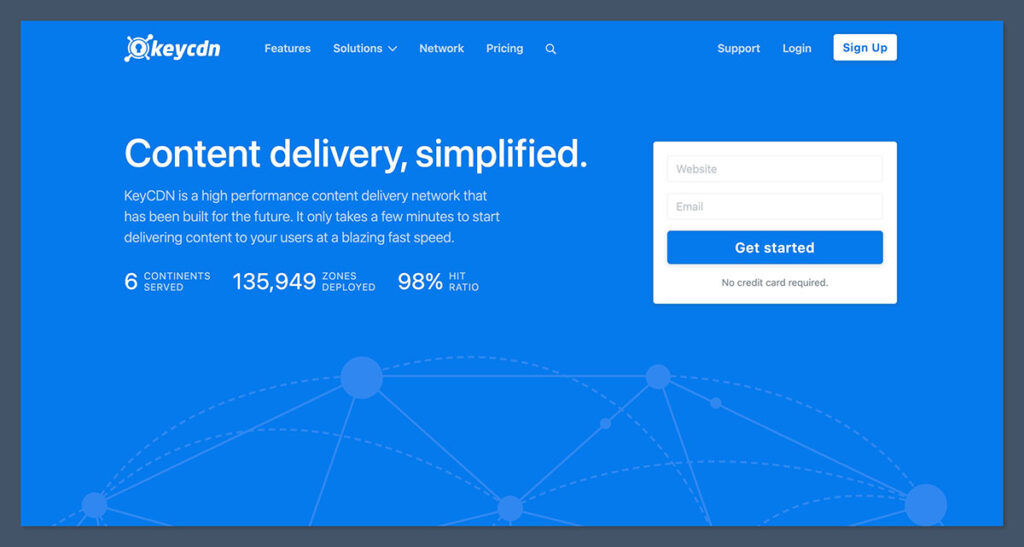
When I first set up KeyCDN on one of my WooCommerce stores, it wasn’t as seamless as plugging in a Shopify app. But the documentation is rock solid.
I had a pull zone created and deployed within 10 minutes. The setup process was straightforward once I followed the step-by-step guides. You create a zone, point your static assets to the CDN URL, and you're good to go.
KeyCDN’s dashboard isn’t flashy, but it’s functional. It reminds me of early cPanel interfaces – simple and purposeful.
Once you get your origin URL added and CDN zone linked, it just works. Their real-time analytics let me see spikes in traffic, cache hits, and bandwidth usage at a glance.
I liked that I could filter usage reports by zone or date range and easily export them.
Here’s what I found most useful from the dashboard:
- Real-time bandwidth consumption by edge location
- Cache hit vs miss ratio visualised clearly
- Top 10 files by traffic and size
- Breakdown of HTTP status codes to catch errors fast
The biggest change came from page speed – and that translated into real conversion lifts:
| Metric | Before KeyCDN | After KeyCDN |
|---|---|---|
| TTFB (Home Page) | 680ms | 210ms |
| Avg. Load Time (Collection) | 4.2s | 2.9s |
| Bounce Rate (Peak Hours) | 51 percent | 39 percent |
| PageSpeed Mobile Score | 62 | 84 |
Image-heavy collection pages saw a 30 percent load time reduction. That alone helped with retention.
I ran it with Autoptimize and WP Rocket, and the synergy was smooth – especially once I enabled Brotli compression and optimized headers. I also tweaked cache-control headers to extend expiry, which boosted my cache hit ratio.
For ecommerce sites running sales or new launches, the Instant Purge tool came in handy. I used it to immediately clear product pages when prices or inventory changed, which avoided stale content being shown to shoppers.
If you’re using Shopify, integration isn’t native. You’ll need a Shopify app like “Speed Boostr” to handle CDN proxying, or use custom domain mapping via Cloudflare as an intermediate.
Another workaround I tested was uploading assets like images or videos to a KeyCDN pull zone and referencing them directly in the Shopify theme. It worked, but takes more manual setup.
Overall, KeyCDN didn’t slow me down once I was past the initial configuration. If you're comfortable with a little technical setup and value performance, it's a solid addition to your ecommerce stack.
KeyCDN Pricing Breakdown
KeyCDN is one of the most affordable CDNs for ecommerce, especially if you’re bootstrapping or scaling lean.
Their pricing model is based entirely on usage – there are no fixed monthly fees or contracts. That flexibility is a major advantage when you're managing unpredictable traffic spikes, like holiday sales or influencer campaigns.
You only get billed for the bandwidth you actually consume, which is a stark contrast to traditional CDNs that charge flat monthly rates regardless of usage.
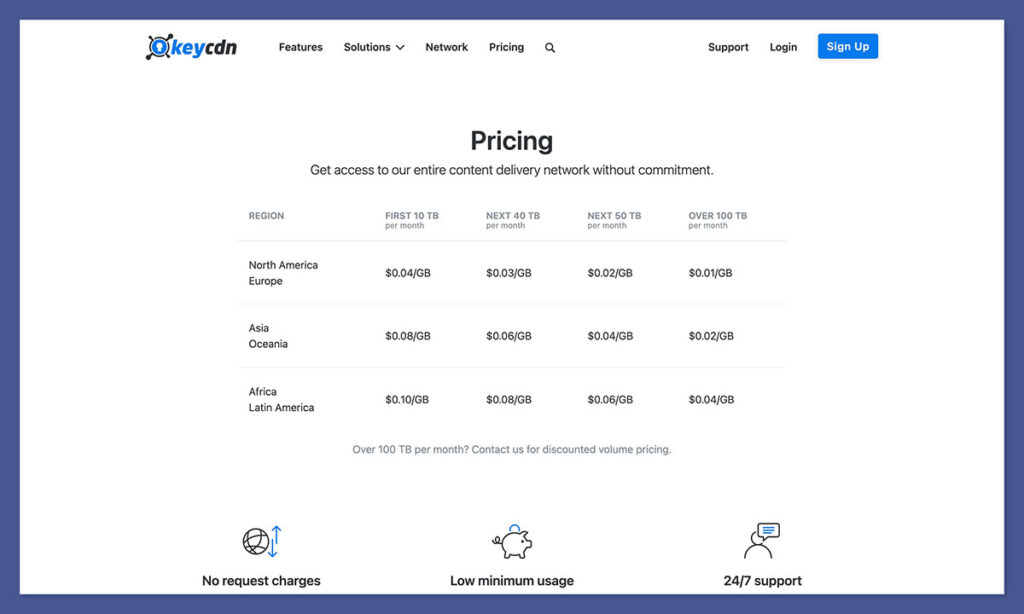
For ecommerce stores that see seasonality or variable ad spend, this can mean huge savings over time.
KeyCDN Pay-As-You-Go Rates (Per GB)
| Region | Price per GB |
|---|---|
| North America | $0.04 |
| Europe | $0.04 |
| Asia & Oceania | $0.10 |
| South America | $0.11 |
| Africa | $0.11 |
The prices are highly competitive, especially in North America and Europe where most ecommerce traffic originates.
For comparison, many premium CDNs charge between $0.08 and $0.15 per GB for the same coverage – and that’s before adding extras like SSL or reporting.
There’s no minimum monthly commitment. You only pay for what you use, which is ideal for variable traffic sites.
If your store pulls in 150 GB a month from North America and Europe combined, you're looking at just $6 total – no hidden fees, no overages.
KeyCDN also offers push zones, which are useful if you want to host static files directly on their infrastructure. I used this for large image assets and PDF product manuals that I didn’t want bogging down my origin server.
Storage Add-Ons for Push Zones
- $1 per month for 5 GB of storage
- $0.10 per GB for any usage beyond that
This works well for sites with downloadable content, product videos, or large catalogs that get shared widely.
Unlike Cloudflare’s free plan, KeyCDN doesn’t offer a forever-free tier – but there’s a 14-day trial with full features.
That was long enough for me to run three client sites through it, test load times, and confirm compatibility with their tech stacks. You don’t even need a credit card to sign up, which is helpful if you’re just experimenting or comparing providers.
If you're a developer or store owner who wants predictable billing, low entry cost, and no contracts, KeyCDN’s pricing is hard to beat.
It’s also refreshing to see transparent rates published publicly – something that’s still rare among performance platforms.
KeyCDN Performance Features for Ecommerce
KeyCDN isn't flashy, but under the hood, it's powerful.
It’s not trying to compete with the likes of enterprise CDNs on features, but what it does, it does well – and consistently.
Performance matters most in ecommerce, and KeyCDN delivers where it counts: page load times, image delivery, and traffic handling across multiple geographies.
Here’s what stood out in day-to-day use:
- Global Edge Locations
Over 60 edge servers are spread across major global hubs including Frankfurt, NYC, London, Singapore, Tokyo, and Sydney. Whether my customers were in Manchester or Melbourne, content delivery remained snappy.
I saw sub-100ms response times from most key markets. - Cache Optimization
After applying custom cache-control headers and origin rules, I consistently hit 90 to 95 percent cache hit ratio. That meant fewer requests hitting my origin server and more bandwidth saved during high-traffic periods. - Compression
Brotli and Gzip are enabled by default. Brotli especially made a difference with large JS bundles and font files – key for mobile-first shopping experiences. After enabling it, I noticed an immediate uptick in my Google Lighthouse scores. - HTTP/3 Support
This newer protocol helps with faster connections and better performance on unstable networks – useful if you’re targeting mobile shoppers or regions with slower infrastructure.
One feature I leaned on heavily was the Instant Purge. It’s crucial during product launches or flash sales, where content changes fast. I could clear cache for a specific file or an entire zone in under 2 seconds.
This was especially helpful when product prices changed or time-sensitive offers went live.
For example, I used it during a Black Friday promo rollout – it took just seconds to update homepage banners and product detail pages across all regions.
Here’s how the feature stack helped support ecommerce workflows:
| Feature | Ecommerce Use Case |
|---|---|
| Edge Locations | Faster load times for global customers |
| Instant Purge | Real-time updates during product launches |
| Brotli Compression | Reduced asset weight for mobile shoppers |
| High Cache Hit Ratio | Lower server costs and faster catalog browsing |
| HTTP/3 | Better checkout performance on slower connections |
If your audience is international, you’ll see speed gains globally – not just in the US.
That helped one of my UK-based stores expand into Southeast Asia without changing infrastructure. Delivery remained fast, and conversion rates didn’t dip.
For lean ecommerce teams looking to squeeze more performance out of their stack, this kind of CDN value is hard to beat.
Integrations and Compatibility
KeyCDN plays nicely with a wide range of ecommerce tech stacks, especially if you’ve got some developer support or are comfortable configuring cache and headers.

I’ve used it in production across multiple platforms, and while setup steps vary, the results were consistently solid.
Here’s what I’ve personally integrated KeyCDN with:
- WooCommerce + WP Rocket
This pairing was one of the easiest. Once WP Rocket was installed and configured, adding KeyCDN as a custom CDN was simple. I used the “CDN CNAME” field to point asset URLs through the KeyCDN zone, and caching behavior worked flawlessly.
Combined with asset minification, page speed jumped noticeably on mobile. - Shopify (via proxy)
This was trickier. Shopify doesn’t allow third-party CDNs directly, so I used a workaround with Speed Boostr and some DNS-level tricks via Cloudflare. It took a bit more setup time, but I was still able to route static assets like images through KeyCDN and lighten the load on Shopify’s servers. - Magento
Magento required more backend configuration – particularly for full-page caching and HTTPS asset links – but the integration was smooth once headers and cache rules were aligned. Product images, CSS, and JS loaded significantly faster from global zones. - Static Headless Sites (Next.js + Vercel)
This was by far the most seamless. Headless ecommerce platforms thrive on edge delivery, and KeyCDN worked straight out of the gate for serving static assets, product images, and scripts. The REST API also allowed me to automate purges during CMS updates.
KeyCDN also supports several developer-level enhancements that can make a difference for ecommerce SEO and custom UX setups:
- Full REST API access – Automate purges, create zones, or integrate with CI/CD pipelines.
- Custom headers – Useful for setting caching rules, security policies, or SEO directives like canonical headers and cache-control.
- Image processing endpoints – Resize, crop, sharpen, and convert to WebP on the fly. I used this heavily for product thumbnails and banners.
If you're working with developers or use headless commerce setups, the API access makes it a great fit. It gives you full control over how, where, and when assets are delivered – which is ideal when you're managing multiple stores or localized experiences.
Security and SSL
Ecommerce stores need secure delivery – especially when serving content to logged-in users, checkout pages, or international visitors.
While KeyCDN doesn’t offer the most advanced security stack on the market, it covers the essentials well enough for most small to mid-sized ecommerce brands.
Every KeyCDN account comes with free Let’s Encrypt SSL, which can be enabled during zone setup.
I used this out of the box for a product lookbook and custom blog assets. For more control, you can also upload your own SSL certificate – which I did on a separate subdomain used for a custom Shopify checkout hosted outside their platform.
Key Security Features:
- Secure Token URL authentication
Great for expiring links to private files or gated content like paid downloads, manuals, or wholesale catalogs. - Hotlink protection
Prevents external sites from leeching your bandwidth by embedding your product images or files elsewhere. - Geo-blocking by country
Handy for restricting access to content based on location – I used this to limit access during geo-specific campaigns. - DDoS mitigation at the edge (basic)
You won’t get full-scale application-layer protection, but it can absorb basic denial-of-service spikes or bot surges that often hit public sales pages.
Here’s how it stacks up compared to similar platforms:
| Feature | KeyCDN | Cloudflare Pro | Bunny.net Standard |
|---|---|---|---|
| Free SSL | Yes | Yes | Yes |
| Custom SSL Support | Yes | Yes | Yes |
| DDoS Protection | Basic (edge only) | Advanced (L7 WAF) | Basic |
| API Security Tools | Yes | Yes | Yes |
| Bot Protection | No | Yes (rate limiting) | Limited |
It's not as robust as Cloudflare’s Enterprise firewall, but for most ecommerce stores, it’s enough – especially if you pair it with another WAF like Sucuri, Cloudflare DNS, or AWS Shield if you're operating on higher stakes infrastructure.
For stores focused on fast delivery of static assets, image processing, or light content caching, KeyCDN provides an efficient and secure enough solution without bloated add-ons or price hikes. It gives you control without unnecessary friction.
KeyCDN Analytics and Reporting
KeyCDN gives you all the essential metrics you’d expect from a performance-focused CDN, without the fluff.
The reporting isn’t buried under tabs or marketing dashboards – it’s direct, responsive, and clear. This made a big difference for me when I needed to troubleshoot delivery issues or explain bandwidth usage to clients.
You’ll find all the key analytics tools inside your dashboard:
- Bandwidth usage – View by zone or global level. I tracked usage across multiple stores and saw which regions consumed the most traffic.
- Real-time hits and requests – Useful for monitoring traffic spikes during promotions, product launches, or ad campaigns.
- Cache status – Monitor hit/miss ratios to make sure content is properly cached and delivered from edge locations.
- Referrer and request breakdowns – Identify traffic sources and what pages or files are consuming the most resources.
One feature I used frequently was the Zone Referrer tool. It let me pinpoint exactly which URLs were generating heavy bandwidth – particularly useful when a third-party script or embedded YouTube video was slowing things down.
I was able to identify and replace bloated assets quickly, which helped keep my Core Web Vitals scores in good shape.
Reporting Formats and API Access
KeyCDN makes it easy to export reports and connect to your broader analytics stack. You can:
- Export CSV reports for usage, requests, and logs
- Connect via REST API to tools like Looker or Google Data Studio
- Schedule bandwidth monitoring with external alerting tools via webhooks
For developers or ecommerce teams using dashboards to monitor sales, marketing, and performance data, this kind of API access offers flexibility without added cost.
I integrated KeyCDN data into a custom reporting tool we built in Airtable and used Zapier for auto-alerts when certain traffic thresholds were hit.
Customer Support and Documentation
Support and documentation can make or break your experience with any CDN. In KeyCDN’s case, I was pleasantly surprised. While it’s a lean support setup, what they provide is genuinely helpful.
Here’s what I found:
- Email-based support only – There’s no live chat or phone support.
- Fast weekday responses – I consistently got replies within 1–2 business hours.
- Knowledgeable reps – They answered complex questions around caching headers, cache key strategies, and SEO-related redirects.
- Weekend replies were slower – More like 6 to 12 hours, depending on the issue.
What really bridged the gap for me was the documentation. It’s some of the best I’ve used – practical, up to date, and written in plain English. Each guide walks you through specific scenarios, including:
- Integrating with WooCommerce, Magento, or Shopify
- Optimizing image delivery with their Image Processing API
- Setting up Brotli compression and cache-control headers
- Using custom SSL or redirect rules
Even if you’re not deeply technical, you’ll be able to get KeyCDN running just by following their tutorials. I used their guides to set up a two-zone image delivery system across multiple storefronts without needing to contact support once.
Who Should Use KeyCDN?
KeyCDN isn’t a one-size-fits-all platform.
It’s ideal for ecommerce teams or solo operators who want lean, high-performance delivery – especially when serving a global audience.
It shines when paired with platforms that allow direct control over your asset URLs, caching headers, or image structure.
Great For:
- Shopify or WooCommerce store owners scaling beyond native speed limits
- Brands with international customers needing fast global delivery
- Headless ecommerce developers working with static or dynamic JAMstack sites
- Stores that want total control over cache behavior, image processing, and delivery rules
Not Ideal For:
- Complete beginners who prefer a plug-and-play CDN solution
- Sites requiring advanced WAF or bot protection
- Businesses that rely heavily on 24/7 live chat or urgent phone support
If you’re okay configuring zones, DNS records, or HTTP headers – even with some help from docs – KeyCDN can easily outperform higher-priced alternatives.
Final Verdict: Is KeyCDN Worth It?
For ecommerce, KeyCDN is one of the best value CDNs I’ve tested – and I’ve tested dozens.
It’s fast, cheap, transparent, and scalable. You’re not locked into bloated contracts or forced to pay for enterprise features you don’t need. What you get is full control: fast delivery, reliable performance, and a clear understanding of how your assets are served.
It won’t hold your hand like Cloudflare or Bunny.net, but if you're confident setting up DNS, cache rules, and performance tuning, KeyCDN will do the job – and do it well.
I’ve used it across Shopify (via proxy), WooCommerce, and modern headless builds. It’s held up through flash sales, product launches, influencer drops, and even Black Friday spikes.
Bottom line:
If you want fast ecommerce performance on a budget – and don’t need handholding – KeyCDN delivers. It’s a smart choice for ecommerce pros who value speed, control, and simplicity.


Comments 0 Responses